
SUMMARY:
Decoding the complex structure of Electronic Data Interchange (EDI) files allows businesses to accurately extract B2B data and efficiently import X12 standard profiles into the Boomi integration platform.
- EDI data relies on a strict architecture composed of structural segments, individual data elements separated by delimiters, and loops of related information.
- Retrieving specific data points requires referencing the correct segment qualifier and counting the precise number of delimiters to locate the target element.
- Developers can utilize the Boomi platform to import predefined X12 standard versions, such as a Purchase Order 850, which automatically configures the necessary data elements and delimiter options.
Automating the profile creation process within Boomi standardizes EDI implementations across organizations and eliminates the need for manual data mapping.
Table of contents
Introduction
EDI (Electronic Data Interchange) files are structured data files used for B2B communication. To read them, you’ll need to understand their structure and may need to use specialized tools or software.
Understand the Structure
EDI Data consists of:
- Segments: EDI files are built from segments, which are lines of data. Each segment starts with a segment tag (e.g., ISA, GS, ST).
- Elements: Segments are further divided into elements, which are individual pieces of data. Elements are separated by delimiters (usually an asterisk * or a tilde~)
- Loops: Some segments are grouped into loops, which represent related sets of information (e.g., claim information, service line information).
Identify the EDI Standard
- EDI files adhere to specific standards, like X12 (primarily used in the US) or EDIFACT (primarily used in Europe).
- The standard defines the file’s structure and syntax, including segment and element definitions.
- Knowing the standard is crucial for interpreting the data.
Important Considerations
- Delimiters: Pay close attention to the delimiters used in the file (e.g., asterisk *, tilde ~) because they separate elements and segments.
- Segment Lengths: Some segments have specific lengths for each element. Ensure you are correctly identifying the start and end of each element.
Reading an X12 EDI File
Example 1
EDI Data is made up of segments and elements, and is separated by delimiters
Segments:

Elements:

Delimiters:

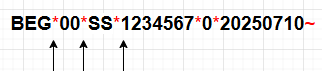
To retrieve information from an EDI segment, we need to reference both the segment and the element. Specifically, in this example, we want to determine the value sent in the BEG03 position. BEG is referring to the EDI segment, and 03 is referring to the specific element to determine which value is being sent in the BEG03 position. We need to count 3 delimiters; the 3rd element is BEG03=1234567.
Example 2
ST*850*352598~
BEG*00*SS*1234567*0*20250710~
REF*IA*012456789~
DTM*004*20250710~
TD5**ZZ*PRCL: E4C553 LTL: 21373520**NDA SAVER~
N1*ST*ABCD company~
N3*Avenue Road st road~
N4*Brooklyn*MN*55430*US~
PO1*1.1*1*EA*5948**IN*85202482*VN*HOSSP-5616~
PID*F****WATER VALVE REPLACEMENT~
CTT*1~
SE*12*352598~
Looking at the sample data above, what value is being sent in N404?
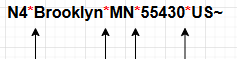
First, we need to locate the N4 segment in the data, then count 4 delimiters.
ST*850*352598~
BEG*00*SS*1234567*0*20250710~
REF*IA*012456789~
DTM*004*20250710~
TD5**ZZ*PRCL: E4C553 LTL: 21373520**NDA SAVER~
N1*ST*ABCD company~
N3*Avenue Road st road~
N4*Brooklyn*MN*55430*US~
PO1*1.1*1*EA*5948**IN*85202482*VN*HOSSP-5616~
PID*F****WATER VALVE REPLACEMENT~
CTT*1~
SE*12*352598~
Here we can see that the N404 = US.
Example 3
ST*850*352598~
BEG*00*SS*1234567*0*20250710~
REF*IA*012456789~
REF*SO*9876543~
DTM*004*20250710~
TD5**ZZ*PRCL: E4C553 LTL: 21373520**NDA SAVER~
N1*ST*ABCD company~
N3*Avenue Road st road~
N4*Brooklyn*MN*55430*US~
PO1*1.1*1*EA*5948**IN*85202482*VN*HOSSP-5616~
PID*F****WATER VALVE REPLACEMENT~
CTT*1~
SE*12*352598~
Let’s look at the raw data sample above and find the REF02 position. Notice that there are multiple REF segments. When there are multiple segments, it is important to know the Qualifier of each segment.
Qualifier: A Qualifier is a piece of information that identifies the segment or element that immediately follows it in the data.
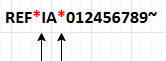
In the REF segments below, the qualifiers are IA and SO.
REF*IA*012456789~
REF*SO*9876543~
Hence, if we want to know what data been sent in REF02 with the IA qualifier, we locate the correct qualifier, count 2 delimiters, and see that the value is 012456789.
How to Import X12 EDI Purchase Order-850 in Boomi Atmosphere
Create a Folder-Test
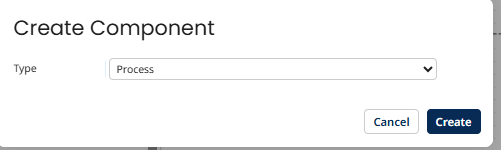
New Component Type Process, click on Create.
Within Process, select Map, click Choose.
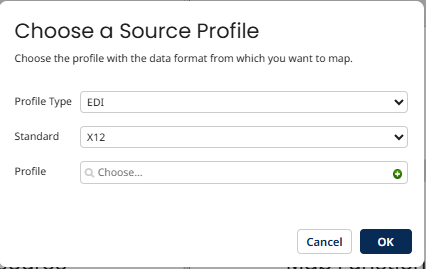
Select Profile Type: EDI and Standard: X12 on the profile tab, click the + add button. It will then open another tab to import or manually create a profile as required.
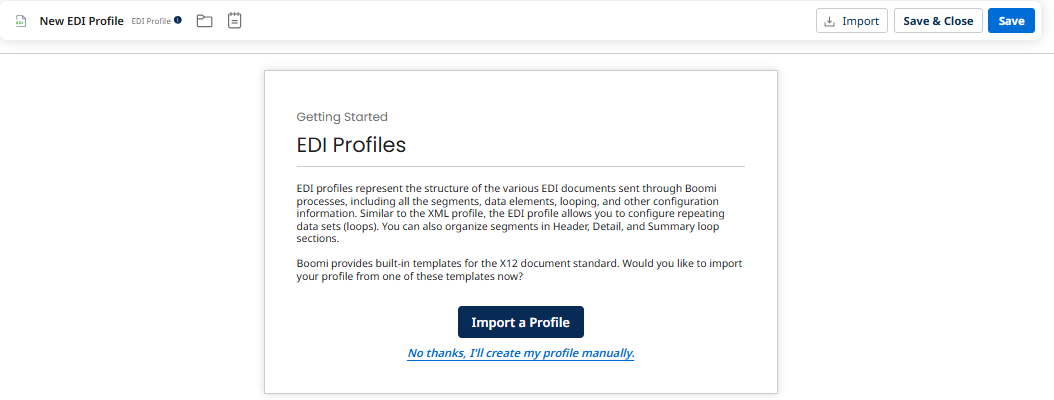
Here we are importing a profile, so click on Import a Profile.
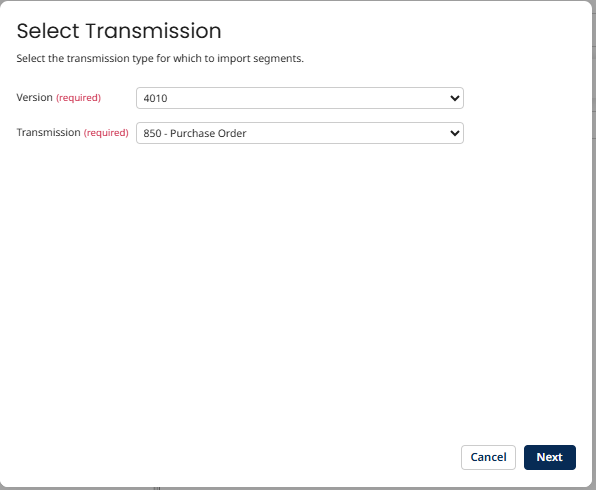
Select version and transmission. Versions are X12 standards, and Transmissions are a type of document that you want to create. In the example above, we create version 4010 of Purchase Order 850, then click Next.
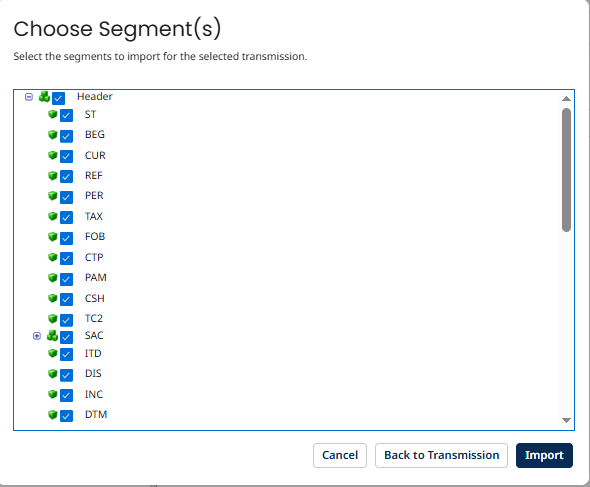
Select the Header, Detail, and Summary segments as per the client’s requirements, then click Import.
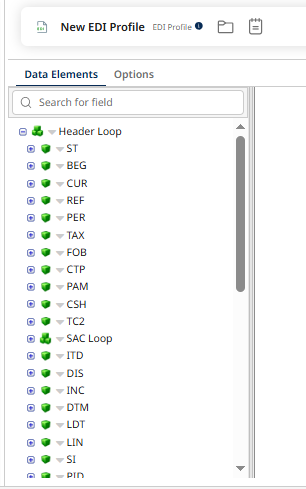
Once imported, we see 2 tabs:
- Data Elements
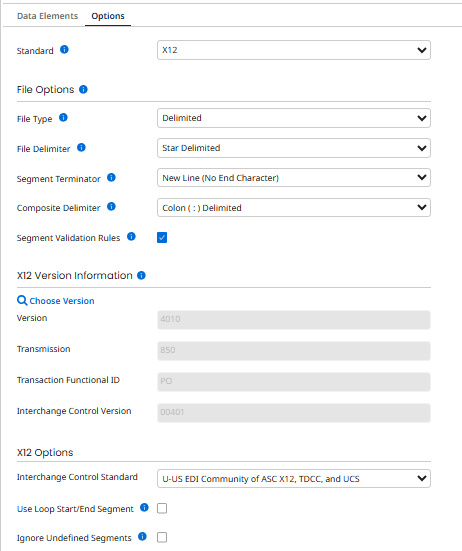
- Options tab
The Data Elements tab displays all selected segments.
Options show all the information about delimiters and terminators. As requested, you can select the appropriate delimiters.
Conclusion
Reading a piece of information from an Electronic Data Interchange- X12 file with data coming in from source/Target systems, and how we can leverage/use Boomi to get EDI standards used across organizations by importing required X12 standard versions, EDI Transmission Type, and segments with a few clicks, rather than creating it manually.
Accelerate your Boomi implementation with our expertise.
Contact us for any questions.