

SUMMARY:
Organizations can enhance security and compliance by following distinct, step-by-step procedures to encrypt existing unencrypted AWS Elastic Block Store (EBS) volumes, securing data that is not protected automatically by default.
- Encrypting a data volume requires creating a snapshot of the volume, creating a new volume from that snapshot with encryption enabled, and then detaching the old volume.
- To encrypt a root volume, the recommended procedure involves taking an image of the instance—ideally after shutting it down first—and then launching a new instance from that image with encryption enabled.
- To establish preventative security, users must navigate the EC2 Dashboard to set the region-specific account attribute that requires all new EBS volumes to be encrypted.
Encrypting AWS EBS volumes is recognized as a fundamental security practice essential for maintaining a secure and compliant AWS environment.
Table of contents
In today’s ever-evolving security environment, securing data both in transit and while at rest is at the top of the list. However, AWS does not automatically encrypt new volumes by default. This, unsurprisingly, leads to instances being created without the protection of encryption. If you find existing unencrypted volumes, options exist to secure existing volumes, depending on whether the volume is a data volume or the root volume of your instance.
In this scenario, we have an instance with 2 volumes attached.
- 8GB volume is the root volume containing the OS and is needed for the instance to boot.
- 10GB is the data volume that contains data and is not critical for the instance to function.

Data volumes
- Create a snapshot of the volume.

- Create a new volume from the snapshot with encryption enabled.

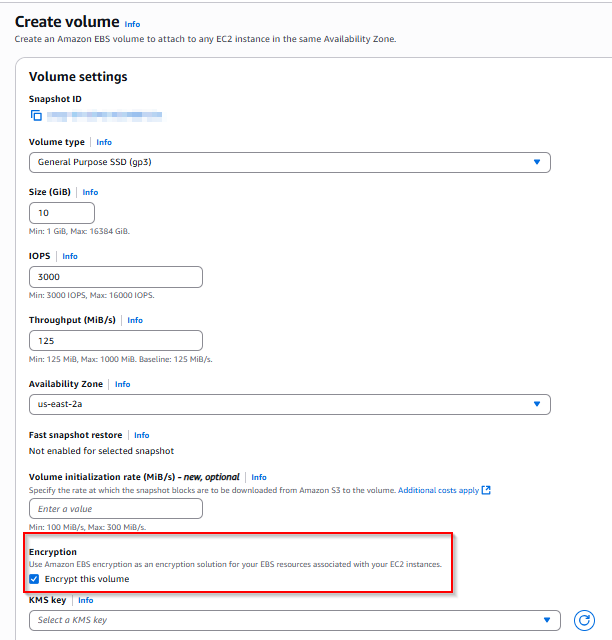
- Detach the old volume from the instance.

- Attach the new volume to the instance.

Root Volumes
- Take an image of the instance (Recommended to shut the instance down first).

- Launch a new instance from the image with encryption enabled.


Once complete you can see that the volumes are encrypted.

To help ensure all new volumes are encrypted, set the account attribute to require all volumes to be encrypted. This setting is region-specific.
- Navigate to the EC2 Dashboard.
- At the top right, choose Account Attributes -> Data protection and security.
- Click Manage on the EBS encryptions section.
- Check enable. -> Update EBS encryption.
Encrypting your AWS EBS volumes is a fundamental security practice. By following these steps, you can effectively encrypt your existing unencrypted volumes. You can build a more secure and compliant AWS environment by enabling the account-level setting to require encryption for all new volumes.
Learn more about our AWS Services from XTIVIA.
This blog was originally posted here.