

SUMMARY:
Cloud data warehouse users can significantly reduce spiraling Snowflake costs by actively monitoring compute usage and implementing critical best practices, such as Auto-Suspend and warehouse right-sizing.
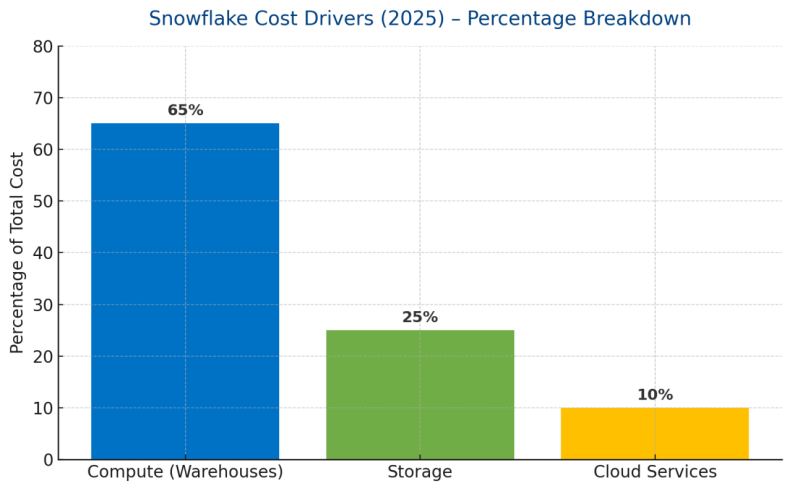
- Compute (warehouses) is the dominant factor in Snowflake spending, typically consuming about 65% of the budget, followed by Storage at roughly 25%.
- Snowflake provides powerful built-in monitoring tools, including the Account Usage Schema and Snowsight Dashboards, which enable users to track usage history and set budget limits through Resource Monitors.
- The most significant immediate cost saving comes from enabling Auto-Suspend, setting the idle threshold to 60 seconds or less to prevent warehouses from running unnecessarily and wasting credits.
- Effective cost governance requires right-sizing warehouses based on query needs, minimizing Multi-Cluster usage, and archiving older, cold data to cheaper external storage tiers.
Consistent implementation of these governance and optimization tactics ensures that the powerful Snowflake platform remains cost-efficient and transparent for any organization.
Table of contents
What Makes Up Snowflake Costs?
Snowflake costs are made up of three key components:
- Compute (Warehouses) – Every query you run uses compute resources.
- Storage – Data stored in tables, stages, or backups.
- Cloud Services – Metadata management, query optimization.
Example: If you run a query on a large dataset, Snowflake uses compute (credits). If you store 1 TB of data, you pay for storage. If you use automatic clustering, cloud service costs apply.
This chart provides a more precise comparison of cost drivers by percentage.
Key Takeaways
- Compute (Warehouses) dominates Snowflake spend (~65%).
- Storage is the next major contributor (~25%).
- Cloud Services costs are relatively small (~10%) but can grow with heavy metadata/optimization workloads.
Optimizing warehouse usage (Auto-Suspend, right-sizing) provides the biggest cost savings.
Monitoring Snowflake Costs
Snowflake provides built-in features to monitor costs:
- Account Usage Schema: Special tables that store query history, warehouse usage, and storage.
- Snowsight Dashboards: Pre-built charts and tables for spend tracking.
- Resource Monitors: Set limits to stop warehouses when a budget is reached.
SQL Example:
SELECT * FROM SNOWFLAKE.ACCOUNT_USAGE.WAREHOUSE_LOAD_HISTORY WHERE START_TIME > CURRENT_DATE - 7;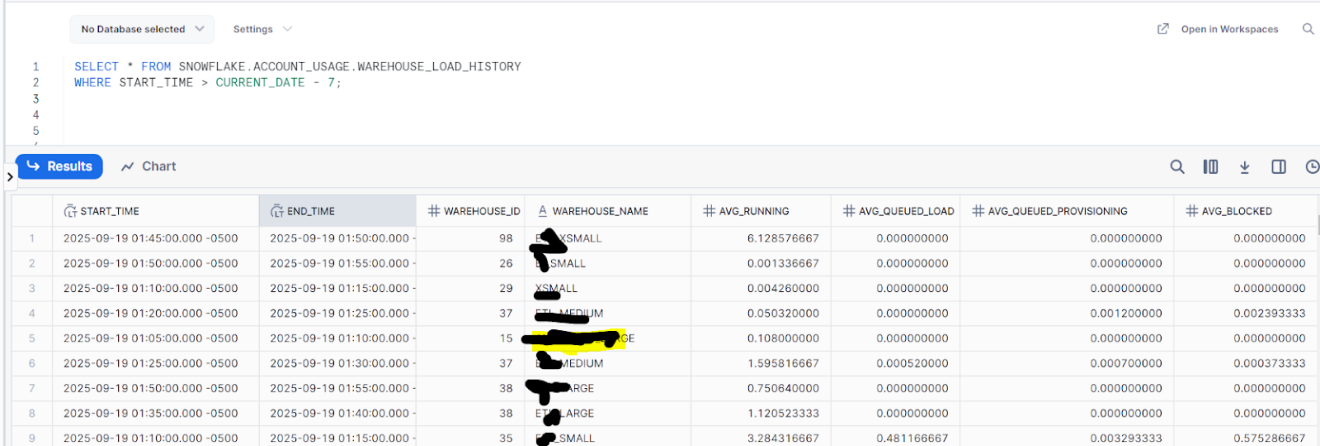
How Monitoring Works
- Snowflake Usage Data → collected automatically.
- Goes into Account Usage Views → system tables that track compute, storage, and query history.
- Feeds into Dashboards & Alerts (Snowsight, BI tools, email / webhook alerts).
- Leads to Optimization & Actions → adjusting warehouses (auto-suspend/resize), archiving old data, setting budgets, etc.
This diagram shows the flow of monitoring and optimization in Snowflake:

Cost Optimization
a. Warehouse Management(Auto Suspend Mechanisms):
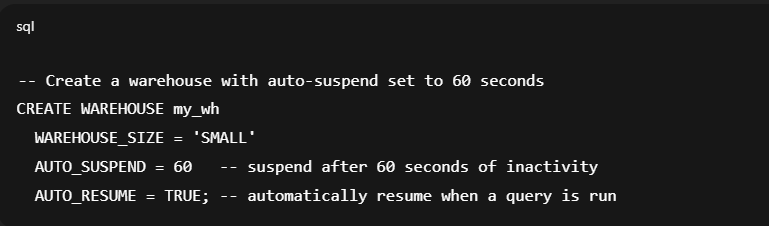
- Enable Auto-Suspend (set to 60s or less) to stop idle warehouses.
- Disable Auto-Resume for non-critical warehouses to avoid accidental restarts.
b. Right Size Warehouse:
- Right-size warehouses — start small and scale up only when queries need more power.
- Use Multi-Cluster only for high concurrency; otherwise, disable it.
- Monitor Query History for long-running or inefficient queries.
c. Cost Governance:
- Activate Account Budget and set spend limits.
- Configure Custom Budgets by project/team using tags.
- Enable Forecasting & Alerts in Snowsight for proactive monitoring.
- Send notifications to Slack/Teams/Email when spending nears the budget.
d. Storage Optimization(Archive old data):
- Archive cold data (e.g., logs older than 1 year) to cheaper storage tiers (S3, ADLS, GCS).
- Drop or purge transient/staging tables regularly.
- Use Clustering Keys only where query performance benefits justify the cost.

- Use Result Caching and avoid re-running identical queries unnecessarily.
- Schedule heavy jobs in off-peak hours to minimize contention.
- Review Service Usage (Cloud Services costs) — optimize metadata-heavy queries.
Best Practices
- Always enable Auto-Suspend for warehouses.
- Alter existing warehouse to enable auto-suspend
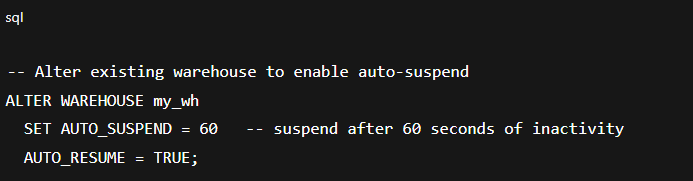
Note: Set AUTO_SUSPEND to a small value (like 60 seconds or even 30 seconds) so warehouses don’t stay running idle and burn credits.
- Use Auto-Resume only when needed.

- Do not use large warehouses unless required.
- Archive old data into cheaper storage tiers.
Example: Instead of keeping 3 years of logs in Snowflake tables, move older data to an external storage system, such as S3.
Real-Life Example
Imagine a retail company running reports every morning:
- They used a large warehouse costing $ 16 per hour.
- The queries only took 10 minutes, but the warehouse was left running for 1 hour.
- Cost for 1 day = 16 credits.
- For 30 days = 480 credits wasted.
Solution: Set Auto-Suspend = 60 seconds so the warehouse stops immediately after queries.
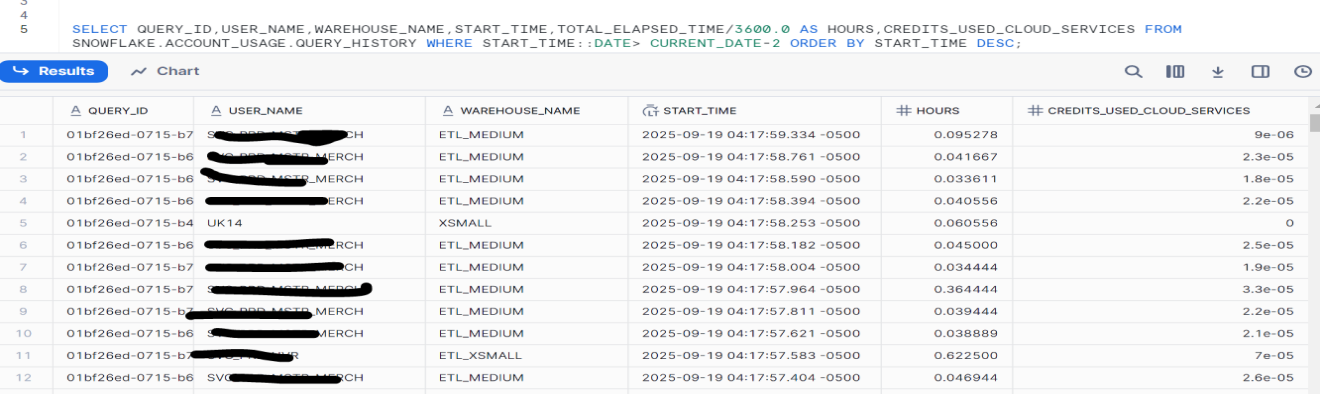
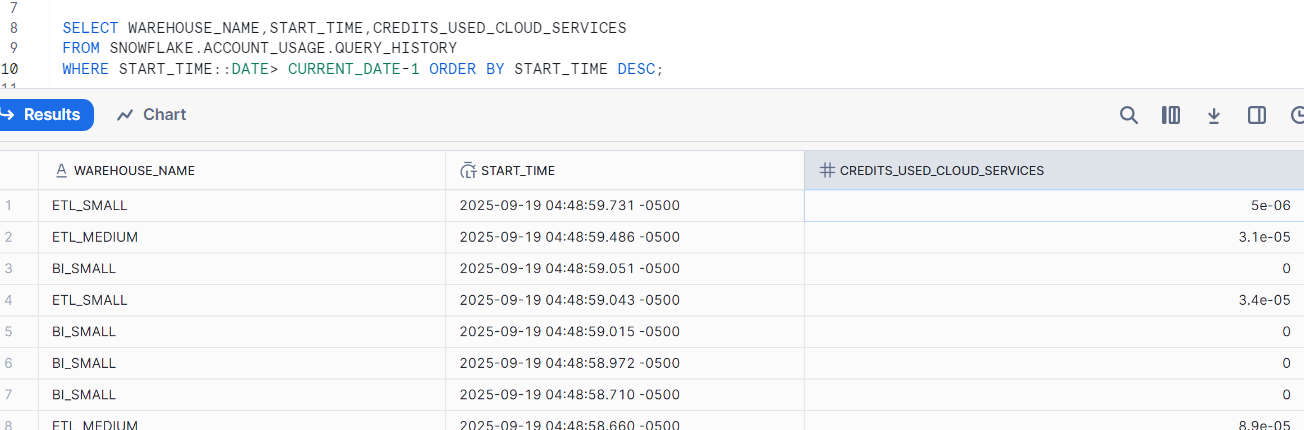
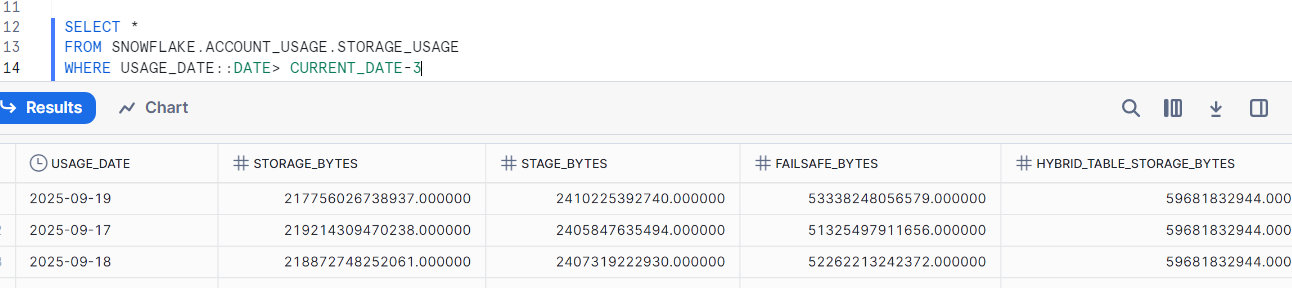
Real-time Query Screenshots (Sample)
These are mock examples to show what Snowsight outputs look like.
Query History (Sample)
Warehouse Load History (Sample)
Storage Usage (Sample)
Key Takeaways
- Understand compute, storage, and cloud service costs. Use Snowsight dashboards and SQL queries for monitoring.
- Apply auto-suspend and tagging.
With these steps, Snowflake remains cost-efficient and transparent.
Conclusion
The Snowflake cloud data warehouse is powerful, but its costs can quickly increase if not properly managed. By adhering to best practices, utilizing its built-in tools, and leveraging 2025 features, you can optimize your spending.
For questions, please contact us.