
SUMMARY:
XTIVIA provides a technical guide on establishing secure cross-account connectivity by configuring IAM roles and trust policies to allow AWS Lambda functions in one account to access Amazon S3 buckets in another.
- Administrators must create an IAM role in the destination account that grants specific S3 permissions and includes a trust relationship allowing the source account to assume it.
- The destination S3 bucket policy requires an update to explicitly authorize the cross-account role to perform read or write operations on the specific resource.
- Developers need to configure the source Lambda execution role with
sts:AssumeRolepermissions and utilize SDKs like boto3 to programmatically assume the destination role.
Implementing this architecture enables enterprises to maintain strict security isolation between departments while facilitating necessary data sharing and automated workflows.
Table of contents
Introduction
In many enterprise AWS environments, workloads are often spread across multiple AWS accounts for security, compliance, or organizational reasons. A common scenario is when a Lambda function in one account (say, Account A) needs to access an S3 bucket that resides in another account (Account B).
What is Cross-Account Lambda Access?
In the AWS ecosystem, resources are typically confined within individual accounts to maintain isolation and security. However, there are scenarios in which applications or services in one AWS account need to interact with resources in a different AWS account. This is where “cross-account access” comes into play. Specifically, “Cross-Account Lambda Access to S3” refers to configuring an AWS Lambda function in one account to securely read from or write to an Amazon S3 bucket located in another distinct AWS account. This capability is crucial for building distributed, collaborative architectures across organizational boundaries or within different departments within a large enterprise.
Problem Statement: Accessing Cross-Account Resources
Imagine a scenario where a data processing team operates in AWS Account A, and their processed data needs to be stored in an S3 bucket managed by a data archiving team in AWS Account B. Without cross-account access, the data processing team would either have to replicate data, which can be inefficient and lead to data inconsistencies, or implement complex workarounds. The primary challenge is to enable secure, controlled access from the Lambda function in Account A to the S3 bucket in Account B without compromising the security posture of either account. This involves carefully configuring IAM roles, policies, and bucket policies to establish a trust relationship between the two accounts.
Architecture Overview
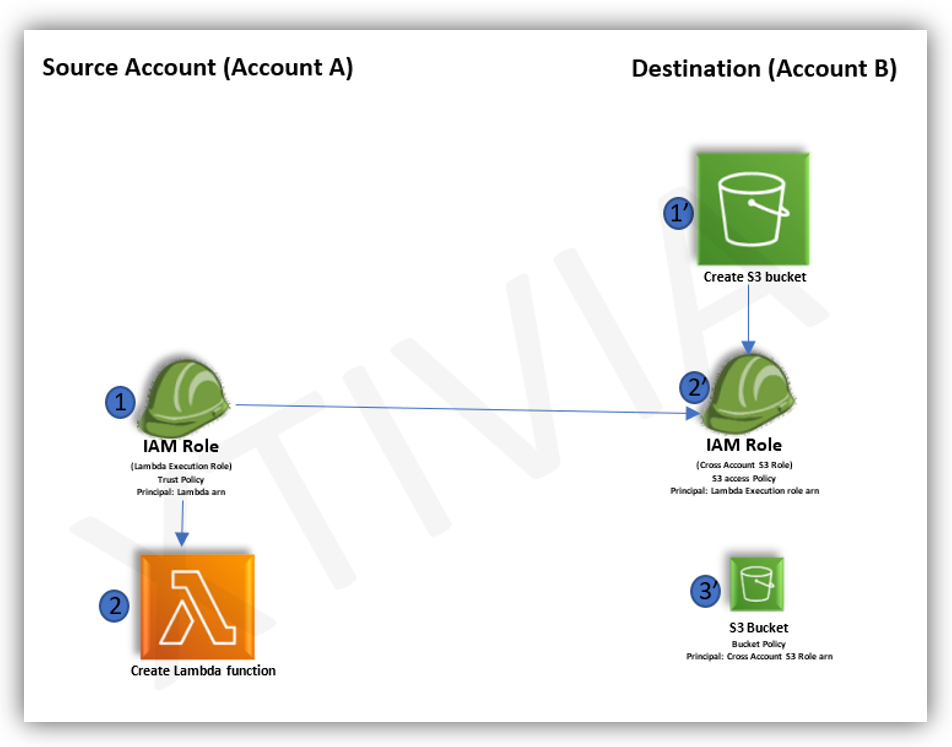
The architecture for enabling cross-account Lambda access to S3 involves the following key components:
- Source Account (Account A): This account hosts the AWS Lambda function that requires access to the S3 bucket. The Lambda function will assume an IAM role with permissions to invoke Lambda and access the S3 bucket in the destination account.
- Destination Account (Account B): This account hosts the Amazon S3 bucket that the Lambda function in Account A needs to access. The S3 bucket will have a bucket policy attached that explicitly grants permission to the IAM role from Account A.
- IAM Role (Account A): An IAM role in Account A will be created for the Lambda function. This role will have a trust policy that allows the Lambda service to assume it, and an inline policy or attached managed policy that grants
sts:AssumeRolepermissions to assume a specific role in Account B. - IAM Role (Account B): An IAM role in Account B will be created that the Lambda function in Account A will assume. This role will have a trust policy that permits the IAM role from Account A to assume it, and an inline policy or attached managed policy that grants specific S3 permissions (e.g.,
s3:GetObject, s3:PutObject) to the target S3 bucket. - S3 Bucket Policy (Account B): The S3 bucket in Account B will have a bucket policy that explicitly grants the assumed role from Account A permission to perform the desired S3 actions on the bucket.
Step-by-Step Guide
Here’s a detailed step-by-step guide to setting up cross-account Lambda access to S3:
1. In Destination Account (Account B):
Create S3 Bucket(1’): If you don’t already have one, create an S3 bucket in Account B. Let’s call it my-cross-account-s3-bucket.
Create IAM Role for Cross-Account Access(2’):
- Navigate to IAM in the AWS Management Console.
- Go to “Roles” and click “Create role”.
- Choose “AWS service,” then “Lambda.”
- Attach a policy that grants the necessary S3 permissions to
my-cross-account-s3-bucket. For example,s3:GetObjectands3:PutObject. - Edit the “Trust relationships” of this role to allow the IAM role from Account A to assume it. The principal in the trust policy will be the ARN of the IAM role from Account A (which we’ll create in the next step). For example:
{
  "Version": "2012-10-17",
  "Statement": [
    {
      "Effect": "Allow",
      "Principal": {
        "AWS": "arn:aws:iam::<Account A ID>:role/<Lambda_Execution_Role_Name_in_Account_A>"
      },
      "Action": "sts:AssumeRole"
    }
  ]
}- Note down the ARN of this role (e.g.,
arn:aws:iam::<Account B ID>:role/S3CrossAccountAccessRole).
Attach S3 Bucket Policy(3’):
- Go to the S3 bucket
my-cross-account-s3-bucket. - Navigate to “Permissions” and then “Bucket Policy”.
- Add a policy that grants permissions to the IAM role created in the previous step. For example:
{
  "Version": "2012-10-17",
  "Statement": [
    {
      "Effect": "Allow",
      "Principal": {
        "AWS": "arn:aws:iam::<Account B ID>:role/S3CrossAccountAccessRole"
      },
      "Action": [
        "s3:GetObject",
        "s3:PutObject"
      ],
      "Resource": [
        "arn:aws:s3:::my-cross-account-s3-bucket",
        "arn:aws:s3:::my-cross-account-s3-bucket/*"
      ]
    }
  ]
}
2. In Source Account (Account A):
Create Lambda Execution Role(1):
- Navigate to IAM in the AWS Management Console.
- Go to “Roles” and click “Create role”.
- Choose “AWS service,” then “Lambda.”
- Attach policies that grant necessary Lambda execution permissions (e.g.,
AWSLambdaBasicExecutionRole). - Add an inline policy to this role that grants
sts:AssumeRolepermissions to the IAM role in Account B that you created earlier. For example:
{
  "Version": "2012-10-17",
  "Statement": [
    {
      "Effect": "Allow",
      "Action": "sts:AssumeRole",
      "Resource": "arn:aws:iam::<Account B ID>:role/S3CrossAccountAccessRole"
    }
  ]
}- Note down the ARN of this role (e.g.,
arn:aws:iam::<Account A ID>:role/Lambda_Execution_Role_Name_in_Account_A).
Create Lambda Function(2):
- Navigate to Lambda in the AWS Management Console.
- Click “Create function”.
- Choose “Author from scratch” or use a blueprint.
- Select the Lambda execution role you just created in Account A.
- Write your Lambda function code. Inside your Lambda function, you’ll need to use the
boto3library (for Python) or equivalent SDK for other languages to assume the role in Account B. Here’s a Python example:
import boto3

def lambda_handler(event, context):
    account_b_role_arn = 'arn:aws:iam::<Account B ID>:role/S3CrossAccountAccessRole'
    bucket_name = 'my-cross-account-s3-bucket'
    object_key = 'my-file.txt'

    try:
        # Assume the role in Account B
        sts_client = boto3.client('sts')
        assumed_role_object = sts_client.assume_role(
            RoleArn=account_b_role_arn,
            RoleSessionName="CrossAccountS3Access"
        )
        credentials = assumed_role_object['Credentials']

        # Create an S3 client using the assumed role credentials
        s3_client = boto3.client(
            's3',
            aws_access_key_id=credentials['AccessKeyId'],
            aws_secret_access_key=credentials['SecretAccessKey'],
            aws_session_token=credentials['SessionToken']
        )

        # Perform S3 operations
        s3_client.put_object(Bucket=bucket_name, Key=object_key, Body='Hello from Lambda!')
        print(f"Successfully wrote {object_key} to {bucket_name} in Account B.")

        response = s3_client.
Conclusion
In enterprise cloud environments, cross-account Lambda access to S3 is a frequent real-world requirement. Secure and seamless data sharing between AWS accounts can be achieved by correctly configuring IAM roles, trust policies, and SDK-based role assumption.
For questions, please contact us.