
SUMMARY:
This guide explains how to install the AppDynamics Cluster Agent on a Google Kubernetes Engine (GKE) cluster using a Helm Chart. This approach enables automatic application instrumentation, thereby eliminating the need for manual agent installation, configuration, and complex upgrades across individual workloads.
- Helm charts simplify the setup and deployment of the Cluster Agent, ensuring version control for seamless upgrades and rollbacks, while also preparing the deployment for CI/CD pipelines.
- The Cluster Agent provides complete Kubernetes cluster visibility, offering node-level metrics, pod health tracking, and a topology view of how microservices are distributed in the GKE cluster.
- The automatic application instrumentation feature injects AppDynamics agents into supported workloads (such as Java) without requiring manual modification of container images or application redeployment.
- Operational efficiency is significantly enhanced by reducing the manual effort required for monitoring configurations and allowing dynamic updates to instrumentation policies via the Cluster Agent.
Adopting this streamlined, scalable approach is ideal for dynamic cloud-native environments like GKE, providing comprehensive full-stack visibility by combining infrastructure metrics with application performance data.
Table of contents
Benefits of AppDynamics Cluster Agent on GKE
- Faster Deployment with Helm
- Simplified setup: Helm charts make deploying the Cluster Agent easy and repeatable.
- Configurable: Easily customize values via values.yaml.
- Version control: Helm makes upgrades and rollbacks seamless.
- Full Kubernetes Cluster Visibility
- Node-level insights: Monitor CPU, memory, disk, and pod usage at the node level.
- Pod health tracking: Understand pod restarts, resource constraints, and deployments across namespaces.
- Topology view: Visualize how microservices are distributed in your GKE cluster.
- Automatic Application Instrumentation
- Auto-injection of AppDynamics agents into supported workloads (e.g., Java).
- Eliminates the need to modify container images or deployments manually.
- Ensures consistent monitoring across all environments.
- Operational Efficiency
- Reduces manual monitoring configuration effort.
- Helm makes cloud-native deployment ready for CI/CD pipelines.
- Dynamic updates to instrumentation policies via the Cluster Agent without app redeployment.
- Enhanced Troubleshooting and Root Cause Analysis
- Combine infrastructure metrics with app performance data in one UI.
- Drill down from cluster health to specific transactions in your app.
- Quickly identify if issues are caused by code, configuration, or infrastructure.
- Cloud Native Scalability
- Ideal for GKE’s dynamic and auto-scaling environment.
- Cluster Agent adapts to scaling nodes and workloads automatically.
- Easily monitor new pods and namespaces as they are created.
- Secure and Compliant
- Secrets managed in Kubernetes.
- Supports SSL, proxy, and restricted cluster permissions.
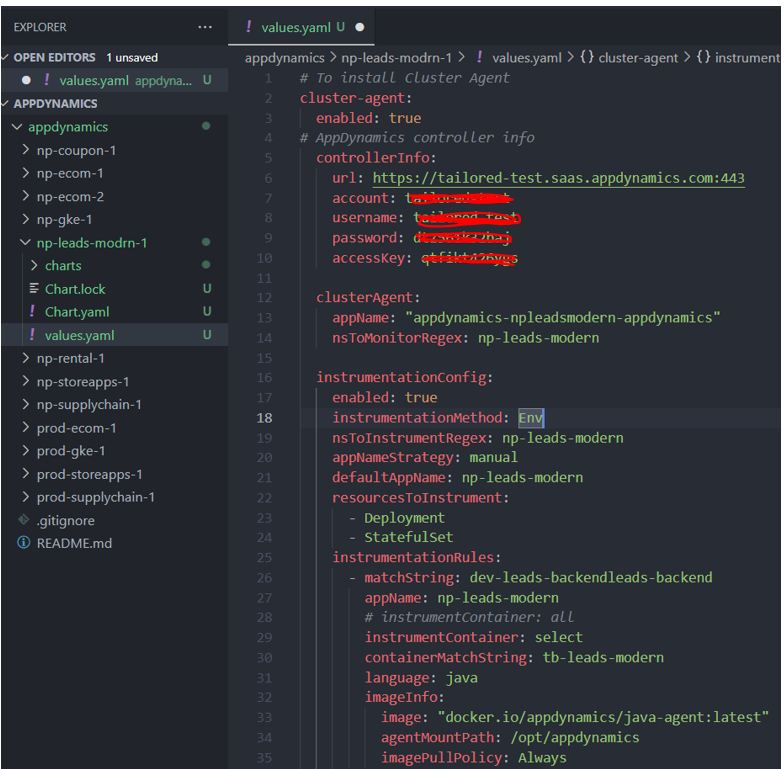
Below is an example of creating a Helm values file, specifically a file named values.yaml. We update the controllerInfo properties with the credentials from the Controller. And update the clusterAgent properties to set the namespace and pods to monitor.
The file below adds a new Argo ApplicationSet for deploying the AppDynamics cluster agent Helm chart to two environments:np-leads-modern and rod-leads-modern. The ApplicationSet automates the deployment and management of the Appdynamics cluster agent across these environments, using specific cluster configurations and namespaces.
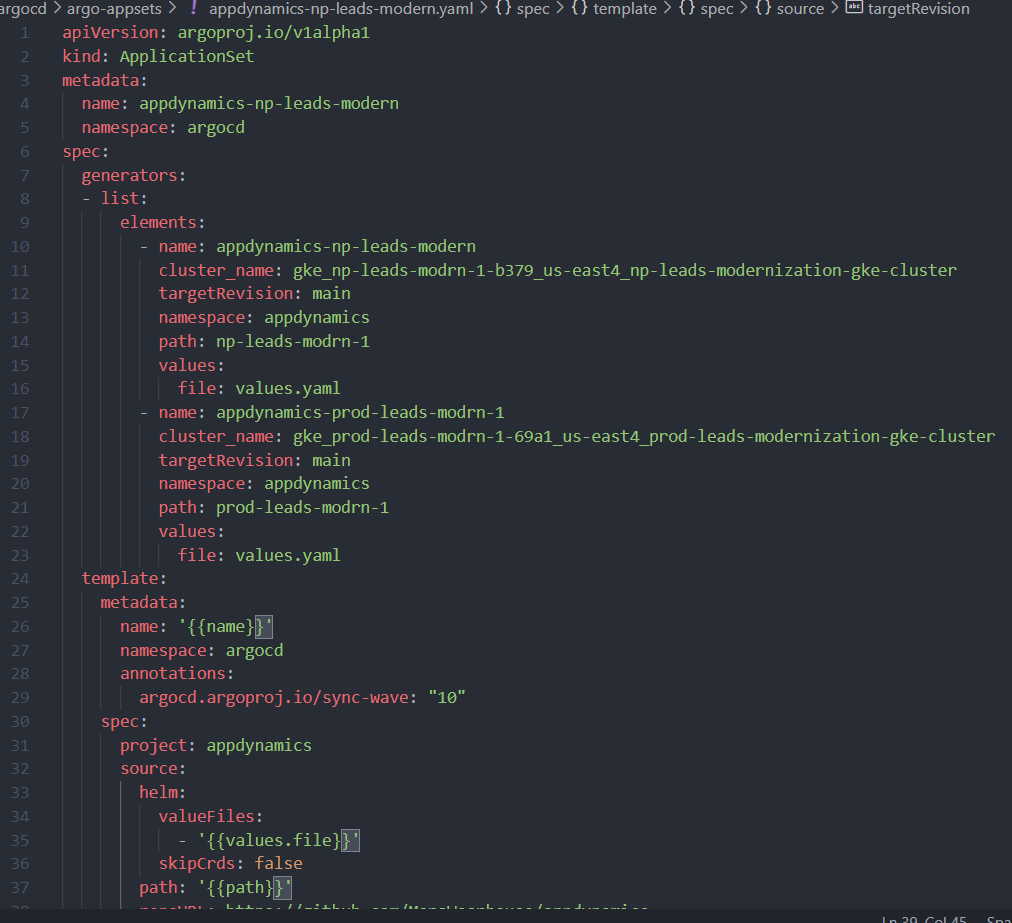
Highlights in this file:
- New ApplicationSet: Introduces a new Argo ApplicationSet named appdynamics-np-leads-modern to manage Appdynamics cluster agent deployments.
- Environment Configuration: Configures the ApplicationSet to deploy to both np-leads-modern and prod-leads-modern environments, specifying cluster names, namespaces, and paths.
- Helm Chart Integration: Integrates with the Appdynamics Helm chart, using values.yaml for configuration and specifying the repository URL and target revision.
Changelog:
- argo-appsets/appdynamics-leads-modern.yaml
- Added a new ApplicationSet definition for appdynamics-np-leads-modern to manage Appdynamics cluster agent deployments in np-leads-modern and prod-leads-modern environments.
- Configured the ApplicationSet to use a list generator with elements for each environment, specifying cluster names (lines 11, 18), namespaces (lines 13, 20), and paths (lines 14, 21).
- Defined a template for the ApplicationSet, including metadata such as name and namespace (lines 26-27), and spec such as project, source (Helm chart details), and destination (cluster and namespace).
- Set the syncPolicy to PruneLast=true to prune resources that are no longer defined in the ApplicationSet.
Post-Installation Verification for GKE Cluster Agent
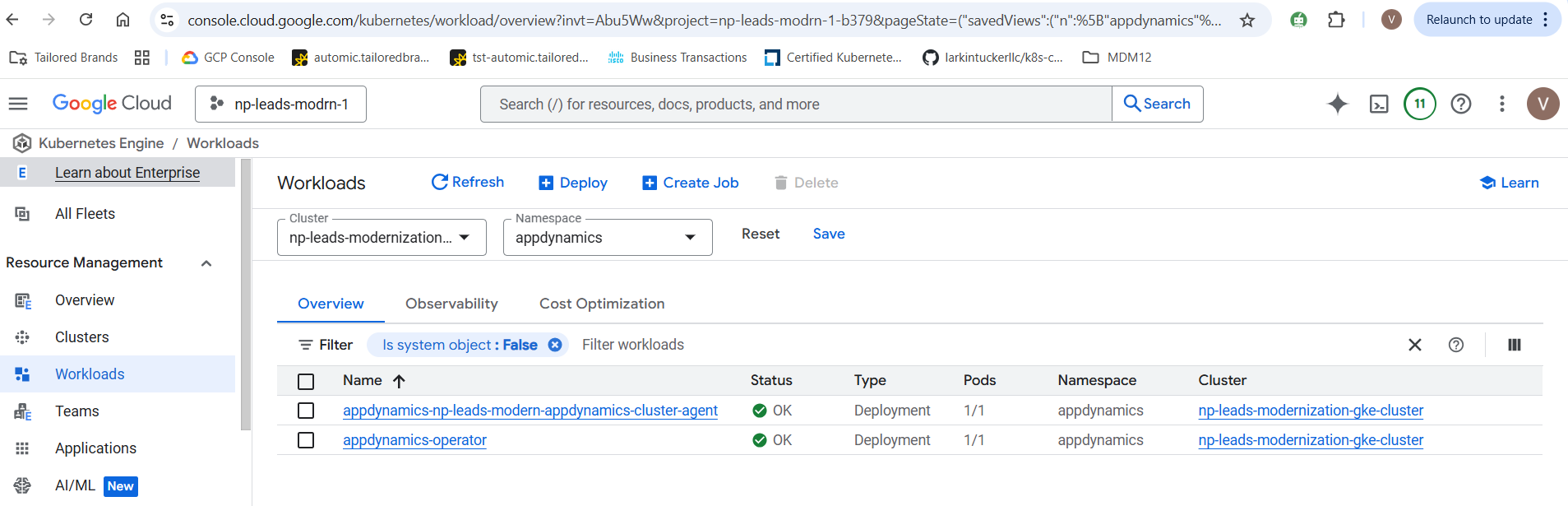
Checking whether the Operator and Cluster agent have been installed on the Cluster level in the AppDynamics namespace on the target GKE cluster.
Below is to confirm whether ApplicationSet is deployed or not in ArgoCD.

Monitoring workloads in AppDynamics Controller:
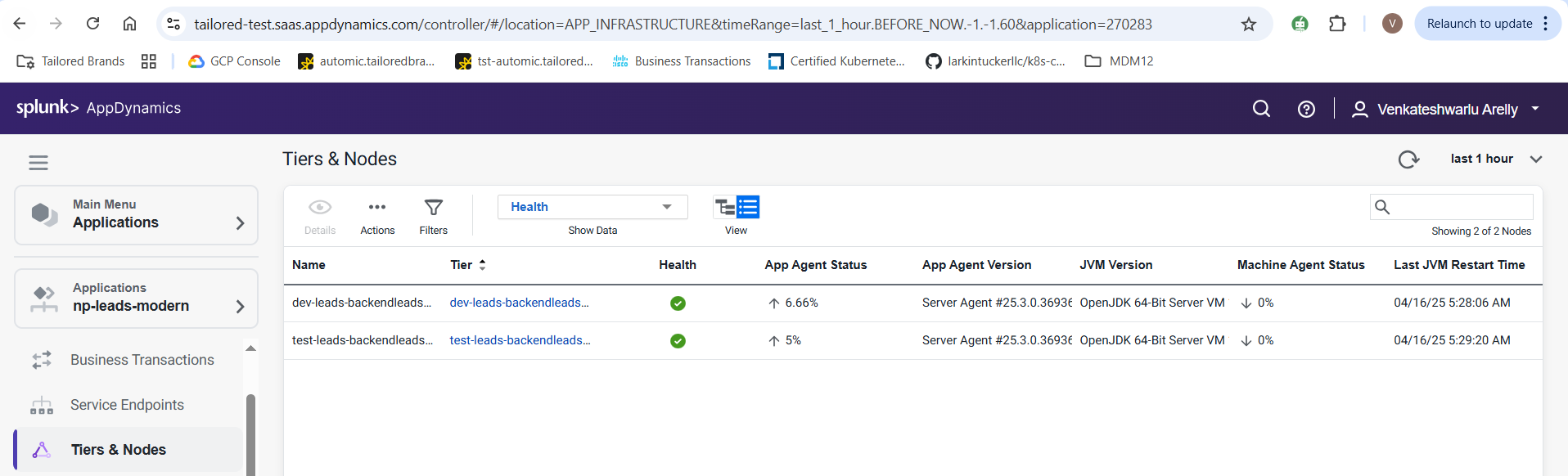
The screenshot below confirms the auto-instrumentation for each workload.

Reference table:
The following table provides the version details of key components involved in setting up the AppDynamics Cluster Agent on GKE. These versions apply to the steps and configurations used in this guide.
| Component | Version Used | Notes |
| Kubernetes (GKE) | 1.31 | Ensure your GKE cluster is up to date |
| AppDynamics Cluster Agent | 22.7 | Deployed via Helm chart |
| AppDynamics Java Agent | 22.7 | Enabled via auto-instrumentation |
| ArgoCD | 2.1.12 | Required for installing the Helm chart |
| AppDynamics Helm Chart | appdynamics/cluster-agent | Pulled from official AppDynamics Helm repo |
| Namespace Monitored | default, your app-namespace | Customize based on your environment |
Conclusion
Installing the AppDynamics Cluster Agent on your GKE cluster using Helm provides a streamlined, scalable, and robust way to gain full-stack visibility into your Kubernetes workloads. By enabling instrumentation, you not only monitor infrastructure health but also automatically capture critical application performance data — all without altering your deployment pipelines. Helm simplifies both installation and future upgrades, making it ideal for dynamic cloud-native environments like GKE.
If you’re looking to enhance observability in your Kubernetes workloads or have questions about integrating AppDynamics into your GKE environment, feel free to drop a comment on this blog post or connect with us directly — we’re here to help you get the most out of your Kubernetes and AppDynamics investment.