
SUMMARY:
Integrating QuickBooks Online with monday.com through API-driven workflows enables organizations to automate invoicing and gain real-time financial visibility by eliminating data silos between operations and finance teams.
- Connecting these platforms eliminates the need for manual double data entry and significantly reduces the risk of billing errors or disputes arising from disconnected systems.
- Organizations can configure directional or bidirectional synchronization via webhooks to automatically trigger invoices or update project budgets in response to real-time financial events.
- Effective implementation requires defining clear trigger points, mapping data fields accurately between systems, and utilizing a sandbox environment to test automations before live deployment.
Adopting this integration strategy transforms static financial data into actionable project insights, allowing businesses to accelerate revenue recognition and ensure every project decision is informed by financial reality.
Table of contents
Introduction
In many organizations, project execution and financial management operate in parallel, but rarely in sync. Delivery teams manage work in project and work management platforms, while finance teams rely on accounting systems like QuickBooks Online to track revenue, expenses, and cash flow. When these systems are disconnected, inefficiencies quietly compound: duplicate data entry, delayed billing, limited financial visibility, and slower decision-making.
At XTIVIA, we help organizations eliminate these gaps through integrating QuickBooks Online with modern work management platforms such as monday.com. The result is a connected operating model where operational activity and financial insight move in step, supporting scalability, accuracy, and stronger financial performance.
In the modern business landscape, the divide between project management and financial management is often where efficiency goes to die. Recently, XTIVIA successfully merged the two.
Operations teams use project management tools to track tasks, milestones, and deliverables. Meanwhile, finance teams use dedicated accounting software such as QuickBooks Online to monitor cash flow, invoices, and expenses. When these two worlds are disconnected, the result is a “silent drain” on profitability, manifested in double data entry, delayed invoicing, and a lack of real-time visibility into project profitability.
Integrating QuickBooks Online (QBO) with a Work OS like monday.com is not just a technical convenience; it is a strategic necessity for businesses aiming to scale. This integration bridges the operational and financial divides, transforming static financial data into actionable project insights. By streamlining these workflows, organizations can reduce administrative overhead, eliminate human error, and ensure that every project decision is informed by financial reality.
The Cost of Disconnected Systems
When project and accounting platforms operate in silos, teams are forced to rely on manual handoffs. A project milestone may be marked as complete in a work management tool, but finance may not realize it’s time to invoice until days or weeks later. This delay immediately affects cash flow.
Manual processes also introduce risk. Rekeying customer data, hours, or expenses increases the probability of inaccuracies that can lead to billing disputes, rework, or reporting inaccuracies. Over time, these problems reduce visibility into true project profitability and limit leadership’s ability to act on up-to-the-minute data.
To understand the value of this integration, one must first recognize the friction caused by silos. In a non-integrated environment, a project manager might mark a milestone as “complete” in monday.com. However, the finance team, working in QuickBooks Online, has no visibility into this status change. They must wait for a manual email or a weekly meeting to determine when to generate an invoice.
This lag creates a “cash flow gap”—the time between completing work and collecting payment. Furthermore, manual data entry is error-prone. A typo in an invoice number or a missed expense line item can lead to payment disputes, further delaying revenue. The integration of QuickBooks Online with monday.com solves these issues by creating a single source of truth that enables seamless data flow between operations and finance.
The Mechanics of Connection: Using APIs for Directional and Bidirectional Sync
Integrating monday.com with QuickBooks Online creates a direct link between operational execution and economic results. Using native integrations or trusted automation platforms, organizations can define rules that automatically trigger updates between systems.
This interface can be configured as one-way or bi-directional, depending on business needs. Project updates can trigger financial actions, while account event management can feed visibility back into project dashboards, establishing a common source of truth across teams.
While “integration” sounds like a magic switch, it is actually a conversation between two different software languages. Monday.com uses a GraphQL API (which lets you request specific data in a flexible structure), while QuickBooks Online uses a REST API (which uses standard web commands like POST and GET to create or retrieve records).
Bridging this gap typically requires a “middleware” layer, such as a custom script, a low-code platform like Make.com or Zapier, or a dedicated integration application that translates these languages. Here is how you can architect this using the APIs for both one-way and two-way workflows.
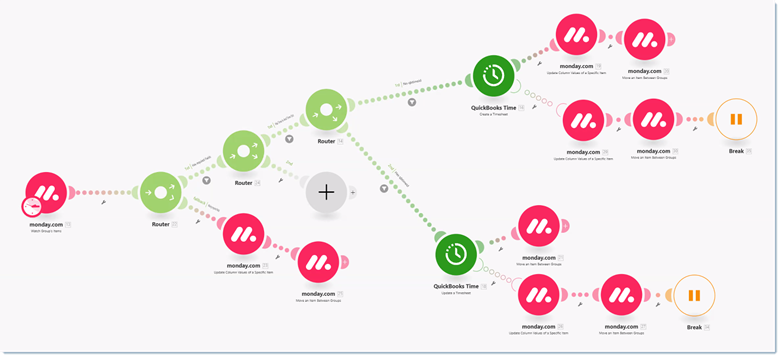
1. Directional Sync: monday.com → QuickBooks Online (The “Push” Workflow)
Best for: Triggering invoices or creating new client profiles upon deal closure.
In this scenario, monday.com acts as the “Master” for operational data, pushing updates to QuickBooks Online only when specific conditions are met. This relies heavily on monday.com Webhooks.
Step 1: The Trigger (monday.com Webhook): You set up a webhook on your monday.com board (e.g., “When Status changes to ‘Ready for Billing'”). When a user changes that status, monday.com instantly sends a JSON payload to your middleware. This payload contains the pulse_id (Item ID) and the board data.
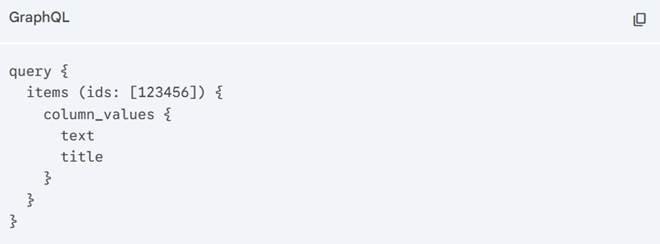
Step 2: The Data Query (monday.com GraphQL): The middleware receives the signal but may require additional details (e.g., the Client’s Email or Tax ID). It sends a GraphQL query back to monday.com to retrieve specific column values (e.g., column_values { text title }).
Step 3: The Action (QuickBooks Online REST API): The middleware formats this data into a QBO-compatible JSON object and sends a POST request to the QuickBooks Online invoice endpoint. A critical best practice here is to first have the script search QBO for an existing customer using the query endpoint (select * from Customer where DisplayName = ‘Client Name’) to avoid creating duplicates.
2. Directional Sync: QuickBooks Online → monday.com (The “Pull” Workflow)
Best for: Updating project budgets with real-time actuals or flagging late payments.
Here, QuickBooks Online is the “Master” for financial data. You want that data reflected in your project boards. This requires using QuickBooks Online Webhooks or scheduled polling.
The Webhook Approach (Real-Time): QuickBooks Online supports webhooks that notify your system whenever an entity (like an Invoice, Payment, or Expense) is created or updated.
The Process:
- Trigger: A finance team member logs an expense in QBO.
- Notification: QBO sends a payload to your endpoint containing the EntityId and the event type (e.g., Create).
- Fetch: Your middleware uses the QBO API to GET the full details of that expense.
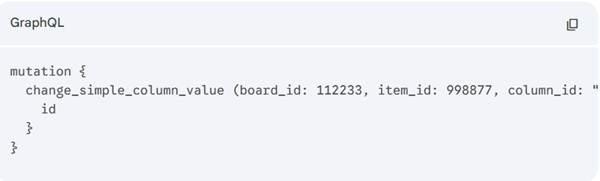
- Update (monday.com Mutation): The middleware pushes this data into monday.com using a GraphQL mutation to update the specific budget column: mutation {change_simple_column_value (…) }.
3. Bidirectional Sync: The “Two-Way Mirror”
Best for: Keeping Customer Data identical in both systems or managing inventory.
Bidirectional sync is complex because it creates a risk of “infinite loops” (monday updates QBO, which triggers a QBO update, which triggers monday again). To achieve this successfully, your API logic must include Idempotency Checks and Source-of-Truth rules.
The “Mapped ID” Strategy
To enable two-way sync, you must store the “Foreign Key” in both systems.
- In monday.com, create a hidden Text column to store the QBO_Customer_ID.
- In QuickBooks, use a custom field to store the Monday_Item_ID.
When a change happens in monday.com:
- The middleware checks if the QBO_Customer_ID column is empty.
- If empty, it creates a new customer in QBO via the API and writes the returned ID back to monday.com.
- If populated, it sends an update (POST /update) to QBO using that specific ID.
Preventing Loops
Your middleware code should include logic to compare incoming data with existing data. If Monday_Phone_Number == QBO_Phone_Number, the script terminates immediately without sending an API call. This prevents the “echo” effect, where systems endlessly update each other with the same information.
Key Benefits of API-Level Integration
- Eliminating Double Data Entry. The most immediate benefit is the time reclaimed. Staff no longer need to copy-paste data from project boards into accounting fields. This reduction in manual labor frees finance teams to focus on analysis and strategy rather than data entry, allowing project teams to focus on delivery.
- Granular Security and Error Handling Using APIs allows you to grant permission only to specific endpoints. You can allow monday.com to write Invoices to QuickBooks Online while restricting it from reading Payroll data to ensure financial security. Furthermore, unlike manual entry, API interactions generate response codes. If an invoice fails to create (e.g., “Error 400: Invalid Email”), the API can return that error directly to a monday.com “Status” column, instantly flagging the issue for the project manager.
- Real-Time Budget Tracking For project managers, “blind spending” is a significant risk. Integrating QuickBooks Online allows actual expense data to sync back into monday.com. Imagine a “Budget vs. Actual” dashboard in monday.com. As expenses are logged in QuickBooks Online, they automatically update the “Actual Spend” column on the project board. Project managers can view a live visual bar showing remaining budget, enabling proactive adjustments rather than reactive apologies.
- Faster Revenue Recognition. By automating the trigger from “Project Done” to “Invoice Sent,” businesses can shave days or even weeks off their billing cycle. In an economy where cash flow is king, this acceleration can improve liquidity and reduce the reliance on credit lines.
Implementation Best Practices
While the benefits are clear, successful integration requires careful planning. It is crucial to define the “trigger” points clearly. For example, exactly which status change should generate an invoice? It is also vital to map fields correctly, ensuring that the “Service Item” in monday.com matches the “Product/Service” list in QuickBooks Online to avoid synchronization errors.
Start with a “sandbox” approach. Test the workflow with a dummy project and a test company file in QuickBooks Online to ensure that automations fire correctly before rolling it out to live client accounts. Additionally, establish explicit permissions. Not every monday.com user should be able to trigger financial actions; use monday.com’s robust permission settings to restrict these capabilities to authorized team leads or finance liaisons.
Practical Integration Use Cases
Automated Invoicing
- One of the most impactful use cases is automated invoicing. When a project, task, or milestone in monday.com reaches a predefined status, such as “Completed” or “Ready to Bill,” an invoice draft can be automatically created in QuickBooks Online. Essential elements such as customer information, billable hours, service descriptions, and rates are pulled directly from the project board into the invoice, significantly decreasing billing cycle time.
Real-Time Budget and Expense Visibility
- By syncing expense data from QuickBooks Online back into monday.com, project managers obtain immediate insight into actual spend. Instead of waiting for the month-end reports, teams can monitor budget consumption as expenses are recorded. Dashboards can highlight budget-to-actuals variances, enabling proactive adjustments before overruns occur.
Customer and Contact Synchronization
- Preserving accurate customer records is critical for both operations and finance. With integration in place, new clients added in monday.com can automatically be created or updated in QuickBooks Online. This secures consistent customer data across systems and eliminates duplicate or obsolete records.
Two-Way Operational and Financial Sync
- Key entities, such as customers, invoices, products, services, and pricing, can be synchronized between platforms. Updates made in one system are reflected in the other, reducing reconciliation effort and improving data harmony across departments.
Financial Intelligence Embedded in Project Workflows
- Financial data from QuickBooks Online, including invoice status or payment information, can be surfaced directly within monday.com boards and dashboards. This allows delivery teams to understand the financial state of their work without needing direct access to accounting systems.
Time Tracking and Billing Alignment
- Time tracked in monday.com or via connected time-tracking tools can flow into QuickBooks Online for billing and payroll. This matching improves billing accuracy and ensures that all billable work is captured consistently.
Automated Notifications and Status Updates
- Accounting events such as invoice payments or estimate approvals can trigger updates or notifications in monday.com. Teams stay up to date without manual follow-ups, improving communication between finance and delivery stakeholders.
Vendor and Supplier Coordination
- Vendor or supplier records created in monday.com can be synchronized with QuickBooks Online, keeping procurement and finance teams in sync. This is notably useful for organizations managing subcontractors or external service providers within project workflows.
Best Practices for an Effective Integration
- Effective integrations start with a clear process design. Organizations should define which project events trigger financial actions and confirm that data fields are mapped correctly between systems. Testing integrations in a test environment before going live helps prevent interruptions and ensure reliability.
Permission management is equally important. Not every user should be able to trigger financial transactions. monday.com’s role-based permissions allow organizations to limit financial actions to approved users while maintaining appropriate visibility.
How XTIVIA Adds Value
XTIVIA brings deep expertise in system integration, automation, and financial platforms. We work in close collaboration with clients to design integrations that correspond with their business processes and financial requirements, via native tools or custom integration solutions.
Let XTIVIA’s monday.com Experts help you get set up and guide your project to success on time and under budget.
Contact us for any questions.