

SUMMARY:
Docker and Containerization offer an essential solution for developers and system administrators by packaging Salesforce-connected applications and their dependencies into standardized, isolated containers, thereby eliminating the persistent problem of environment inconsistency.
- Containerization solves environment inconsistency by creating a standalone, executable software package containing all necessary code, runtime, and settings, ensuring the application runs identically everywhere.
- Containers are significantly more efficient than Virtual Machines (VMs) because they virtualize only the operating system and share the host kernel, whereas VMs must include a full copy of the operating system.
- Docker is the platform used to manage containers, leveraging components like the Dockerfile (the recipe) and the Image (the template) to deliver unparalleled consistency and portability across systems.
- Benefits of using Docker include superior consistency, portability across different operating systems, resource efficiency compared to VMs, and rapid deployment.
Adopting Docker represents a fundamental shift in software delivery, ensuring reliability and streamlining development workflows by changing how software is built, shipped, and executed across various environments.
Table of contents
If you’ve spent any time in the world of software or tech, you’ve probably used an application that runs on one machine but not another. This is what’s known as environment inconsistency.
What if I told you there’s a way to solve this issue? A way to ensure that your application runs the same way on your laptop, your colleague’s desktop, a testing server, and in the cloud?
Enter Docker and the magic of Containerization—the key to running your Salesforce-connected applications with perfect consistency everywhere.
Let’s break down what these buzzwords actually mean, without the confusing jargon.
Why Would an Application Work on One Machine vs. Another?
Let’s start with an analogy. Imagine you’re baking a cake. You have a precise recipe (your code) that works perfectly in your kitchen (your computer). Your kitchen has a specific brand of oven, a particular type of flour, and precisely 2% fat milk.
Now, you give this recipe to a friend. They try to bake it in their kitchen, but their oven runs hotter, they use a different brand of flour, and they only have skim milk. The cake comes out completely different – maybe it’s burnt, or it didn’t rise. The recipe was the same, but the environment was different.
This is precisely what happens with software. Your code might rely on:
- A specific version of C# or Node.js
- Certain system libraries or dependencies
- A particular database or configuration file
When any of these things are different on another machine, your application can break in mysterious and frustrating ways.
Containerization
For a moment, think of a shipping container. Before the invention of standardized shipping containers, moving goods across the world was a challenging task. Crates, barrels, and bags of all shapes and sizes had to be loaded individually onto a ship. It was slow, inefficient, and things often got damaged.
Then, the shipping container was invented. It provided a standard, isolated unit that could hold anything – from cars to bananas. Cranes, ships, and trucks were all designed to handle this single, standard shape. This revolutionized global trade.
Docker containers are the shipping containers for your code.
Instead of shipping a messy pile of code and a long, complicated list of setup instructions, you package your application and everything it needs to run into a neat, standardized box called a container.
What is a Container?
A container is a lightweight, standalone, executable package of software that includes everything needed to run it: code, runtime, system tools, system libraries, and settings.
Think of it as a tiny, self-contained virtual machine, but much more efficient.

Containers vs. Virtual Machines (VMs)
This is a common point of confusion, so let’s clarify it.
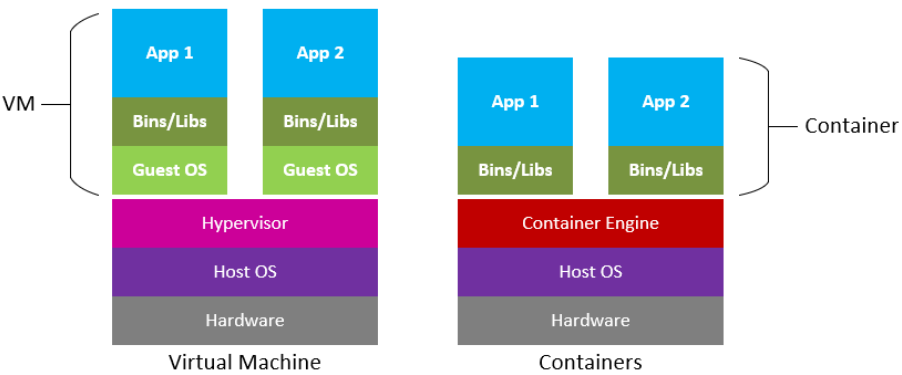
- Virtual Machines (VMs): A VM virtualizes an entire computer. It includes a full copy of an operating system, the application, and all its dependencies. This makes VMs very large and slow to start up. It’s like building a new house within your existing property for each application.
- Containers: Containers virtualize only the operating system. They share the host system’s kernel but run in isolated user spaces. This makes them incredibly lightweight and fast to start up, allowing you to run many more on the same machine. It’s like having separate, secure bedrooms in one house, where they all share the same foundation but each has its own private space.
Below shows a comparison of how applications would run on a Virtual Machine (VM) vs. being Containerized:
What is Docker?
Docker is the most popular platform for creating, managing, and running containers. It provides the tools and ecosystem to make containerization easy.
The key components are:
- Dockerfile: This is a simple text file with a set of instructions for building a container image. It’s like the recipe for your cake. It says, “Start with this base, add these files, run these commands.”
- Image: This is a read-only template created by your Dockerfile. It’s a snapshot of your application and its environment. Reflect on our earlier baking analogy. It is the blueprint or the cake mix in the box.
- Container: This is a running instance of an image. It’s the actual cake that you baked from the mix. You can start, stop, or delete containers without affecting the image.
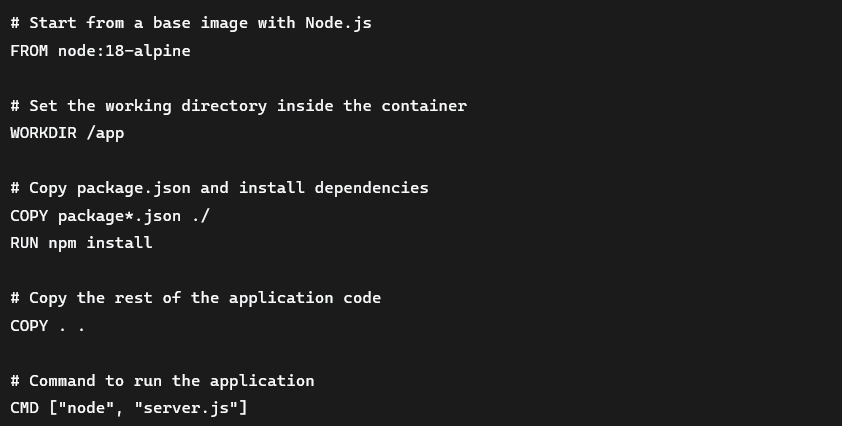
Above is a simple Dockerfile opened in VS Code. This specifies the environment, files to copy, and different Docker commands.
Consistency and Portability: Docker’s Benefits in the Salesforce Ecosystem
- Consistency: Eliminates the possibility that software may work on one machine and not another. Your application runs the same everywhere.
- Isolation: If one application fails or has issues, it doesn’t affect others running on the same machine.
- Portability: You can build a container on your Mac and run it without changes on a Windows server, a Linux cloud instance, or your teammate’s laptop.
- Efficiency: Containers use fewer resources than VMs, allowing you to do more with your existing hardware.
- Rapid Deployment: Starting a container is as fast as starting a process, making scaling and deploying new versions incredibly quick.
Getting Started is Easy
The best way to learn is through hands-on experience. Visit the Docker website to download Docker Desktop for your OS (Mac, Windows, or Linux), and then follow the installation guide.
Try running the classic “Hello World” container:
bash
docker run hello-world
This simple command pulls a small image and runs a container that prints a welcome message. Congratulations, you’ve just run your first container!
Here is a sample output of the following command:

Wrapping Up
Docker and containerization aren’t just a fad; they are a fundamental shift in how we build, ship, and run software. They solve real, painful problems for developers and system administrators alike.
By packaging your application into a container, you’re not just following a trend; you’re ensuring reliability, streamlining your workflow, and eliminating environment-related headaches for good.
With all of this in mind, why not try Docker for your next deployment? Your future self and your teammates will thank you.
Also, remember our Salesforce-certified CRM experts are available to assist you. Consider XTIVIA your trusted guide throughout your Salesforce CRM implementation. Don’t forget to inquire about our Salesforce CRM Admin On-Demand service.
Give us a call today!