
Last reviewed: September 20, 2026
TL;DR
- Support for AEM 6.5 on Adobe Managed Services ended on 31 August 2026. On-premise core support is planned to end in February 2027.
- Service pack 6.5.26.0 was the last one for the 6.5 line. There is no further maintenance stream on that branch.
- You have five realistic options. Two keep you on Adobe, and for some organizations those are the right call.
- Both replatforming and moving to AEM as a Cloud Service require substantial rework. Staying with Adobe is the familiar option, not the low-risk one.
- Six things are worth doing in the next 90 days whichever way you go.
Table of Contents
- AEM 6.5 End of Support: Where the Dates Stand
- Option 1: Move to AEM 6.5 LTS
- Option 2: Move to AEM as a Cloud Service
- Option 3: Replatform to a Composable Content Platform
- Option 4: Replatform to a Portal Platform
- Option 5: Build a Custom Portal on Next.js
- The Question That Decides Your AEM 6.5 End of Support Response
- What to Do in the Next 90 Days
If you run Adobe Experience Manager 6.5, the decision window is not approaching. It is open, and part of it has already closed behind you.
This article sets out where the dates stand and what the five realistic paths are. That includes the two that keep you inside Adobe, and where each of them is the right call.
We implement alternatives to AEM, so weigh our enthusiasm accordingly. We have tried to write the version we would want to read if the decision were ours.
AEM 6.5 End of Support: Where the Dates Stand
Three facts matter. They are not equally well known.
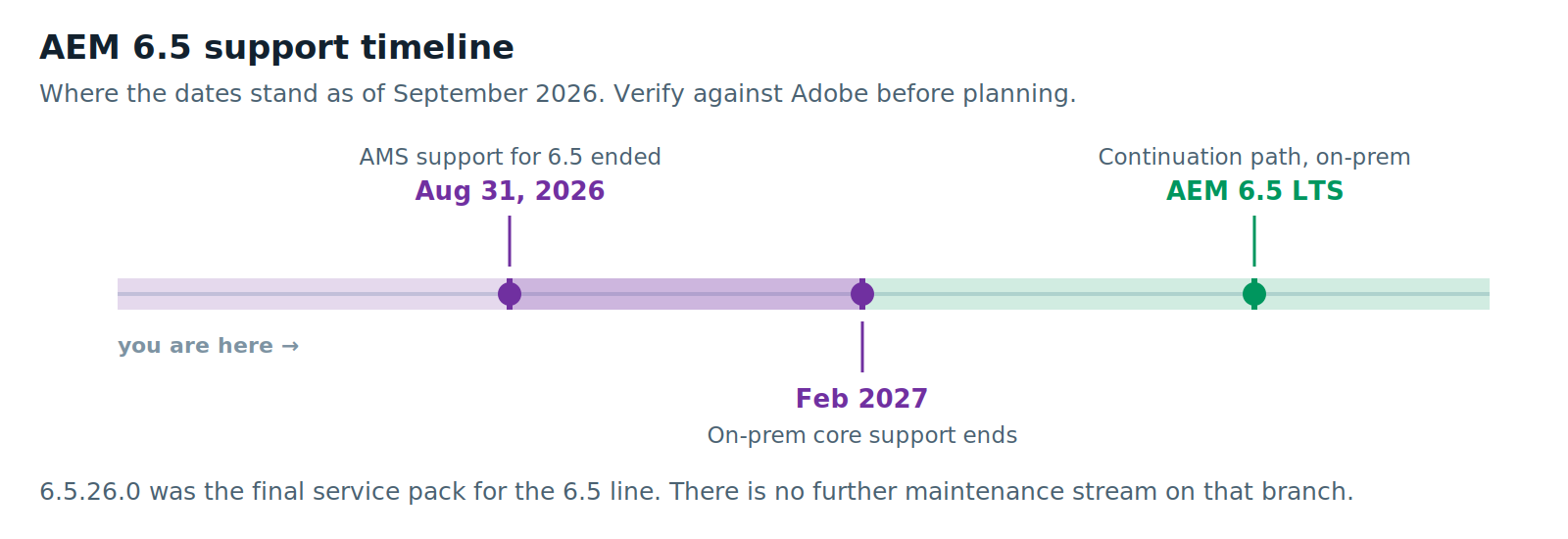
Support for AEM 6.5 on Adobe Managed Services ended on 31 August 2026. If your environment is AMS-hosted, you are past it. Not approaching it. Past it.
On-premise core support for AEM 6.5 is planned to end in February 2027. That is about five months away. Service pack 6.5.26.0 was the final one for the 6.5 line.
AEM 6.5 LTS is the continuation path for on-premise. It is a separate release — you may see it called AEM 6.6. It brings refreshed foundations, support for Java 17 and 21, and removes some legacy features and artifacts.
It is not a service pack. Moving to it is an upgrade with a testing cycle. Adobe publishes an analyzer tool specifically to assess the impact on your customizations.
Check all of this against Adobe’s current release roadmap before you plan around it. Support calendars move.
Your Five Options
Option 1: AEM 6.5 LTS
What it is. Stay on-premise. Stay on AEM. Move to the supported long-term branch.
What it buys you. Time, with the least immediate disruption of any option here.
If you have hard data residency requirements, a regulated environment, or infrastructure commitments that make cloud a multi-year conversation, this is a legitimate answer. Some organizations genuinely cannot move to SaaS this fiscal year. Pretending otherwise does not help them.
What it does not buy you. Anything about the underlying problem.
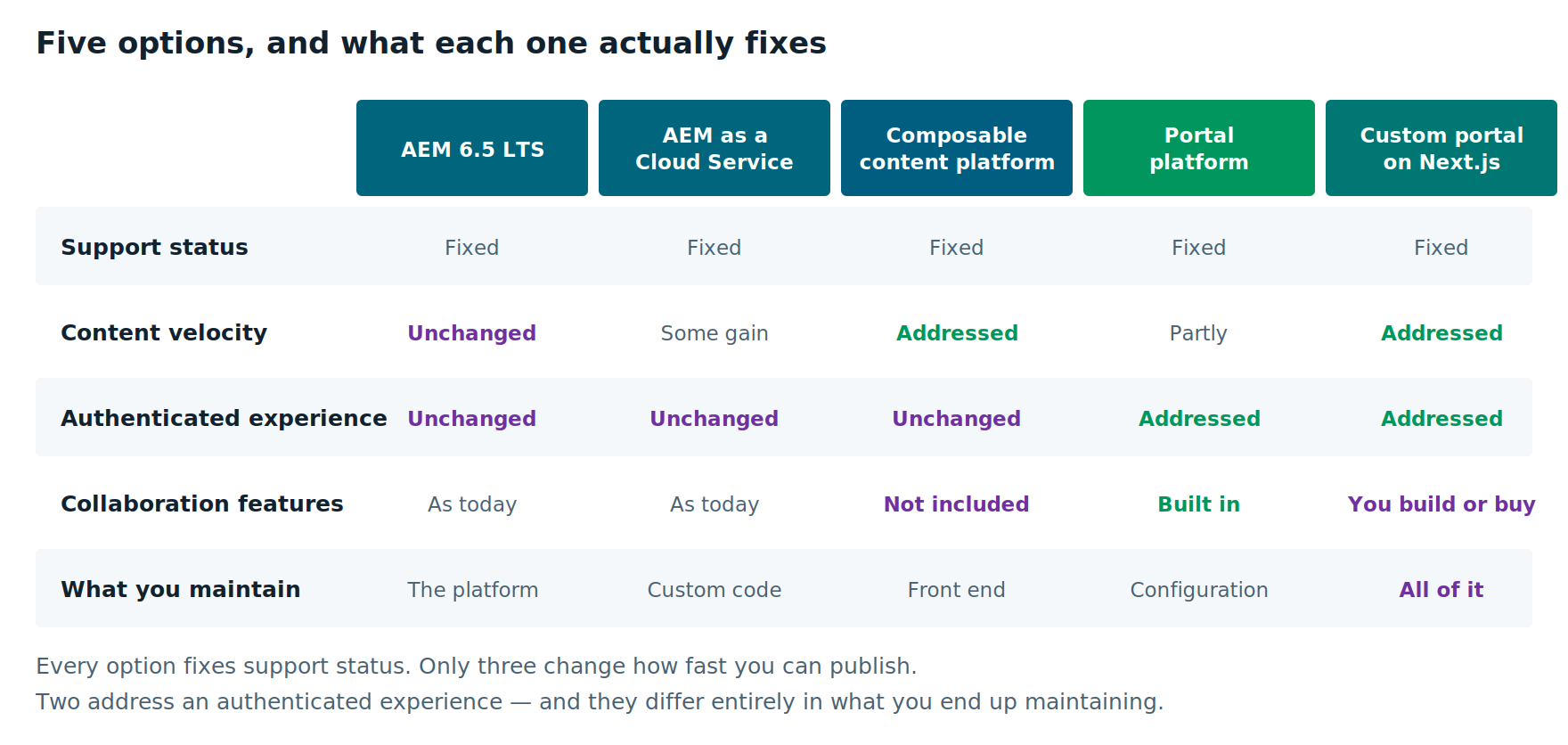
If you are reading this because content changes take three weeks, or because your agency invoice has become a line item people ask about, or because you maintain seven near-identical regional sites — LTS changes none of that. It fixes support status. That is all it claims to do.
One thing to check early. Legacy features have been removed. Long-lived AEM 6.5 estates tend to depend on exactly those. Run the analyzer now. The upgrade is usually straightforward. Occasionally it is not, and you want to find out in September rather than January.
Choose it if your constraint is genuinely regulatory or infrastructural, or you need a defensible bridge while a bigger decision gets made properly.
Option 2: AEM as a Cloud Service
What it is. Adobe’s cloud-native platform. Continuous updates, no version lifecycle, managed infrastructure. You can build the traditional way with HTML Template Language (HTL) and Java, or use Edge Delivery Services, which is a different front-end model.
What it buys you. The end of upgrade projects. For an organization that has been through two or three painful AEM upgrades, that is not a small thing.
And if you are deeply invested in the rest of the Adobe stack — Analytics, Target, Real-Time CDP, Marketo, Assets as your enterprise DAM — AEMaaCS keeps those integrations native instead of something you rebuild.
This is the strongest argument for staying, and it is a good one. If four Adobe products are genuinely operational in your business, not just shelfware, the cost of leaving is not just the CMS.
What people underestimate. This is a re-architecture, not a hosting change.
Custom code moves to the cloud manager pipeline. The repository model changes. Years of accumulated customization become the cost driver. In a long-lived 6.5 estate, that customization is usually most of the work.
Teams who budget for this as an upgrade find out around month four that they budgeted for the wrong shape of project.
Choose it if you are genuinely using the Adobe suite — not licensing it, using it — and your content operation is working.
Option 3: A Composable Content Platform
What it is. Replace AEM’s content layer with an API-first headless CMS and a modern front end. Integrate the rest of your stack rather than buying it from one vendor.
What it buys you. Publishing throughput and content reuse.
Content is structured once and delivered to a website, an app, a partner feed and thirty locales without duplication. Marketers publish without a developer in the loop. You assemble the stack rather than inherit it.
What it costs. A content modeling exercise that is real work and cannot be skipped — we have written about how to approach it. A front-end build. Change management for editors whose habits came from a page builder.
You also give up the native Adobe integrations. You rebuild them as integrations. That is tractable, but it is not free.
Choose it if your bottleneck is content velocity, your audience is largely unauthenticated, and you are paying for a suite you use perhaps a third of.
Option 4: A Portal Platform
What it is. The option most AEM articles skip. Which is odd, because a lot of AEM estates are not really marketing sites.
If a meaningful part of your implementation sits behind a login — a customer portal, a dealer or broker portal, a provider or supplier portal, an intranet — then you are running a portal on a platform designed for marketing. You have almost certainly built the missing half yourself.
That custom identity layer, that entitlements matrix, those integration adapters: that is the part costing you money. None of the first three options address it.
What it buys you. Identity, entitlements, workflow and integration as native platform capabilities instead of custom code you maintain. Consolidation of multiple portals onto one foundation. Deployment flexibility, including self-hosted where data residency demands it.
What it costs. It is a bigger project than a marketing-site replatform, with a longer discovery phase. The hard part is the back-office integration inventory, not the content.
Choose it if the authenticated experience is where your value and your costs both concentrate, and you want the platform to supply identity, entitlements, workflow and collaboration rather than your team building them. Our Liferay DXP practice works almost entirely in this territory.
Option 5: Build a Custom Portal on Next.js
What it is. Skip the DXP entirely. Build the portal as a custom Next.js application. Use a headless CMS for content, an identity provider such as Entra ID, Okta or Auth0 for authentication, and direct API integration to your back-office systems.
This is a real option and it gets skipped in most vendor comparisons, for obvious reasons.
What it buys you. Total control of the user experience. No portal platform license. One front-end stack across both the marketing estate and the portal, which means one set of components, one design system and one team.
For a portal that is essentially “show this user their data and let them submit a request,” this can be the cleanest architecture available.
What it costs. You build and maintain everything a portal platform would have given you.
Authentication is the easy part — an identity provider solves it either way. The rest is not.
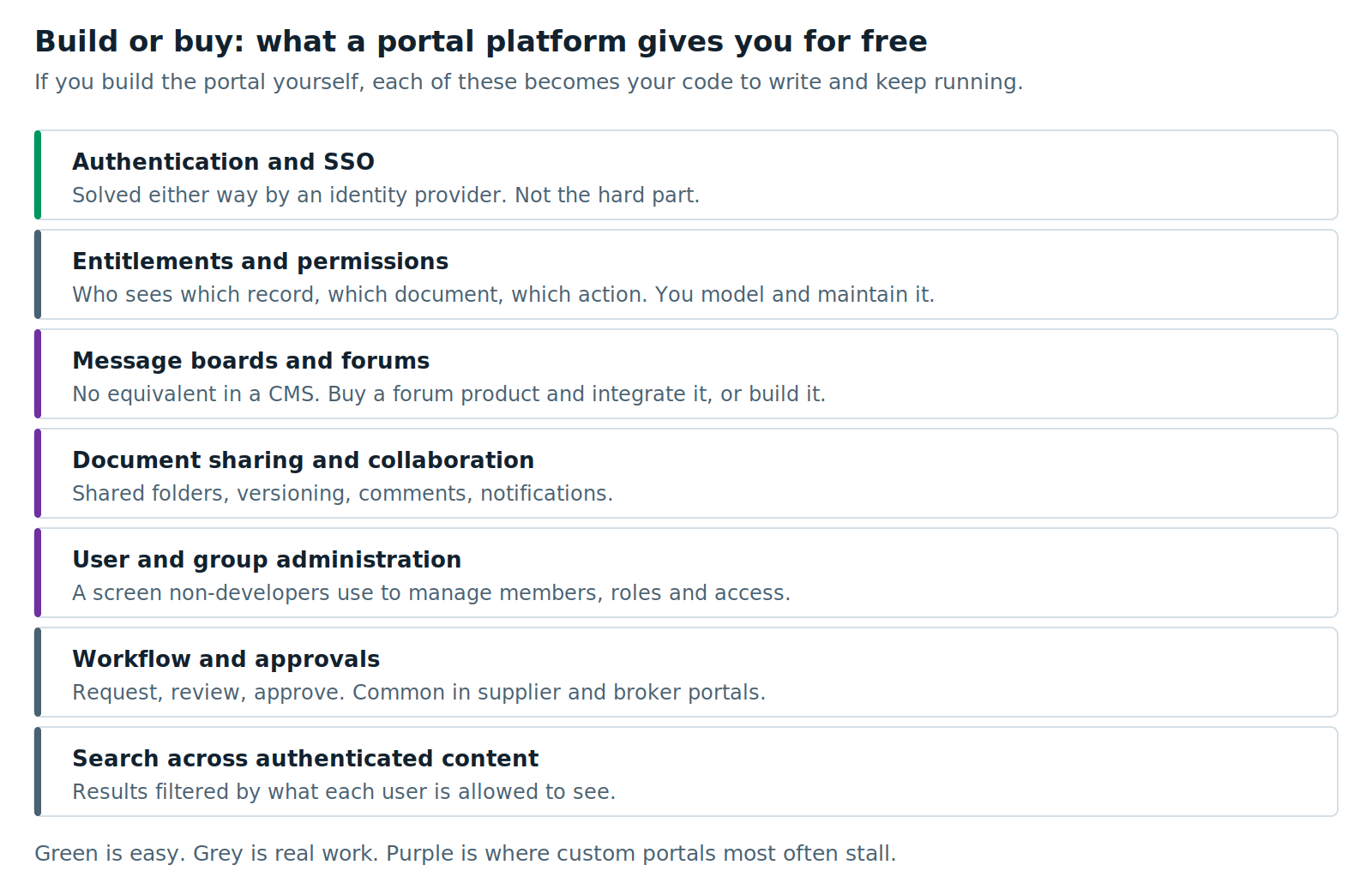
Entitlements and permissions become your model to design and maintain. Workflow and approvals become your code. User and group administration needs a screen that non-developers can actually use. Search has to be filtered by what each user is allowed to see.
And then there is collaboration.
If your portal needs message boards, discussion forums, document sharing, comments, notifications or activity feeds, a CMS gives you none of it. You have two choices: license a separate forum or community product and integrate it, or build it yourself.
Both are real work, and both add a component to maintain. A portal platform like Liferay includes these capabilities natively, and that single difference is often what decides between Option 4 and Option 5.
Choose it if the portal is transactional rather than collaborative, your integration surface is well understood, and you have an engineering team that can sustain a custom application for years rather than months.
Do not choose it if you need community features, you need non-developers to administer it, you plan to stand up several portals, or your team cannot commit to owning the platform long term.
A Note on the Honest Version of Build Versus Buy
Custom portals fail less often for technical reasons than for organizational ones. The build goes fine. Then the engineers who wrote it move on, the feature requests keep arriving, and nobody budgeted for the platform work that a license would have covered.
The right question is not “can we build this?” It is “will we still be able to run this in year three and four?”
The Question That Decides Your AEM 6.5 End of Support Response
Strip away the platform comparison and it comes down to one thing.
How much of the Adobe suite are you genuinely using, versus paying for?
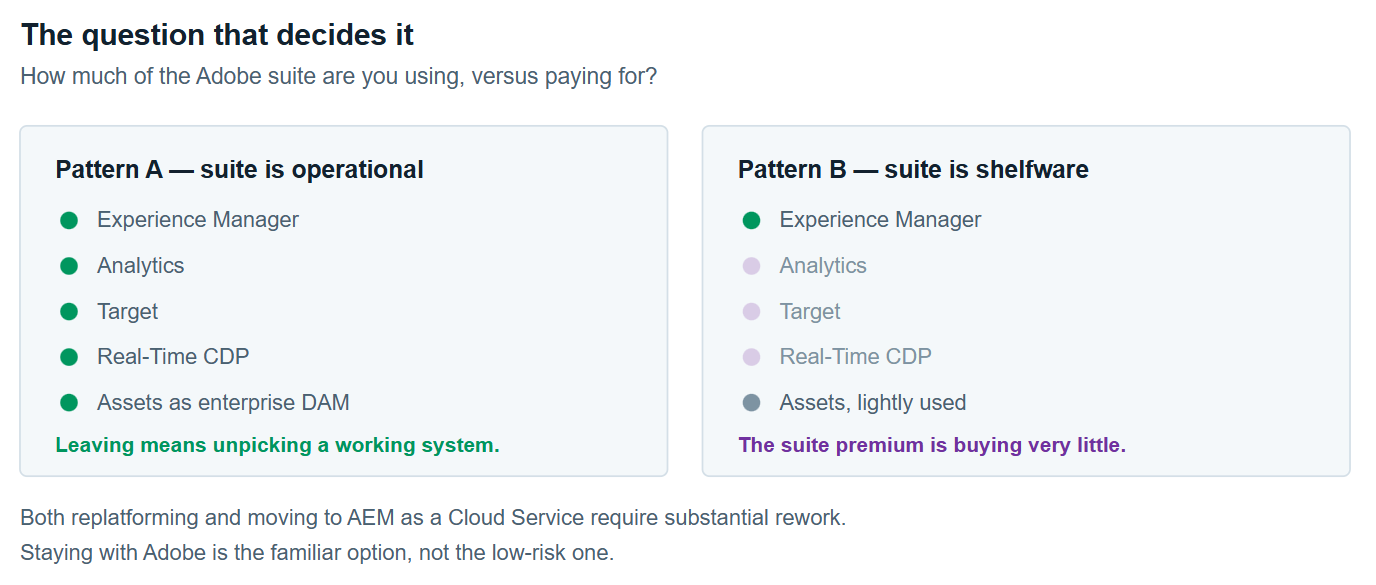
We have assessed AEM estates where Analytics, Target and Real-Time CDP were fully operational and load-bearing. For those organizations, leaving AEM means unpicking a working system. AEMaaCS is the right answer.
We have assessed more where AEM Sites did all the work, Assets held some images, and the rest of the suite had been licensed for years and never operationalized. Usually because it needed specialist skills nobody hired for. For those organizations, the suite premium buys very little.
Then the uncomfortable follow-up.
Both replatforming and moving to AEMaaCS require substantial rework. Once you accept that, “staying with Adobe” is not the low-risk option. It is the familiar one.
Those are different things. Confusing the two represents the single most frequent oversight made during this evaluation process.
If that does not settle it, the next question is about workload rather than vendor: are you replacing a CMS or a platform? Answer that before you talk to anyone.
And if the answer turns out to be both — a marketing estate and an authenticated portal, which is common in long-lived AEM estates — we have written up the three ways to split them, including the single-vendor option and the custom-portal option.
What to Do in the Next 90 Days
This applies to everyone reading, including organizations that decide to stay.
1. Establish your actual support status in writing. Hosting model, version, service pack, contract terms. Not what you assume — what your agreement says.
2. Get a security posture assessment. An unpatched content platform facing the public internet is a risk that grows quietly. Your security team would rather have this conversation now than after an incident.
3. Inventory your customizations. Run Adobe’s analyzer tool. This informs every option equally — it is the cost driver for LTS, for AEMaaCS and for a replatform.
4. Inventory your integrations. What reads from AEM, what AEM reads from, and what breaks if it moves. This is usually the most surprising document the whole assessment produces.
5. Measure your current content operation. Time from request to live. Share of changes needing a developer. You will need the baseline to justify any option. Capture it now or you will be arguing from anecdote in six months.
6. Name the decision owner and the decision date. Support timelines create urgency but not ownership. Plenty of organizations reach a deadline having discussed it for a year with nobody accountable for choosing.
None of that commits you to a direction. All of it is work you need regardless. Doing it now turns a deadline into a decision you control.
Further Reading
- Adobe’s AEM release roadmap — the authoritative source for support dates
- Adobe’s AEM 6.5 LTS FAQ — what LTS includes and what it removes
- Understanding AEM Sites offerings — Adobe’s own comparison of AEMaaCS and Edge Delivery Services
XTIVIA has implemented enterprise content and portal platforms for over twenty years, including Liferay since 2006. We are a Liferay Platinum Partner and a Contentful partner. We do not implement AEM — a bias worth knowing when you read anything we publish on the subject. Talk to us if you want a second opinion on your options.