
SUMMARY:
- Most legacy DXP implementations run two workloads at once: public marketing content, and an authenticated experience.
- Those two workloads have different right answers. A shortlist built before you separate them will be a shortlist for the wrong project.
- Five questions tell you which one dominates. It takes about ten minutes.
- The default: content velocity problems point to a content platform, integration and entitlement problems point to a portal platform.
- Three conditions override that default, and at the enterprise end the answer is sometimes both.
Table of Contents
- Why Legacy DXP Migration Starts in the Wrong Place
- The Two Workload Signatures Behind Every Legacy DXP Migration
- Five Questions That Decide Your Legacy DXP Migration Path
- The Legacy DXP Migration Default, and What Overrides It
- When a Legacy DXP Migration Means Both Platforms
- When You Should Not Migrate at All
- What to Do Next
Why Legacy DXP Migration Starts in the Wrong Place
Most platform selections start with a shortlist.
Someone circulates three vendor names. The shortlist becomes a scorecard. The scorecard becomes an RFP. Four months later there is a decision that nobody can fault and nobody is sure about.
The shortlist was the problem. It was assembled before anyone established what was being replaced.
When you leave a monolithic digital experience platform — Sitecore XP, Adobe Experience Manager, a WordPress site that grew past its limits — you are rarely replacing one thing. Almost every legacy platform we assess is doing two jobs.
It publishes marketing content to the public internet. It also serves an authenticated experience to people who log in.
Those are different jobs. Different economics, different buyers, different answers. The suite was sold on the idea that one platform could do both well. In practice, most organizations find it does one well and the other expensively.
So before the shortlist, answer this: which of those two jobs are you actually solving for?
The Two Workload Signatures Behind Every Legacy DXP Migration
These are not product categories. They are patterns of work. You can usually spot which one dominates within twenty minutes of looking at the real system.
Signature One: Content Velocity
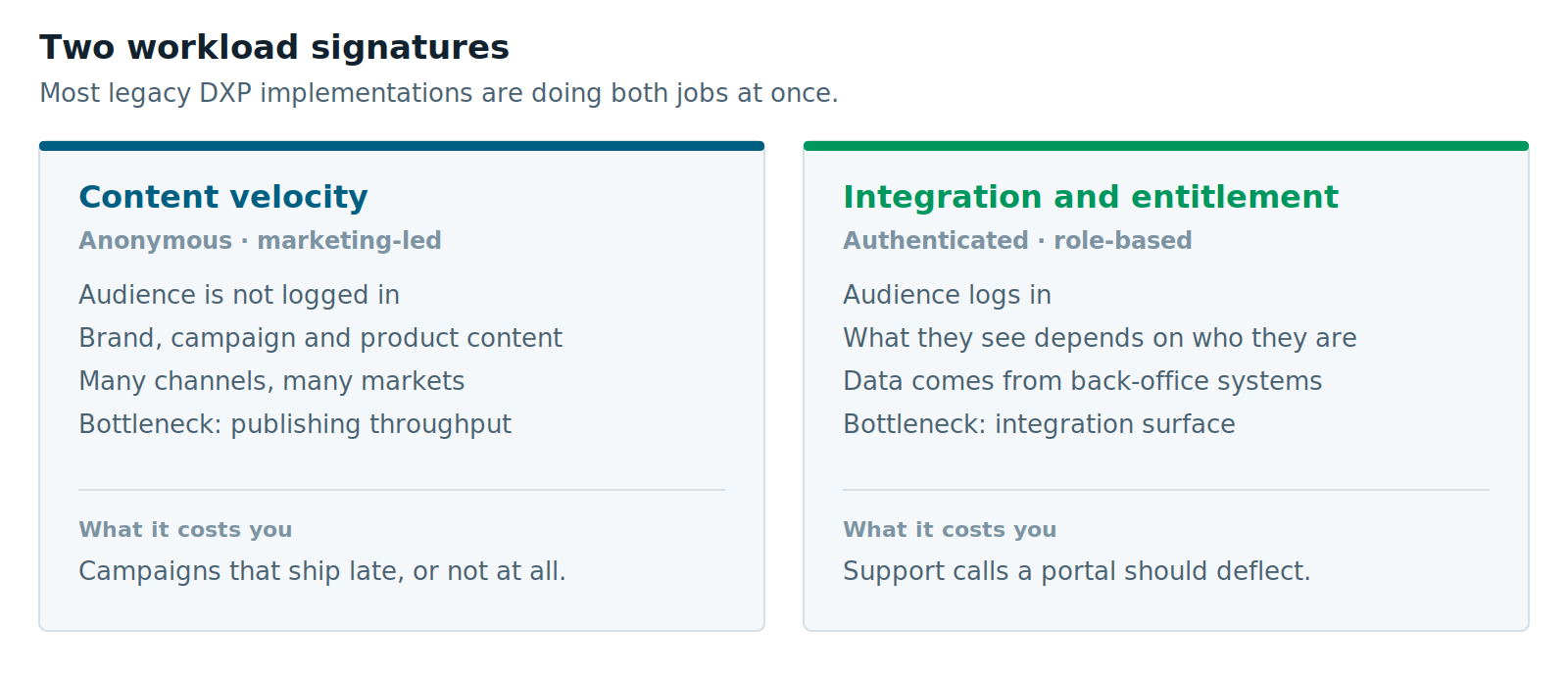
The audience is not logged in. The content is brand, campaign, product and editorial material. It needs to reach a website, probably a mobile app, maybe a partner feed or a set of regional sites.
The constraint is almost never capability. It is throughput.
Marketing wants to publish and cannot. Publishing needs a developer, a release window, and a ticket that is eleventh in the queue. The business cost shows up as campaigns that ship late.
What this looks like in practice: a content team of six with a two-week turnaround on a copy change. Seven regional sites that are near-copies of each other, each maintained separately. A mobile app team asking for content the website already has, and being told it will take a quarter.
Signature Two: Integration and Entitlement
The audience logs in. They are customers checking a claim, dealers placing an order, brokers pulling documents, providers verifying eligibility, employees finding a form.
What they see depends on who they are. What they see comes from systems that are not the CMS — an ERP, a CRM, a policy administration system, a warehouse.
The constraint is not publishing speed. It is integration surface and entitlement complexity. The hard part is not showing the content. It is knowing which eleven back-office systems have to agree first.
What this looks like in practice: four portals acquired or built at different times, each with its own login. A partner portal where the content is 80% transactional. A rules matrix covering which of nine user types can see which of forty document categories.
Five Questions That Decide Your Legacy DXP Migration Path
Answer these honestly rather than aspirationally. The aspirational answer is how organizations buy a platform for the system they wish they had.
1. What share of the experience sits behind a login?
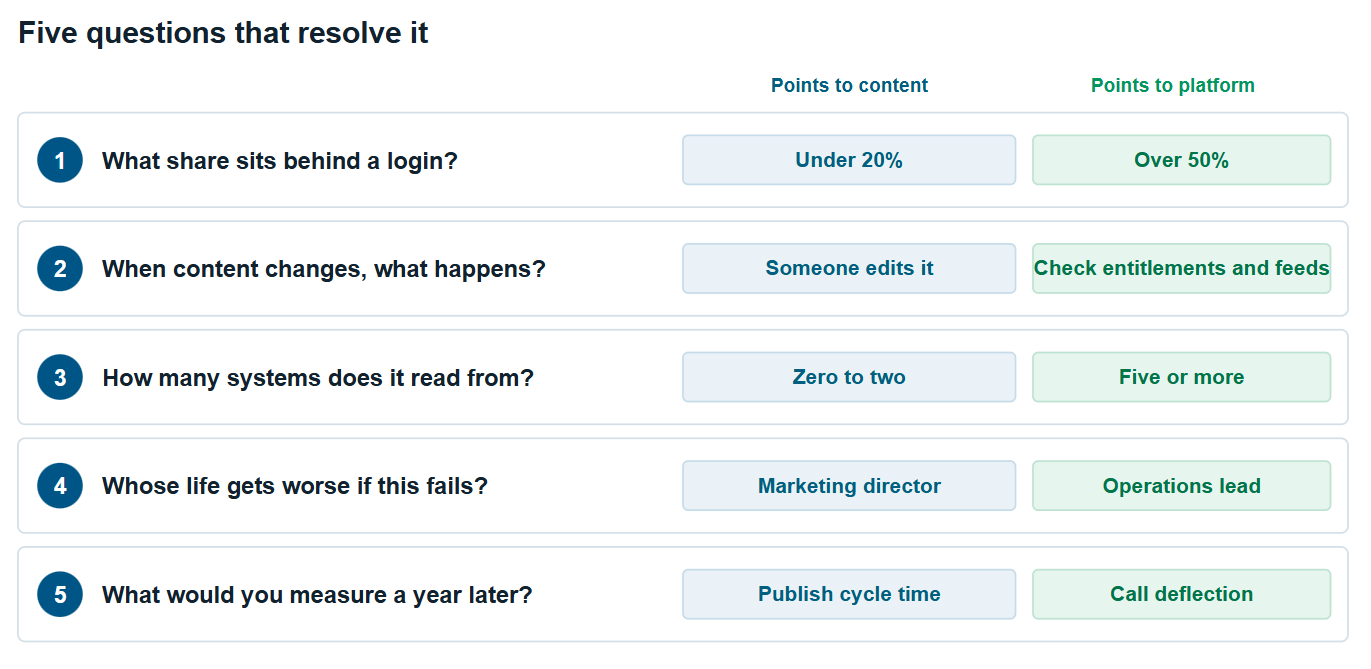
Not whether you have a login. Nearly everyone does. What share of the value reaches authenticated users? Under 20% and you are replacing a CMS. Over 50% and you are replacing a platform.
2. When content changes, what actually has to happen?
If the answer is “someone edits it and it goes live,” your bottleneck is publishing throughput. If the answer is “we check the entitlement rules and whether the SAP feed is current,” your bottleneck is integration.
3. How many back-office systems does the experience read from in real time?
If you connect to zero to two systems, content delivery is typically the primary driver — though even a single integration can occasionally push you toward an integration-led setup. Five or more, and integration architecture dominates. The CMS is a detail inside it.
4. Whose life gets worse if this project fails?
A marketing director who cannot ship campaigns is a different project from an operations lead buried in calls a portal should deflect. The sponsor tells you the workload.
5. What would you measure a year later?
Publish cycle time and content reuse point one way. Call deflection, self-service adoption and portals consolidated point the other. If you cannot name the measure, the business case is not ready.
The Legacy DXP Migration Default, and What Overrides It
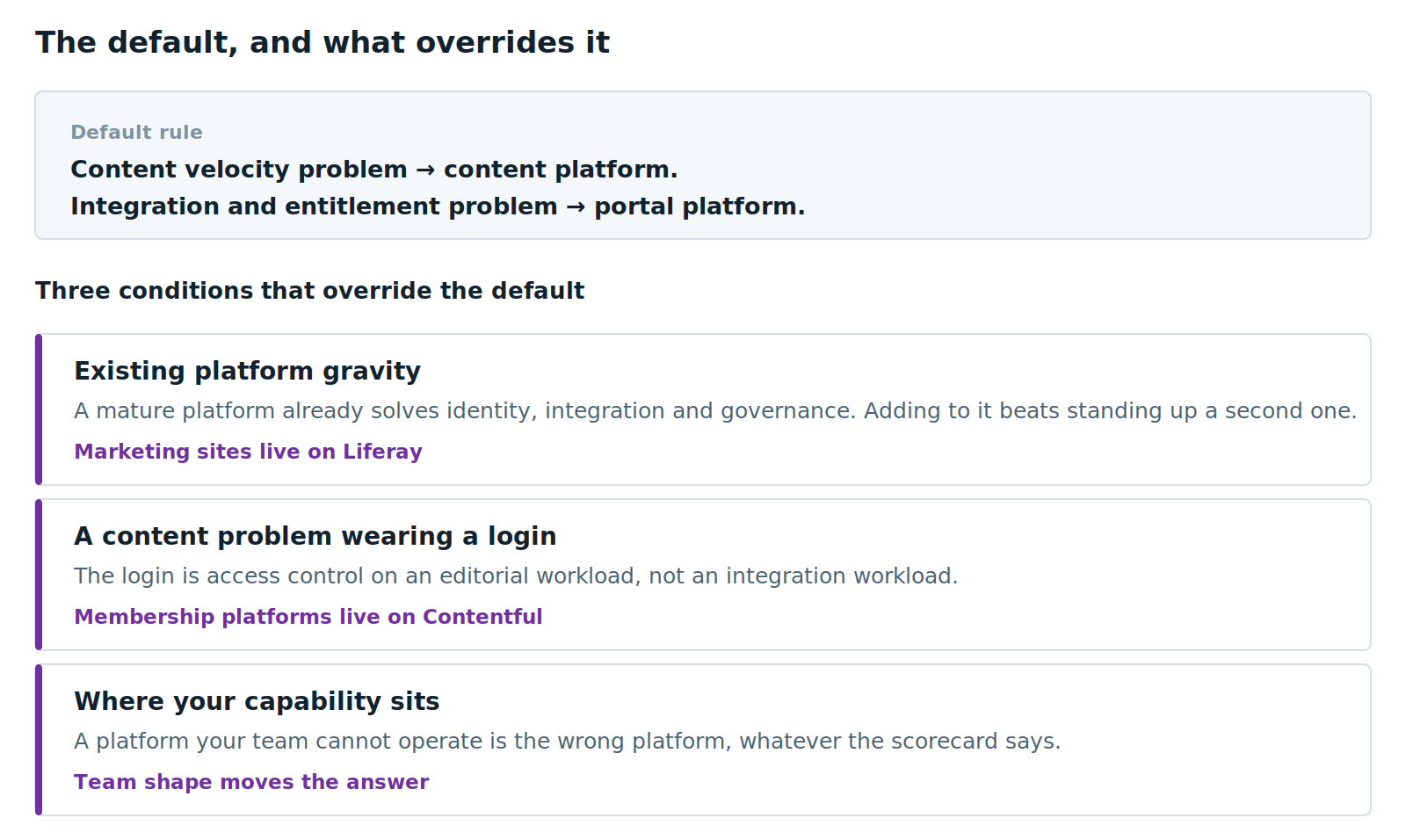
Work through those five and a default emerges. It is a reliable one.
Content velocity problems are usually better served by a composable content platform — a headless CMS with a modern front end, where content is structured once and delivered anywhere.
Integration and entitlement problems are usually better served by a digital experience platform built for portals, where identity, entitlements, workflow and integration are native rather than bolted on.
There is a third path on the portal side, and it is worth naming because prospects raise it themselves: build the portal as a custom Next.js application with no DXP at all. Identity comes from a provider like Entra ID or Okta, content from the headless CMS, data from direct API integration.
That works well for a transactional portal — show this user their data, let them submit a request. It works badly the moment you need collaboration. Message boards, discussion forums, document sharing and notifications are all included in a portal platform and all absent from a CMS, so you end up licensing a separate community product or building one. We cover that trade-off properly in the three ways to split a public website and a portal.
Worth saying plainly: XTIVIA implements both. We have built each one against its own default.
We have delivered public marketing websites on Liferay — a university giving platform and a financial services site among them. We have built membership platforms on Contentful, including a trade association platform and a research consortium portal, both with logins.
These are not exceptions we hide. They are why we treat the default as a starting point rather than an answer.
Override One: Existing Platform Gravity
If an organization already runs a mature platform with identity, integration and governance solved, adding a marketing site to it is often cheaper and faster than standing up a second platform. Even where a standalone content platform would win a greenfield comparison.
The right unit of analysis is the whole platform, not the single site.
Override Two: A Content Problem Wearing a Login
Some membership and association platforms look like portals because of the login. The actual work is editorial — standards, technical documentation, research, training material, published at volume to members and the public.
The login is access control on a content problem. It is not an integration problem in disguise. Structured content wins there.
Override Three: Where Your Capability Actually Sits
A platform your team cannot operate is the wrong platform, whatever the scorecard says.
A five-person marketing team with no engineering support is a real constraint. So is a two-person IT department. Both should move the answer.
When a Legacy DXP Migration Means Both Platforms
This is common enough at the enterprise end to deserve its own answer.
A large organization leaving AEM often has a public website and an authenticated customer portal. Both sit in one platform because that is what the suite promised.
Splitting them is not a failure to consolidate. It is recognizing they were never the same workload — and that forcing them together is what made the incumbent expensive.
We have written that scenario up separately in When You Need Both a Public Website and a Portal, including the three ways to fill the two halves — best of breed, single vendor, or a custom portal.
When You Should Not Migrate at All
A good diagnostic will sometimes tell you to do nothing.
Stay where you are if your content operation works, your integration surface is stable, your support status is current, and the pressure to move is coming from a vendor roadmap rather than your own constraints.
Replatforming is expensive and disruptive. It needs a constraint you can name. “The platform is old” is not one. “It takes three weeks to publish a press release” is.
Stay on WordPress if you run one site with a small content team and no integration requirements. WordPress is good at what it is for. The threshold for leaving is higher than most vendors suggest.
What to Do Next
If a support deadline brought you here, start with the specifics:
Both lay out the options without pointing at a destination.
If you have worked through the five questions and landed on content velocity, our Contentful consulting practice is the place to start, and our guide to content modeling in Contentful covers the part most migrations get wrong.
If you landed on integration and entitlement, start with our Liferay DXP practice.
And if you want to know how we decide when it is genuinely ambiguous, we have written the rule down — including the cases where we recommended against our own practices.
Further Reading
- Adobe’s AEM release roadmap — current support dates, straight from the source
- Sitecore’s product strategy for XP — Sitecore’s own position on where XP is heading
- Liferay’s comparison against Sitecore — useful mostly for where Liferay concedes ground
- Contentful’s guide to content migration planning — vendor perspective, but the sequencing advice is sound
Vivek Agarwal is CTO and VP of Digital Experience Solutions at XTIVIA. XTIVIA has implemented enterprise content and portal platforms for over twenty years. We are a Liferay Platinum Partner and a Contentful partner, and we do not implement Sitecore or AEM — worth knowing when you read our view on them.