
SUMMARY:
- In Purview vs. Unity Catalog, Unity Catalog controls who can use data inside Databricks, while Microsoft Purview catalogs it alongside Microsoft data and protects the Microsoft side.
- Purview can scan Unity Catalog for metadata, lineage, and classifications, but it can’t apply sensitivity labels or access policies to Databricks data.
- Mirroring a Databricks catalog into Fabric doesn’t carry its permissions across, so you must rebuild access in Fabric.
- Teams that run only Databricks, or run it on AWS or Google Cloud, often need only Unity Catalog for their analytics data.
- When you run both, give each governance job one owner, so business users find data in one place and engineers enforce access in one place.
Table of Contents
- Purview vs Unity Catalog: The Short Answer
- What Unity Catalog Governs Inside Databricks
- What Microsoft Purview Adds When It Scans Unity Catalog
- Purview vs Unity Catalog: Where They Overlap
- Who Governs What: A Purview vs Unity Catalog Split
- What Changes When You Mirror Databricks Into Fabric?
- When You Don’t Need Both
- Purview vs Unity Catalog in Practice: How to Run Both
Purview vs Unity Catalog: The Short Answer
In Purview vs Unity Catalog, each tool owns a different job. Unity Catalog decides who can read which Databricks table, row, and column. Microsoft Purview shows that data alongside the rest of your Microsoft data and protects files, email, and Fabric items. Most companies that run Databricks alongside Microsoft 365 and Fabric need both.
Unity Catalog is the governance layer built into Databricks. Microsoft calls it the layer that enforces access control “when you query a table or call a model” (Microsoft Learn). It’s on by default in Azure Databricks workspaces created after November 9, 2023.
Microsoft Purview is Microsoft’s data security and governance product. It does two kinds of work. It catalogs data across many platforms. And it protects data in Microsoft 365 and Fabric with sensitivity labels and data loss prevention (DLP).
The trouble starts when the two tools are bought by different teams. The data platform team owns Unity Catalog. The security or compliance team owns Purview. Each one assumes the other covers the gaps.
Worth saying plainly: XTIVIA is a Microsoft Solutions Partner and a Databricks partner. We implement both tools, so we have no reason to push you toward one.
 Unity Catalog enforces access inside Databricks. Purview finds, describes and protects data across Microsoft. Run both only when each one has a job the other can’t do.
What Unity Catalog Governs Inside Databricks
Unity Catalog governs how data is used inside Databricks. It controls access to tables, files, models, and functions. It also tracks lineage, logs every action for audit, finds sensitive data, and monitors data quality. If a person or a job queries Databricks data, Unity Catalog decides whether they can.
Its main features, from Microsoft’s Azure Databricks documentation (Microsoft Learn):
- Access control. Permissions on catalogs, schemas, and tables, plus row filters and column masks. A row filter hides rows a user shouldn’t see. A column mask blanks out values such as Social Security numbers.
- Policies based on tags. Attribute-based access control (ABAC) applies one rule to every table that carries a tag, such as “PII”. Databricks made ABAC, governed tags, and automatic data classification generally available on May 13, 2026 (Databricks).
- Lineage. It records how data flows from source tables to models and dashboards.
- Audit. It writes every data access to a system table you can query.
- Data quality monitoring. It profiles tables and alerts on unusual changes.
The key word is enforce. Unity Catalog doesn’t just describe a rule. It applies the rule at query time, for every user and job. Purview can’t do that for Databricks data.
What Microsoft Purview Adds When It Scans Unity Catalog
Microsoft Purview adds a view of Databricks data next to your other data. Purview scans Unity Catalog and brings its catalogs, schemas, tables, views, and columns into Purview Unified Catalog. It can also pull in lineage and run data quality checks. But it reads Unity Catalog. It doesn’t control it.
Purview does this with the Purview Data Map, the part of Purview that scans data sources. Its Unity Catalog connector brings in (Microsoft Learn):
- Metadata from the metastore down to columns.
- Tags from Unity Catalog, shown as properties in Purview.
- Lineage between tables, views, and columns, read from Unity Catalog’s system tables after notebook runs.
- Classifications, such as “credit card number”, are found by sampling data. Custom classifications aren’t supported for this source.
Then Purview Unified Catalog, Purview’s business catalog, adds what Unity Catalog doesn’t focus on. That means business terms, data products grouped by governance domains, and data quality scores a business owner can read. Purview’s data quality checks can run on Unity Catalog tables (Microsoft Learn).
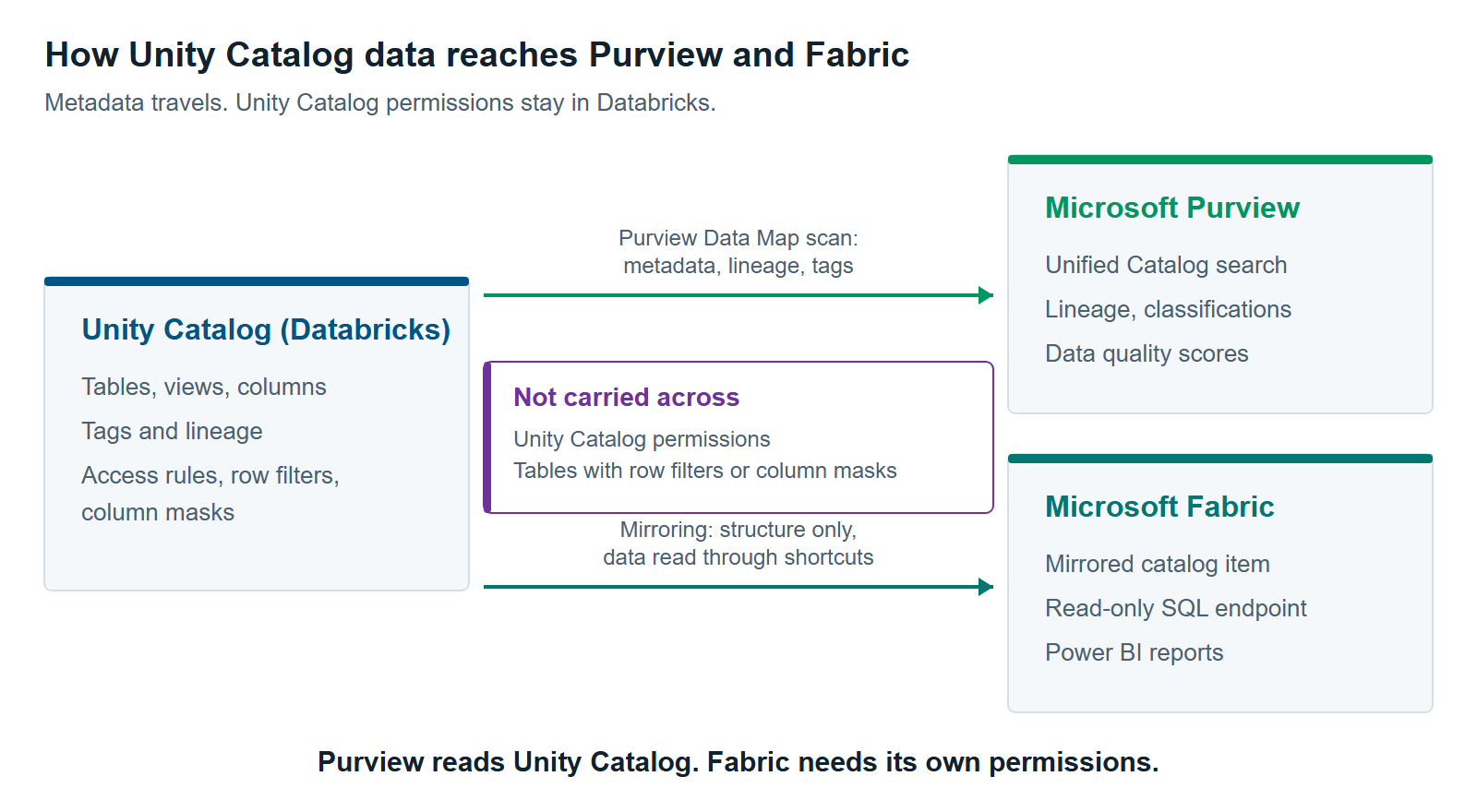
Three limits matter to a buyer. First, Purview can’t apply sensitivity labels or access policies to Unity Catalog data (Microsoft Learn). Second, lineage is only as good as Unity Catalog’s own records. If Azure Data Factory triggers a notebook, Purview won’t show that link. Third, the connector is for Azure Databricks. Databricks on AWS or Google Cloud isn’t on Purview’s list of supported sources.
There’s a cost point too. Purview data quality is billed on its own pay-as-you-go meters. Its scans also run queries on a Databricks SQL warehouse, and Microsoft suggests starting with a Medium size for production data. So you pay for compute on both sides.
Purview vs Unity Catalog: Where They Overlap
Purview and Unity Catalog overlap in five areas: search, classification, lineage, data quality, and audit. Both tools can do the first four for Databricks data, and each keeps an audit trail for its own side. That overlap is where teams can waste money, paying twice for one job.
| Job | Unity Catalog | Microsoft Purview |
|---|---|---|
| Search and discovery | Catalog Explorer, for Databricks users | Unified Catalog, across Microsoft and other sources |
| Finding sensitive data | Automatic data classification and governed tags | Classifications from sampled data, for Databricks and other sources |
| Lineage | Inside Databricks, down to columns | Across sources it scans, built on Unity Catalog’s records for Databricks |
| Data quality | Data quality monitoring for engineers | Rules and scores for business owners, grouped by data product |
| Audit | System tables for Databricks activity | Audit for Microsoft 365 and Fabric activity |
Sources: Unity Catalog overview and Purview Unity Catalog connector, Microsoft Learn, checked October 2026.
Overlap isn’t a problem by itself. It becomes a problem when nobody decides which tool is the record. A steward fixes a tag in Purview, but the access rule reads the tag in Unity Catalog. Now the two disagree, and the rule that matters is the one in Databricks.
Who Governs What: A Purview vs Unity Catalog Split
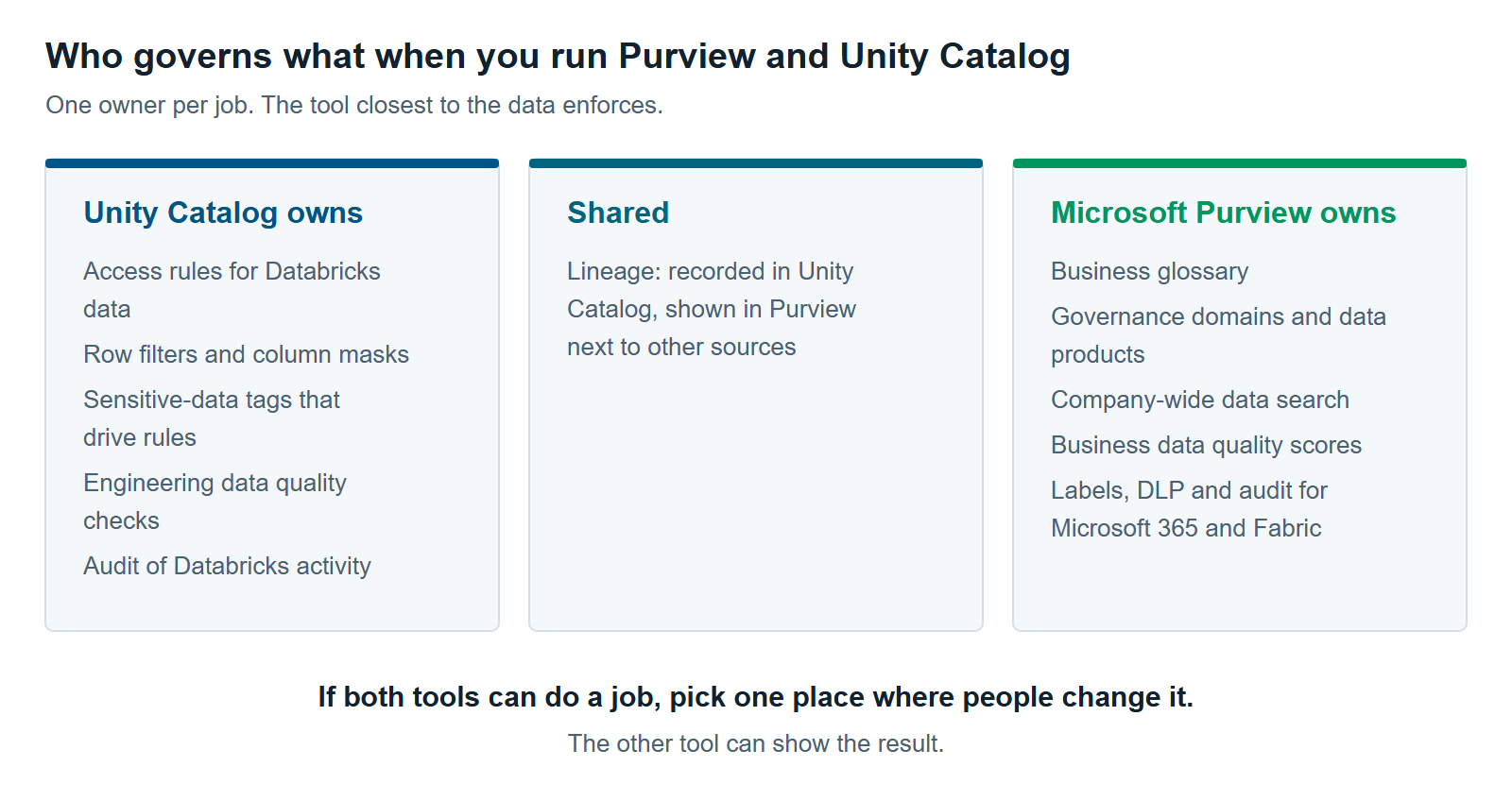
The cleanest Purview vs Unity Catalog split follows one rule. The tool closest to the data enforces. The tool closest to the business describes and protects. In practice, Unity Catalog owns access and engineering checks, and Purview owns the business catalog and Microsoft-side protection.
Here’s the split we recommend as a starting point:
- Unity Catalog owns: access rules, row filters and column masks, the tags those rules read, engineering data quality checks, and audit of Databricks activity.
- Purview owns: the business glossary, data products and governance domains, the company-wide search experience, and data quality scores that business owners track.
- Purview also owns protection on the Microsoft side: sensitivity labels, DLP, audit, and Insider Risk Management for Microsoft 365 and Fabric.
- Lineage is shared. Unity Catalog records it. Purview joins it to lineage from your other sources, so users can see the whole path.
Tags deserve one more word. Sensitive-data tags drive access rules in Unity Catalog. So the master list of those tags should live in Unity Catalog, and Purview should read them. Don’t let stewards maintain a second list in Purview that nothing enforces.
What Changes When You Mirror Databricks Into Fabric?
Mirroring puts Databricks data in front of Fabric and Power BI users, but it moves access control to Fabric. A mirrored Databricks catalog copies the catalog structure into Fabric and reads the data through shortcuts. Unity Catalog permissions don’t come with it. You have to rebuild them in Fabric.
Microsoft Fabric is Microsoft’s analytics platform. Its mirroring feature lets Fabric read a Unity Catalog catalog without copying the data (Microsoft Learn). Users query it through a read-only SQL endpoint or build Power BI reports on it. That’s useful when your report writers live in Fabric, and your engineers live in Databricks.
The catch is security. Microsoft’s own wording is direct: “Unity Catalog policies and permissions aren’t mirrored in Fabric” (Microsoft Learn). Fabric reads the data with the single credential used to set up the mirror. Every Fabric user then gets what Fabric’s permissions allow.
Two more limits follow from that. Tables with row filters or column masks can’t be mirrored at all. Views can’t either (Microsoft Learn). So the tables you protected with row filters or column masks are the ones that stay behind.
Once data is mirrored, it becomes a Fabric item. It appears in the OneLake catalog, Fabric’s built-in catalog, alongside your other Fabric items. For the Fabric side of Purview in full, read Microsoft Purview for Fabric: A Practical Guide to Securing and Governing Your Data.
When You Don’t Need Both
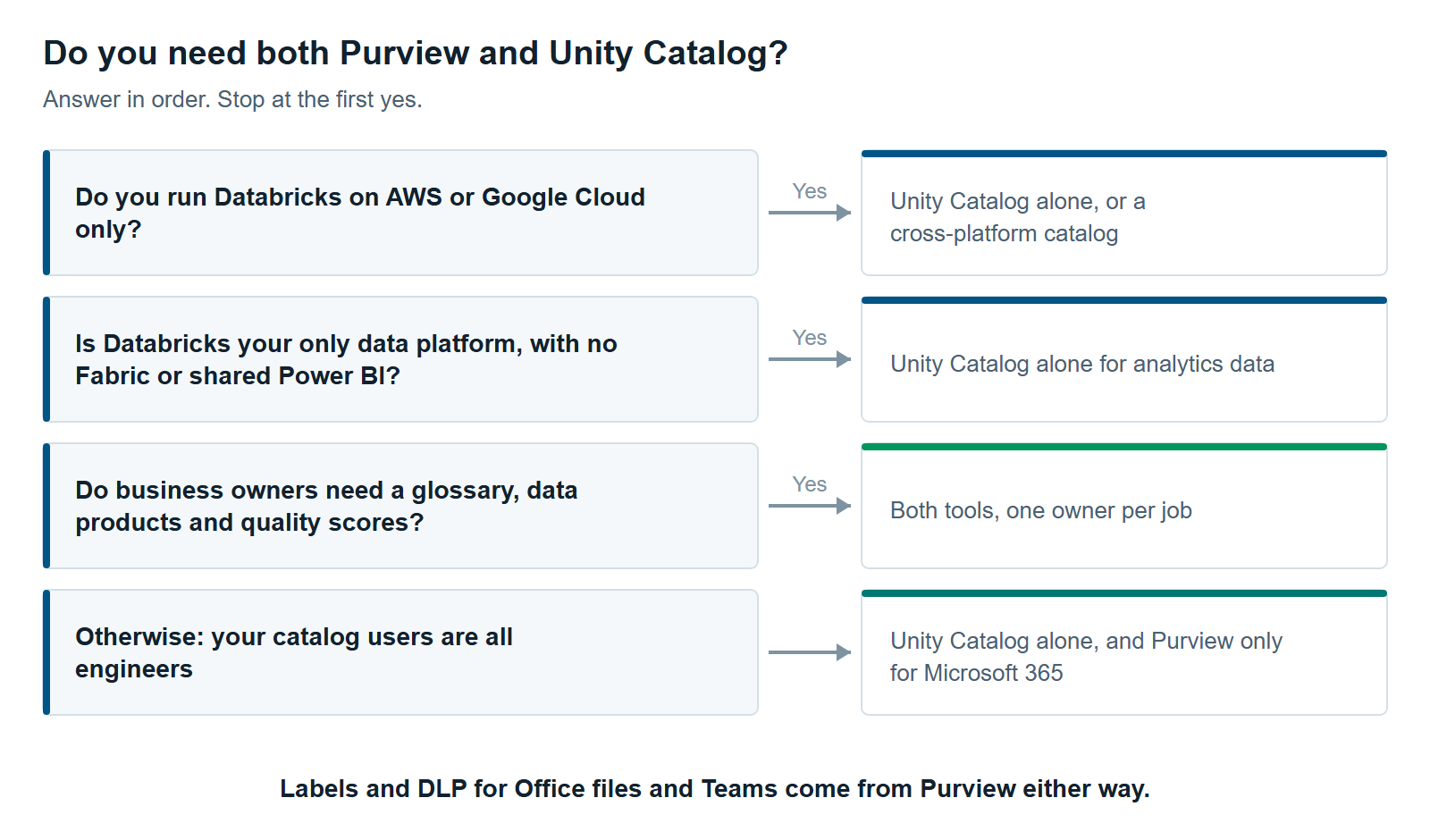
You don’t need both tools for your Databricks data when Databricks is your only analytics platform. The same is true when you run Databricks on AWS or Google Cloud, or when nobody outside the data team searches for data. In those cases, Unity Catalog alone covers access, lineage, audit, and quality.
Databricks is your only data platform. If there’s no Fabric, no Power BI on shared data and no other warehouse, Purview’s catalog adds a second place to look. Unity Catalog’s Catalog Explorer is enough for the people who use the data.
You run Databricks on AWS or Google Cloud. Purview’s Unity Catalog connector is for Azure Databricks. A cross-cloud setup may be better served by Unity Catalog alone, or by a cross-platform catalog. Our comparison, Data Governance Tools for Microsoft Fabric: Purview, Collibra, Alation, Atlan and Informatica Compared, covers those options.
Your catalog users are all engineers. Purview Unified Catalog earns its cost when business owners need a glossary, data products, and quality scores. If your catalog users all write SQL, they’ll stay in Databricks anyway.
You have no budget for a second owner. Two tools need two sets of admins, or one team that knows both. A half-run Purview catalog is worse than none, because people stop trusting search.
There’s one exception. You may still need Purview for Microsoft 365, even if Databricks never touches it. Exports from Databricks often end up in Excel files and Teams chats. Labels and DLP for those files come from Purview, not Unity Catalog.
Purview vs Unity Catalog in Practice: How to Run Both
To run Purview and Unity Catalog together, set ownership first, then connect the tools. Agree on who owns each job. Then scan Unity Catalog into Purview, line up your tags, and only then mirror data into Fabric. This order stops two teams from building the same thing twice.
- Write down the owner of each job. Use the split above as a draft. Get the data platform lead and the governance lead to sign the same page.
- Make Unity Catalog the record for access and sensitive-data tags. Turn on its automatic data classification. Use its tags to drive row filters and column masks.
- Scan Unity Catalog into Purview. Turn on lineage extraction. Scan every workspace that writes to shared tables, or lineage will have gaps.
- Build the business layer in Purview. Add glossary terms, governance domains and data products for the Databricks tables business users rely on.
- Choose one place for data quality per table. Engineering checks belong in Databricks. Business-facing scores belong in Purview. Don’t run the same rule in both.
- Mirror into Fabric last. Rebuild access in Fabric before you share anything. Keep tables with row filters or column masks in Databricks.
If you’re also weighing where Databricks fits next to Fabric, read Databricks vs. Snowflake vs. Microsoft Fabric: Which Platform Fits Your Workload?. Governance affects cost, too. Why Your Databricks Bill Is a Governance Problem, Not a Spending Problem explains how.
The Purview vs Unity Catalog question rarely has a single winner. It has an ownership answer. Our data governance services, Databricks consulting and Microsoft Fabric consulting services teams can help you draw that line on your own platform.
Further reading
- What is Unity Catalog? — Microsoft’s overview of Unity Catalog in Azure Databricks
- Connect to and manage Azure Databricks Unity Catalog in Microsoft Purview — what Purview scans and its limits
- Microsoft Fabric mirrored databases from Azure Databricks: security — why permissions don’t carry over
- Databricks: ABAC, governed tags and data classification are generally available — Unity Catalog’s newest access controls
Pavan Malpani is the Fabric Practice Delivery Lead at XTIVIA. Talk to us.