
Last reviewed: October 23, 2026
SUMMARY:
- The data governance tools for Microsoft Fabric split into two jobs: cataloging Fabric data, which all five tools do, and protecting it, which only Microsoft Purview does inside Fabric.
- Atlan has the deepest documented Fabric catalog coverage, including semantic models and reports, while Alation’s Fabric connector is still in beta.
- Collibra and Informatica cover lakehouses and warehouses well, but their Fabric documentation doesn’t list semantic models or reports.
- Purview fits best when most of your data lives in Microsoft, and a cross-platform catalog often fits better when most of it lives elsewhere.
- A team that picks a third-party catalog still needs Purview for sensitivity labels and data loss prevention in Fabric.
Table of Contents
- Data Governance Tools for Microsoft Fabric: The Short Answer
- Two Jobs: Cataloging Fabric Data and Protecting It
- How We Compared Data Governance Tools for Microsoft Fabric
- What Each Tool Covers in Microsoft Fabric
- Data Governance Tools for Microsoft Fabric, Side by Side
- When Purview Is the Wrong Choice
- How to Choose Data Governance Tools for Microsoft Fabric
Data Governance Tools for Microsoft Fabric: The Short Answer
The best data governance tools for Microsoft Fabric depend on where the rest of your data lives. Microsoft Purview fits a Microsoft-centered platform and is the only tool here that protects Fabric data with labels and data loss prevention. Collibra, Alation, Atlan and Informatica fit when Fabric is one platform among several.
Microsoft Fabric is Microsoft’s analytics platform. It brings data engineering, warehousing and Power BI together on one copy of data, called OneLake. Fabric comes with its own catalog, the OneLake catalog. Microsoft calls it “the primary experience for governing Fabric data”, even after you add Purview (Microsoft Learn).
So the first question isn’t which tool to buy. It’s whether you need one yet. If your data and data owners all sit in Fabric, read OneLake Catalog vs. Purview Unified Catalog: When Fabric’s Built-In Governance Is Enough first.
Worth saying plainly: XTIVIA is a Microsoft Solutions Partner, and we implement Purview and Fabric for clients. We’ve tried to make this comparison fair anyway, and to say where other tools win.
 Pick a catalog for where your data lives. Pick Purview for protecting Fabric data. Those can be two different tools.
Two Jobs: Cataloging Fabric Data and Protecting It
Data governance tools for Microsoft Fabric do two different jobs, and comparisons often blur them. The first job is cataloging: helping people find data, understand it and trust it. The second job is protection: controlling what people can do with sensitive data. All five tools catalog. Only Purview protects Fabric data.
A data catalog is a searchable inventory of your data. It records what each table or report holds, who owns it, what the business terms mean and where the data came from. That last part is lineage, the trail from a source system to a report.
Protection works differently. In Fabric, it comes from Microsoft Purview (Microsoft Learn):
- Sensitivity labels are tags such as “Confidential” that can be set on every Fabric item and stay with data on supported exports.
- Data loss prevention (DLP) policies find sensitive data in lakehouses, warehouses, databases and semantic models, and warn or alert when it’s at risk.
- Audit logs every Fabric user activity in Purview.
- Insider Risk Management spots signs of data theft in lakehouse and Power BI activity.
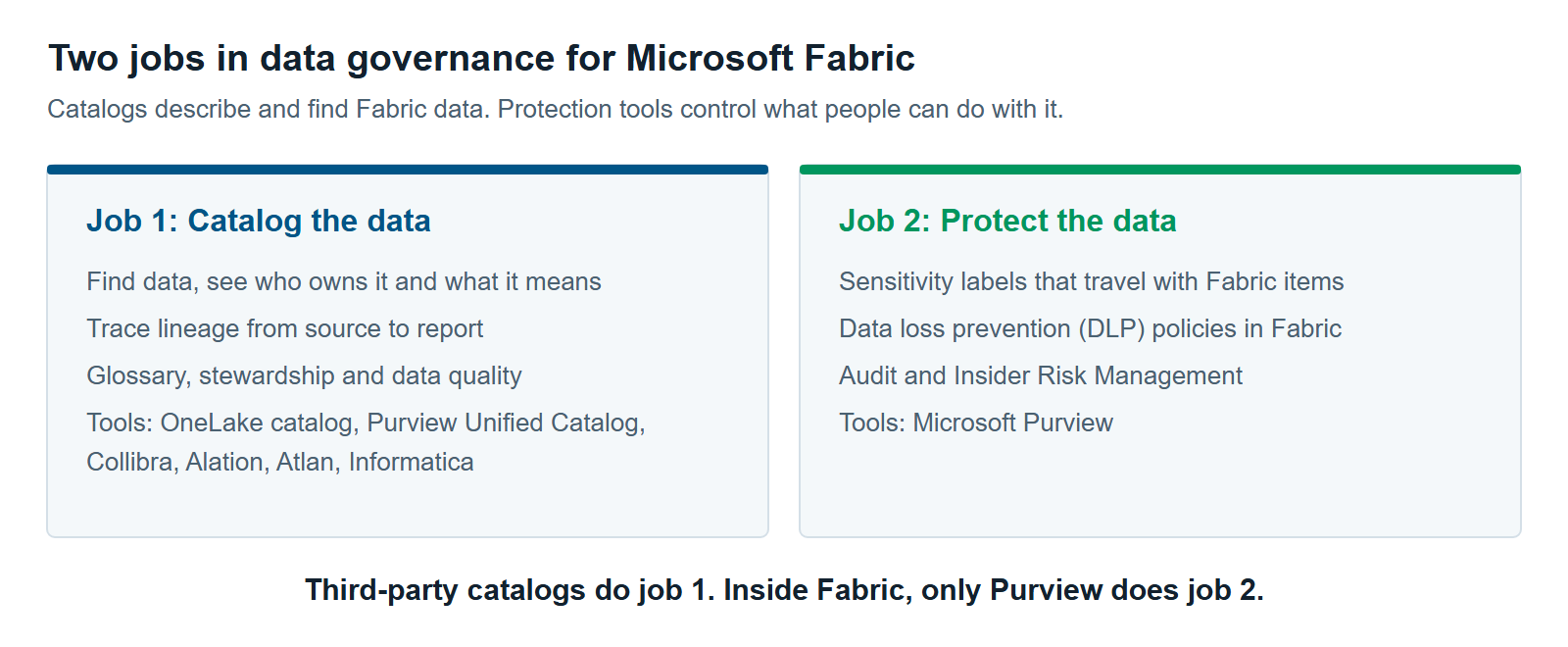
A third-party catalog can show you that a table holds customer data. It can’t stop someone from exporting that table from Fabric. So a team with a third-party catalog still needs Purview for protection.
How We Compared Data Governance Tools for Microsoft Fabric
We compared the five data governance tools for Microsoft Fabric on what matters inside Fabric, not on general catalog features. Each criterion belongs to one of the two jobs, plus release status. Every finding comes from the vendor’s own documentation or announcements, checked in October 2026.
Job 1: Catalog Fabric data
- Catalog: lakehouses and warehouses. Does the tool list Fabric’s main data stores, down to tables and columns?
- Catalog: semantic models and reports. Does it list the Power BI layer, where most business users meet the data?
- Catalog: lineage inside Fabric. Can it trace data from a lakehouse table through a semantic model to a report?
- Catalog: sources beyond Fabric. Can the same catalog cover your other data platforms?
Job 2: Protect Fabric data
- Protect: sensitivity labels and DLP. Can it apply labels and data loss prevention to Fabric items, not just describe them?
Release status
- Status: Fabric support. Is the Fabric connection generally available, in beta, or released without a label?
We left out price. Purview publishes pay-as-you-go meters, but we couldn’t compare the other tools’ prices fairly from public pages.
We also left out analyst rankings. They rate governance platforms in general, not Fabric support.
What Each Tool Covers in Microsoft Fabric
All five tools catalog Fabric’s lakehouses and warehouses. They differ most on the Power BI layer, on lineage and on release status. Only Purview does the protect job. Each tool below uses the same labels as the comparison table.
Microsoft Purview
Microsoft Purview is Microsoft’s data security and governance product. Its catalog has two parts. The Purview Data Map scans your data sources. Purview Unified Catalog adds business terms, data products and data quality on top (Microsoft Learn).
- Catalog: lakehouses and warehouses. Lakehouses down to tables and columns. Warehouses as items only, without their tables.
- Catalog: semantic models and reports. Yes. Semantic models are listed down to their tables and columns.
- Catalog: lineage inside Fabric. Item to item, such as dataflow to semantic model to report. Column-level lineage works only for Power BI semantic models built on Azure SQL Database (Microsoft Learn).
- Catalog: sources beyond Fabric. Yes, including Databricks, Snowflake, SQL Server, Amazon S3 and Oracle (Microsoft Learn).
- Protect: sensitivity labels and DLP. Yes. Purview is the only tool here that does this job in Fabric.
- Status: Fabric support. Available, with no preview label. It can’t scan Fabric workspaces behind private links.
Collibra
Collibra is an enterprise data governance platform. It announced its Fabric connector on June 26, 2026 (Collibra).
- Catalog: lakehouses and warehouses. Yes. Lakehouses with their files and tables, and warehouses down to columns. Its docs also list SQL Server and Databricks Unity Catalog data mirrored into Fabric (Collibra docs).
- Catalog: semantic models and reports. Not listed in its Fabric docs.
- Catalog: lineage inside Fabric. Not listed in its Fabric docs.
- Protect: sensitivity labels and DLP. No. Pair it with Purview.
- Status: Fabric support. Released, with no GA or beta label. Each Azure tenant can have only one Fabric connection.
Alation
Alation is a data catalog. Alation turns its Fabric connector on by request, and it needs Alation version 2026.4.1 (Alation docs).
- Catalog: lakehouses and warehouses. Yes, down to columns, plus Fabric workspaces.
- Catalog: semantic models and reports. Partly. Its docs list them in lineage only, not as catalog items.
- Catalog: lineage inside Fabric. Lakehouse table to semantic model to report.
- Protect: sensitivity labels and DLP. No. Pair it with Purview.
- Status: Fabric support. Beta. It doesn’t profile or sample Fabric data.
Atlan
Atlan is a newer data catalog. It has the deepest documented Fabric coverage of the five, down to measures, report pages and visuals (Atlan docs).
- Catalog: lakehouses and warehouses. Yes, down to columns, plus dataflows, pipelines and notebooks.
- Catalog: semantic models and reports. Yes, including measures, report pages and dashboards.
- Catalog: lineage inside Fabric. Table to semantic model to report; column-level report lineage needs Scanner API access turned off.
- Protect: sensitivity labels and DLP. No. Pair it with Purview.
- Status: Fabric support. Generally available, per Atlan’s September 29, 2026 announcement (Business Wire).
Atlan lists its own gaps, too (Atlan docs). It skips mirrored databases, machine learning models and KQL databases. It doesn’t read Fabric’s row-level security roles. And it can’t run incremental scans.
Informatica
Informatica is a data management platform. It combines data integration, data quality and a catalog. Salesforce finished buying Informatica on November 18, 2025 (Business Wire).
- Catalog: lakehouses and warehouses. Yes. Tables, columns, views and stored procedures, plus OneLake folders and files (Informatica).
- Catalog: semantic models and reports. Not listed on its Fabric pages.
- Catalog: lineage inside Fabric. Tables and columns; Informatica’s example traces it through its own mapping.
- Protect: sensitivity labels and DLP. No. Pair it with Purview.
- Status: Fabric support. Scanners released in 2024, with no GA label found. Its data quality app for Fabric is in public preview.
Data Governance Tools for Microsoft Fabric, Side by Side
Side by side, the data governance tools for Microsoft Fabric sort into three groups. Purview catalogs the most Fabric item types and is the only one that protects, but its lineage stays item to item. Atlan has the deepest documented catalog coverage. Collibra, Alation and Informatica catalog the data stores well, but not the Power BI layer as searchable items.
| Microsoft Purview | Collibra | Alation | Atlan | Informatica | |
|---|---|---|---|---|---|
| Catalog: lakehouses and warehouses | Lakehouses to columns; warehouses as items only | To columns | To columns | To columns | To columns |
| Catalog: semantic models and reports | Yes, to columns | Not listed | In lineage only | Yes, with measures | Not listed |
| Catalog: lineage inside Fabric | Item to item; columns only for Power BI on Azure SQL Database | Not listed | Lakehouse table to report | Table to report; columns with Scanner API access off | Tables and columns, across Informatica pipelines |
| Catalog: sources beyond Fabric | Yes | Yes | Yes | Yes | Yes |
| Protect: sensitivity labels and DLP | Yes | No | No | No | No |
| Status: Fabric support | Available, no preview label | Released June 2026, no GA label | Beta | Generally available | Released 2024, no GA label found |
Sources: each vendor’s documentation and announcements linked above, checked October 2026. “No” means the tool doesn’t do this in Fabric. “Not listed” means the vendor’s Fabric documentation doesn’t mention it.

Fabric connectors are changing fast. Three of these five changed status in 2026. Check each vendor’s documentation again before you sign anything.
When Purview Is the Wrong Choice
Purview is often the wrong main catalog when most of your governed data lives outside Microsoft. It’s also the wrong catalog when you need detailed lineage inside Fabric, or when another catalog already runs your governance program. In each case, you’d still keep Purview for protecting Fabric data.
Most of your data lives outside Microsoft. If Snowflake, Databricks or AWS hold most of your data, a cross-platform catalog may fit better. Purview can scan those sources. But its depth there varies by source, and your data teams may already work in another tool.
You need column-level lineage into semantic models and reports. In Fabric, Purview tracks lineage item by item. Its column-level lineage covers only Power BI built on Azure SQL Database. If auditors or analysts need to trace a report figure back to a source column, test Atlan and Alation’s beta connector.
Another catalog already runs your governance program. If Collibra or Informatica already holds your glossary, stewards and workflows, don’t start over. Add its Fabric connector and close its gaps. Replacing a working catalog is expensive and slow.
Your Fabric workspaces sit behind private links. Purview’s Fabric scans don’t support Fabric private links at the tenant or workspace level. Check whether your setup is affected before you plan on Purview as the catalog.
How to Choose Data Governance Tools for Microsoft Fabric
Choose data governance tools for Microsoft Fabric by answering four questions in order. Stop at the first yes. Then run a short proof of concept on your own Fabric items before you sign.
- Do you already run Collibra, Informatica, Alation or Atlan across the company? Keep it. Add its Fabric connector, and use Purview for protection.
- Does most of your governed data live in Fabric and Azure? Start with the OneLake catalog and Purview.
- Do you need column-level lineage into semantic models and reports today? Shortlist Atlan, and test Alation’s beta.
- Otherwise, most of your data lives outside Microsoft. Test two cross-platform catalogs on your own Fabric items.

Keep the proof of concept small and specific. Pick one lakehouse, one semantic model and one report your business relies on. Then check three things for each tool:
- Coverage. Does every item show up, down to columns and measures?
- Lineage. Can you trace a report figure back to its source table?
- Effort. How much setup and admin access did the connector need?
Three articles go deeper on single matchups. Read Microsoft Purview vs. Collibra for Fabric and Microsoft Purview vs. Atlan for Fabric. If you also run Databricks, read Purview vs. Databricks Unity Catalog: Who Governs What When You Run Both. For the Purview side in full, read Microsoft Purview for Fabric: A Practical Guide to Securing and Governing Your Data.
Governance tools work only when the program behind them is clear. Three Questions Before Undertaking a Data Governance Initiative covers that groundwork. If Fabric sits beside Databricks or Snowflake, Databricks vs. Snowflake vs. Microsoft Fabric: Which Platform Fits Your Workload? helps frame the platform question. Our data governance services and Microsoft Fabric consulting services teams can help you run the comparison on your own data.
Further reading
- Use Microsoft Purview with Microsoft Fabric — Microsoft’s view of where Fabric governance ends and Purview begins
- Collibra: About the Microsoft Fabric integration — supported Fabric sources
- Alation: Microsoft Fabric connector overview — beta scope and limits
- Atlan: What Atlan crawls from Microsoft Fabric — asset types and lineage
Pavan Malpani is the Fabric Practice Delivery Lead at XTIVIA. Talk to us.