
By Pavan Malpani, Fabric Practice Delivery Lead, XTIVIA
Last reviewed: October 21, 2026
SUMMARY:
- The OneLake catalog is enough while your data, data owners and definitions stay inside Fabric, and Purview Unified Catalog pays off once they spread beyond it.
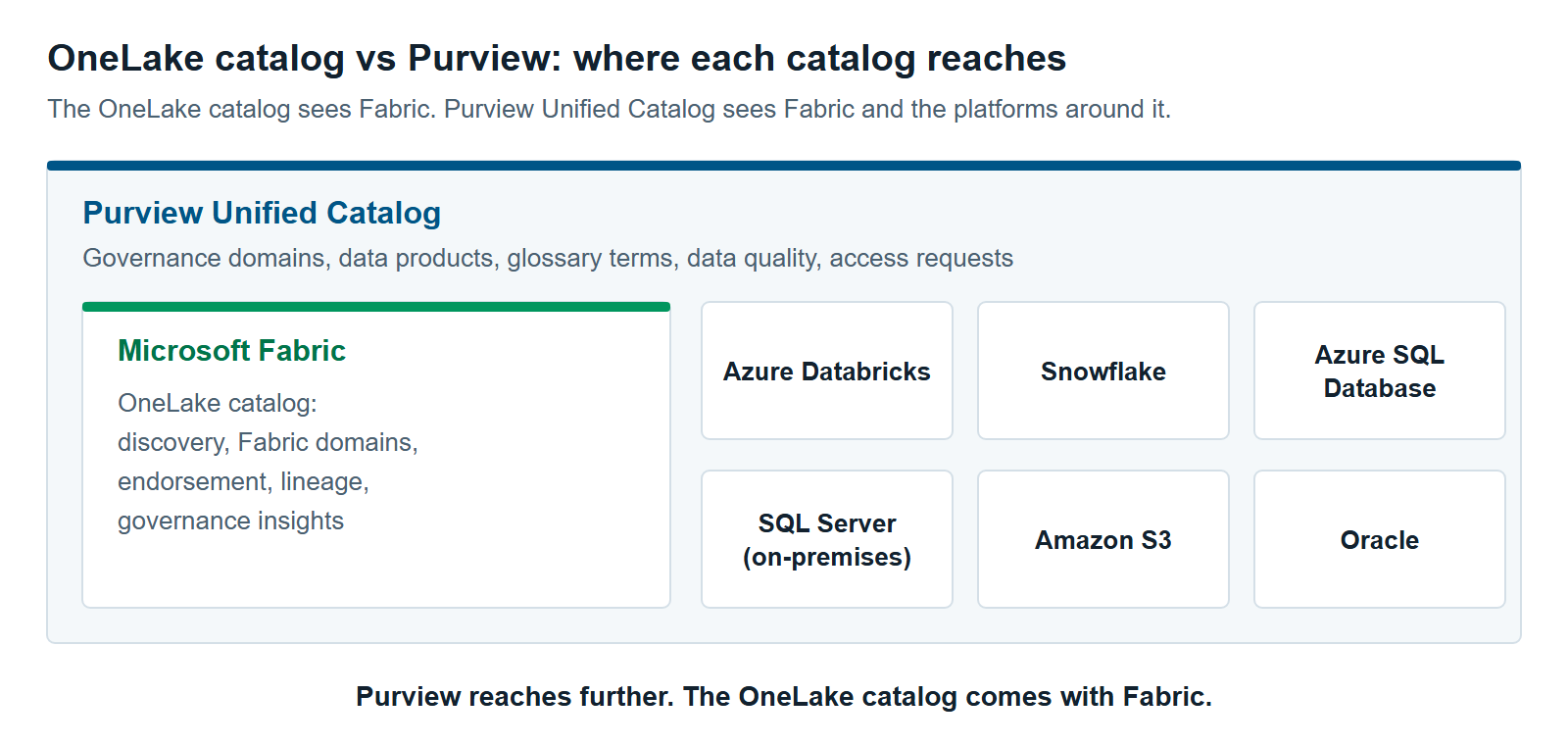
- The OneLake catalog comes with Fabric and covers discovery, Fabric domains, endorsement, lineage inside Fabric and governance insights.
- Purview Unified Catalog adds one catalog across platforms, with governance domains, data products, a business glossary, data quality scores and self-service access requests.
- Unified Catalog is billed pay-as-you-go on the assets you actively govern and the data quality and health checks you run, not on everything you scan.
- Sensitivity labels and data loss prevention are separate Purview tools, so you can add them without adopting Unified Catalog.
Table of Contents
- OneLake Catalog vs Purview: The Short Answer
- What the OneLake Catalog Already Covers
- What Purview Unified Catalog Adds
- OneLake Catalog vs Purview, Side by Side
- How Is Purview Unified Catalog Billed?
- When You Should Stay Put With the OneLake Catalog
- Signs You’ve Outgrown the OneLake Catalog
- A Five-Question OneLake Catalog vs Purview Check
OneLake Catalog vs Purview: The Short Answer
The OneLake catalog vs Purview choice comes down to scope. The OneLake catalog governs data inside Microsoft Fabric, and it comes with Fabric. Purview Unified Catalog governs data across Fabric and your other platforms, and it’s billed separately.
The OneLake catalog is Fabric’s built-in catalog. It’s where people find, understand and govern Fabric items (Microsoft Learn). Microsoft Purview is Microsoft’s data security and data governance product. Purview Unified Catalog is its catalog for business users. It sits on the Purview Data Map, the inventory Purview builds by scanning your data sources.
Microsoft’s own guidance starts with Fabric. It says “the OneLake catalog remains the primary experience for governing Fabric data,” even after you add Purview’s security and compliance tools (Microsoft Learn). So the real question isn’t which catalog wins. It’s whether you need a second one yet. Some teams do. Others should wait.
 Stay with the OneLake catalog while your data and data owners live in Fabric. Add Purview Unified Catalog when people need one catalog across Fabric and the platforms outside it.
What the OneLake Catalog Already Covers
The OneLake catalog already covers discovery, organization, trust signals and governance status for the items in Fabric. It has three tabs: Explore, Govern and Secure. It also shows up inside Microsoft Teams, Excel and Copilot Studio, so people can find data where they already work.
- Explore lists the Fabric items you can access, plus discoverable semantic models you can request access to. You can filter by Fabric domain, item type, tag and endorsement. Each item opens to its details and lineage (Microsoft Learn).
- Govern shows governance insights and recommended actions. It brings Fabric domains, tags, endorsement, metadata scanning and policies into one place. Admins also see sensitivity label coverage and data loss prevention (DLP) results across workspaces (Microsoft Learn).
- Secure shows workspace roles and OneLake security roles in one view, so admins can review who has access to what.
A Fabric domain is a group of workspaces that belong to one business area, such as Finance. Fabric admins can hand some settings to domain admins, such as a default sensitivity label and who can certify items (Microsoft Learn). Endorsement marks items as promoted, certified or master data, so people know which data to trust.
Lineage traces how data moves across Fabric items, from source to report. Data you mirror into Fabric becomes a Fabric item, so the catalog lists it too.
Two limits matter. Govern insights work at the item level, so tables don’t appear in them. Govern also doesn’t support guest users or cross-tenant scenarios, and it isn’t available with Private Link. And the OneLake catalog and Govern are still rolling out by region.
What Purview Unified Catalog Adds
Purview Unified Catalog adds a business layer across every source the Purview Data Map can scan. That includes Fabric, Azure Databricks, Snowflake, Azure SQL Database, on-premises SQL Server, Amazon S3 and Oracle (Microsoft Learn). People search one catalog instead of one per platform.
It also adds tools the OneLake catalog doesn’t have (Microsoft Learn).
- Governance domains. Business areas, such as Marketing or Finance, that work like a small catalog inside the larger one.
- Data products. A data product groups related tables, files and reports for one use case. People find and request the whole bundle at once.
- Glossary terms and critical data elements. Shared business definitions. A critical data element maps the same field from different systems, such as “CustID” and “CID”, to one “Customer ID”.
- Data quality. Rules, profiling and scores at the asset, data product and governance domain levels.
- Self-service access requests. One request for a data product, checked against access policies.
- Health management. Health controls and health actions that track how well your data is governed.
Purview governance domains and Fabric domains are different things, even though the names are alike. Mapping one to the other is a design choice. We cover it in Governance Domains and Data Products: Mapping Fabric Domains to Purview.
Purview has limits of its own inside Fabric. For Fabric items other than Power BI, the Purview Data Map tracks lineage at the item level only, not table by table (Microsoft Learn). A second catalog won’t fill lineage gaps for Fabric items outside Power BI.
OneLake Catalog vs Purview, Side by Side
The OneLake catalog wins on cost and setup inside Fabric. Purview Unified Catalog wins on reach, shared business definitions and data quality across platforms. The table compares them on scope, structure, trust, lineage, access, quality and cost.
| OneLake catalog | Purview Unified Catalog | |
|---|---|---|
| What it covers | Fabric items in your tenant | Fabric plus the other sources the Purview Data Map scans |
| How data is organized | Fabric domains, subdomains, workspaces and tags | Governance domains and data products |
| Business definitions | Item descriptions and tags | Glossary terms and critical data elements |
| Trust signals | Endorsement: promoted, certified and master data | Data quality scores and health controls |
| Lineage | Across Fabric items, from source to report | Across sources that support lineage; item level only for most Fabric items |
| Access | Workspace and item permissions; requests for discoverable semantic models | Self-service access requests for data products |
| Data quality | Freshness and curation insights only | Rules, profiling and scores |
| Setup | Part of Fabric; Govern rolling out by region | Enterprise version of Purview, an Azure subscription and scans of each source |
| Cost | Included with Fabric | Pay-as-you-go on governed assets and data quality processing |
Sources: Microsoft Learn pages linked in this article, checked October 2026.
Worth saying plainly: XTIVIA implements both Fabric and Purview for clients.
How Is Purview Unified Catalog Billed?
Purview Unified Catalog is billed pay-as-you-go on two meters. One counts governed assets each day. The other counts the processing used by data quality and health checks (Microsoft Learn). Scanning sources into the Purview Data Map has no charge once you’re on that billing model.
A governed asset is a table, file or report you attach to something you govern. That can be a data product, a glossary term or a data quality rule. Scanned assets that aren’t attached to anything don’t count. Microsoft’s own example is a SQL Server with 200 tables. If only 20 tables are linked to data products, you pay for 20 governed assets, not 200.
Data quality and health checks use data governance processing units (DGPUs). One DGPU is 60 minutes of managed compute. How many you use depends on the rule type, the data volume and the source.
Setup needs an Azure subscription and a resource group in the same tenant as Purview. Unified Catalog also needs the enterprise version of Purview data governance. A free version exists in preview, but it only lets you browse, search and annotate Azure and Fabric metadata, with a limit of 1,000 annotated assets (Microsoft Learn).
Current prices and a worked budget are in Microsoft Purview Pricing for Fabric: What You’ll Actually Pay.
When You Should Stay Put With the OneLake Catalog
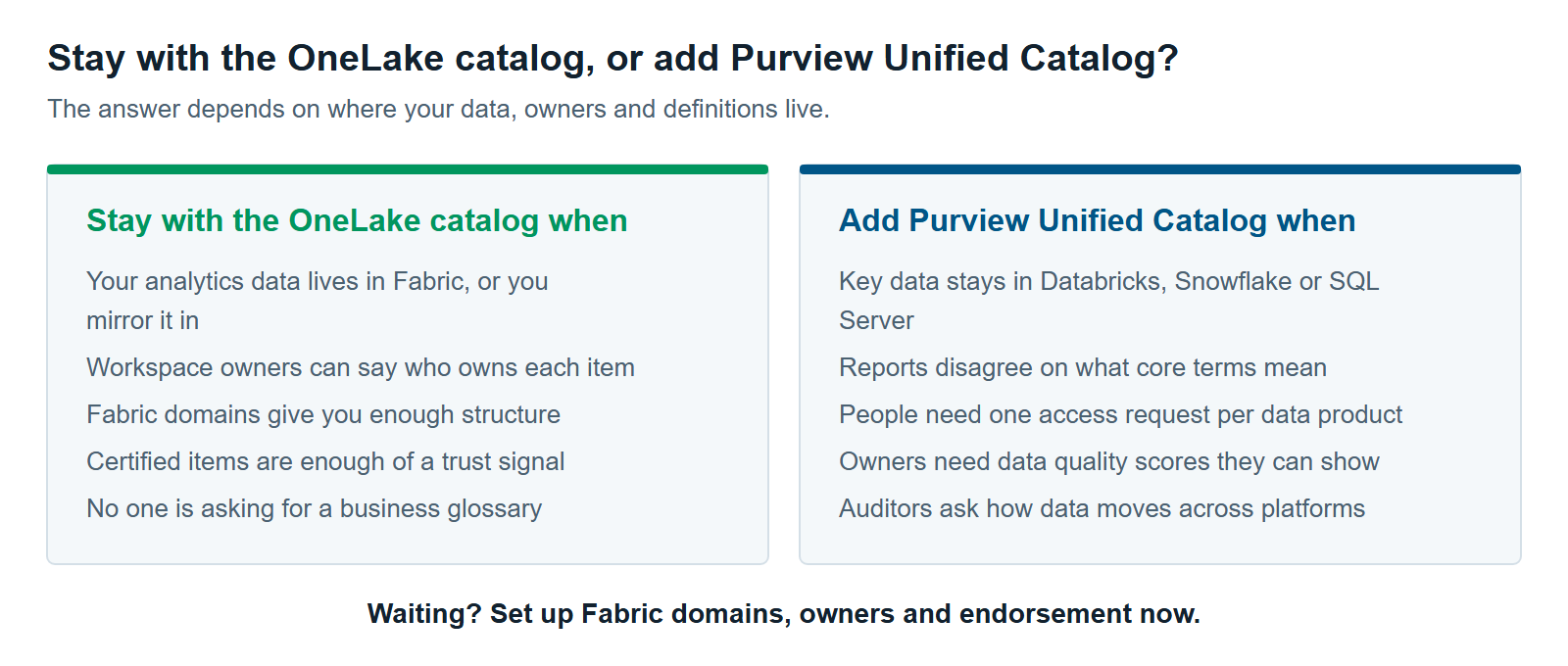
Stay with the OneLake catalog when your data, owners and definitions all live in Fabric. In that case, a second catalog adds cost and setup without solving a problem you have. Stay put if most of these are true:
- Your analytics data lives in Fabric, or you mirror it in. Nothing important sits only in another platform.
- Ownership is clear. Workspace owners can answer “who owns this?” without a meeting.
- Fabric domains give you enough structure. Grouping workspaces by department is as far as you need to go.
- A certified badge is enough of a trust signal. No one is asking for measured quality scores.
- No one has asked for a business glossary. Reports don’t fight over what “active customer” means.
Staying put isn’t standing still. Use the time to set up Fabric domains, name owners, certify key items and work through the recommended actions in Govern. That makes a later Purview rollout faster, because owners and trusted data are already known.
Signs You’ve Outgrown the OneLake Catalog
You’ve outgrown the OneLake catalog when people need governance that reaches past Fabric, or goes deeper than the item level. Watch for these signs:
- Key data lives outside Fabric and will stay there, for example in Databricks, Snowflake or on-premises SQL Server.
- The same measure means different things in different reports, and leaders want one definition.
- People request access system by system, and you want one request for a whole data product.
- Owners need data quality scores they can show, by data product or by domain.
- Auditors or customers ask how data moves across platforms that Purview can trace, not just inside Fabric.
- You need to govern individual lakehouse tables, such as adding them to data products or scoring their quality. The OneLake catalog lets you browse tables, but its governance insights stop at the item level.
One sign is a reason to start planning. Several at once are a reason to start the rollout.
A Five-Question OneLake Catalog vs Purview Check
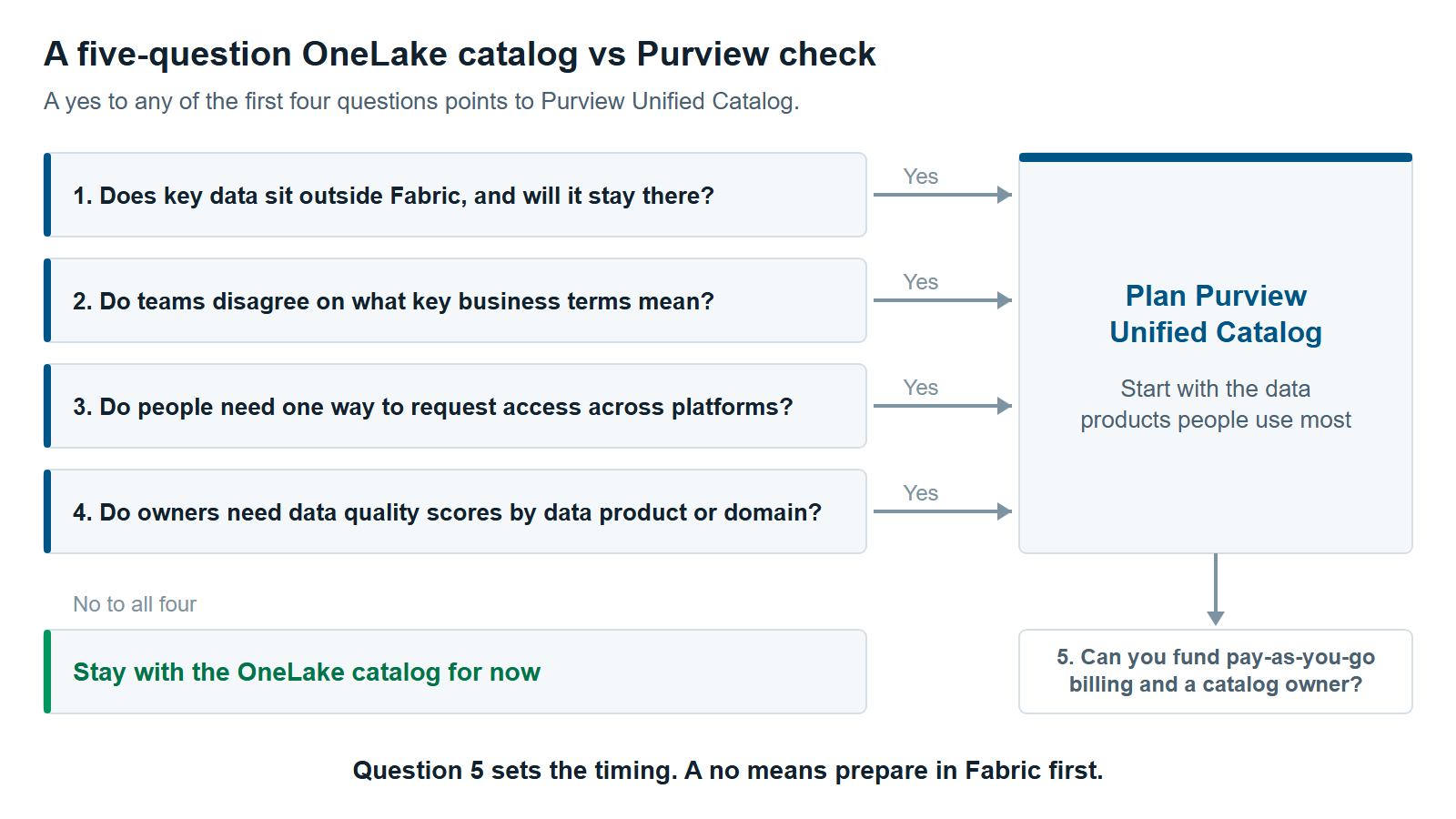
Five questions help you make the OneLake catalog vs Purview call. A yes to any of the first four points to Purview Unified Catalog. The fifth question decides when.
- Does key data sit outside Fabric, and will it stay there?
- Do teams disagree on what key business terms mean?
- Do people need one way to request access across platforms?
- Do owners need data quality scores by data product or domain?
- Can you fund pay-as-you-go billing and someone to own the catalog?
If you answered no to the first four, stay with the OneLake catalog for now. If you answered yes to any of them but no to the fifth, prepare in Fabric first. Set up Fabric domains, owners and endorsement, then revisit the decision.
Keep one decision separate. Sensitivity labels, DLP and audit are Purview data security tools, and you can add them without Unified Catalog. Our guide Microsoft Purview for Fabric: A Practical Guide to Securing and Governing Your Data covers them.
If you aren’t sure your Fabric basics are in place, start with The 12 Most Common Microsoft Fabric Anti-Patterns We See Across Every Assessment. Our Microsoft Fabric consulting team and Microsoft Purview services team can help you run this OneLake catalog vs Purview check on your own environment.
Further reading
- Use Microsoft Purview with Microsoft Fabric — Microsoft’s guide to Fabric’s built-in governance and the Purview security and compliance tools that work with it
- OneLake catalog overview — the Explore, Govern and Secure tabs
- Learn about Microsoft Purview Unified Catalog — governance domains, data products, glossary and data quality
- Billing in Microsoft Purview Data Governance — governed assets and DGPU meters
Pavan Malpani is the Fabric Practice Delivery Lead at XTIVIA. Talk to us.