
SUMMARY:
Learn how to give one user access to multiple Salesforce orgs using plus addressing while overcoming the global unique username requirement.
Table of contents
Introduction
A Salesforce username must be globally unique across all Salesforce environments, creating a common hurdle when consultants, partners, or internal employees require access to multiple organizations. Because Salesforce enforces a strict “Duplicate Username” error for reuse, administrators often struggle to manage multi-org logins efficiently. Fortunately, leveraging plus addressing provides a seamless workaround, allowing a single email inbox to manage multiple distinct Salesforce accounts without violating global uniqueness rules.
Why a Salesforce Username Must Be Unique
A Salesforce username must be unique across all of Salesforce, not just within your organization. The username works as a global login ID. Each one points to exactly one user in an organization.
Salesforce’s Trailhead module on adding users states the rule plainly. Every user needs a username that is unique across all of Salesforce, in the format of an email address.
This rule causes trouble when someone needs access to more than one organization. Common cases include:
- A consultant or partner who works in a client’s org
- An employee of a sister company or a new acquisition
- An admin who also needs a login in a separate business unit’s org
If you try to reuse a username, Salesforce stops you with a “Duplicate Username” error. The error says the username already exists in that org or another Salesforce organization.
A Salesforce username must be unique across every Salesforce org, but the user’s email address doesn’t have to be. That gap is your way around the duplicate username error.
Salesforce Username vs. Email Address
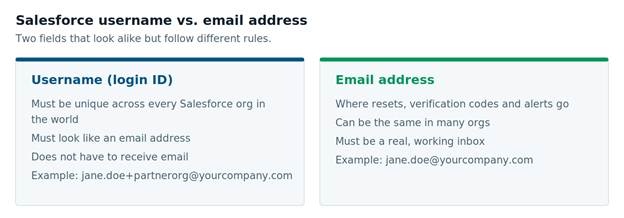
Every Salesforce user has two fields that look alike: a username and an email address. They follow different rules, and mixing them up causes most duplicate username problems.
| Username | Email address | |
|---|---|---|
| What it does | The login ID | Where Salesforce sends resets, codes, and alerts |
| Must be unique? | Yes, across all Salesforce orgs. | No. It can repeat across orgs. |
| Must be a real inbox? | No. It only needs email format. | Yes |
| Default when you create a user | Same as the email address | The address you enter |
By default, Salesforce fills in the username with the email address. That works for most people, because most people only have one login. The process fails immediately if another organization is already using the same email address as a username.
What Happened When We Added a Partner’s Employee
We recently gave a partner company’s employee access to an org we manage. His usual work address was already his username in his own company’s Salesforce org. So, we couldn’t reuse it.
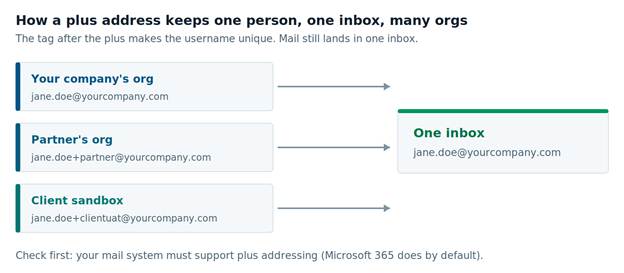
- We created his username with a Plus tag instead: his address with “+” and a short org name added before the @ sign. Then we reset his password so he could log in.
- The reset email arrived at the tagged address. He had never seen that address before, so he did the right thing. He asked us whether the email was phishing before he clicked anything.
- It wasn’t. Mail sent to his tagged address landed in his normal inbox because his email system supports Plus Addressing. Once we explained the tag, he finished the reset and logged in.
- The setup worked. The surprise was the problem. A short note before the reset email would have saved him the worry and saved us from starting a support thread.
Salesforce Username Must Be Unique: How to Handle a Second Org
Creating a unique Salesforce username for a second org takes a few minutes. Select a tag format, confirm it works with the person’s email system, and tell them before you send anything.
- Pick a naming pattern and use it every time. A short org or company name works well. For example: [email protected].
- Decide what goes in the Email field. The Email field doesn’t need to be unique. You can keep the person’s normal address there and tag only the username. Or you can use the tagged address in both fields, as we did.
- Confirm whether the Plus Addressing function works correctly when used in the Email field. Plus Addressing, also called sub-addressing, delivers mail sent to name+tag@domain to name@domain. Microsoft 365 turns it on by default, but admins can turn it off. Google Workspace also enables this feature. Send a test message to the tagged address first.
- Inform the person before you create the user account. Give them the exact username, what emails to expect, and who will send them.
- Create the user and send the welcome or reset email. In Setup, open Users and click New User. Enter the email address, then change the Username field to the tagged version.
- Record the username somewhere the individual can easily access. Many people will forget the tag after a few months.
Logging in also got easier recently. Salesforce has added an option to log in with your email address instead of the username. After entering a verification code, the user sees every org tied to that email and picks one. That helps people with several orgs, but each username must still be unique.
When Plus Addressing Is the Wrong Choice
Plus Addressing is the wrong choice when the person’s email system doesn’t support it or when their admins have turned it off. In that case, mail sent to the tagged address may never arrive. Password resets and verification codes would go nowhere.
You have two viable alternatives:
- Keep the real address in the Email field. Tag only the username. The username never needs to receive mail, so Plus Addressing doesn’t matter.
- Use a suffix instead of a Plus tag. For example: [email protected]. This isn’t a working email address, so nobody will send mail to it. That also makes its purpose obvious to other admins.
Also, think twice before you create extra logins at all. Each one is another account to secure, review, and turn off when the work ends. If someone only needs to see data, a report or shared dashboard may be enough. For partners who need regular access, review those accounts on a schedule. Locking down your Salesforce data covers more of these access controls.
Admin access deserves extra care. Salesforce now requires stronger sign-in for privileged users. We covered the details in Your Salesforce Admins Have a Hard Deadline: What IT Leaders Need to Know Before July 1. And if a tagged user sends an email from Salesforce, their domain must be verified too. See Salesforce Email Domain Verification: Why Your Emails Aren’t Arriving.
A Salesforce username must be unique, but that rule doesn’t have to slow you down. If you manage users across several orgs, our Salesforce team can help you set up a clean pattern.
Further Reading
- Trailhead: Add New Users — username and email rules from Salesforce
- Plus Addressing in Exchange Online — how Microsoft 365 handles Plus Addresses
- New Salesforce login option: use your email address — logging in to several orgs with one email
Anosh Wadia is Senior Director of CRM Solutions at XTIVIA, where he leads Salesforce and Microsoft Dynamics 365 engagements for clients across many industries. Talk to us.
Contact us today and let us help you maximize your Salesforce CRM.