
SUMMARY:
- Microsoft Purview pricing for Fabric has two parts: per-user Microsoft 365 licenses, plus pay-as-you-go meters billed to an Azure subscription for Fabric items.
- Microsoft 365 E3 already covers manual sensitivity labels in Fabric and Power BI, so many teams can start with no new Purview spend.
- DLP for Fabric needs an E5-class license for the admin and a meter of about 50 cents per in-scope item per month.
- Unified Catalog charges only for assets you link to data products or other governance concepts, so scope decides the bill.
- Data quality runs on processing units and is the cost most likely to surprise you, so set its schedule before you scale it.
Table of Contents
- What Does Microsoft Purview Pricing Look Like for Fabric?
- What Your Microsoft 365 Licenses Already Cover
- When You Need Microsoft 365 E5 or the Purview Suite
- How Microsoft Purview Pricing Works on Pay-As-You-Go
- What Data Governance Costs in Unified Catalog
- Three Ways Microsoft Purview Pricing Adds Up for Fabric
- How to Keep Microsoft Purview Pricing Predictable
- When You Shouldn’t Pay for More Purview Yet
What Does Microsoft Purview Pricing Look Like for Fabric?
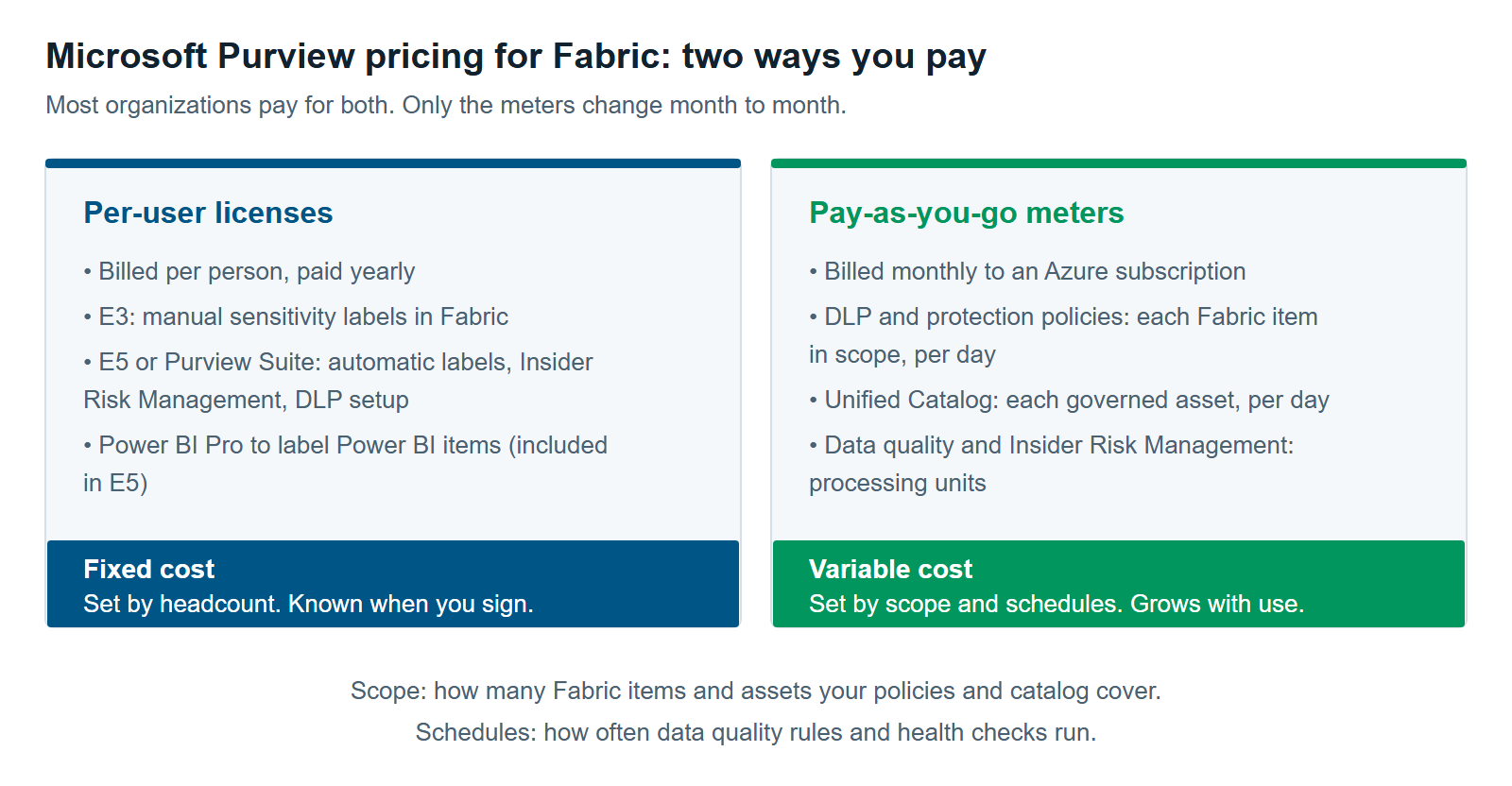
Microsoft Purview pricing for Fabric has two parts. Per-user Microsoft 365 licenses cover your people and their Microsoft 365 files. Pay-as-you-go meters cover your Fabric data, and they bill to an Azure subscription each month. Fabric teams that use Purview usually pay for both, and the second part grows with use.
Microsoft says it plainly. The pay-as-you-go model “builds on the per-user licensing model. The two are complementary, not mutually exclusive” (Learn about Microsoft Purview billing models, updated June 2026). A meter is a usage counter. It measures something like items protected per day, and Azure bills you for the total.
Here is what that means for a Fabric buyer:
- Per-user licenses decide who can create and use labels, DLP rules, and risk policies.
- Pay-as-you-go meters decide what you pay for each Fabric item those policies cover.
- Capacity use is a third, quieter cost. Microsoft notes that DLP evaluation workloads affect capacity consumption (Get started with DLP for Fabric and Power BI).
A quick note on our interest. XTIVIA is a Microsoft partner, and we sell Purview and Fabric services. We’ve tried to show where you can spend less, or nothing.
 For Fabric, the license is the fixed part of the bill. What you pay each month depends on how many Fabric items your policies cover and how often your data quality rules run.
What Your Microsoft 365 Licenses Already Cover
Microsoft 365 E3 already lets people apply and view sensitivity labels in Fabric and Power BI. It also protects labeled data when someone exports it to Excel, PowerPoint, or PDF (Microsoft Purview service description, updated August 2026). For many teams, that’s the right first step, and it adds nothing to the bill.
A sensitivity label is a tag such as “Confidential” that travels with the data. In Fabric, it can flow from a lakehouse down to the reports built on it. Our article, Sensitivity Labels in Microsoft Fabric: How Inheritance Really Works, covers that flow in detail.
There are two catches:
- Power BI licenses still apply. To apply labels to Power BI items, a user needs Power BI Pro or Premium Per User in addition to the label license (Information protection in Fabric). Microsoft 365 E5 includes Power BI. E3 doesn’t.
- Automatic labeling isn’t in E3. Policy-based labeling requires E5, the Purview Suite, or Information Protection and Governance, per the same service description.
When You Need Microsoft 365 E5 or the Purview Suite
You need an E5-level license once you want Purview to act for you. That includes automatic labeling, Insider Risk Management, and setting up data loss prevention (DLP) rules for Fabric. Microsoft sells these features in two ways. Both are paid yearly (Microsoft Purview Suite pricing, read October 2026).
| Option | List price (US) | Requires | Also includes |
|---|---|---|---|
| Microsoft 365 E5 | $60 per user per month | Nothing else | Everything in E3, plus Power BI Pro |
| Purview Suite add-on | $12 per user per month | Microsoft 365 E3, or Office 365 E3 plus EMS E3 | Advanced Purview features only |
Purview Suite is the new name for Microsoft 365 E5 Compliance. Microsoft says the rename didn’t change features or price. The E5 price rose from $57 to $60 on July 1, 2026, per Microsoft’s 2026 pricing update. Enterprise agreements and other countries often pay different amounts.
For Fabric DLP, the license rule is narrow. It applies to the admin who sets up the DLP rules (Configure DLP policies for Microsoft Fabric). That admin needs E5, E5 Compliance, E5 Information Protection & Governance, or Purview capacities. Don’t buy E5 for every Fabric user on that basis alone. Ask your Microsoft licensing contact which of your users actually benefit.
How Microsoft Purview Pricing Works on Pay-As-You-Go
Pay-as-you-go is how Microsoft Purview pricing reaches your Fabric data. You link your Microsoft 365 tenant to an Azure subscription. Purview then counts usage each day, and Azure bills the total at the end of the month.
Only a Global Administrator can turn it on. All charges then show up in Cost Management + Billing in the Azure portal (Enable pay-as-you-go via subscription).
These are the meters a Fabric team is most likely to see. Rates are US list prices for the East US region. We checked them in Microsoft’s Azure price list on October 27, 2026.
| What you turn on | What it counts | List rate |
|---|---|---|
| DLP and protection policies on Fabric items | Each item in scope of a policy, per day | $0.0165 per item per day |
| Insider Risk Management with Fabric (Power BI) signals | Processing units; one unit handles 10,000 user activities | $25 per unit |
| Unified Catalog | Each governed asset, per day | $0.0165 per asset per day |
| Data quality and data health | Data governance processing units (DGPUs) | $15 Basic, $60 Standard, $240 Advanced |
Two counting rules matter most for Fabric:
- In scope means billed. An item counts if it sits in a workspace a policy covers, even if it holds no sensitive data. Microsoft’s example: 10 workspaces with 50 items each, and a policy on five of them, gives 250 billed items.
- Each item counts once. An item covered by several policies or solutions still counts as one item per day.
At $0.0165 a day, one item costs about 50 cents per 30 days. That’s small per item. It adds up fast if a policy covers every workspace by default.
What Data Governance Costs in Unified Catalog
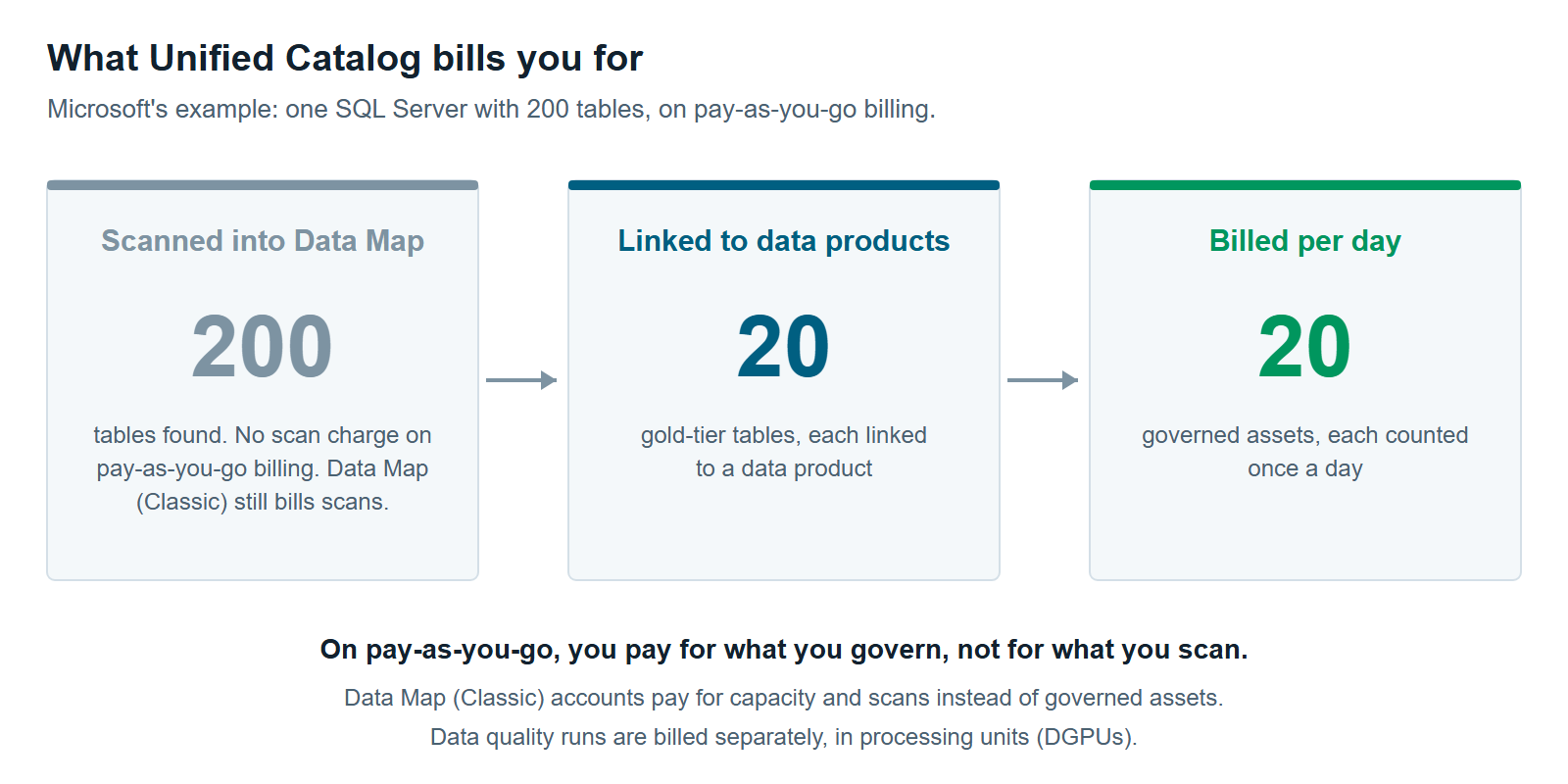
Purview Unified Catalog charges only for governed assets. A governed asset is a table, file, or report linked to a data product or another governance concept. Assets the Purview Data Map scans but you never link aren’t billed (Billing in Microsoft Purview Data Governance, updated April 2026).
Microsoft’s own example makes the point. A SQL Server has 200 tables. You link 20 gold-tier tables to data products. You pay for 20 governed assets, not 200. A table used in five data products still counts as one asset per day. The pricing page puts 200 governed assets at about $100 per 30 days.
Your billing model determines whether scanning costs anything. On Purview pay-as-you-go billing, Data Map and scan charges don’t apply to Unified Catalog. You can get there by consenting to pay-as-you-go or upgrading from the free to the enterprise tier, as described on the same page. Accounts still on Data Map (Classic) pricing keep paying for Data Map capacity and every scan. At list rates, that’s $0.411 per capacity unit hour, with at least one unit always on, plus $0.63 per vCore hour of scanning. One always-on unit alone is about $300 a month. If you run a classic account today, check which model it’s on before you budget.
Data quality is billed differently. It runs on data governance processing units. One DGPU is 60 minutes of managed compute. A simple rule on a million rows uses about 0.02 DGPU per run on the Basic tier. Microsoft’s example is 100 rule runs in a day, which uses 2 DGPUs. At the Basic rate of $15, that’s $30 a day.
The tier matters a lot. Standard costs four times Basic, and Advanced costs 16 times Basic. Basic is the default until someone changes it. Our article on Data Quality in Fabric With Purview: What It Measures and What It Doesn’t covers what you get for that spend.
Three Ways Microsoft Purview Pricing Adds Up for Fabric
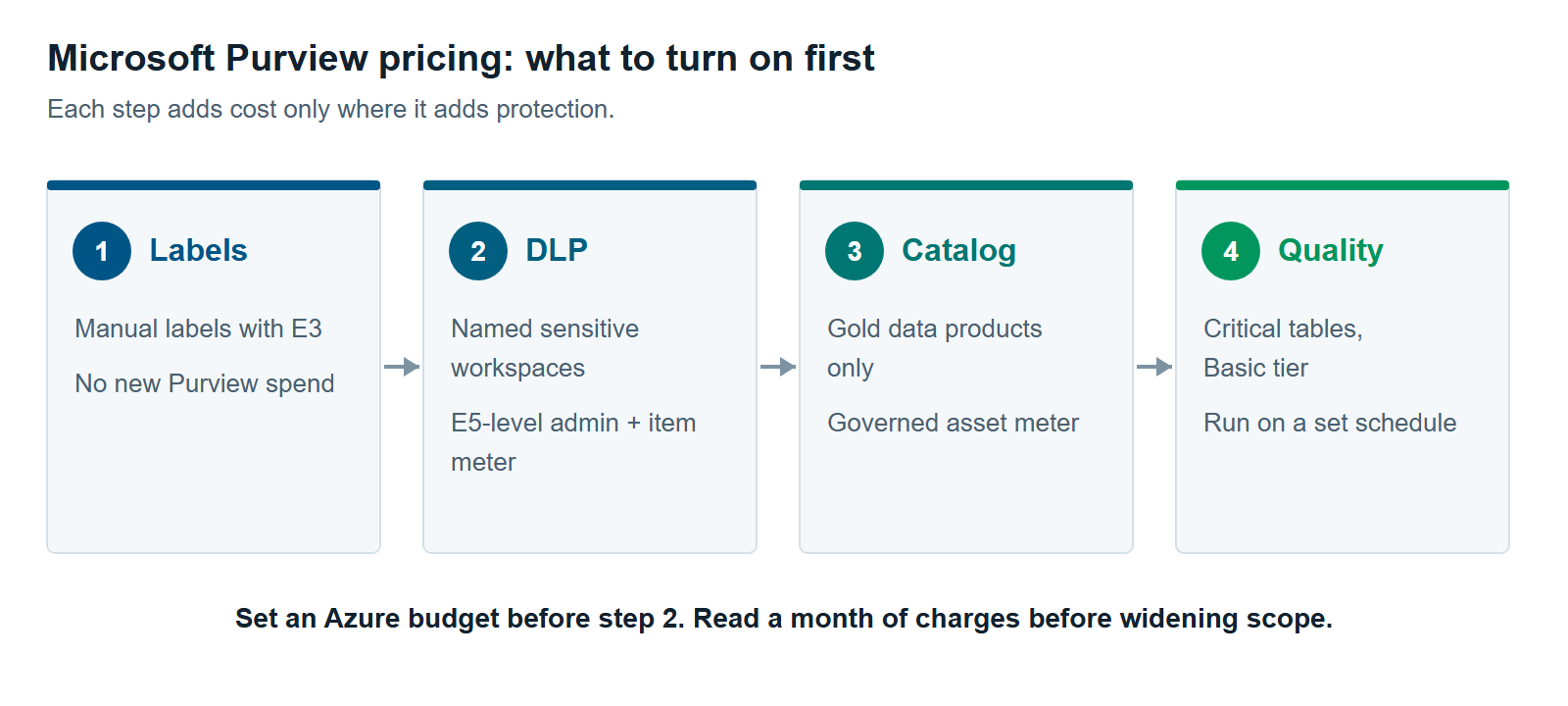
Microsoft Purview pricing for Fabric depends on which features you turn on. Here are three common starting points, priced from the list rates above. These totals are our own math, at list price × count × 30 days. They’re a way to size the problem, not a quote.
1. Labels only. A team labels its Fabric items by hand with Microsoft 365 E3 and Power BI Pro. New Purview spend: none. This suits many teams in their first few months on Fabric.
2. Labels plus DLP on sensitive workspaces. A team adds a DLP policy to five of its ten workspaces, with 50 items each. That’s Microsoft’s own example, so 250 items are in scope. The meter comes to about $124 per 30 days (250 × $0.0165 × 30). Add at least one admin with an E5-level license if you don’t already have one.
3. A governed data platform. A team publishes 200 gold tables as data products in Unified Catalog. That’s about $100 per 30 days. It also runs 100 data quality rules a day on the Basic tier, which comes to about $900 per 30 days (2 DGPUs × $15 × 30). Data quality is nine times the catalog cost here. Running the rules weekly instead of daily would cut that line by about 85%.
Insider Risk Management is harder to size in advance. It bills by user activity, and one $25 unit covers 10,000 activities. Microsoft added a pay-as-you-go usage report for Insider Risk Management in March 2026 (Fabric March 2026 Feature Summary). Run a pilot and review that report before estimating a full rollout.
How to Keep Microsoft Purview Pricing Predictable
You keep Microsoft Purview pricing predictable by controlling scope. The asset meters count what a policy or catalog covers, so a narrow scope gives a small, steady bill. These steps keep surprises off the invoice:
- Set an Azure budget first. Create a budget and an alert on the subscription before you turn on any meter. Purview charges land in Azure Cost Management with everything else.
- Scope DLP to named workspaces. A new Fabric DLP policy applies to all workspaces unless you edit it. Pick the workspaces that hold sensitive data.
- Link only what you’ll govern. Start Unified Catalog with gold-tier data products. Link the tables you mean to govern. Microsoft counts a linked server as one asset, not as all of its tables.
- Keep data quality on Basic and on a schedule. Run rules where the data changes, and only as often as it changes.
- Price it in the calculator. Microsoft’s Azure pricing calculator includes Unified Catalog, data quality, and data health controls.
Our Microsoft Purview services team can help you size this before you sign anything. For the bigger picture, start with Microsoft Purview for Fabric: A Practical Guide to Securing and Governing Your Data.
When You Shouldn’t Pay for More Purview Yet
You shouldn’t pay for more Purview yet if your Fabric data contains no regulated or customer data and is used only by staff. Manual labels under Microsoft 365 E3, plus good workspace access, may be enough for now. Adding meters before you have sensitive data just adds cost.
Fabric also has its own built-in catalog. The OneLake catalog lets people find and explore Fabric items with no Purview meter. Our article OneLake Catalog vs. Purview Unified Catalog: When Fabric’s Built-In Governance Is Enough explains when that’s all you need.
Hold off on paid features in these cases too.
- Your access model is the real problem. DLP flags sensitive data, but it won’t fix workspaces that too many people can open. That’s anti-pattern #6, Individual Account Access Everywhere, in The 12 Most Common Microsoft Fabric Anti-Patterns We See Across Every Assessment. See also Purview DLP for Fabric: Policy Tips, Restrict Access and What It Won’t Catch.
- No one owns the data products yet. A catalog with no owners turns into a list. Name owners first, then pay to govern their assets.
- Your pipelines already test the data. If dbt tests or notebook checks already catch bad rows, Purview data quality may repeat that work.
When sensitive data arrives, guests join, or an auditor starts asking, add the next step in Figure 3. That’s when Microsoft Purview pricing starts to pay for itself. Our Microsoft Fabric consulting team can help you plan the order.
Further reading
- Microsoft Purview pricing — Microsoft’s current rates by region
- Learn about Microsoft Purview billing models — per-user vs pay-as-you-go, and how items are counted
- Billing in Microsoft Purview Data Governance — governed assets, DGPUs and Data Map charges
- Microsoft Purview Suite pricing — per-user prices for the Suite and E5
Pavan Malpani is the Fabric Practice Delivery Lead at XTIVIA, leading Microsoft Fabric delivery for data platform and governance projects. Talk to us.