

By Pavan Malpani, Fabric Practice Delivery Lead, XTIVIA
Last reviewed: October 20, 2026
SUMMARY:
- Microsoft Purview for Fabric adds data security and data governance controls that Fabric’s built-in tools don’t cover on their own.
- The security half covers sensitivity labels, data loss prevention, Insider Risk Management, audit and DSPM for AI.
- The governance half covers the Purview Data Map, Purview Unified Catalog, data quality scoring and lineage across sources beyond Fabric.
- Start with audit, labels and DLP in alert mode, then add catalog and quality work for the data that matters most.
- If all your data lives in Fabric and none of it is regulated, Fabric’s OneLake catalog may be enough for now.
Table of Contents
- What Is Microsoft Purview for Fabric?
- What Fabric Already Does Without Purview
- Securing Fabric Data With Purview
- Governing Fabric Data With Purview
- Microsoft Purview for Fabric, Mapped Item by Item
- Where to Start With Microsoft Purview for Fabric
- When You Don’t Need Microsoft Purview for Fabric Yet
What Is Microsoft Purview for Fabric?
Microsoft Purview for Fabric is the set of Purview tools that plug into Microsoft Fabric. They protect sensitive data in Fabric and govern it alongside the rest of your data. Microsoft Purview is Microsoft’s data security and data governance product. Fabric is Microsoft’s analytics platform, built on one shared data lake called OneLake.
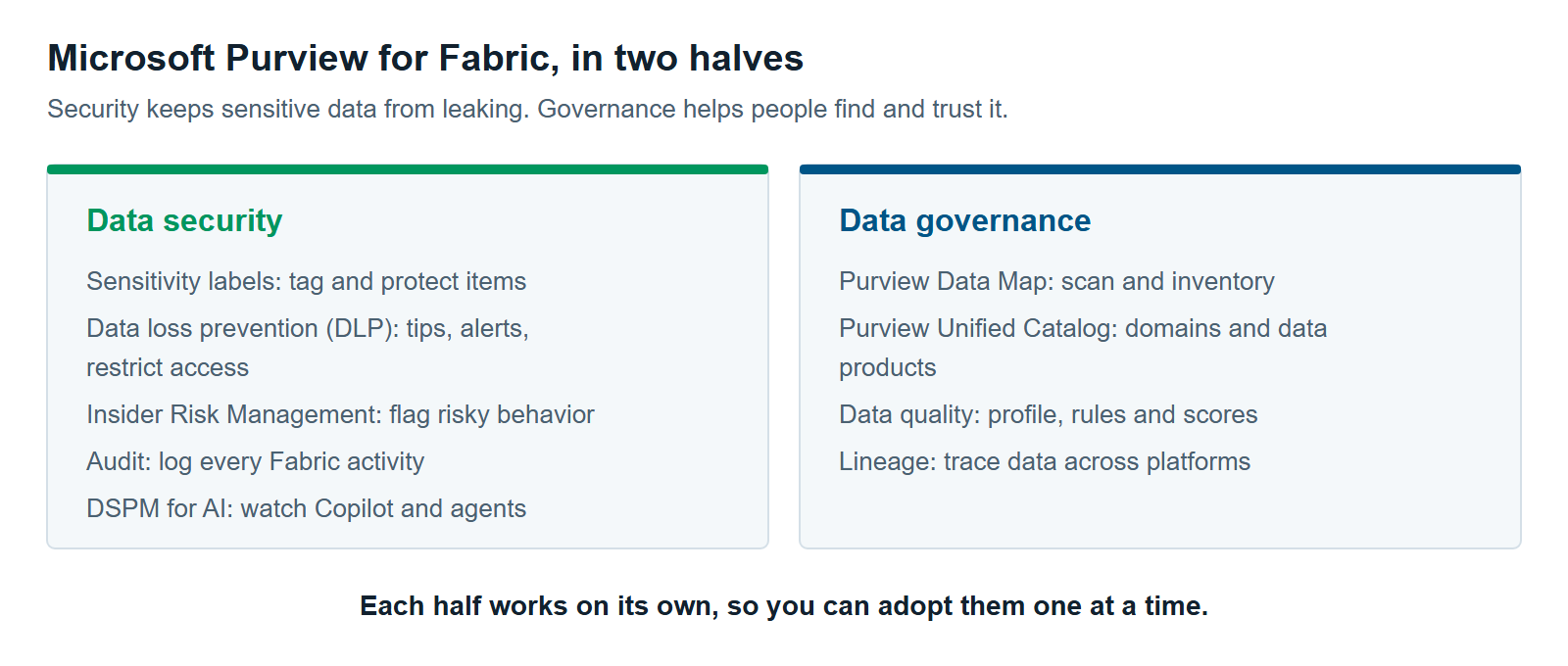
The tools split into two halves. The security half keeps sensitive data from leaking. The governance half helps people find data, trust it and use it correctly.
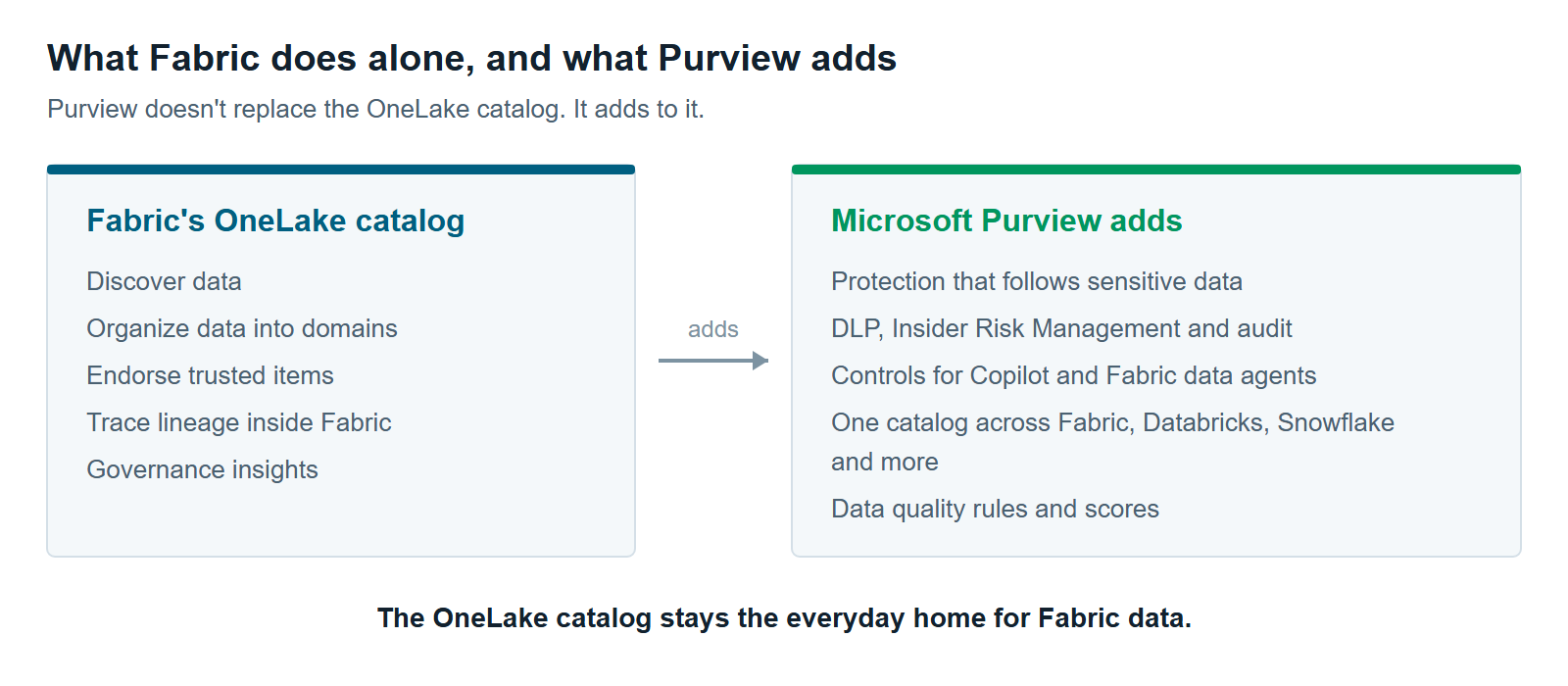
 Microsoft Purview for Fabric adds two things Fabric can’t do alone: protection that follows sensitive data, and governance that reaches past Fabric.
Each half answers a different question. Security asks who can see the data and where it can go. Governance asks what the data is, who owns it, and whether to trust it. Most organizations we work with need both, though rarely on the same day.
What Fabric Already Does Without Purview
Fabric already covers everyday governance inside Fabric. Its OneLake catalog helps people find data and sort it into domains. It also lets owners mark trusted items and trace data from source to report. Microsoft says the OneLake catalog stays the main place to govern Fabric data, even after you add Purview (Microsoft Learn).
Microsoft is also clear about when to add Purview. Do it when your security and compliance needs reach past Fabric. That means you need to protect sensitive data, stop risky sharing, or check who did what.
So Purview doesn’t replace the OneLake catalog. It adds to it.
Securing Fabric Data With Purview
Purview secures Fabric data in five ways. It labels sensitive items, blocks risky sharing, spots risky behavior, records activity, and watches how AI tools use your data. Most pieces work on their own, so you can adopt them one at a time.
Sensitivity labels. A sensitivity label is a tag such as “Confidential” that tells people and systems how to handle an item. Labels can be set on every Fabric item. They also pass downstream, so a report built on a labeled lakehouse picks up the label. Protection stays with the data only on certain exports: Excel, PDF, PowerPoint and Power BI Desktop files from Power BI items. Exports to CSV or text files don’t carry protection (Microsoft Learn). The full story is in Sensitivity Labels in Microsoft Fabric: How Inheritance Really Works.
Data loss prevention (DLP). DLP finds sensitive data, such as credit card numbers, and acts on it. In Fabric it covers semantic models, lakehouses, warehouses, and KQL, SQL, mirrored and Cosmos databases. A DLP policy can show a policy tip to the item owner, send an alert, or restrict access to the item (Microsoft Learn). Microsoft Learn still lists restrict access as a preview feature, and Microsoft plans general availability for late 2026. DLP in Fabric only scans Delta tables, and it doesn’t support advanced classifiers such as exact data match. See Purview DLP for Fabric: Policy Tips, Restrict Access and What It Won’t Catch.
Insider Risk Management. Insider Risk Management looks for risky behavior by people inside your organization. For Fabric, it watches Power BI and lakehouse activity. Examples include downloading reports, removing a sensitivity label, or sharing lakehouse data outside the company. These Fabric indicators need Purview’s pay-as-you-go billing turned on (Microsoft Learn).
Audit. Every Fabric user activity is logged in the Purview audit log. That gives security and compliance teams one place to investigate.
Data Security Posture Management (DSPM) for AI. DSPM shows where sensitive data sits and how it’s at risk. DSPM for AI applies that view to Copilot and AI agents. For Fabric, it covers prompts and responses in Copilot for Power BI. Support for other Fabric Copilots and for Fabric data agents was still in preview at the last Microsoft Learn update (Microsoft Learn). Sensitivity labels and DLP don’t apply to those AI conversations yet. More in Securing Fabric Copilot and Data Agents With Purview.
Governing Fabric Data With Purview
Purview governs Fabric data by pulling it into one catalog with your other data sources. That includes Databricks, Snowflake, Azure SQL and on-premises SQL Server. Governance here has four parts: a map, a catalog, quality checks and lineage.
Purview Data Map. The Purview Data Map is the inventory underneath everything else. It scans your Fabric tenant and records what exists. It picks up lakehouses, warehouses, notebooks, pipelines, KQL databases and Power BI items. One limit matters. For Fabric items other than Power BI, lineage is tracked at the item level only, not table by table (Microsoft Learn).
Purview Unified Catalog. The Unified Catalog is where business users find and request data. It organizes data into governance domains, such as Finance or Sales. Inside each domain, related tables and reports are grouped into data products. A data product is a ready-to-use bundle with an owner, a description and an access request process. Glossary terms give everyone the same business vocabulary.
Data quality. Purview data quality profiles your data and scores it against rules. The rules check completeness, consistency, conformity, accuracy, freshness and uniqueness. Scores roll up from columns to data products to governance domains (Microsoft Learn). For Fabric, it supports lakehouses, shortcuts and mirrored databases. Two practical limits apply. Quality scans run with managed identity only, and they’re billed on pay-as-you-go meters. See Data Quality in Fabric With Purview: What It Measures and What It Doesn’t.
Lineage. Fabric’s own lineage view traces data within Fabric. The Purview Data Map adds lineage from supported sources outside Fabric. That matters when a Fabric report depends on data that starts somewhere else.
Microsoft Purview for Fabric, Mapped Item by Item
Microsoft Purview for Fabric covers different Fabric items with different tools. The table below shows which Purview capability protects or governs which part of Fabric. It also lists the license or billing note to watch for each one. Costs get their own article: Microsoft Purview Pricing for Fabric: What You’ll Actually Pay.
| Purview capability | What it does in Fabric | Fabric items covered | Watch for |
|---|---|---|---|
| Sensitivity labels | Tags items and carries protection downstream | All Fabric items | Protection on export works only for Power BI items |
| Data loss prevention (DLP) | Policy tips, alerts, restrict access | Semantic models, lakehouses, warehouses, KQL, SQL, mirrored and Cosmos databases | Delta tables only. Restrict access still in preview |
| Insider Risk Management | Flags risky user behavior | Power BI and lakehouse activity | Needs pay-as-you-go billing |
| Audit | Logs user activity | All Fabric activity | None |
| DSPM for AI | Watches AI prompts and responses | Copilot for Power BI. Other Copilots and Fabric data agents in preview | Needs pay-as-you-go billing and the enterprise version of Purview data governance |
| Purview Data Map | Scans metadata and lineage | Lakehouses, warehouses, notebooks, pipelines, KQL databases, Power BI items | Item-level lineage only outside Power BI |
| Purview Unified Catalog | Domains, data products, glossary, access requests | Anything scanned into the Data Map | Needs the enterprise version of Purview data governance |
| Data quality | Profiles data and scores it against rules | Lakehouses, shortcuts, mirrored databases | Managed identity only. Pay-as-you-go meters |
Sources: Microsoft Learn pages linked above, plus Microsoft Learn’s Purview data governance free version page, checked October 2026.
Where to Start With Microsoft Purview for Fabric
Start with Microsoft Purview for Fabric where the risk is highest and the effort is lowest. For most teams, that’s audit, labels and DLP in alert mode. Catalog and quality work comes next, focused on the data that matters most.
Here is the order we recommend:
- Confirm audit is on. Fabric activity already flows to the Purview audit log. Check that someone can search it before you need it.
- Publish sensitivity labels and set a default label. Default labeling gets most new items labeled without anyone remembering to do it.
- Add DLP policies in alert mode. Use policy tips and alerts first. Review what the policies flag for a few weeks.
- Turn on restrict access for the clearest cases. Do this only after you’ve seen the alerts, so you don’t lock out your own engineers.
- Scan Fabric into the Purview Data Map. Then build two or three governance domains in the Unified Catalog for your most-used data.
- Add data quality rules to critical data products. Start with the reports your executives read.
- Add Insider Risk Management for Fabric activity, then DSPM for AI as Copilot and Fabric data agents spread through your teams.
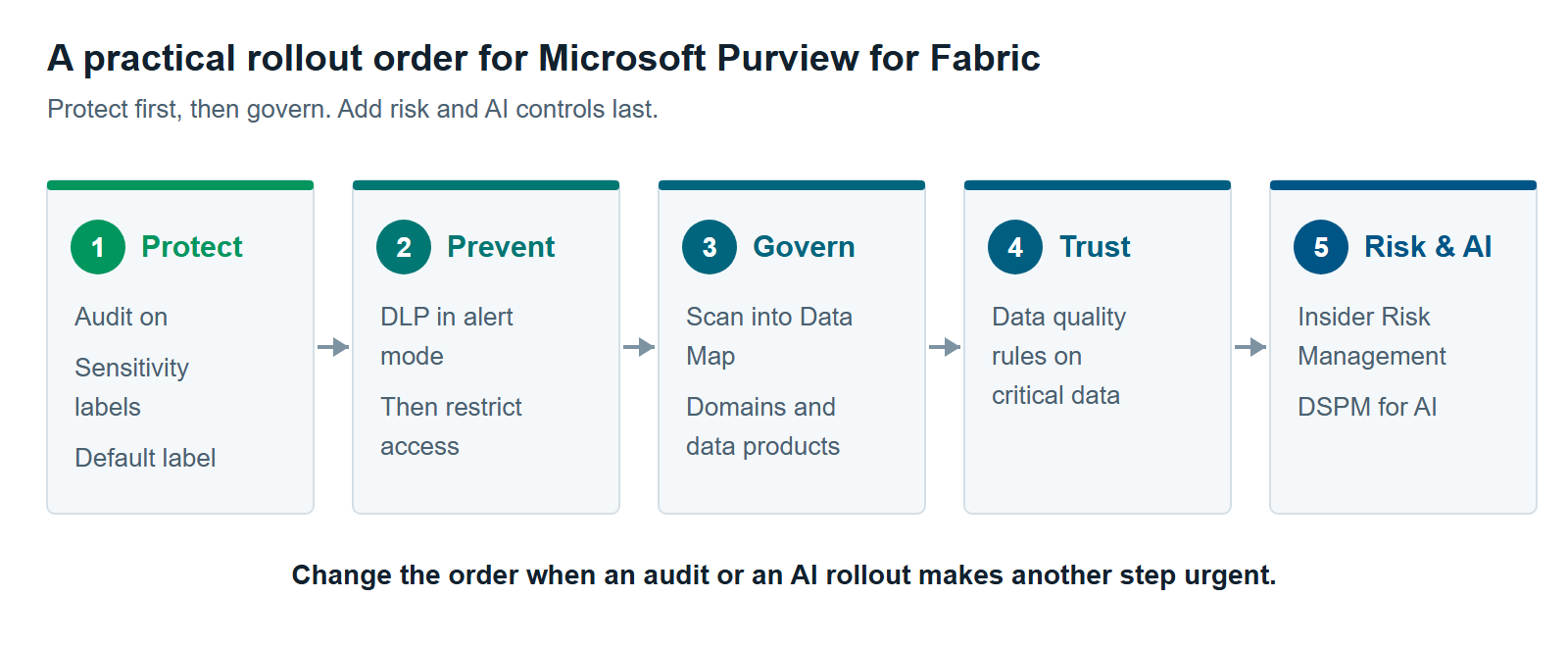
This order isn’t a rule. A team facing an audit next quarter may start with the catalog. A team rolling out Fabric data agents may start with DSPM for AI. Our Microsoft Fabric consulting team and Microsoft Purview services team can help you sequence it. In the interest of full disclosure, XTIVIA implements both Fabric and Purview for clients.
When You Don’t Need Microsoft Purview for Fabric Yet
You may not need Microsoft Purview for Fabric yet if three things are true. All your analytics data lives in Fabric. None of it is regulated. One team owns it. In that case, the OneLake catalog’s discovery, domains, endorsement and lineage may cover what you need today.
Purview adds cost and setup. Several features run on pay-as-you-go meters. Scans need admin settings, security groups and managed identities. That effort is worth it when the risk is real, not before.
Revisit the choice when any of these change:
- You start storing personal, financial or health data in Fabric.
- Data comes in from Databricks, Snowflake or on-premises systems, and people need one catalog.
- Auditors or customers ask how you control sensitive data.
- You roll out Copilot or Fabric data agents to a wide audience.
Still not sure? Read The 12 Most Common Microsoft Fabric Anti-Patterns We See Across Every Assessment. Several of its governance and security patterns are gaps Purview can help close. For a side-by-side view, read OneLake Catalog vs. Purview Unified Catalog: When Fabric’s Built-In Governance Is Enough.
Further reading
- Use Microsoft Purview with Microsoft Fabric — Microsoft’s guide to when Fabric is enough and when Purview adds value
- Information protection in Fabric — sensitivity label support by Fabric item
- Get started with DLP for Fabric and Power BI — supported items, actions and limits
- Data quality in Microsoft Purview Unified Catalog — rules, scores and billing
Pavan Malpani is the Fabric Practice Delivery Lead at XTIVIA. Talk to us.