
Last reviewed: November 3, 2026
SUMMARY:
- In Purview vs Collibra for Fabric, choose Collibra to run a governance program across many platforms, and choose Purview when your data lives mostly in Microsoft.
- Collibra’s access-control product doesn’t list Fabric, so teams that pick Collibra still use Purview for sensitivity labels and data loss prevention.
- Collibra covers Power BI through a separate integration from its Fabric connector, so check both before you judge its coverage.
- Purview covers more Fabric item types in one scan, while Collibra lists Fabric warehouses in more detail, down to columns.
- Teams whose data and data owners all sit in Fabric may need neither catalog yet, because the OneLake catalog is built in.
Table of Contents
- Purview vs Collibra: The Short Answer
- Purview vs Collibra: The Two Jobs in Fabric
- How Purview vs Collibra Compare in Microsoft Fabric
- Where Collibra Is the Stronger Choice
- Where Purview Is the Stronger Choice
- What Does Purview vs Collibra Cost?
- What Running Both Looks Like
- When You Don’t Need Either Catalog Yet
- How to Choose Between Purview vs Collibra
Purview vs Collibra: The Short Answer
Purview vs Collibra comes down to where your data lives and who runs your governance program. Collibra fits a program that spans many platforms. Microsoft Purview fits a platform centered on Microsoft. Inside Fabric, Purview also protects data, and Collibra’s access-control product doesn’t list Fabric.
Microsoft Purview is Microsoft’s data security and governance product. Collibra is an enterprise data governance platform. Microsoft Fabric is Microsoft’s analytics platform, which brings data engineering, warehousing and Power BI together.
Worth saying plainly: XTIVIA is a Microsoft Solutions Partner, and we implement Purview and Fabric for clients. So we have an interest here. We’ve tried to say clearly where Collibra wins, and it wins in several places.
 In Fabric, Purview vs Collibra is really a choice about who runs your catalog. Purview is still the tool for sensitivity labels and DLP on your Fabric data.
Purview vs Collibra: The Two Jobs in Fabric
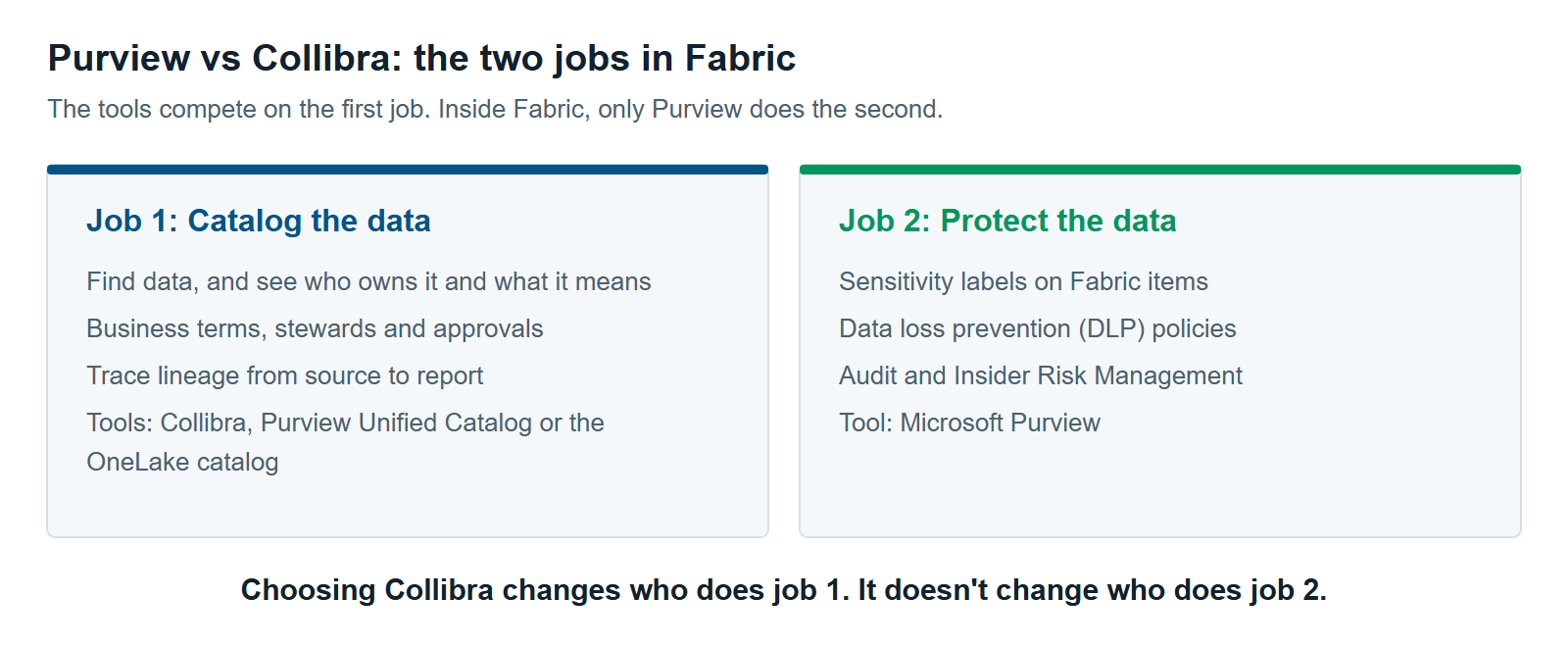
Purview and Collibra compete on one governance job in Fabric, not two. The first job is cataloging: helping people find data, understand it and trust it. The second job is protection: controlling what people can do with sensitive data. Both tools catalog. Only Purview protects Fabric data.
A data catalog is a searchable inventory of your data. It records what each table or report holds, who owns it and what the business terms mean. It also shows lineage, the trail from a source system to a report.
Beyond Fabric’s own permissions, protection in Fabric comes from Purview (Microsoft Learn):
- Sensitivity labels are tags such as “Confidential” that can be set on all Fabric items.
- Data loss prevention (DLP) policies limit what people can do with sensitive data in lakehouses, warehouses and semantic models.
- Audit logs Fabric user activity for compliance and investigation.
- Insider Risk Management helps spot possible data theft in Power BI and lakehouse activity.
Collibra has its own access-control product, called Protect. Its documentation lists AWS Lake Formation, BigQuery, Databricks and Snowflake as sources, but not Fabric (Collibra docs).
How Purview vs Collibra Compare in Microsoft Fabric
Purview vs Collibra in Fabric is a closer race than a quick read of the documentation suggests. Purview covers more Fabric item types in one scan. Collibra lists warehouses in more detail. Both have real limits on lineage, so test it before you rely on it.
| Microsoft Purview | Collibra | |
|---|---|---|
| Lakehouses | Yes, with tables and files | Yes, with files, tables and column details |
| Warehouses | As items only | Yes, with schemas, tables, views and columns |
| Other Fabric items | KQL databases, notebooks, pipelines, dataflows and machine learning models | SQL Server and mirrored Databricks Unity Catalog items; others not listed |
| Semantic models and reports | Yes, in the same Fabric scan | Yes, through its separate Power BI integration |
| Lineage between Fabric items | Item to item, within one workspace except for Power BI; no notebook-to-pipeline lineage | Power BI lineage; lakehouses, warehouses, notebooks and pipelines not listed as sources |
| Column-level lineage in Power BI | Only for Power BI built on Azure SQL Database | Inside Power BI; report-field lineage is in preview |
| Automatic classification in the catalog | Not for Fabric in the Purview Data Map | Only for SQL Server columns, per its docs; its announcement is broader |
| Sensitivity labels and DLP in Fabric | Yes | No |
| Known limit | Can’t scan Fabric behind tenant-level or workspace-level private links | One Fabric synchronization per Azure tenant; no DirectQuery or live connections in Power BI lineage |
| Release status | No preview label | Announced June 26, 2026, with no GA or beta label |
Sources: Purview’s Fabric scan, Purview Data Map sources, Purview Power BI lineage, Collibra’s Fabric integration, Collibra’s Power BI limits, Collibra’s lineage sources and Collibra’s announcement. All checked November 2026.
Two details in that table are easy to miss.
Collibra’s Fabric coverage comes from two integrations. Its Fabric page doesn’t mention semantic models or reports. Its Power BI integration, part of Collibra Data Lineage, does. It’s a separate setup, so ask for both in any demo.
Neither tool has finished lineage to the report field. Purview’s column-level lineage works only for Power BI built on Azure SQL Database. Collibra’s report-field lineage is in preview, and Collibra says it’s “not recommended for production environments” (Collibra docs).

Where Collibra Is the Stronger Choice
Collibra is the stronger choice when governance reaches well beyond Microsoft, or when a formal program already runs on it. Its strength is the business process around data, not Fabric coverage. That matters most when many teams must agree on terms and approve changes.
- Your data spans many platforms. Collibra cites Gartner’s mention of “native integrations with over 100 applications and data environments” (Collibra). Purview scans many sources too, but its depth varies by source.
- You need formal stewardship. A data steward is the person who answers for a set of data. Collibra offers a business glossary, stewardship structures and a tool for designing your own approval workflows (Collibra docs).
- You need warehouse detail in the catalog. Collibra lists Fabric warehouses down to columns. Purview lists them as items.
- You want access control outside Fabric. Protect covers Snowflake, Databricks, BigQuery and AWS Lake Formation. Purview can see much of that data, but it mostly can’t control access to it.
- Collibra already runs your program. Your glossary, stewards and workflows hold years of work. Replacing them to gain a Fabric catalog rarely makes sense.
Gartner’s general governance report also appears to favor Collibra, based on the two sources below. Collibra says Gartner named it a Leader in the January 2026 Magic Quadrant for Data and Analytics Governance Platforms (Collibra). Trade press lists Microsoft as a Challenger in that report (AI Data & Analytics Network). That report rates governance platforms in general, not Fabric support.
Where Purview Is the Stronger Choice
Purview is the stronger choice when most of your governed data sits in Microsoft platforms. One product then handles the catalog and protection, and a single Fabric scan picks up Power BI too. You also avoid adding a second vendor and a second place for people to look.
- One scan covers more of Fabric. Scanning a Fabric tenant brings in metadata and lineage from Fabric items, including Power BI (Microsoft Learn). Collibra needs its Fabric and Power BI integrations set up separately.
- Your Microsoft 365 license may cover part of it. Microsoft 365 E3 covers manual sensitivity labels, though applying them to Power BI items also needs Power BI Pro or Premium Per User (Microsoft Learn). Our guide to Microsoft Purview Pricing for Fabric: What You’ll Actually Pay shows what else is included.
- Catalog and protection share a vendor. Purview Unified Catalog adds governance domains, data products, glossary terms and data quality on top of the catalog (Microsoft Learn). A governance domain groups data by business area, such as Finance. A data product groups related data so people can find it together.
- You can start small. Purview’s catalog charges for assets you link to a governance concept, so you can begin with a few important tables.
Unified Catalog has its own approval workflows for publishing terms and data products and for granting access (Microsoft Learn). Test them against your real approval process. If that process has many steps and many teams, compare it directly with Collibra’s workflows.
What Does Purview vs Collibra Cost?
Purview vs Collibra costs can’t be compared fairly from public pages. Purview publishes its pay-as-you-go prices, and we couldn’t find a public price list for Collibra. So get a written Collibra quote and model Purview’s meters on the same scope. Then add the cost of the people who run the program.
Purview’s main catalog meter is $0.0165 per governed asset per day, or about 50 cents a month (Azure Retail Prices API, East US, November 2026). A governed asset is one you link to a concept such as a data product or a glossary term. Assets that are only scanned don’t count (Microsoft Learn). Data quality runs bill separately, in processing units.
Choosing Collibra may not remove Purview from your budget. You’d still pay for any protection features your licenses don’t cover. Those are separate from the catalog meter, and our pricing guide covers them.
For Collibra, ask these questions in writing. Collibra’s docs say “your Collibra contract and assigned roles determine which capabilities you can access” (Collibra docs).
- Does the quote include both the Fabric integration and the Power BI integration?
- Collibra says “a license must be purchased” before you use Collibra Data Lineage (Collibra Marketplace). Is that license in this quote?
- What drives the price as we add users, sources and assets?
- What will the setup need, and who runs Collibra Edge, its connection software, if we use it?
What Running Both Looks Like
Running Purview and Collibra together works when each job has one owner. Collibra holds business terms, stewards and approvals. Purview holds sensitivity labels, DLP and audit. If both tools answer the same question, people won’t know which to trust. So decide the split before you connect anything.
| Job | Owner when you run both |
|---|---|
| Business terms, stewards and approvals | Collibra |
| Search across all data platforms | Collibra |
| Sensitivity labels, DLP and audit in Fabric | Purview |
| Insider Risk Management | Purview |
| Finding data while working inside Fabric | OneLake catalog |
| Who can open a workspace or item | Fabric permissions |
Sensitive data needs one clear owner. Collibra’s classification can flag sensitive data, but its docs limit that to SQL Server columns in Fabric. Purview uses sensitivity labels. A paid third-party Power BI connector on the Collibra Marketplace lists sensitivity labels for reports. We didn’t find a connector that keeps labels and Collibra’s classification in step across Fabric. So one table could read as sensitive in Collibra and carry no label in Fabric.
Pick one rule: labels in Fabric are what enforce protection, and Collibra’s classification informs them where it’s available. Then have a steward review the differences on a schedule.
You also don’t need Purview’s catalog to use its protection. If Collibra is your catalog, you can skip Unified Catalog’s data products and avoid running two glossaries.
When You Don’t Need Either Catalog Yet
You may not need Purview’s catalog or Collibra if your data and data owners all sit in Fabric. Fabric has its own catalog, the OneLake catalog. It helps people find data, group it by business area and trace lineage. Microsoft says it “remains the primary experience for governing Fabric data”, even after you add Purview (Microsoft Learn).
Our article on OneLake Catalog vs. Purview Unified Catalog: When Fabric’s Built-In Governance Is Enough covers that decision. Each tool can also be the wrong choice on its own.
Collibra is often the wrong choice in three cases.
- Fabric is your only data platform, and one team owns most of it.
- You have no stewards yet, and no budget for them. A workflow tool can’t create a program.
- You need lineage to report fields in production today. Collibra’s is still in preview, and Purview doesn’t document it.
Purview’s catalog is often the wrong choice in three cases, too.
- Most of your data and your data teams live outside Microsoft.
- Your Fabric workspaces sit behind private links, which Purview’s scans can’t reach.
- Your governance team needs long approval chains across many platforms.
In all of these cases, you may still want Purview’s protection features for Fabric. That decision is separate from the catalog.
How to Choose Between Purview vs Collibra
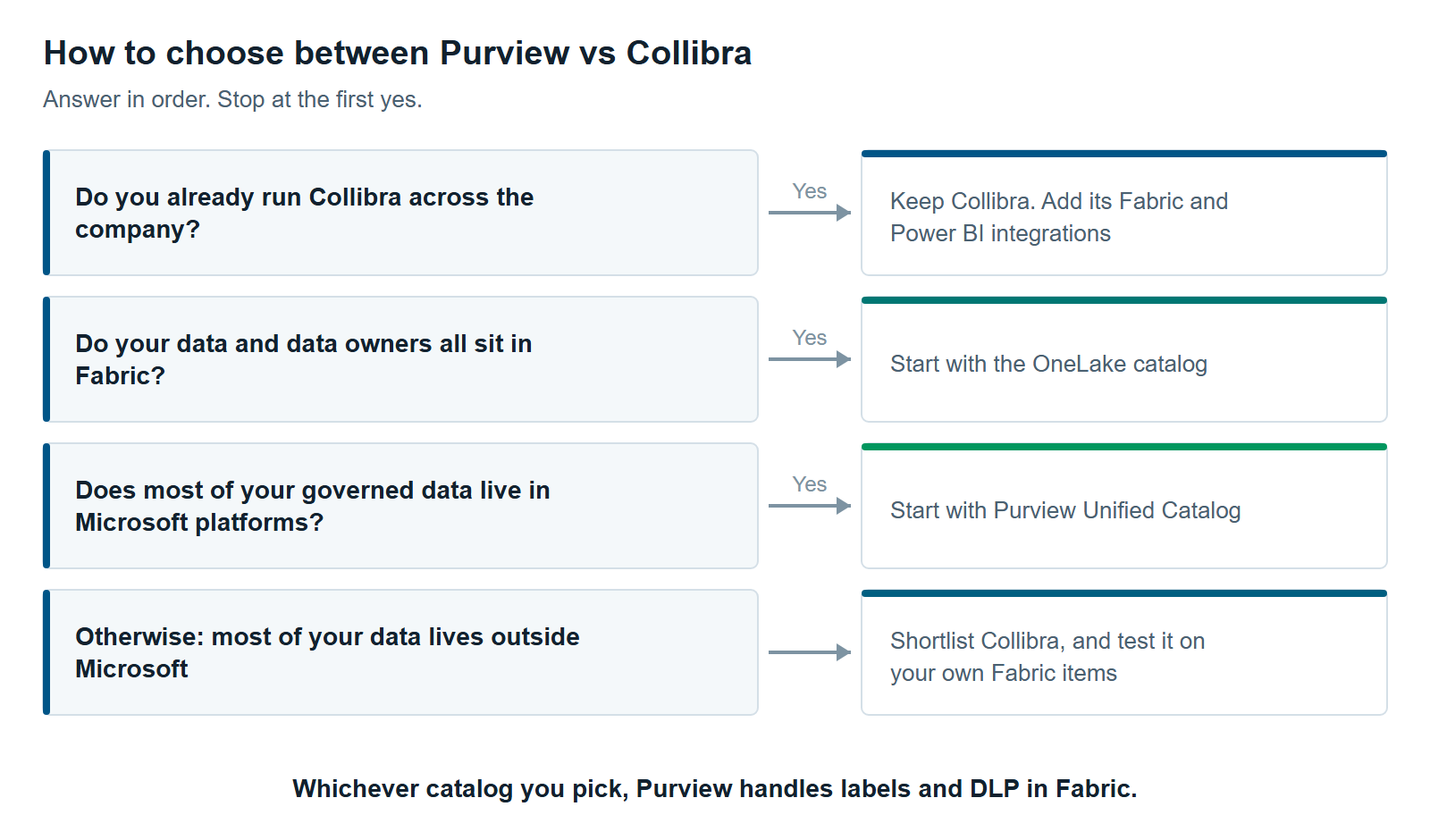
Choose between Purview vs Collibra by answering four questions in order, and stop at the first yes. Then test your pick on your own Fabric items before you sign. Vendor documentation shows what’s supported. Only a test shows what your own workspaces will return.
- Do you already run Collibra across the company? Keep it. Add its Fabric and Power BI integrations.
- Do your data and data owners all sit in Fabric? Start with the OneLake catalog.
- Does most of your governed data live in Microsoft platforms? Start with Purview Unified Catalog.
- Otherwise, most of your data lives outside Microsoft. Shortlist Collibra, and test it on your own Fabric items. Our hub, Data Governance Tools for Microsoft Fabric: Purview, Collibra, Alation, Atlan and Informatica Compared, covers the other options.
Keep the proof of concept small. Pick one lakehouse, one warehouse, one semantic model and one report your business relies on. Then check four things in each tool:
- Coverage. Does every item show up, down to tables and columns?
- Lineage. Can you trace a report figure back to its source table?
- Direct Lake. This Fabric mode lets a semantic model load Delta tables directly from OneLake, including lakehouse tables. Neither vendor’s lineage pages we read mention it, so include one.
- Stewardship. Can a business user find a term, see its owner and approve a change without help?
Fabric connectors change quickly. Collibra announced its Fabric integration only in June 2026, so check both vendors’ documentation again before you sign.
For the wider program, Three Questions to Ask Yourself Before Undertaking a Data Governance Initiative covers the groundwork. For the Purview side in full, read Microsoft Purview for Fabric: A Practical Guide to Securing and Governing Your Data. Our data governance services and Microsoft Fabric consulting services teams can help you run the Purview vs Collibra test on your own data.
Further reading
- Use Microsoft Purview with Microsoft Fabric — Microsoft’s view of where Fabric governance ends and Purview begins
- Collibra: About the Microsoft Fabric integration — supported Fabric sources and limits
- Collibra: Power BI ingestion considerations and limitations — what its Power BI integration leaves out
Pavan Malpani is the Fabric Practice Delivery Lead at XTIVIA. Talk to us.