

TL;DR
- Large legacy DXP estates often run a public marketing site and an authenticated portal on one platform.
- Those are different workloads. Forcing them together is usually what made the incumbent expensive.
- Separating them is not a failure to consolidate. It is consolidating along the right line.
- There are three ways to split, including a single-vendor route and a custom-portal route with no DXP at all.
- Four layers stay shared whichever route you take. Get those wrong and you have two silos instead of one monolith.
Table of Contents
- How One Platform Ends Up Running Both
- Signs Your Marketing Estate and Portal Need Separating
- Three Ways to Split a Marketing Estate and Portal
- Where the Custom Portal Route Breaks Down
- What Stays Shared Between the Marketing Estate and Portal
- What It Costs, Honestly
- When Not to Split
- How to Sequence It
How One Platform Ends Up Running Both
Nobody sets out to build this.
It happens gradually. You buy a digital experience platform to run the marketing site. It works. Then someone needs a customer portal, and the platform you already own can technically do portals, so you build it there.
Then a dealer portal. Then a supplier area. Each one adds custom identity work, a permissions matrix, and a handful of integrations to back-office systems the marketing platform was never designed to reach.
Five years later you have one platform doing two very different jobs, and neither of them well.
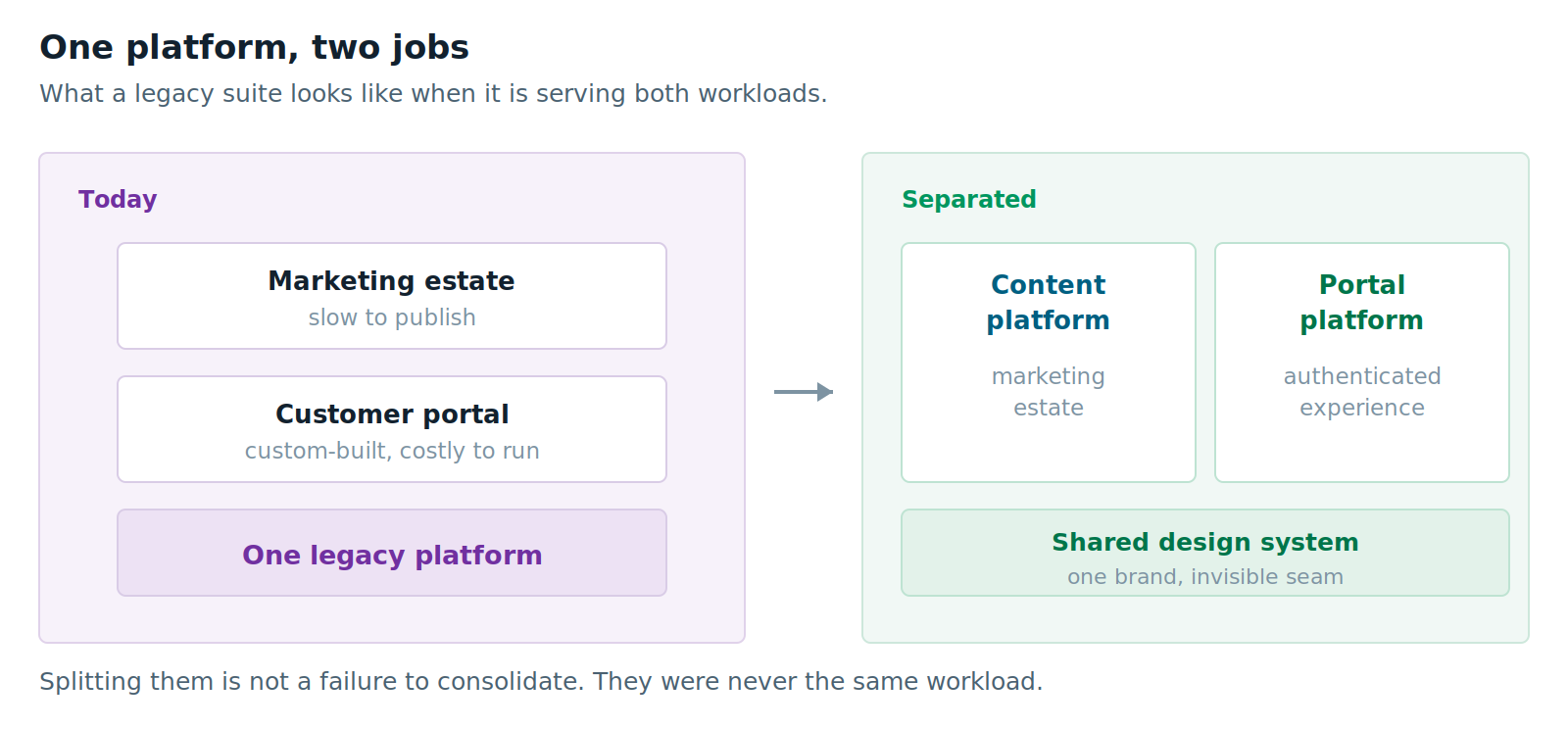
The marketing team says publishing is slow. The portal team says every change needs a developer. Both are right. Both problems come from the same source: a platform optimized for one workload carrying another it was not built for.
Signs Your Marketing Estate and Portal Need Separating
You do not need all of these. Three or four is usually enough.
Your release cycle is set by the slower half. A copy change on the marketing site waits for a release window that exists because portal code sits in the same deployment. Marketing pays for the portal’s risk profile.
You have built an identity layer yourself. Custom SSO, a hand-rolled entitlements matrix, session handling nobody wants to touch.
Integration work dominates your backlog. Most engineering effort goes into connecting to ERP, CRM or a policy system. Very little goes into anything a visitor would notice.
Two sponsors are fighting over one roadmap. The CMO wants campaign velocity. The COO wants self-service deflection. One backlog cannot serve both.
Your content team avoids the tool. They have worked out it is faster to email a developer than to use an authoring interface built for a different job.
Nobody can tell you the cost of either half. One license, one hosting bill, one team. You cannot say what the portal costs, so you cannot make a case about it.
Three Ways to Split a Marketing Estate and Portal
Here is where most articles on this topic stop short. They assume splitting means buying two products from two vendors. It does not.
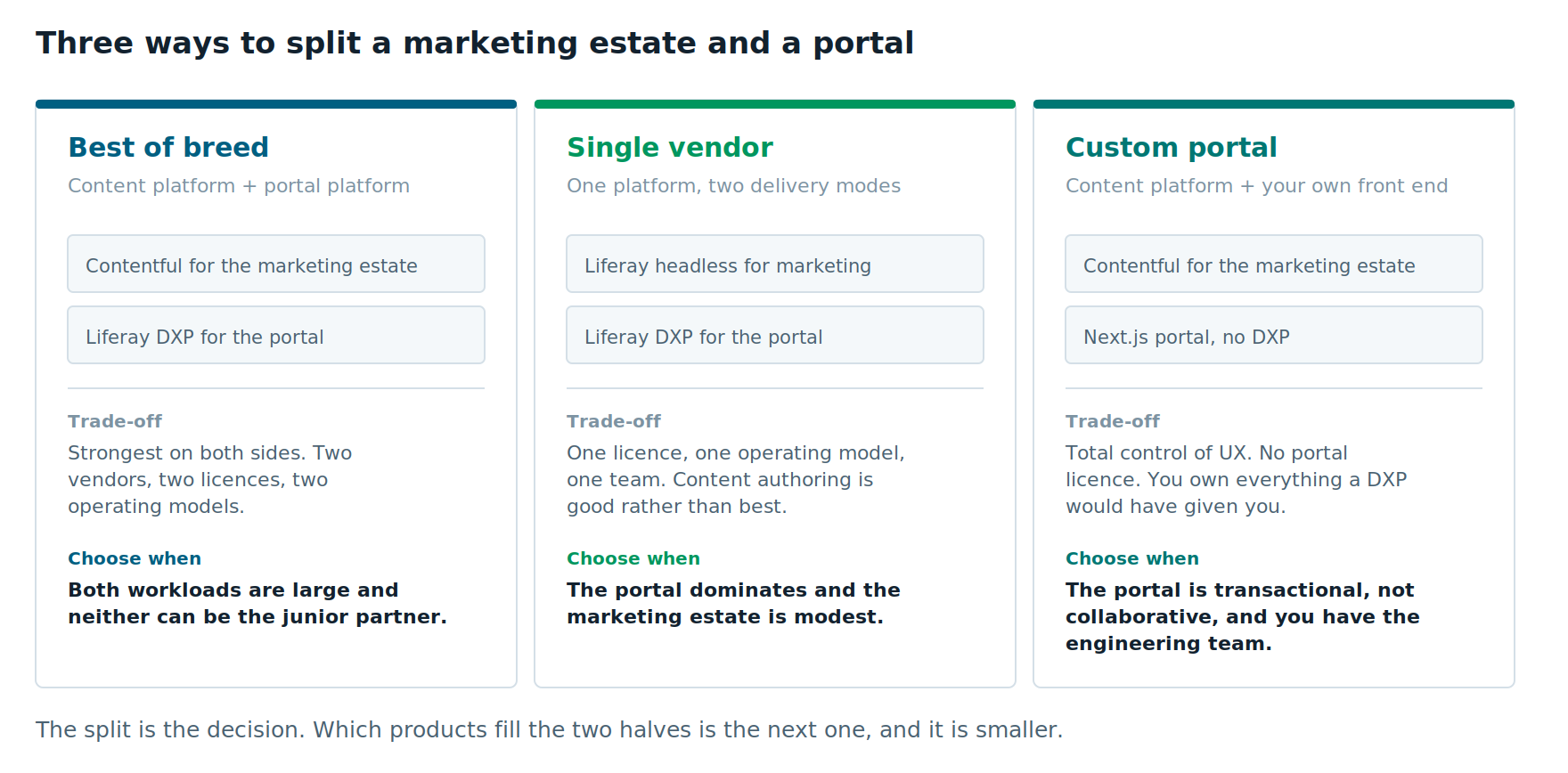
Route One: Best of Breed
A content platform for the marketing estate and a portal platform for the authenticated experience. In our work that usually means Contentful and Liferay DXP.
What you get. The strongest option on both sides. A content platform built for structured content and omnichannel delivery, and a portal platform built for identity, entitlements, workflow and collaboration.
What it costs. Two vendors, two licenses, two operating models. More to run, and it needs the shared layers below to feel like one experience.
Choose it when both workloads are large and neither can be the junior partner. A serious marketing estate and a serious portal, each with its own sponsor and its own roadmap.
Route Two: Single Vendor
Liferay for both halves — Liferay DXP for the portal, and Liferay’s headless capabilities serving the marketing estate through a modern front end.
This route gets overlooked because people think of Liferay as portal software. It also has a perfectly capable headless CMS, and using it means one platform, one subscription agreement and one team.
What you get. A single operating model. One set of skills to hire for. One vendor relationship. No integration seam between the two halves, because there is no seam.
What it costs. Content authoring is good rather than best in class. If your marketing team needs the editorial tooling, localization depth and content modeling flexibility of a dedicated content platform, you will feel the difference.
Choose it when the portal dominates and the marketing estate is modest. If the portal is the real product and the marketing site is a dozen well-maintained pages, adding a second platform is overhead you do not need.
This is also the right route when you already run a mature Liferay estate. The cheapest platform is often the one you already know how to operate.
Route Three: Custom Portal
A content platform for the marketing estate, and a custom Next.js application for the portal. No DXP at all.
Authentication comes from an identity provider — Entra ID, Okta, Auth0. Content comes from the headless CMS. Data comes from direct API integration to your back-office systems.
What you get. Total control of the user experience. No portal platform license. One front-end stack across both halves, which means one component library, one design system and one team.
For a portal that is essentially “show this user their data and let them submit a request,” this can be the cleanest architecture available.
What it costs. You build and maintain everything a portal platform would have supplied. That is the whole trade, and it deserves its own section.
Choose it when the portal is transactional rather than collaborative, your integration surface is well understood, and you have an engineering team that can own a custom application for years.
Where the Custom Portal Route Breaks Down
We build custom portals. We also talk clients out of them, and it is usually for the same reason.
Authentication is not the problem. An identity provider handles SSO, MFA and federation as well as any DXP would.
The problem is everything else a portal platform quietly includes.
Entitlements and permissions. Who sees which record, which document, which action. Simple until it is not, and it is almost never as simple as the first requirements document suggests. Internal enterprise systems and intranets often demand far more intricate security frameworks than public-facing customer or partner portals, which typically rely on a small set of defined roles supplemented by user personalization.
User and group administration. Somebody who is not a developer needs a screen to manage members, roles and access. That screen is a real application and, in the case of customer and partner portals, delegated user administration where the customer or partner manages their own users.
Workflow and approvals. Request, review, approve. Common in supplier, broker and partner portals, and it is not trivial to build well.
Search across authenticated content. Results have to be filtered by what each user is allowed to see. Getting this wrong is a security incident, not a bug.
And collaboration, which is where this route most often fails.
If the portal needs message boards, discussion forums, document sharing, comments, notifications or activity feeds, a headless CMS gives you none of it.
You have two options. License a separate forum or community product and integrate it — which means another vendor, another data model and another login to reconcile. Or build it yourself, which is a far larger project than it looks. Threaded discussions, moderation, notification preferences and spam handling are a product, not a feature.
Liferay DXP includes all of this natively. That single fact is often what decides between route two or three and a custom build, and it is worth establishing early rather than discovering in month six.
The honest test. Custom portals fail less often for technical reasons than organizational ones. The build goes fine. Then the engineers who wrote it move on, feature requests keep arriving, and nobody budgeted for the platform work a license would have covered.
The question is not “can we build this?” It is “will we still be able to run this in year four?”
What Stays Shared Between the Marketing Estate and Portal
Whichever route you take, four layers stay single. Keeping them single is what makes the architecture work.
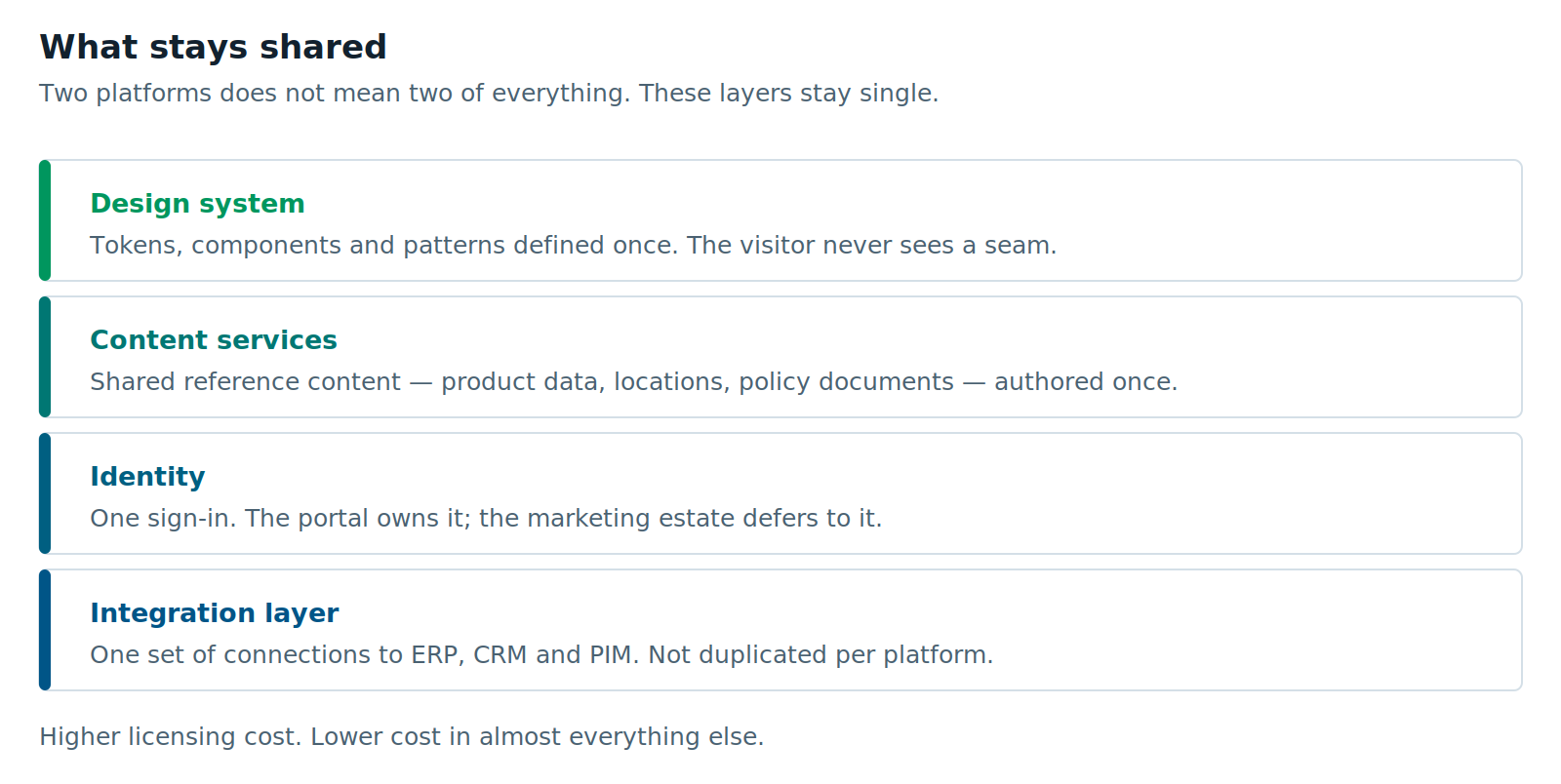
The design system. Tokens, components and patterns defined once and consumed by both. This is not a nice-to-have. It is what makes the seam invisible, and it is the first thing to build.
Content services. Reference content both halves need — product data, locations, policy documents, FAQs — authored once and consumed by the portal through an API. If your product descriptions live in two places, the split has failed.
Identity. One sign-in. The portal side owns it. The marketing estate defers to it for the few places it needs to know who someone is.
The integration layer. One set of connections to ERP, CRM and PIM, not one per platform. If you run Boomi or MuleSoft, this is where it earns its keep.
Get those four right and you have two halves with one operating model. Get them wrong and you have two silos, which is worse than the monolith you left.
What It Costs, Honestly
Licensing depends on the route. Best of breed means two licenses. Single vendor means one. Custom portal means one content platform license plus an identity provider, and then an engineering commitment that does not appear on any invoice.
Almost everything else goes down.
Release cycles decouple, so marketing stops waiting on portal risk. Content changes stop needing developers. Each half can be sized, measured and funded on its own terms — which for most organizations is the first time anyone can say what either one actually costs.
The project is also bigger than a single replatform. Two workstreams, a shared design system built up front, and a longer discovery phase because you have to inventory both sides properly.
Be honest about that in the business case. A split sold as cheaper than it is will be judged a failure even when it was the right call.
When Not to Split
Three cases where we would tell you to keep it together.
The authenticated side is small and simple. A login gating a document library is not a portal. If the entitlement logic fits on a page and there are no real-time integrations, put it on the content platform and move on.
You do not have the team for two things. Two halves means two operating models even with shared layers. A small team running one thing well beats the same team running two things badly. This is a legitimate reason to consolidate on either side — and it is the strongest argument for route two.
Your existing platform genuinely does both adequately. Sometimes the marketing estate is modest, the portal is the real product, and the portal platform handles the marketing site perfectly well. We have built public marketing sites on Liferay for exactly this reason, and they were the right call.
The test is whether the two workloads are actually pulling against each other. If they are not, leave them alone.
How to Sequence It
If you decide to split, the order matters more than the product choice.
1. Build the shared design system first. Before either half is chosen. Least glamorous step, and the one that determines whether the result feels like one experience.
2. Separate the measurement. Work out what each half costs and delivers today. You cannot manage two halves on one undifferentiated budget line.
3. Settle the collaboration question early. Does the portal need forums, document sharing or community features, now or within three years? The answer rules route three in or out, and it is much cheaper to ask now.
4. Move the simpler half first. Usually the marketing estate. It proves the design system, gives the team a win, and carries less risk than starting with the authenticated experience.
5. Run both in parallel on one domain. Edge routing lets the legacy platform serve whatever has not moved. No content freeze, no big-bang cutover.
6. Move the authenticated experience in waves. By user type or by function. Each wave gets a parity check before the next starts.
7. Decommission deliberately. This is where the savings are realized and where most programs quietly stall. Put a date on it and give it an owner.
If you have not yet established whether you genuinely have two workloads, start with the diagnostic: are you replacing a CMS or a platform? This article assumes you already know the answer is both.
Further Reading
- Adobe’s AEM release roadmap — if a support deadline is forcing this decision
- Liferay’s positioning on authenticated enterprise workloads — a clear statement of where a portal platform claims its ground
- Contentful’s guide to content migration planning — useful on phasing, whichever route you pick
- Our own guide to content modeling in Contentful — shared content services live or die on the model
Vivek Agarwal is CTO and VP of Digital Experience Solutions at XTIVIA. We implement content platforms, portal platforms and custom Next.js applications, which means we benefit commercially from most of the routes above. That is also why the “when not to split” and “where the custom portal route breaks down” sections are as long as they are. Talk to us if you want a second opinion.