

SUMMARY:
Compare autonomous AI sales agents across Salesforce, Dynamics 365, and monday.com to find the best fit for your enterprise workflows with XTIVIA.
Table of contents
- SUMMARY:
- What Are AI Agents for CRM?
- How AI Agents for CRM Qualify Leads
- How AI Agents Prepare Sellers for Meetings
- How Each Platform Runs Multi-Step Sales Workflows
- How AI Agents for CRM Are Priced
- Which Platform Fits Your Sales Team?
- When Not to Deploy AI Agents for CRM Yet
- How to Get Started with AI Agents for CRM
- Further Reading
What Are AI Agents for CRM?
AI agents for CRM are software helpers that take actions inside your sales system, not just suggest text. An AI agent is a program that can plan a task and carry it out within limits you set. It can research a lead, send an email, or update a record. A human still sets the rules and takes over when it matters.
Older CRM AI mostly gave advice. It drafted an email or summarized a thread, and a person did the rest. Agents go a step further. They act, then report what they did.
Salesforce, Dynamics 365, and monday.com all offer AI agents for CRM. The real difference is how much each agent does on its own before a person steps in.
This article compares the three platforms based on the jobs that sales teams care about most:
- Qualifying new leads
- Preparing sellers for meetings
- Running multi-step workflows across systems
- How usage is priced
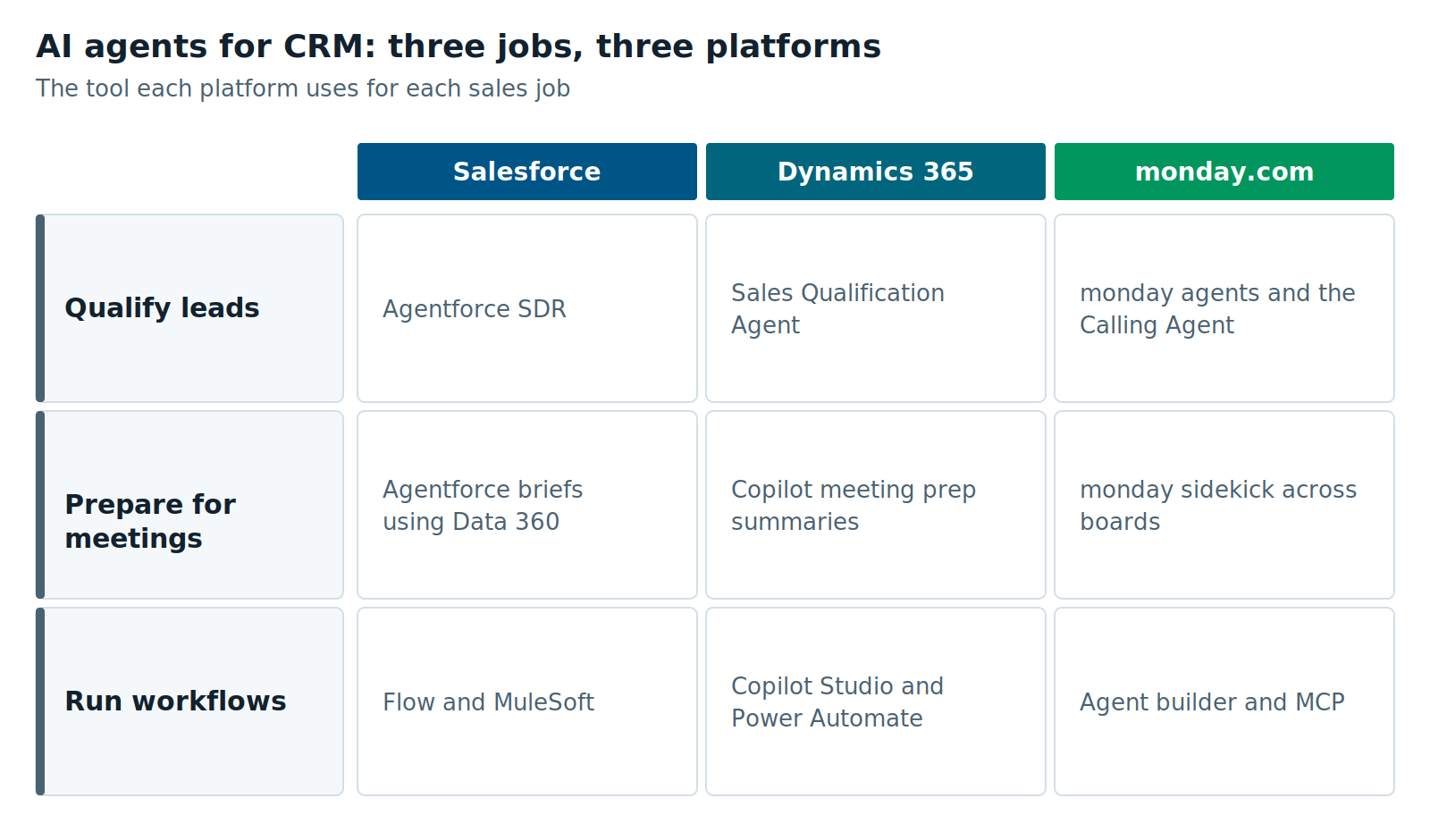
Figure 1: AI agents for CRM compared across Salesforce, Dynamics 365, and monday.com for three sales jobs
How AI Agents for CRM Qualify Leads
All three platforms can now research a new lead and decide if a seller should follow up. They differ in how far the agent goes on its own. Some agents only research. Others talk to the lead directly before handing off.
Salesforce: the Agentforce SDR
Salesforce calls it Agentforce for Sales Development, and most teams call it the Agentforce SDR. SDR stands for sales development representative, the person who does first outreach. Salesforce’s implementation guide lists email, web, mobile, WhatsApp, and Slack as channels.
The agent contacts inbound leads and answers their questions. It sends follow-up nudges when a lead goes quiet. When a lead is ready, it books a meeting or hands off to a seller. You decide what the agent may discuss and when it must stop.
Dynamics 365: the Sales Qualification Agent
Microsoft’s lead agent is the Sales Qualification Agent in Dynamics 365 Sales. It is built on Copilot Studio, Microsoft’s tool for building agents. It runs in one of two modes:
- Research only. The agent researches each lead and drafts emails. A seller reviews and sends them.
- Research and engage. The agent emails leads independently and continues the conversation. It hands off when the lead meets your criteria.
You can move from research only to research and engage later, but not back to research only. Engage mode also needs Dynamics 365 is connected to Exchange so the agent can send and read email. Microsoft announced general availability in October 2025.
monday.com: agents in monday.com CRM
monday.com offers ready-made agents in monday.com CRM. One is a Calling Agent, an AI voice agent for lead qualification and outreach calls. You can also build your own agent by describing it in plain words.
monday.com says each agent runs on rules you define, has a review step before it acts, and logs every action. That makes monday.com agents a good fit for teams that want people to approve the work at first.
Salesforce and Dynamics 365 can let an agent hold a full email conversation with a lead. monday.com puts a review step in front of agent actions by default.
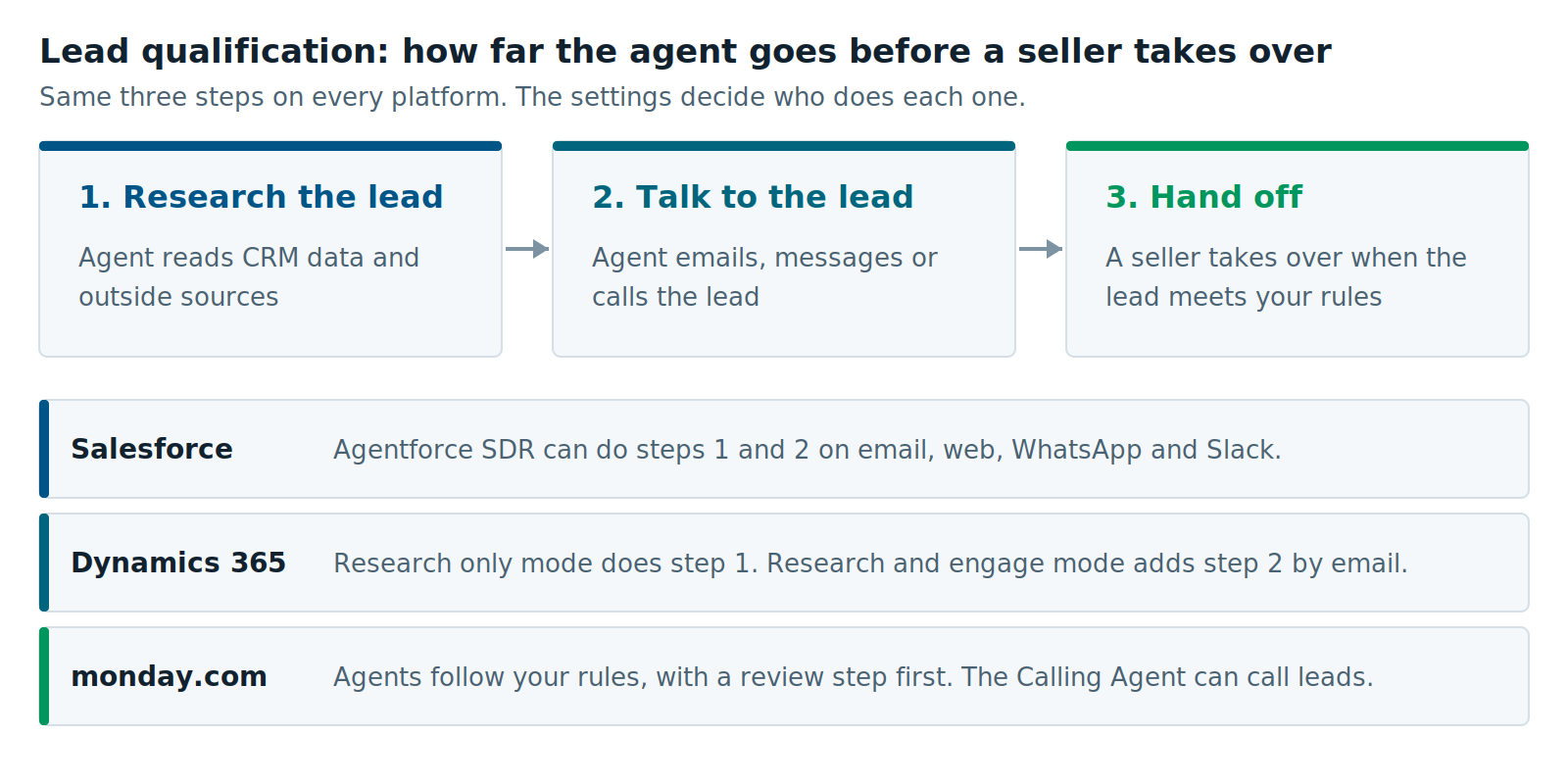
Figure 2: Set the handoff point first. It matters more than which platform you pick.
How AI Agents Prepare Sellers for Meetings
All three platforms can build a short brief before a sales call. The brief pulls together recent emails, open issues, and account history. What differs is where the data comes from.
Salesforce. Agentforce gathers account and customer data before each meeting. Salesforce describes summaries that show priorities, open items, and next steps. It draws on Data 360, Salesforce’s data platform, and both sales and service records. So a seller sees open support cases before the call.
Dynamics 365. Copilot in Dynamics 365 Sales includes meeting prep summaries, lead and opportunity summaries, and email summaries. Microsoft lists these as Copilot features included on its Dynamics 365 Sales pricing page. For broader company research, Microsoft 365 Copilot has a separate tool called Copilot Cowork. It needs a Microsoft 365 Copilot license.
monday.com Sidekick is the AI assistant for monday.com. It works across boards, docs, and people. It can also connect to Gmail, Outlook, and Slack. That helps when sales notes, onboarding status, and open tickets live on different boards.
Before you judge meeting prep, check where your account data lives. An agent can only brief a seller on data it can reach.
How Each Platform Runs Multi-Step Sales Workflows
A workflow agent does several steps in a row across systems without a person passing work along. Each platform uses its own automation engine to do these tasks. The engine you already know is usually the fastest place to start.
Salesforce agents use Flow, Salesforce’s automation tool, to take action. Data 360 gives them account context. Large companies often add MuleSoft to reach systems outside Salesforce.
Dynamics 365 agents are built and extended in Copilot Studio. They use Power Automate to run steps and Dataverse to store data. That keeps them close to Teams, Outlook, and the rest of Microsoft 365.
monday.com agents can create and update items, assign owners, change statuses, and draft messages. Per monday.com’s help center, they cannot delete items or data from a board. You can also connect outside tools through MCP. MCP, the Model Context Protocol, is an open standard that lets AI tools talk to other software.
| Salesforce | Dynamics 365 | monday.com | |
|---|---|---|---|
| Lead agent | Agentforce SDR | Sales Qualification Agent | monday.com agents, including the Calling Agent |
| How it reaches leads | Email, web, mobile, WhatsApp, Slack | Phone calls and email | |
| Meeting prep | Agentforce briefs using Data 360 | Copilot meeting prep summaries | monday.com sidekick across boards and apps |
| Automation engine | Flow, MuleSoft | Copilot Studio, Power Automate | Agent builder, MCP, monday.com vibe |
| Who usually builds agents? | Admins and developers | Admins and makers | Business users and admins |
How AI Agents for CRM Are Priced
All three vendors charge for agent use on top of seat licenses. Each one uses its own meter, so compare cost per task, not list price. These numbers change often, so check them with the vendor before you buy.
- Salesforce sells Flex Credits. Salesforce lists them at $500 per 100,000 credits, and a standard action uses 20 credits, about $0.10. A per-conversation option and per-user licenses also exist. See Agentforce pricing.
- Dynamics 365 agents need Copilot credits to run. Microsoft includes 1,000 Copilot Credits with each Dynamics 365 Sales Premium license. You can purchase additional credits as needed.
- monday.com runs agent actions using AI credits included with paid plans, and you can top up your credits. Its help center says agent credit use began on June 8, 2026, for Pro plans and below.
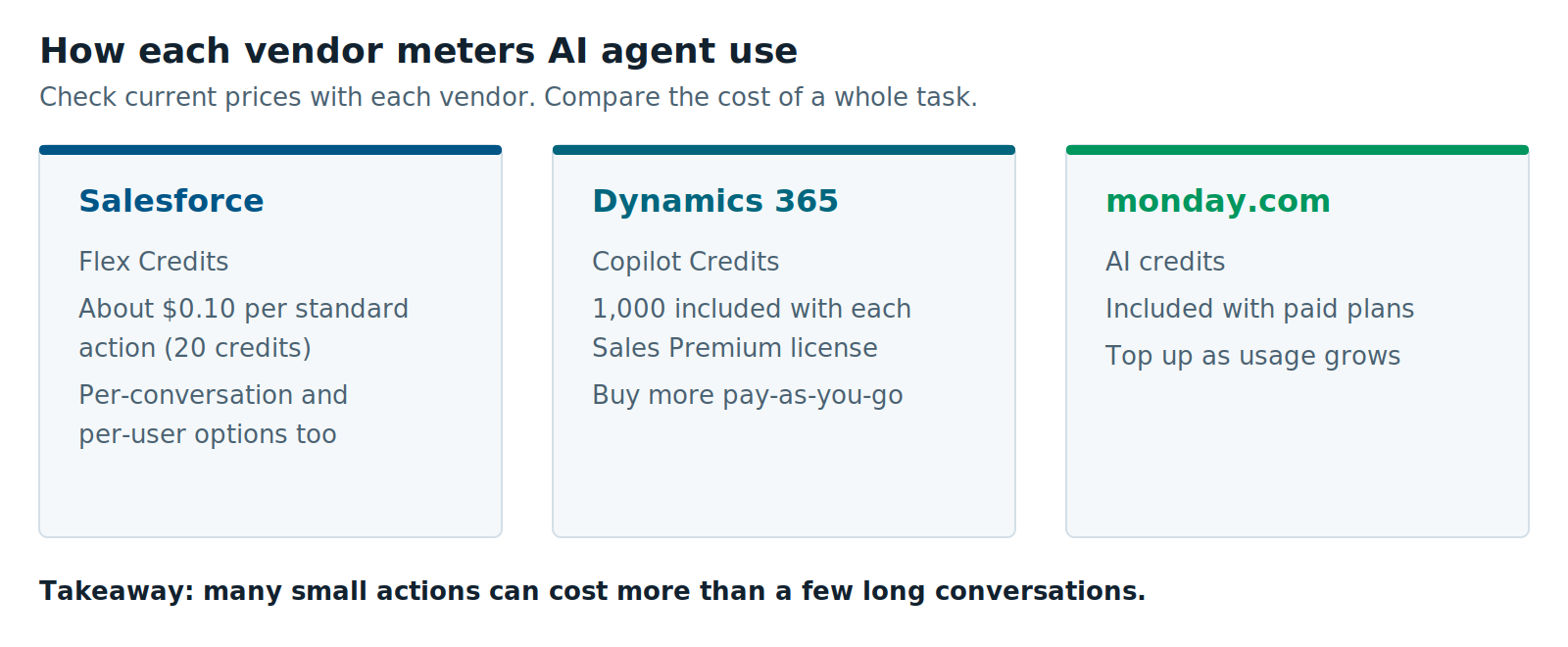
Figure 3: Three vendors, three meters. Estimate actions per task before you compare.
A busy agent that takes many small actions can cost more than one that holds a few long conversations. Count actions per task before you sign.
Which Platform Fits Your Sales Team?
The best fit is usually the platform your sellers already live in. Switching CRMs to get a better agent rarely pays off. Use the guide below if you are choosing for the first time or already run more than one.
Salesforce Agentforce fits if:
- You run a large sales team that reaches leads on several channels.
- Your customer data already lives in Salesforce and Data 360.
- You have admins or partners who can build and test Flow-based actions.
Dynamics 365 Sales is a fit if:
- Your company runs on Microsoft 365, Teams, and Outlook.
- You want a clear switch between research only and full outreach.
- Your team already builds in Power Platform.
monday.com fits if:
- You want sales leaders, not just IT, to build and change agents.
- Sales, onboarding, and delivery share boards and need a single view.
- You want people to review agent actions while trust builds.
Each platform also has limits. Salesforce and Dynamics 365 need more setup and admin skills before an agent goes live. monday.com is quicker to start, but it has fewer built-in sales features for complex enterprise deals.
When Not to Deploy AI Agents for CRM Yet
Occasionally the right answer is to wait. An agent works on top of your CRM data and rules. If those are weak, the agent repeats mistakes faster, in front of customers.
Hold off if any of these are true:
- Your lead data is messy. Duplicate records and missing fields lead to wrong outreach.
- Nobody owns the handoff rules. An agent needs clear criteria for when to take over.
- Lead volume is low. If sellers already reach every lead quickly, usage fees may cost more than they save.
- Sellers don’t use the CRM yet. An agent can’t fix adoption. Fix that first.
- Outreach rules are strict in your industry. Start in research-only or review mode until legal and compliance sign off.
Start with one agent, one team, and one job. Keep a person approving actions until the results hold up for a few weeks.
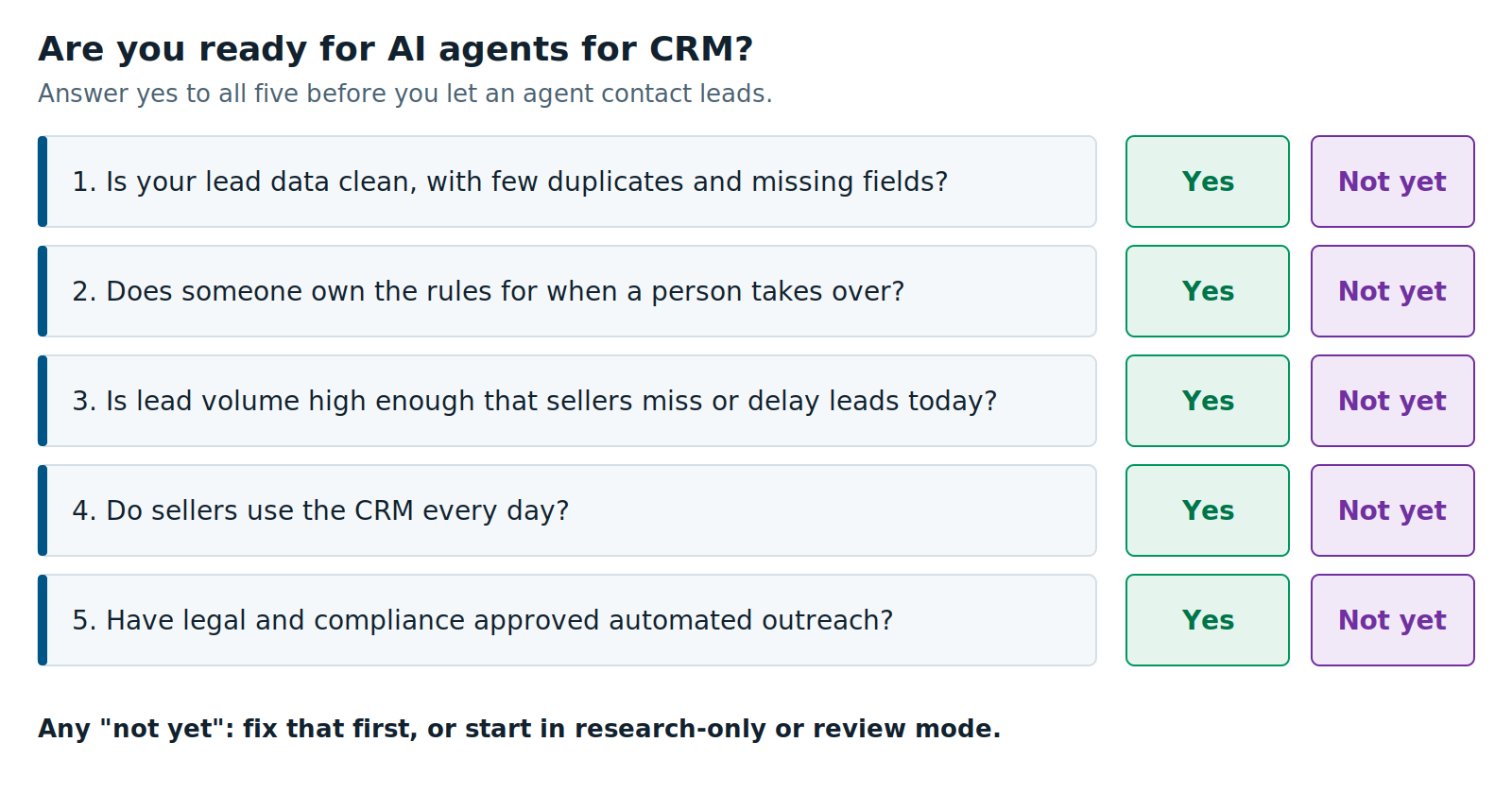
Figure 4: If you answer no to any question, fix that first.
How to Get Started with AI Agents for CRM
Start small and measure. Pick one job, such as first response to inbound leads. Set the handoff rules, then run the agent in its most cautious mode. Compare results against your current process before you widen it.
XTIVIA partners with Salesforce, Microsoft, and monday.com, and we implement all three. If you want help choosing or setting up AI agents for CRM, see our CRM services or start with a CRM assessment. You can also read more on each platform:
- The Reality of Salesforce Agentforce in 2026
- Orchestrating a digital workforce in Dynamics 365
- Implementing monday.com AI with XTIVIA’s strategic guardrails
Further Reading
- Agentforce for Sales Development Implementation Guide from Salesforce
- Dynamics 365 Sales pricing and agent access from Microsoft
- AI Agents on monday.com from the monday.com help center
Navigating a CRM implementation on your own can be overwhelming. Our certified CRM experts make the process clear, efficient, and aligned with your business goals.
XTIVIA provides comprehensive, long-term strategic partnership beyond standard consulting. Our flexible CRM Admin On-Demand service customizes, scales, and continuously aligns your environment with your operational goals, from initial deployment to ongoing optimization.
Contact us today and let us help you get the most from your CRM.