
Last reviewed: October 8, 2026
SUMMARY:
- Content Understanding uses a generative model and Document Intelligence uses trained models. Consequently, confidence scores from either platform cannot be treated as actual predicted accuracy without prior calibration.
- A 0.9 from Content Understanding and a 0.9 from Document Intelligence are different claims, so never choose between their answers by raw confidence.
- Score every field as correct, incorrect, or missing, because a confident wrong answer usually costs more downstream than an empty one.
- Both services cost about a penny per document in our tests, so review time, not list price, drove the real cost.
- Accurate calibration requires a representative dataset consisting of at least 30 verified field responses—evaluated by unique source documents rather than duplicate scans—to establish a reliable confidence curve.
Table of Contents
- Content Understanding vs Document Intelligence: How They Differ
- Why a Confidence Score Is Not Predicted Accuracy
- Why a 0.9 From Each Service Means Something Different
- Correct, Incorrect, or Missing: Score Three Outcomes, Not One
- How Big a Corpus Do You Need to Calibrate Confidence?
- Content Understanding vs Document Intelligence Pricing
- Content Understanding vs Document Intelligence Latency
- Content Understanding vs Document Intelligence: Which Should You Choose?
Content Understanding vs Document Intelligence: How They Differ
Content Understanding vs Document Intelligence is a choice between two Microsoft Azure services that pull fields out of documents. Fields are values like names, dates and totals. Document Intelligence mostly uses trained models: prebuilt ones for common documents like IDs and invoices, or custom ones you train on labeled samples. Content Understanding uses a generative AI model that follows a written description of each field.
The two take different paths when a field comes back wrong. A prebuilt Document Intelligence model has no setting for how it reads a field. You train a custom model instead, or handle the field in your own code. With Content Understanding, you can often fix the field by rewriting its description. Microsoft’s Content Understanding best practices recommend exactly that: refine descriptions first, add labeled examples second.
Setup effort differs too. A Document Intelligence custom model needs labeled samples of each layout. Content Understanding can classify and extract with no labeled data at all. Neither one removes the need for a test set, though. To know how well either service works, you need scored documents: real documents where you already know the right values.
We tested both services side by side on real documents in a recent client project. Our tests compared Content Understanding with Document Intelligence’s prebuilt models. This article shares what we learned about confidence, cost and speed. XTIVIA is a Microsoft partner, so we have a stake in Azure. We have no stake in which of these two services you pick.
 A confidence score from Content Understanding or Document Intelligence is not a predicted accuracy. It becomes one only after you calibrate it against documents you have already scored.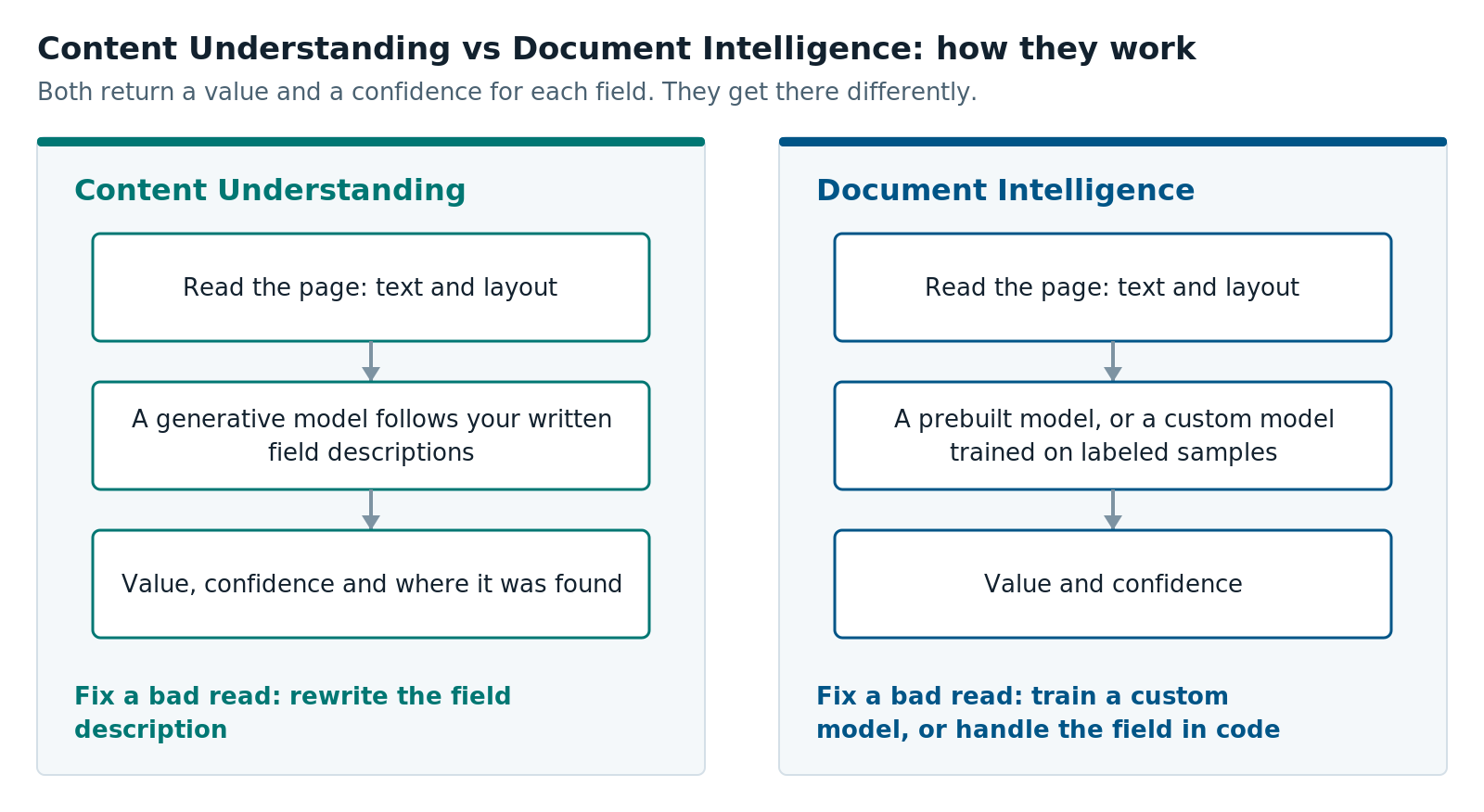
Why a Confidence Score Is Not Predicted Accuracy
A confidence score tells you how sure the model is. It doesn’t tell you how often the model is right on your documents, and the gap between the two can be large.
Microsoft describes Document Intelligence field confidence as an estimated probability: a 0.95 should be right about 19 times out of 20. That is most likely to hold when your documents look like the ones the model learned from. Real uploads often don’t. Phone photos, glare and unfamiliar layouts all make the score less reliable. Microsoft’s Content Understanding guidance makes a similar point. Its sample confidence thresholds are illustrations, and it tells you to set your own by experiment.
So we stopped treating confidence as the answer and started treating it as an input. For each service and each field, we fit a curve that turns a confidence score into the chance the answer is right. We call that chance predicted accuracy. Fitting the curve is called calibration: adjusting a score so that “80%” really means right about 80% of the time. The scikit-learn guide to probability calibration explains the common methods.
Each curve also had to earn its place. On documents it had never seen, it had to predict better than two simple baselines:
- The raw confidence score, taken at face value.
- The field’s right rate: the share of that field’s answers that were right, ignoring confidence.
Where a curve didn’t beat both, we used the field’s right rate instead. That answer is less precise, but it doesn’t claim more than the data shows.
Confidence can also be high on a wrong answer. One pay stub layout labeled its deductions row “Net Pay.” Both services read the deductions total as the net pay, with confidence near 0.9. A simple arithmetic check caught it: gross pay minus deductions didn’t equal the net pay they read. Confidence didn’t catch it. Rewriting the field description fixed Content Understanding. The prebuilt Document Intelligence model had no equivalent setting.
Why a 0.9 From Each Service Means Something Different
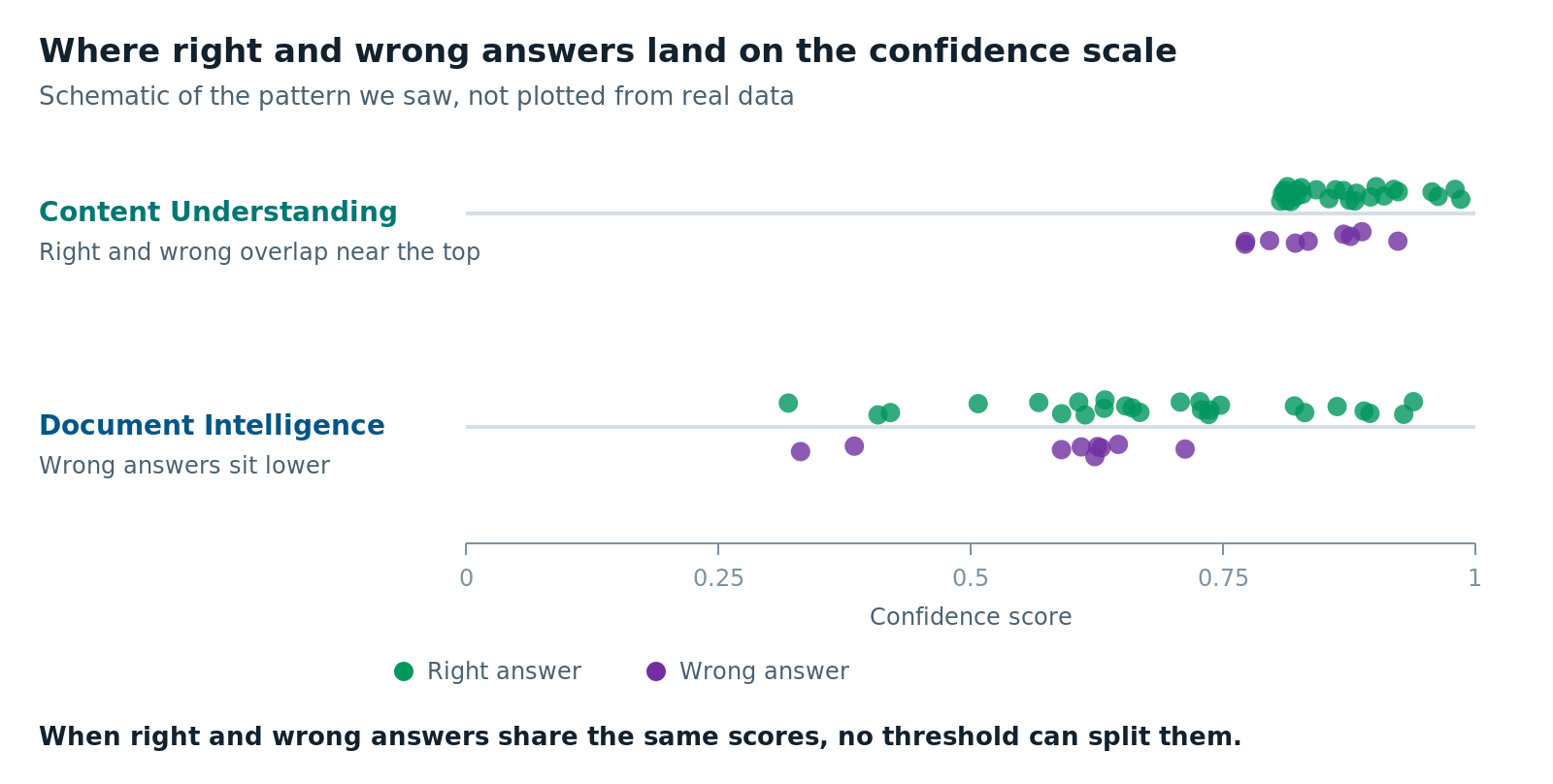
A 0.9 from Content Understanding and a 0.9 from Document Intelligence are not the same claim. The two services produce confidence in different ways, so their scores sit on different scales.
We first saw this in an early test on a small set of identity cards. Content Understanding’s scores bunched near the top: its average confidence was 0.90 on right answers and 0.85 on wrong ones. That gap is small, so the score did little to tell right answers from wrong ones. Document Intelligence’s scores were lower and more spread out: 0.68 on right answers and 0.49 on wrong ones.
Our larger test set confirmed the pattern. Document Intelligence’s wider gap made its confidence more useful. We had ten fields per service with enough answers to test. On seven of them, Document Intelligence’s confidence separated right answers from wrong ones by more than chance would explain. Content Understanding’s did on three. On the rest, there were too few wrong answers to tell either way.
That doesn’t make Content Understanding’s confidence meaningless. It means you need more scored documents to learn what it’s telling you.
This matters whenever you put the two services’ scores side by side. A higher number from one service doesn’t mean a likelier answer than a lower number from the other.
Correct, Incorrect, or Missing: Score Three Outcomes, Not One
Every field has three possible outcomes, not two. The service can be correct, it can be incorrect, or it can be missing, meaning it returns no value at all. A single accuracy number lumps wrong and empty together, and those two failures cost very different amounts.
An abstain is a visible problem. The field is empty, so someone looks at it. A wrong answer is an invisible problem. It looks just like a right one, and it can flow straight into your system of record.
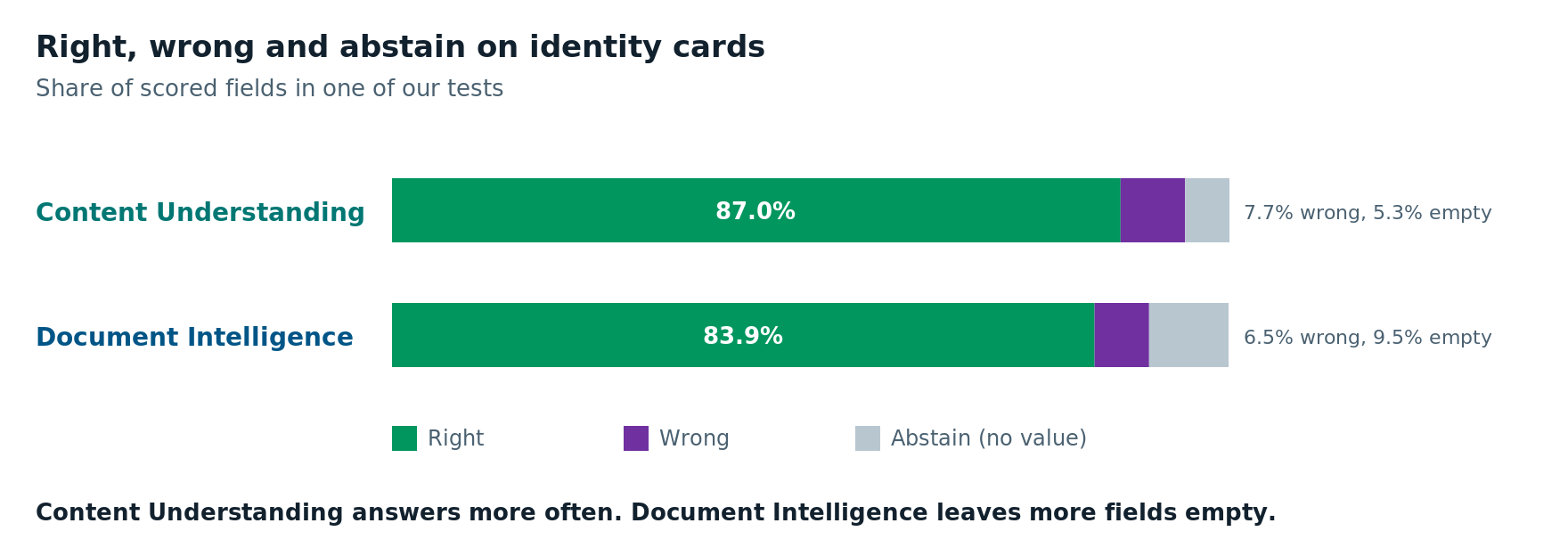
The two services failed in different ways. Here is what we saw on identity cards:
| Outcome | Content Understanding | Document Intelligence |
|---|---|---|
| Correct | 87.0% | 83.9% |
| Incorrect | 7.7% | 6.5% |
| Missing | 5.3% | 9.5% |
Content Understanding was right about 3 percentage points more often, but it was also wrong slightly more often. Document Intelligence left almost twice as many fields empty. Bank statements showed the same pattern, more strongly. Content Understanding was right on 73% of fields to Document Intelligence’s 63%, and Document Intelligence left 26% empty to Content Understanding’s 11%.
Which service is better depends on what each failure costs you, so price each outcome separately. An empty field sent to review costs a few seconds of someone’s time. A wrong value nobody catches usually costs more.
One caveat: sometimes empty is the right answer, because the field isn’t on the document. Your scored documents need to record that, or a correct abstain scores as a miss.
How Big a Corpus Do You Need to Calibrate Confidence?
Our working floor was 30 scored answers per field, and fields that are rarely wrong need more. A corpus here means your collection of scored documents. Calibration learns from mistakes. A field that is almost always right needs many documents before it shows enough wrong answers to learn from.
We followed five rules:
- Count documents, not copies. Several photos or scans of one document are not independent. Counting them separately makes your sample look bigger than it is.
- Score on held-out documents. Fit each curve on one set of documents and measure it on another. A curve scored on the documents it was fit on looks better than it will in production.
- Treat small samples as anecdotes. We flagged any document type with fewer than 10 scored documents as a low sample.
- Check for overlap before you set a threshold. Compare the lowest confidence on any right answer with the highest on any wrong one. If those ranges overlap, no single cutoff catches every wrong answer without also flagging right ones. The more they overlap, the less a threshold helps.
- Label without the model’s answer in view. Our labeling form starts blank. A labeler who sees the model’s guess tends to agree with it, and then the model is grading itself.
Expect to clean your scored values too. Values from a system of record don’t always match what is printed on the document. A form might print “CA” where the database says “California.” Unless you normalize both sides first, a correct read scores as wrong.
Recalibrate whenever something changes. A new model version, a rewritten field description or a new document source can all shift the scores. Record the versions behind every result so you know which curve applies.
Content Understanding vs Document Intelligence Pricing
For comparable work, Content Understanding vs Document Intelligence pricing comes out close per page, but the two bills are built differently. Document Intelligence charges a flat rate per page, set by the model you use. Content Understanding charges per page to read and prepare the document, plus the generative model’s tokens, which bill separately.
Here are Document Intelligence list prices from Microsoft’s pricing page (US East, pay as you go, October 2026):
| Document Intelligence model | Price per 1,000 pages |
|---|---|
| Read (text only) | $1.50 |
| Custom classification | $3 |
| Prebuilt models (ID, invoice, receipt and others) | $10 |
| Custom extraction | $30 |
Content Understanding has more moving parts. Microsoft’s pricing explainer breaks it into three:
- Content extraction: reading the page. Microsoft’s examples use $5 per 1,000 pages for layout.
- Contextualization: preparing the content for the model, then adding confidence scores and source locations. This costs $1 per 1,000 pages at the standard rate.
- Model tokens: billed on your own Microsoft Foundry model deployment, not on the Content Understanding meter.
The third line is easy to miss. The Content Understanding bill shows only part of the cost, and the model’s share appears on the model deployment’s bill. Microsoft’s own invoice example works out to about $8 per 1,000 pages in total. Microsoft also suggests starting with a smaller “mini” model to keep the token share down.
In our tests, both services cost about a penny per document. List price didn’t separate them.
People did. Say a reviewer takes 15 seconds to fix one field and costs $30 an hour. That fix costs 12.5 cents, more than ten API calls. So measure total cost per correct field, including review time, not just cost per page.
Content Understanding vs Document Intelligence Latency
Content Understanding and Document Intelligence took about the same time per document in our tests. In our larger test run, both averaged roughly 8 to 12 seconds per document, depending on the document type. Neither service was faster across the board.
In our tests, both services had a median of about 7.5 seconds. But the median didn’t tell the whole story. The median is the middle value: half the calls were faster, half slower. Document Intelligence stayed close to its median. Content Understanding split into two groups. Most calls finished in 4 to 11 seconds. About 40% took 37 to 42 seconds, with nothing in between.
That kind of split matters more than any single number. A median hides the slow calls, and a 95th-percentile figure hides the fast ones. The slow calls also weren’t about the documents. When we reran the same documents, the slow group followed the order of the requests, roughly every other call, not the files themselves. That points to request scheduling in the service or our test setup. Our larger run’s averages suggest the slow group didn’t come back there. Either way, look at the full spread before you set timeouts or promise turnaround times.
If people wait on the result, plan for the slow calls, not the median.
Content Understanding vs Document Intelligence: Which Should You Choose?
Choose field by field, and only after you have scored your own documents. In our tests, neither service won everywhere. Each one did better on different fields and different document types.
Lean toward Content Understanding when:
- Your layouts vary or change often. It works from field descriptions, so a new layout doesn’t need new training data.
- You want a way to fix errors yourself. Rewriting a field description fixed a mistake that the prebuilt model had no setting for.
- Empty fields are your bigger problem. It answered more often in our tests.
Lean toward Document Intelligence when:
- A prebuilt model covers your document. IDs, invoices and receipts all have one.
- You need confidence scores you can act on. Its scores separated right answers from wrong ones more clearly in our tests.
- A wrong answer costs you far more than an empty one. It tended to leave a field empty rather than guess.
Don’t choose either one yet when:
- You don’t have a scored corpus. Without one, you can’t calibrate, and you can’t tell which service does better on your documents. Build the corpus first.
- A simple rule does the job. Some short codes, like a bank routing number, include a built-in check digit. Plain text reading with Document Intelligence Read, plus a validation rule, can handle them for less than either service’s field extraction.
Content Understanding vs Document Intelligence is not a contest with one winner. Whichever you choose, the most important step is the same: score your own documents before you trust any confidence number.
Planning a document extraction project on Azure? Our AI solutions and Azure cloud services teams can help you build the test set first. For another example of sending low-confidence fields to people, see Transforming Microsoft Dynamics 365 into an AI-Powered Contract Command Center.
Further reading
- Interpret and improve model accuracy and confidence scores: Microsoft’s guide to Document Intelligence confidence
- Best practices for using Content Understanding: field descriptions and confidence thresholds
- Pricing for Azure Content Understanding: how the meters and model tokens add up
- Probability calibration: scikit-learn’s guide to calibrating classifier scores
Ben Kinsey is a Sr. AI Developer at XTIVIA and builds AI document processing on Azure. Talk to us.