
SUMMARY:
- Human review sampling is choosing which documents people check by hand, and that choice decides whether your OCR and fraud accuracy numbers are true or misleading.
- Reviewing only low-confidence or flagged documents finds errors to fix, but it can’t tell you how accurate the system is.
- Split documents into groups, pick at random inside each group, and record a weight for each pick so reviews add back up to an honest accuracy.
- Comparing two engines can take a few dozen labels, while proving an auto-accept threshold is safe can take hundreds per document type.
- For fraud checks, reviewing flagged documents measures false alarms but never missed fraud, so review a random sample of unflagged documents too.
Last reviewed: October 29, 2026
Table of Contents
- Why Human Review Sampling Decides What Your Accuracy Numbers Mean
- What Do You Need Human Review to Tell You?
- Why Reviewing Only Low-Confidence Documents Misleads You
- Human Review Sampling, Step by Step
- How Many Documents Should People Review?
- Human Review Sampling for Fraud Detection Accuracy
- How to Keep Review Labels Honest
- When Human Review Sampling Is Not Worth It
Why Human Review Sampling Decides What Your Accuracy Numbers Mean
Human review sampling is how you choose which documents a person checks by hand.
Reviewers can’t look at everything. So the documents you pick decide what you learn. A poorly chosen set can make a good OCR engine look broken, or a weak one look fine.
OCR (optical character recognition) here means any service that reads text and fields from a document image. We call each service an engine. Fields are values like names, dates, ID numbers and dollar amounts. For each field, the engine also returns a confidence score from 0 to 1, its own guess at how likely the reading is right. A label is the right value for a field, recorded by a person who looked at the document. You measure OCR accuracy by comparing the OCR output against labels.
The natural first move is to review the documents the system is least sure about. That’s a sensible way to catch mistakes. It’s a poor way to measure accuracy, because those documents aren’t typical.
We learned this on a recent document-processing project. The system read identity documents, pay stubs and other paperwork, mostly from phone photos. We ran two engines on the same documents and compared them: Azure AI Content Understanding and Azure AI Document Intelligence. When they gave different answers for a field, we call that field contested. We needed labels to answer several questions at once. Our first review lists answered one of them well and gave misleading answers to the rest.
This article shares how we now choose documents for review, for both OCR accuracy and fraud checks. It builds on our earlier article, Azure Content Understanding vs Document Intelligence: What Confidence Really Tells You. That one covers what to do with labels once you have them.
 The documents you send to human review decide what your accuracy numbers mean. Choose them for the question you need answered, and record how you chose them.
What Do You Need Human Review to Tell You?
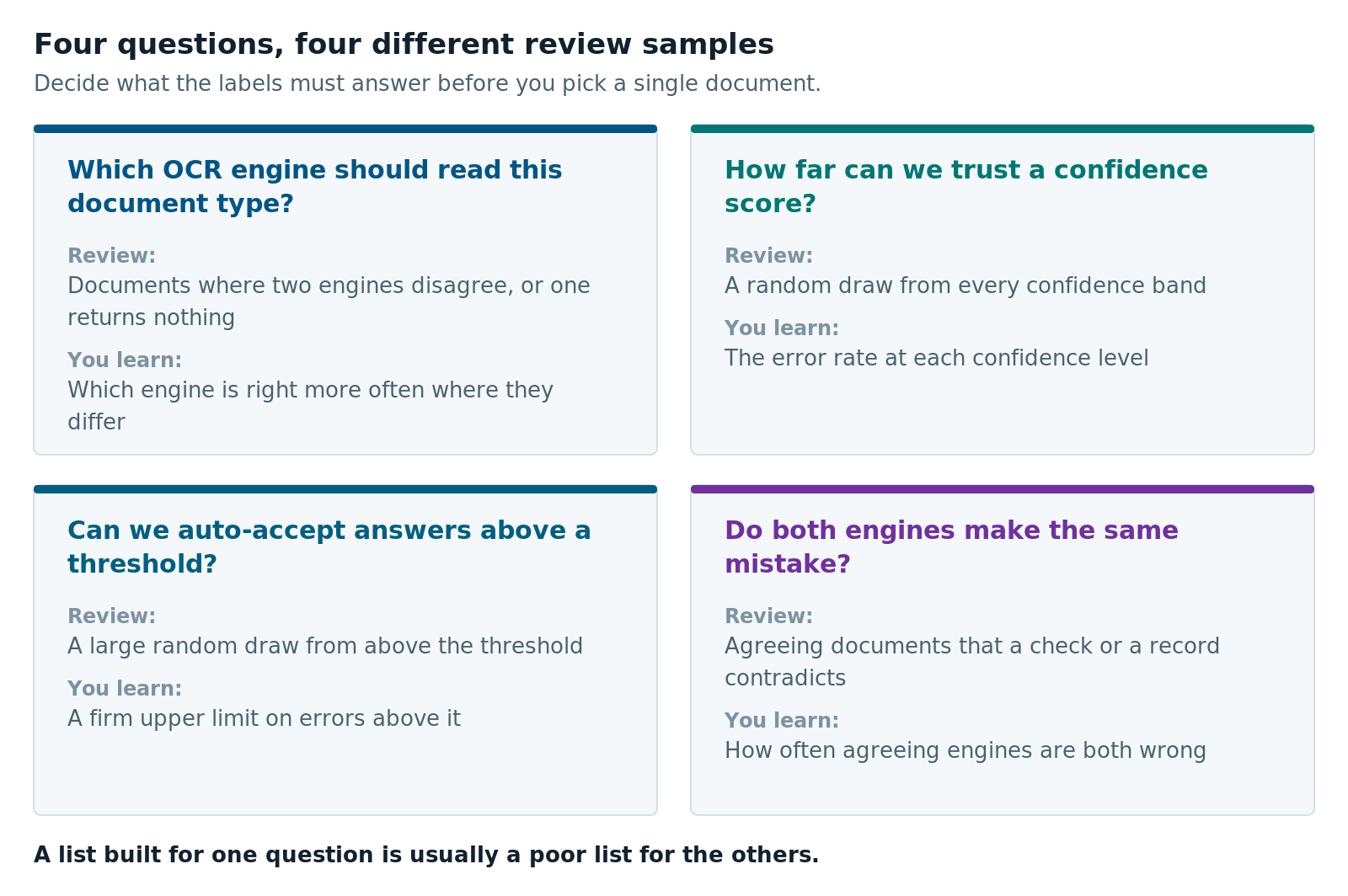
Human review can answer four different questions, and each one needs a different set of documents. Start with the decision the labels will support. A review list built for one question is usually a poor list for another. A confidence band is a range of scores treated as one group, such as every reading from 0.85 to 0.95. These are the four questions we kept coming back to:
| Question | What you need to know | What to review |
|---|---|---|
| Which OCR engine should read this document type? | Which engine is right more often where they differ | Fields where the two engines disagree, or one returns nothing |
| How far can we trust a confidence score? | The error rate in each confidence band | A random draw from every confidence band |
| Can we auto-accept answers above a threshold? | A firm upper limit on errors above it | A large random draw from above the threshold |
| Do both engines make the same mistake? | How often agreeing engines are both wrong | Agreeing fields that a validation rule or the system of record contradicts |
The first question is the cheapest to answer. When the two engines agree on a field, that field tells you nothing about which one is better. In one batch of driver’s licenses, the two engines read 1,450 fields we could compare against a system of record. That’s the business’s own database of what was entered for each customer, such as the license number on file. Only 76 fields had one engine right and the other wrong. Those 76 fields decided the comparison. Labeling the other 1,374 would have added nothing to it.
The other three questions need random draws. That’s where our first review lists went wrong.
Why Reviewing Only Low-Confidence Documents Misleads You
A review list made of the lowest-confidence or most disputed documents is a biased sample. It’s full of errors by design, so any accuracy you compute from it looks worse than the truth. It also skips the high-confidence documents, which is where the costliest mistakes hide.
We tested this. We had a full set of documents with values we already trusted, so we could compare a “most suspicious first” list against the real answer. At the same number of reviews, the ranked list understated accuracy by 15 to 58 percentage points. The gap depended on how many documents were reviewed. A random sample of the same size landed on the real answer, on average.
The high-confidence blind spot is worse. On driver’s licenses, one engine’s answers above 0.95 confidence were wrong 10% of the time. Its answers between 0.85 and 0.95 were wrong 6% of the time. A higher score did not mean a likelier right answer. An auto-accept threshold at 0.95 would have let through a band that was wrong more often than the band below it.
Those rates came from the system of record, not from reviewers, so treat them as a warning sign rather than a final number. The record holds what was on the customer’s application, not what the document says. A document can honestly differ from the application, for example after a move, so some of the “errors” aren’t engine mistakes at all. The engine comparison above holds up better, because both engines were scored against the same record. Even so, a list of low-confidence documents could never have shown the problem with the 0.95 band.
Some confident mistakes repeat across a whole layout. On one pay stub layout, both engines read the deductions total as the net pay, with confidence near 0.9. A simple arithmetic rule caught it: gross pay minus deductions should equal net pay, and here it didn’t. A review list built from low-confidence documents would not have.
Human Review Sampling, Step by Step
Build a human review sample with stratified sampling. Split documents into groups, pick at random inside each group, and record how many documents each pick stands for. Statisticians call the groups strata. This lets you over-sample rare, informative groups and still get honest accuracy numbers.
Here is the method we use:
- Group by what changes accuracy. We grouped by document type, OCR engine and confidence band. Add a group for documents with contested fields. Add another for documents that fail a validation rule, an automatic test of whether a value can be right. One example is a check digit: a character in an ID number, such as a bank routing number, that is calculated from the other characters. If a reading doesn’t produce the right check digit, at least one character is wrong. A pass doesn’t prove the reading is right, though.
- Give more picks to uncertain groups. A group that is wrong about half the time needs more labels than one that is almost always right. The standard rule is called Neyman allocation. It gives each group a share based on its size and how much its results vary. SAS’s survey sampling documentation describes it. Give every group at least two picks, so none goes unseen.
- Pick at random, but repeatably. We sort each group by a hash of the file name and a fixed seed, then take the top of the list. That behaves like a random draw, but the same inputs always give the same list. Anyone can rebuild it and check it.
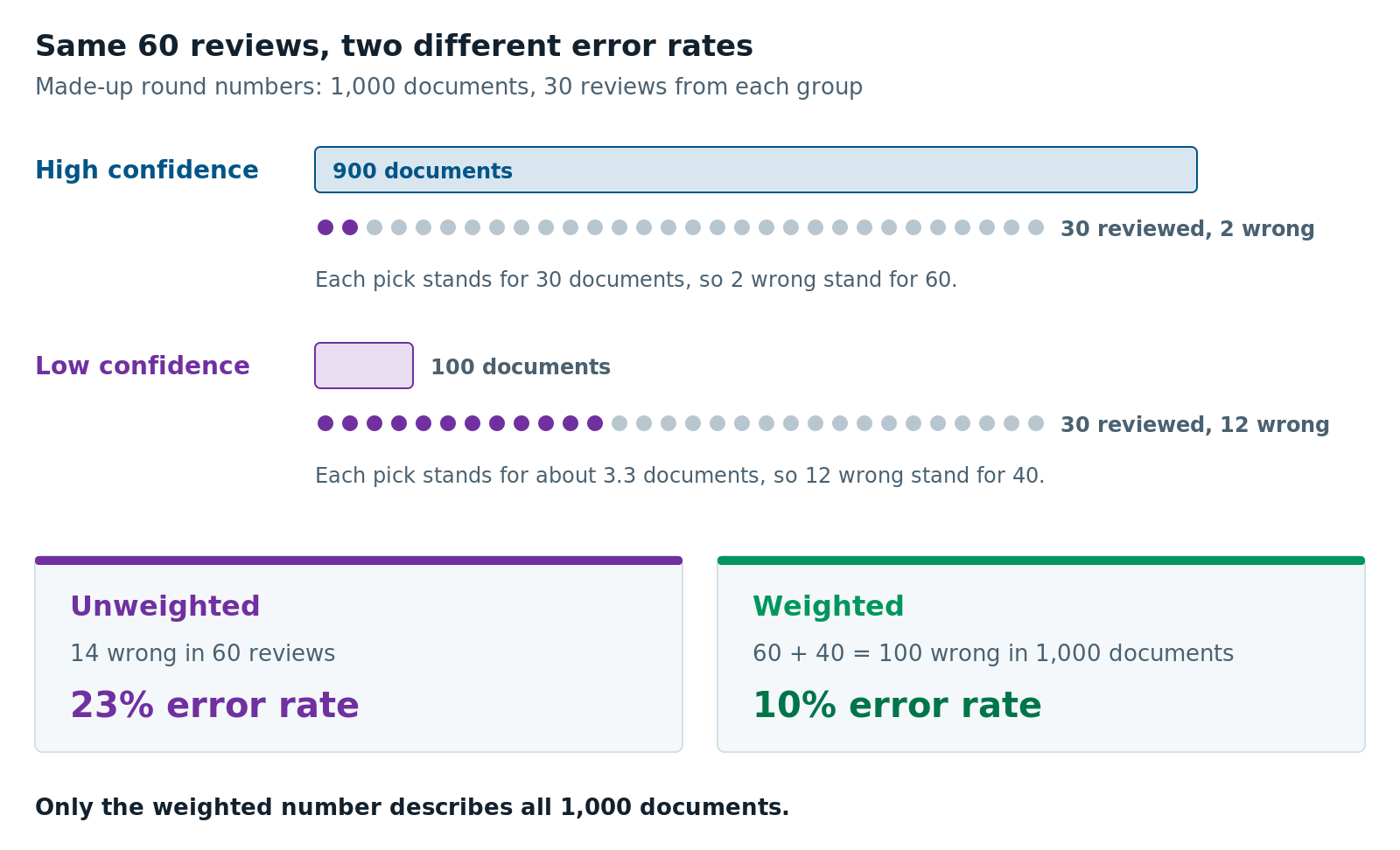
- Record a weight for every pick. The weight is the group’s size divided by the number of picks from it. If you take 30 picks from a group of 900, each pick stands for 30 documents.
- Mix the groups in the review order. Take one document from each group in turn. If reviewers stop halfway, every group still has labels.
- Cap the picks per customer. Limit how many documents come from one customer’s file. Otherwise 15 picks can turn out to be one person’s paperwork.
Weights are what turn a lopsided sample back into an honest number. Here is a simple example with made-up round numbers. You have 1,000 documents: 900 high confidence and 100 low confidence. You review 30 from each group. Reviewers find 2 errors in the high group and 12 in the low group.
- Unweighted, that’s 14 errors in 60 reviews, a 23% error rate.
- Weighted, each high-confidence pick stands for 30 documents, so 2 errors stand for 60. Each low-confidence pick stands for about 3.3 documents, so 12 errors stand for 40. That’s 100 errors in 1,000 documents, a 10% error rate.
One more lesson: let judgment define the groups, not pick the documents. An AI agent or a person choosing documents one by one makes a list nobody can rebuild, with no weights. It also drifts toward vivid cases. Use judgment to spot a failure pattern, such as photos where the field isn’t visible at all. Turn that pattern into a group, then let the sampling pick.
How Many Documents Should People Review?
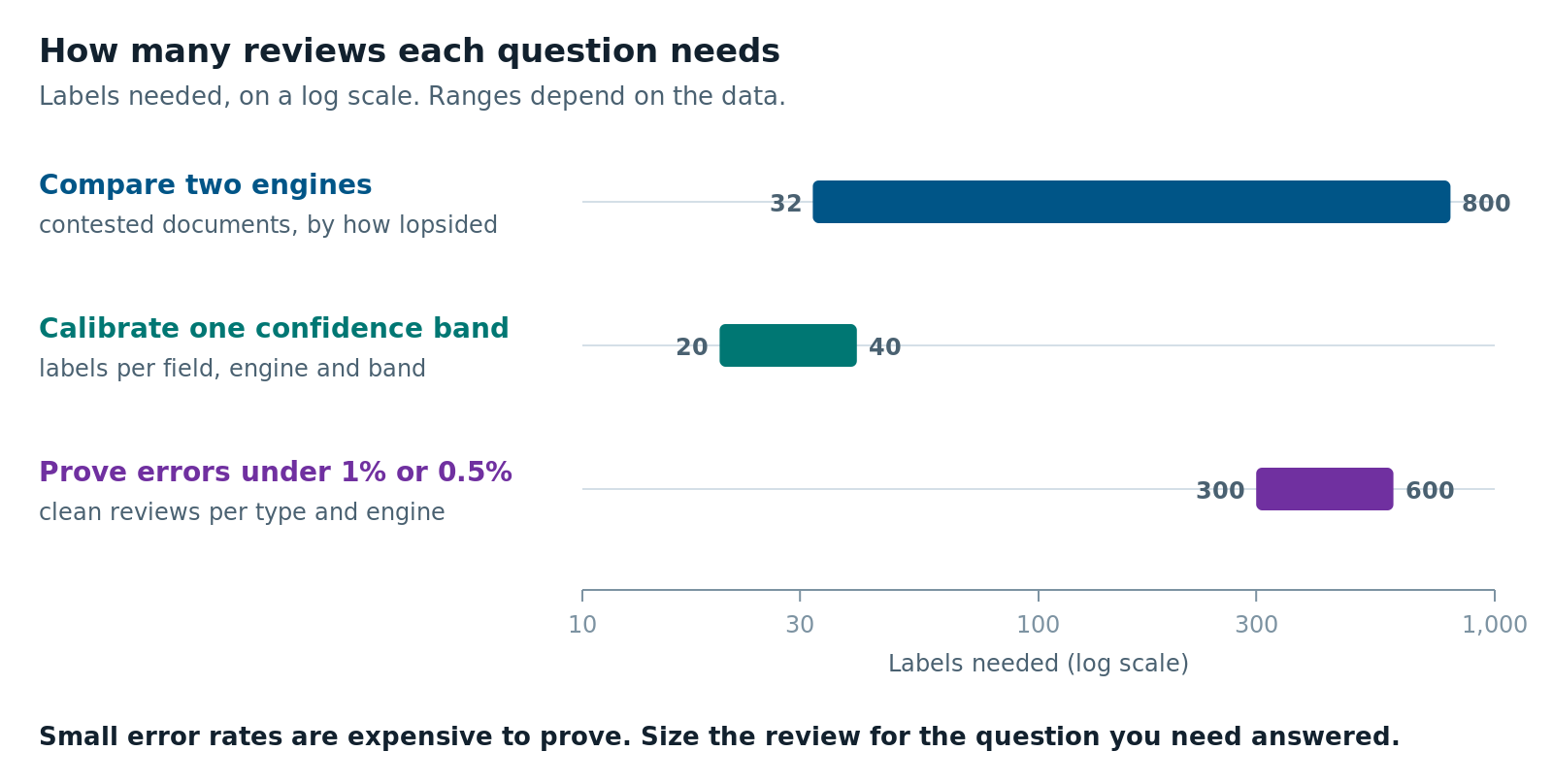
The number depends on the question. Comparing two engines can take a few dozen labels. Trusting a confidence score takes 20 to 40 labels per field and confidence band. Proving an auto-accept threshold is safe can take hundreds per document type.
Comparing engines. Count only the fields where one engine is right and the other is wrong. If one engine wins 75% of those, you need about 32 of them to be confident it’s better. If it wins 60%, you need about 200. At 55%, you need about 800. These come from a common planning formula: 8 ÷ (2p − 1)², where p is the winner’s share. The rule also tells you when to stop labeling. In our driver’s license batch, one engine won 49 of the 76 contested fields, about 64%. The formula plans for about 100 fields at that share, but you can stop sooner when the result is already clear. A split that lopsided would happen by luck less than 1 time in 50, so the winner is real. The edge is just small.
Trusting confidence scores. Say you want the error rate in one confidence band to within about 15 percentage points. You need about 20 labels in that band if it’s usually right, and about 40 if it’s wrong half the time. That’s per field and per engine. Common fields fill up fast, because one labeled document covers many fields. Rare fields, like an address that appears on only a few document types, need their own batch.
Proving an auto-accept threshold. Small error rates take many labels to prove. If you review n documents above a threshold and find no errors, you can be 95% sure the true error rate is no higher than about 3 ÷ n. This is known as the rule of three, explained in a short statistical note in the BMJ. To show an error rate below 1%, you need about 300 clean reviews per document type and engine. Below 0.5% takes about 600.
Many document types won’t have that many documents. That’s still a useful answer. It’s better to say “we can’t prove an error rate below 2% for this type yet” before anyone spends the review budget.
Human Review Sampling for Fraud Detection Accuracy
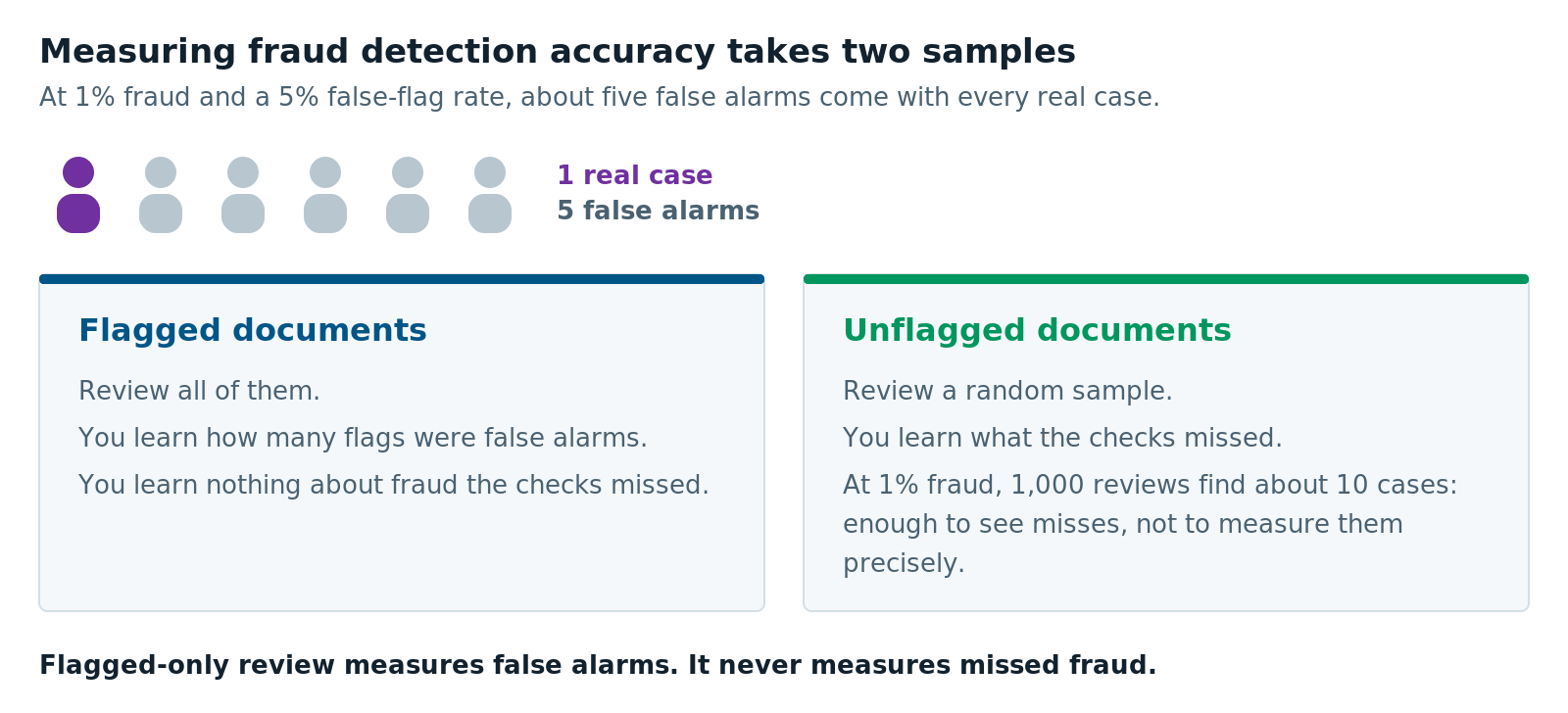
Fraud checks need a different review sample, because fraud is rare. If reviewers only look at flagged documents, you learn how many flags were false alarms. You never learn how much fraud the checks missed.
The arithmetic is harsh. Suppose 1% of documents are fraudulent and a check wrongly flags 5% of clean ones. In 1,000 documents, that’s about 10 real cases and about 50 false flags. That’s five false alarms for every real one. Reviewers learn to ignore a check like that quickly, and then they miss the real cases too.
These practices helped us measure fraud detection accuracy:
- Test every new check on known-clean documents first. One image-quality check we tried rejected 18 of 59 known-good images, or 31%. We turned it off. A fraud check deserves the same test before it reaches a reviewer.
- Review a random slice of unflagged documents. It’s the only way to estimate missed fraud. Be realistic about the cost: at a 1% fraud rate, 1,000 random reviews find about 10 cases. That tells you misses happen. It won’t give you a precise miss rate.
- Make every flag something a reviewer can confirm by looking. A failed check digit, an expired date or the word “SPECIMEN” takes seconds to confirm or dismiss. Sample ID images posted online are often stamped “SPECIMEN,” so seeing it on an upload means someone may have used one. Each of those decisions becomes a label. A vague “this looks altered” score can’t be checked that way, so it never builds a track record.
- Show flags to reviewers, even early. We once recorded flags without showing them to anyone. Nobody confirmed or dismissed them, so they never became labels. A reviewer’s decision is what creates the label.
Two warnings. First, you can’t make realistic fake fraud to test against. You can simulate blur or glare, because those are known effects. Synthetic forgeries mostly teach a detector to find synthetic forgeries.
Second, be careful how you order the review queue. Ranking documents by how suspicious they look is a fraud score by another name, and you can’t check that score until you have labels. Order by facts anyone can verify, like how long a file has waited or whether it’s complete. Use flags as filters. Rankings also spread any skew in their inputs. An intake channel is the route a document arrives by, such as a web upload or an email attachment. In our project, one channel stripped photo metadata, the hidden details a phone saves with a picture, like when it was taken and on what device. Any ranking that used metadata would have pushed that whole channel up or down the queue. Some channels serve mostly one group of customers, such as people who apply in a store rather than online. When that happens, a ranking quirk becomes a fairness problem.
How to Keep Review Labels Honest
A label is only as good as the way it was made. A perfect sample still gives wrong numbers if reviewers copy the engine or one document counts twice. Old labels that outlive the engine they measured do the same. Six habits kept our labels honest:
- Start the review form blank. Show the engine’s reading in a separate panel, and make accepting it a deliberate click. A reviewer who sees the engine’s guess tends to agree with it. Then the engine is grading itself.
- Record where each label came from. A label accepted from one engine’s output scores that engine right by default. Report accuracy with and without those labels, and trust the independent number when they differ.
- Count documents, not copies. Two photos of one pay stub are one document. Counting both makes the sample look bigger than it is.
- Record the engine version behind every result. When the engine changes, the confidence scores shift. That includes its instructions: newer AI-based OCR takes field descriptions or prompts that tell it what to extract, and editing them changes the results. Results from the old version no longer apply, so run the labeled documents through the new version and score them again.
- Don’t treat agreement as truth. Two engines that agree can both be wrong, as the pay stub case showed. Keep a small group of agreeing documents in every sample.
- Save the seed and the weights with the list. Then anyone can rebuild the sample and check your numbers.
When Human Review Sampling Is Not Worth It
Careful sampling isn’t always worth the effort. Skip it, or keep it light, in these cases:
- You’re fixing errors, not measuring them. If the goal is to clean up today’s batch, review the most suspicious documents first. A ranked list is the right tool for that job.
- A rule can settle the field. Some fields check themselves. A check digit, or a pay stub that has to add up, catches many errors without a reviewer. In our project, 62 high-confidence readings failed one field’s check digit, and none of them were right. Validate fields like that in code, and spend reviews elsewhere.
- Your volume is small. If you only get a few hundred documents a month, review them all and skip the statistics.
- You have no independent truth. If the only “truth” is what one engine said, or what a customer typed into a form, labels built on it will flatter some answers. Fix the source of truth first.
Human review sampling comes down to one habit. Decide the question first, then choose the documents that answer it, and write down how you chose them. Microsoft’s own guidance on Document Intelligence accuracy and confidence suggests using confidence to decide what to accept and what to send for human review. The sample you review is what tells you whether that cutoff is safe.
Planning a document-processing or fraud-check project? Our AI solutions team can help you design the review sample before the first label. For another example of sending low-confidence fields to people, see Transforming Microsoft Dynamics 365 into an AI-Powered Contract Command Center.
Further reading
- Interpret and improve model accuracy and confidence scores: Microsoft’s guide to confidence and human review in Document Intelligence
- PROC SURVEYSELECT: Neyman Allocation: how to split a review budget across groups
- Probability of adverse events that have not yet occurred: a statistical reminder: the BMJ’s short explanation of the rule of three, free on PubMed Central
- Azure Content Understanding vs Document Intelligence: What Confidence Really Tells You: calibrating confidence once you have labels
Ben Kinsey is a Sr. AI Developer at XTIVIA and builds AI document processing on Azure. Talk to us.