

By Pavan Malpani, Fabric Practice Delivery Lead, XTIVIA
Last reviewed: October 29, 2026
SUMMARY:
- Many Fabric governance anti-patterns come from assuming a control does more than it does, or switching on tools before deciding what to protect.
- Sensitivity labels, data loss prevention and domains each have documented limits, so check where each one stops before you rely on it.
- Restricting access on day one can lock out your own engineers, so start in simulation mode and with guests only.
- Fix oversharing before Copilot or Fabric data agents go wide, because they answer with each user’s existing access.
- Fix the anti-patterns in order: decide what matters, get coverage, enforce carefully, then organize ownership.
Table of Contents
- What Are Fabric Governance Anti-Patterns?
- Fabric Governance Anti-Pattern #1: Buying Tools Before Deciding What to Govern
- Fabric Governance Anti-Pattern #2: Labels Published but Never Applied
- Fabric Governance Anti-Pattern #3: Trusting Labels to Protect Data Everywhere
- Fabric Governance Anti-Pattern #4: Restricting Access on Day One
- Fabric Governance Anti-Pattern #5: Assuming DLP Scans Everything
- Fabric Governance Anti-Pattern #6: Endorsement Nobody Controls
- Fabric Governance Anti-Pattern #7: Domains That Don’t Change Who Owns Anything
- Fabric Governance Anti-Pattern #8: Treating the OneLake Catalog and Purview as Either-Or
- Fabric Governance Anti-Pattern #9: Rolling Out AI Before Fixing Oversharing
- Fabric Governance Anti-Pattern #10: Audit Logs Nobody Reads
- How to Find Your Own Fabric Governance Anti-Patterns
- When Not to Fix Every Fabric Governance Anti-Pattern at Once
What Are Fabric Governance Anti-Patterns?
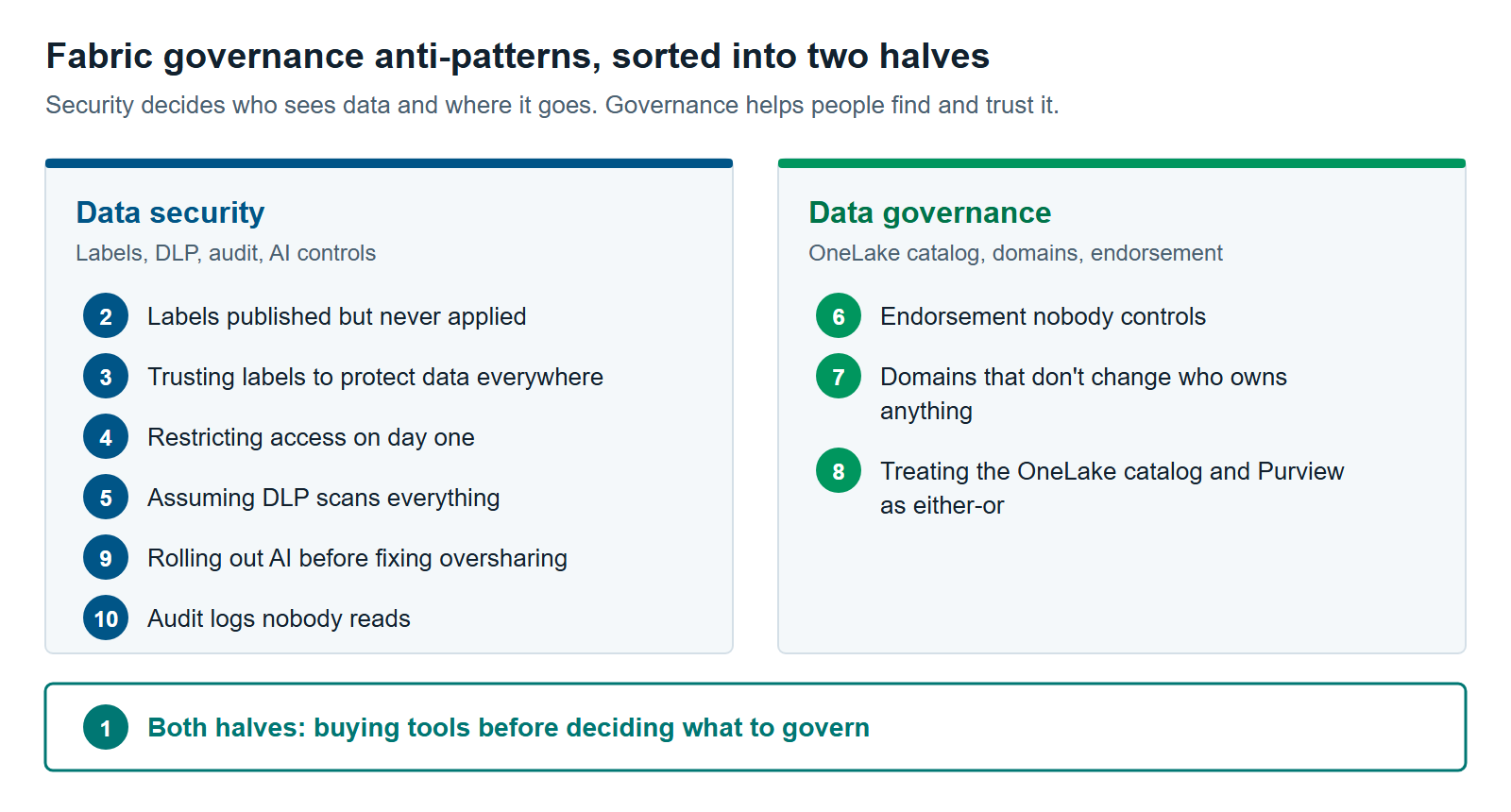
Fabric governance anti-patterns are common ways that governance in Microsoft Fabric looks finished but doesn’t protect data. Most come from one of two habits. Teams assume a control does more than it does, or they switch on tools before deciding what matters.
Governance in Fabric has two halves. The data security half decides who can see sensitive data and where it can go. It uses sensitivity labels, data loss prevention (DLP) and audit, mostly from Microsoft Purview, Microsoft’s data security and governance product. The data governance half helps people find data, know who owns it and trust it. It uses Fabric’s OneLake catalog, domains and endorsement, plus Purview Unified Catalog when data spreads beyond Fabric.
This article covers the governance layer. For platform problems such as naming, capacity and version control, read The 12 Most Common Microsoft Fabric Anti-Patterns We See Across Every Assessment. Its anti-patterns on data ownership and tenant settings pair well with this list.
 Many Fabric governance failures aren’t missing tools. They’re tools trusted to do something they were never built to do.
Fabric Governance Anti-Pattern #1: Buying Tools Before Deciding What to Govern
This anti-pattern starts with licenses and settings instead of a business problem. Teams turn on labels, DLP and a catalog everywhere at once. Nobody can say which data matters most, so every control is set to the same level and none of them are tuned.
Gartner predicts that 80% of data and analytics governance initiatives will fail by 2027. Its reason is that most lack a real or “manufactured” crisis to rally around (Gartner, February 2024). Microsoft’s own Fabric guidance agrees. It says to find “the areas of greatest risk” first, then add policies a little at a time (Microsoft Learn).
The fix. Name one business outcome before you configure anything. Examples: pass next year’s audit, stop customer data leaving in exports, or give finance one trusted revenue number. Then pick the two or three data sets that outcome depends on. Govern those first.
Fabric Governance Anti-Pattern #2: Labels Published but Never Applied
Here, the compliance team publishes sensitivity labels, but most Fabric items stay unlabeled. A sensitivity label is a tag such as “Confidential” that tells people and systems how to handle an item. Labels only help when they’re on the data, and manual labeling rarely gets there on its own.
Fabric gives you three ways to raise coverage (Microsoft Learn):
- A default label goes on new items when nobody picks one. For lakehouses and other non-Power BI items, it applies only when the item is created through a clear create dialog, or when its name or description is edited in the item’s flyout menu.
- Mandatory labeling stops people saving an item without a label. Microsoft says it’s fully supported for Power BI items only.
- The admin label APIs set labels in bulk on items that already exist.
The fix. Set a default label, then label the backlog with the admin APIs, starting with lakehouses and warehouses. Track progress in the OneLake catalog’s Govern section. It shows the share of unlabeled items by item type, domain and workspace. The details are in Sensitivity Labels in Microsoft Fabric: How Inheritance Really Works.
Fabric Governance Anti-Pattern #3: Trusting Labels to Protect Data Everywhere
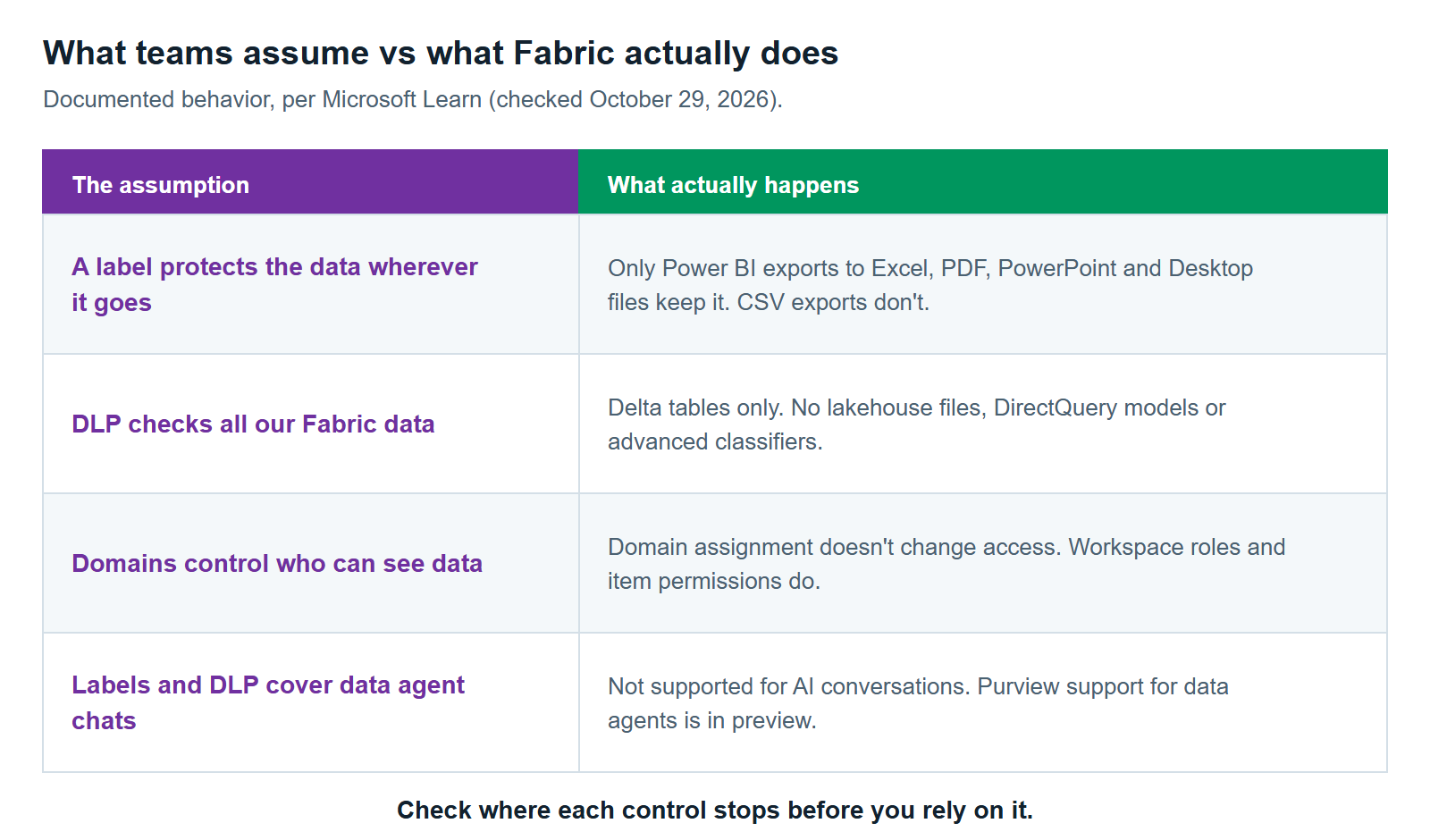
This anti-pattern treats a label as a lock. Inside Fabric, a label on its own is mostly a signal. Fabric permissions still decide who can open an item. A label controls access only through a protection policy, inside a Power BI Desktop file, or in a supported export (Microsoft Learn).
Three gaps catch people out:
- Exports. Excel, PDF, PowerPoint and Power BI Desktop files from Power BI items keep the label. CSV and text exports don’t. Other Fabric items don’t pass a label to exported files at all.
- Landing data. A lakehouse doesn’t inherit the label of the database it loads from. Inheritance from data sources works only for Power BI semantic models.
- Other tenants. Labels don’t control access for cross-tenant scenarios such as external data sharing.
The fix. Label data where it lands in Fabric, not just at the source. Block CSV and other unsupported exports where the data is sensitive. For your most sensitive label, add a protection policy so the label controls who can open the item.
Fabric Governance Anti-Pattern #4: Restricting Access on Day One
This anti-pattern switches on DLP’s restrict access action for everyone before anyone has seen what the policy matches. DLP finds sensitive data, such as credit card numbers, and acts on it. Restrict access removes access for everyone except the data owners or members of your organization, depending on the setting (Microsoft Learn).
The risk is your own team. Engineers who aren’t the item’s data owners can lose access to the data they maintain. So can the service principals that run pipelines and keep mirrored databases up to date. A service principal is an app identity that runs jobs without a person signed in. Restrict access is still marked preview on Microsoft Learn, with general availability rolling out in late 2026.
The fix. Run new policies in simulation mode first. Then use policy tips and alerts on a few pilot workspaces. Restrict guests before you restrict everyone. And name the workspace admin who will fix flagged data before you turn enforcement on. See Purview DLP for Fabric: Policy Tips, Restrict Access and What It Won’t Catch.
Fabric Governance Anti-Pattern #5: Assuming DLP Scans Everything
This anti-pattern reads a quiet DLP dashboard as proof that no sensitive data exists. DLP for Fabric has documented blind spots. A clean report can mean the policy never looked (Microsoft Learn).
The main limits are these:
- DLP checks data only in Delta tables. Files in a lakehouse aren’t covered.
- It skips semantic models that use DirectQuery or live connection, including mixed-storage models.
- It doesn’t run when a service principal publishes or refreshes a semantic model, or owns it.
- Advanced classifiers, such as exact data match and trainable classifiers, return no results in Fabric.
- It checks an item only when the item is published, refreshed or its data changes. A table nobody touches isn’t rechecked.
The fix. List the Fabric items that hold your sensitive data. Then check each one against these limits. Where DLP can’t see, use another control, such as a label with a protection policy, or tighter workspace roles.
Fabric Governance Anti-Pattern #6: Endorsement Nobody Controls
This anti-pattern leaves the trust badges in Fabric meaning nothing. Endorsement marks items as Promoted, Certified or Master data so people can find data they can rely on. Anyone with write access can promote an item. Only users a Fabric administrator names can certify one, and certification works only after an admin enables it (Microsoft Learn).
It goes wrong in two ways. Certification is never turned on, so the “trusted” signal is just whoever promoted their own work. Or the certifier list is so broad that the badge stops meaning anything.
The fix. Write a short certification standard. It should say what a certified item must have: an owner, a description, tested data and a refresh schedule. Name a small group of certifiers. You can delegate certification to each domain so the people who know the data make the call.
Fabric Governance Anti-Pattern #7: Domains That Don’t Change Who Owns Anything
This anti-pattern creates Fabric domains and expects them to settle ownership and access. A domain groups workspaces by business area, such as Finance or Sales. Microsoft is clear about its limit: domain assignment “doesn’t affect item visibility or accessibility” (Microsoft Learn). Workspace roles and item permissions still decide access.
Domains help when someone owns them. Microsoft suggests that domain admins be business owners or experts in the area. Domain admins can then set a default sensitivity label and their own certification rules for the domain.
The fix. Draw domains around how the business uses data, not around team names or tools. Give each one a business owner as domain admin. Then delegate that domain’s default label and certification settings to that owner. If you also use Purview governance domains, map the two once, on purpose. Governance Domains and Data Products: Mapping Fabric Domains to Purview walks through the options.
Fabric Governance Anti-Pattern #8: Treating the OneLake Catalog and Purview as Either-Or
This anti-pattern frames governance as a choice between Fabric’s built-in tools and Purview. Microsoft says the OneLake catalog “remains the primary experience for governing Fabric data,” even after you add Purview (Microsoft Learn). Purview adds protection, audit, risk and compliance coverage on top.
The either-or framing causes problems both ways. Some teams skip Purview and leave sensitive data unprotected. Others buy Purview Unified Catalog for data that lives only in Fabric. Then they run two catalogs nobody keeps in step.
The fix. Use the OneLake catalog for discovery, domains, endorsement and lineage inside Fabric. Add Purview security tools, such as labels and DLP, when you have sensitive data. Add Unified Catalog when your data, owners or definitions spread beyond Fabric. OneLake Catalog vs. Purview Unified Catalog: When Fabric’s Built-In Governance Is Enough has a five-question check.
Fabric Governance Anti-Pattern #9: Rolling Out AI Before Fixing Oversharing
This anti-pattern gives Copilot in Fabric and Fabric data agents to a wide audience before checking who can read what. A Fabric data agent answers plain-English questions about your data. It uses the asking person’s own permissions. So it doesn’t create new access, but it makes existing access much easier to use.
The usual controls don’t cover the chat itself. Microsoft marks sensitivity labels and DLP as not supported for Copilot in Fabric AI interactions, though DLP restrict access on the underlying data still limits what a data agent can query. Purview support for Fabric data agents and Copilots beyond Copilot for Power BI is still in preview (Microsoft Learn).
The fix. Tighten access on the data first, especially semantic models shared widely for one report. Then turn on Data Security Posture Management (DSPM) to capture and review AI activity. DSPM is the Purview tool that shows where sensitive data is at risk, including in AI conversations. Securing Fabric Copilot and Data Agents With Purview covers the full sequence.
Fabric Governance Anti-Pattern #10: Audit Logs Nobody Reads
This anti-pattern assumes that because activity is logged, someone is watching. Every Fabric user activity goes to the Microsoft Purview audit log (Microsoft Learn). But a log only helps if someone searches it, and if the records still exist when you need them.
Retention is the detail buyers miss. Audit (Standard) keeps records for 180 days. Keeping them longer, up to a year, needs an E5 license or an equivalent add-on for the users involved. Ten years needs a further add-on (Microsoft Learn). An investigation into something from last year can find nothing.
The fix. Agree how long you need records with legal and compliance, and license for it. Name who reviews what, and how often. A monthly look at label removals, large exports and sharing outside the company is a good start. Microsoft’s Fabric maturity model treats active analysis of activity logs as a sign of a capable governance program, not a basic one.
How to Find Your Own Fabric Governance Anti-Patterns
You can find most Fabric governance anti-patterns with tools you already have. Start in the OneLake catalog’s Govern section. It shows label coverage, DLP scan results, endorsement and description coverage, and sharing across your Fabric tenant (Microsoft Learn).
Then answer five questions:
- What business problem is governance solving this year? If nobody can say, start with Anti-Pattern #1.
- What share of lakehouses, warehouses and semantic models carry a label? The Govern section shows it.
- Which DLP policies restrict access, and who can lift a restriction?
- Who can certify items, and what must a certified item have?
- Who searched the audit log last, and how far back do records go?
Each answer that comes back as “nobody” or “we don’t know” points to an anti-pattern above. The Govern section refreshes its tenant-wide view once a day, and it’s still rolling out by region, so check that it’s live in your tenant.
When Not to Fix Every Fabric Governance Anti-Pattern at Once
Don’t try to fix every Fabric governance anti-pattern at once. Microsoft’s guidance warns that top-down mandates focused on control aren’t well received, and that long delays encourage workarounds. It recommends “the most lightweight governance model” that meets your needs (Microsoft Learn).
Some anti-patterns may not matter to you yet. Say all your data lives in Fabric, none of it is regulated and one team owns it. Then the OneLake catalog and a default label may be enough for now. Purview Unified Catalog, protection policies and strict DLP can wait until sensitive data arrives or an auditor starts asking.
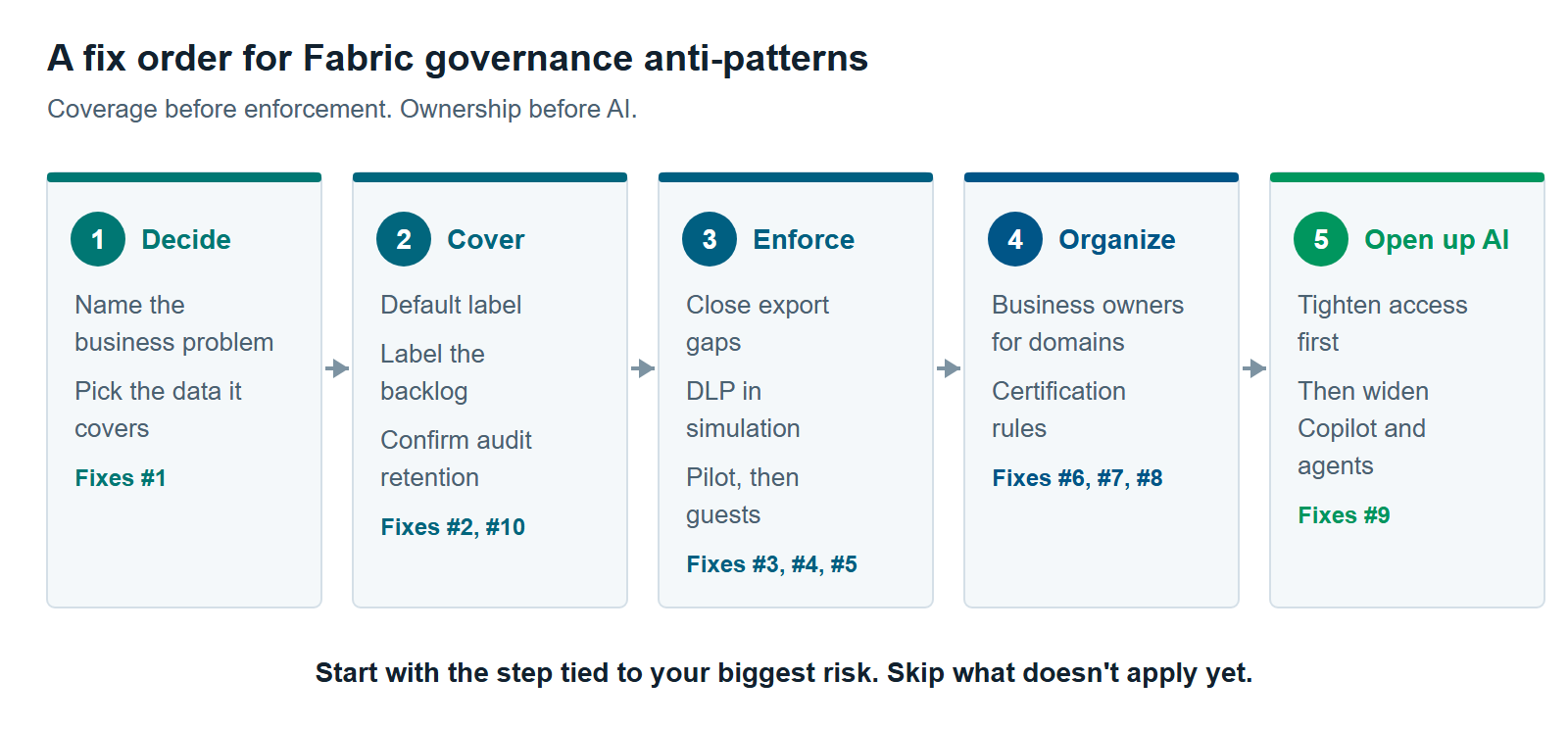
Here’s the order we recommend when you do start:
- Decide. Name the business problem and the data it covers (Anti-Pattern #1).
- Cover. Set a default label, label the backlog, and confirm audit retention (#2, #10).
- Enforce carefully. Close export gaps and run DLP in simulation, then on pilot workspaces (#3, #4, #5).
- Organize. Give domains business owners and set certification rules (#6, #7, #8).
- Open up AI. Widen Copilot and data agents once access is tight (#9).
In the interest of full disclosure, XTIVIA implements both Fabric and Purview for clients. Our Microsoft Fabric consulting and Microsoft Purview services teams can help you find and fix your Fabric governance anti-patterns. For the full map of Purview tools, start with Microsoft Purview for Fabric: A Practical Guide to Securing and Governing Your Data.
Further reading
- Information protection in Fabric — what labels do and don’t cover, item by item
- Get started with DLP for Fabric and Power BI — supported items, actions and limits
- Use Microsoft Purview with Microsoft Fabric — when Fabric is enough and when Purview adds value
- Microsoft Fabric adoption roadmap: Governance — Microsoft’s guidance on governance strategy and maturity
Pavan Malpani is the Fabric Practice Delivery Lead at XTIVIA. Talk to us.