
Last reviewed: October 3, 2026
SUMMARY:
- If you’re moving to Liferay from Sitecore, AEM or a custom build, build on Liferay CMS, the new Liferay headless CMS, not on Web Content.
- In 2026.Q1, Liferay put Web Content and five other content features into maintenance mode: still supported, but with no new features.
- Liferay says there’s no tool to move content from Web Content to Liferay CMS later, so landing on Web Content now means a second, manual migration.
- Before you commit, check the gaps that matter to you, such as staged publishing, older fragments, and features that rely on Liferay’s hosted services.
- Web Content is still fine for a mature Liferay implementation that isn’t changing soon.
Table of Contents
- What Changed in the Liferay Headless CMS in 2026.Q1
- What Maintenance Mode Means, and What It Doesn’t
- Why the Liferay Headless CMS Matters Most When You’re Arriving
- Mapping Sitecore and AEM Content to the Liferay Headless CMS
- Personalization and Segments After 2026.Q1
- AI Hub Is SaaS Only: What That Means If You Self-Host
- What to Check Before You Commit to the Liferay Headless CMS
- When Web Content Is Still Fine
- Next Steps for Your Liferay Headless CMS Plan
What Changed in the Liferay Headless CMS in 2026.Q1
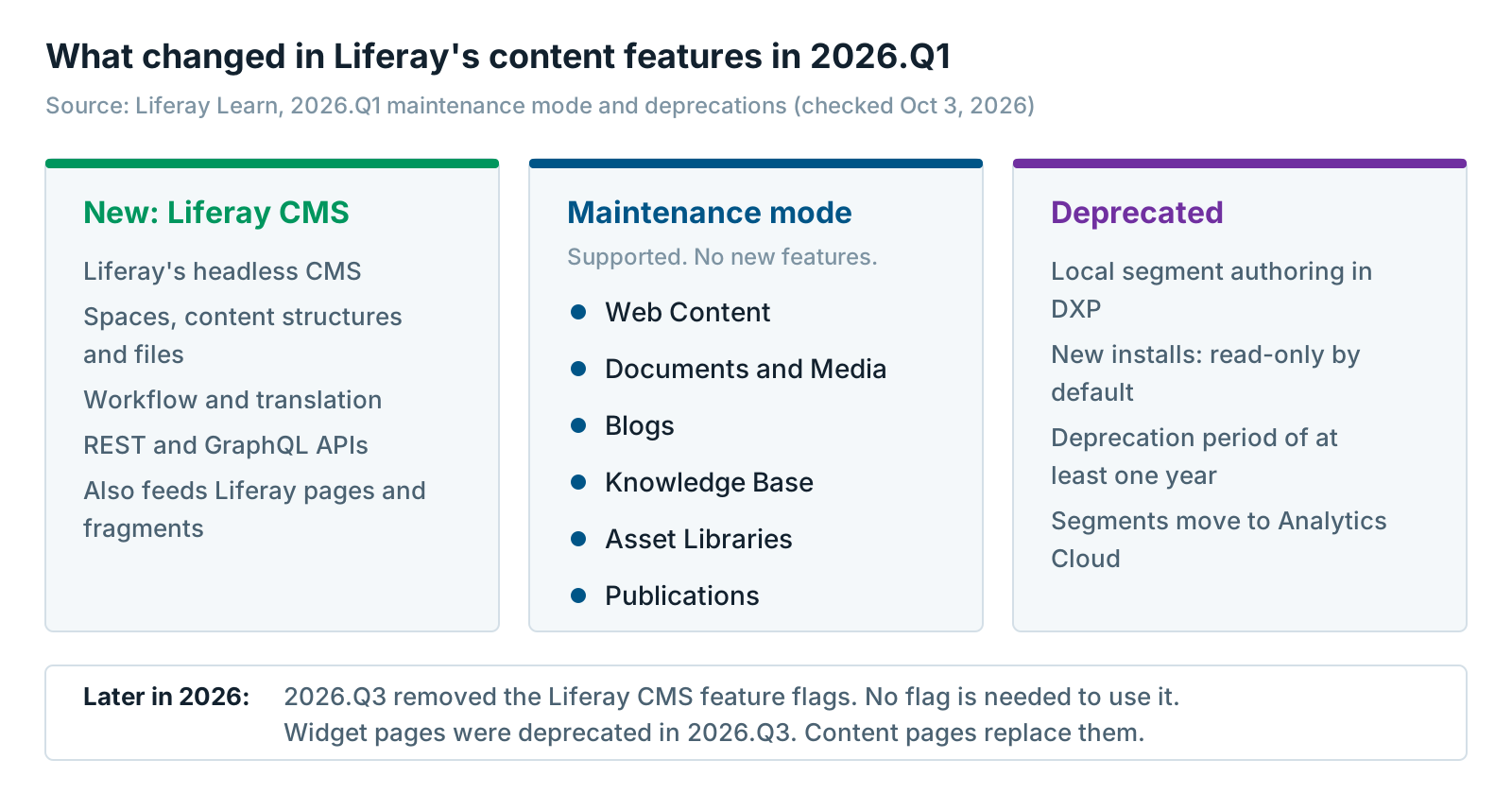
In 2026.Q1, Liferay released Liferay CMS, the new Liferay headless CMS. Content is stored as structured data and delivered through APIs. At the same time, Liferay moved six older content features into maintenance mode and deprecated one more.
Here’s what moved, according to Liferay’s 2026.Q1 maintenance mode and deprecations page:
- Maintenance mode: Web Content, Documents and Media, Blogs, Knowledge Base, Asset Libraries and Publications. For all but Publications, Liferay points to Liferay CMS as the way forward. Liferay hasn’t named a replacement for Publications.
- Deprecated: local segment authoring in Liferay DXP. New installations are read-only by default. Segments move to Liferay Analytics Cloud.
Liferay’s docs call the six older features the classic CMS. We’ll use that name here.
A headless CMS keeps content separate from the pages that show it. Your website, app or portal pulls the content through APIs. Liferay’s own documentation describes content “stored as structured, reusable data rather than static pages”, with REST and GraphQL APIs. Liferay CMS also feeds Liferay’s own pages and fragments, so you don’t have to build a separate front end.
The rollout came in steps. Liferay announced general availability on April 9, 2026, calling it “a fully headless content management system”. In 2026.Q1 and 2026.Q2, you turned it on with a release feature flag. In 2026.Q3, Liferay removed those feature flags and it’s live by default.
Already on Liferay? Read Liferay DXP 2026.Q1: Big Changes Are Coming to Features You Use Every Day. It covers each change for existing customers. This article is for teams arriving from somewhere else.
What Maintenance Mode Means, and What It Doesn’t
Maintenance mode means a feature is still supported but gets no new enhancements. Liferay still fixes bugs in it under its normal support policy. It doesn’t mean the feature is going away soon. Liferay hasn’t announced a removal date for any of the six.
Liferay’s own developer blog is clear on this. In What “Maintenance” Means for the Traditional Liferay CMS (March 20, 2026), Liferay says “support coverage remains the same”. It also says the classic CMS “is not about to move from Maintenance to Deprecated and then disappear”, and that it’s “a long-term horizon”.
So nobody needs to panic. Web Content works today, and it will keep working.
What maintenance mode does mean is that new work goes elsewhere. New content features, like the CMS dashboards in Liferay’s docs, are being built for Liferay CMS. The same blog post says new sites and projects should use Liferay CMS, because “that’s the future for Liferay”.
Why the Liferay Headless CMS Matters Most When You’re Arriving
The Liferay headless CMS matters most to teams arriving from Sitecore, AEM or a custom build, because they have nothing on Web Content yet. Their content has to move anyway. Moving it onto Liferay CMS is one content migration, just like moving it onto Web Content. Moving it twice costs far more.
Existing Liferay customers face a harder choice. They have years of Web Content structures, templates and pages to protect. For them, waiting can be the right call.
Arriving teams don’t have that problem. Three things are true for most of them:
- No installed base to protect. No Web Content templates, no Web Content editors to retrain.
- The budget is already approved. The migration is funded. Content modeling, extraction and testing are already in the plan.
- No tool for a later move. Liferay’s developer blog says “there is no migration tool because the systems are fundamentally different. Moving from one to the other is a manual effort.”
That last point decides it. If you land on Web Content in 2027, you’ll face a second content migration later. It’ll need its own modeling, mapping, testing and editor training. AI-assisted scripts may speed up that work, but it’s still a project.
Much of the “migrate to Liferay” advice online still describes Web Content structures and templates. Most of it was written before 2026.Q1. Check the date on anything you read.
 If you’re moving to Liferay from Sitecore or AEM, land once. Build on Liferay CMS, not Web Content. Otherwise you fund the same content migration twice.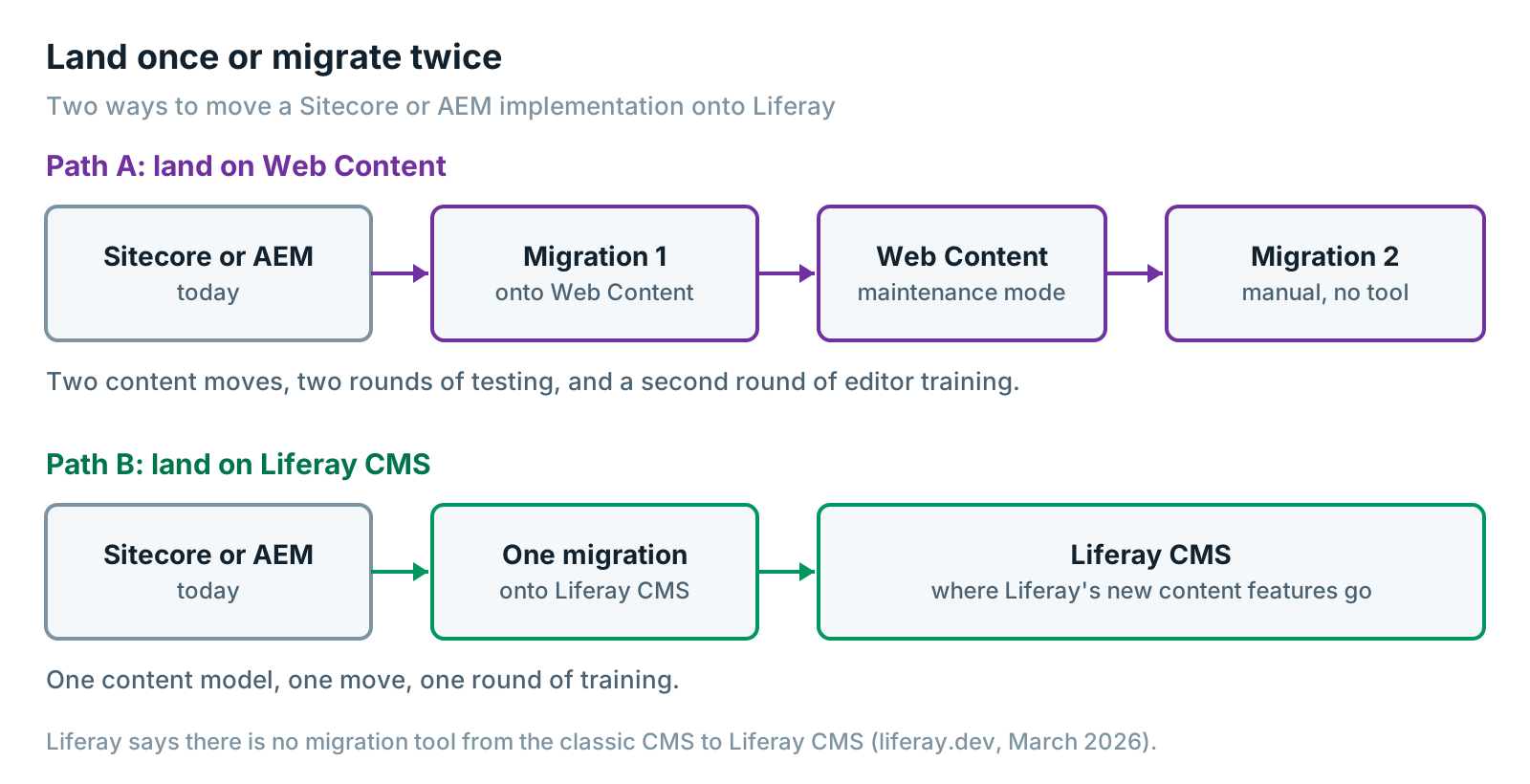
Still deciding whether Liferay is the right home at all? Start with When Your Marketing DXP Is Really Running a Portal. Then read Sitecore vs Liferay for Customer and Partner Portals or AEM vs Liferay for Portals: What to Do With the Login Side of AEM.
Mapping Sitecore and AEM Content to the Liferay Headless CMS
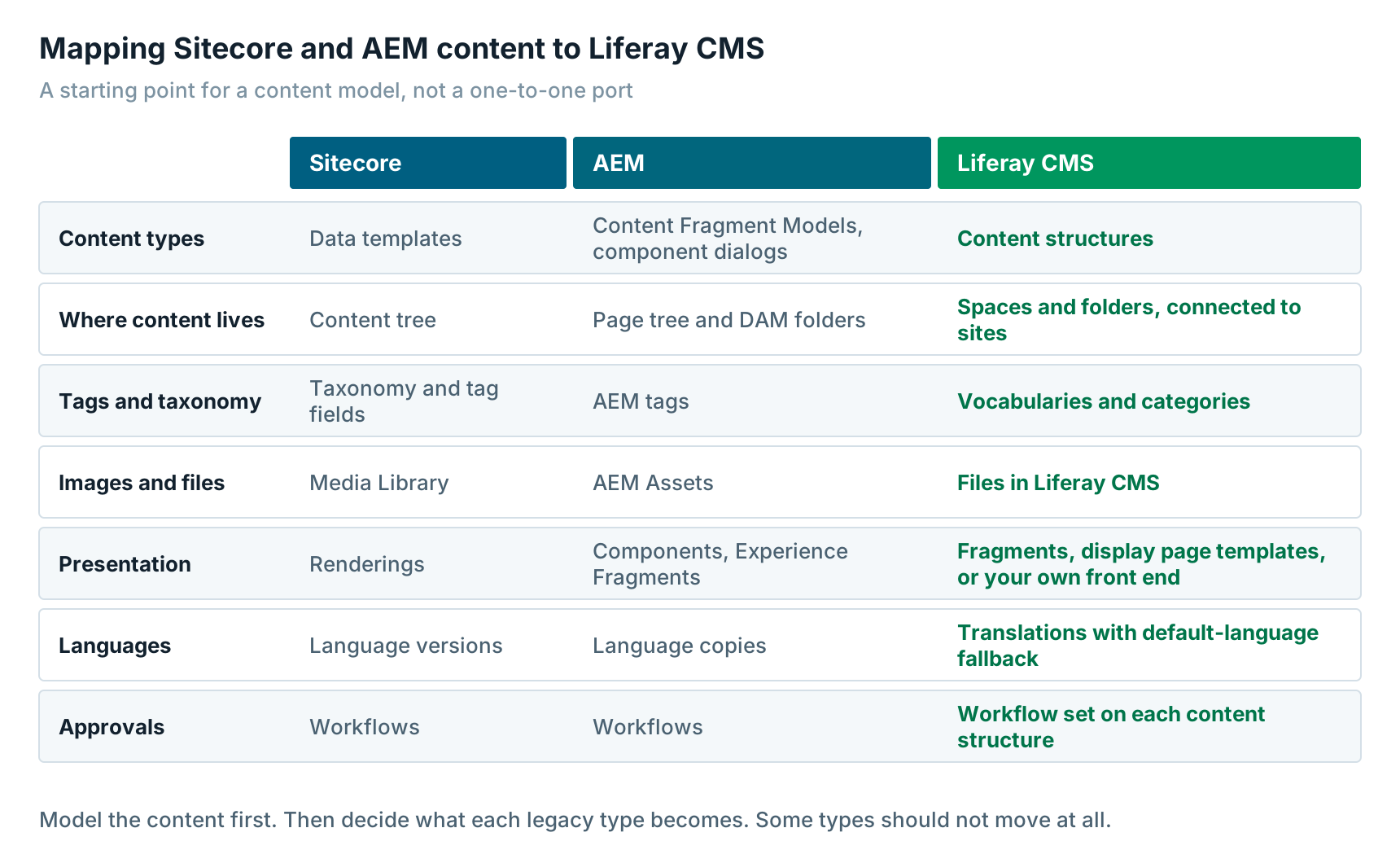
Most Sitecore and AEM content maps onto the Liferay headless CMS through four building blocks. Content structures define your content types. Spaces hold the content. Vocabularies and categories tag it. Fragments, display page templates or your own front end show it.
Here’s the short version:
- Content types. Sitecore data templates, AEM Content Fragment Models and AEM component dialogs become content structures. Structures support nested and repeatable fields.
- Where content lives. Sitecore’s content tree and AEM’s page tree become spaces and folders. A space is a team’s content area, with its own members and roles. You connect a space to one or more sites.
- Presentation. Sitecore renderings and AEM components become fragments and display page templates. Or your own front end reads the content through APIs.
- Languages and approvals. Translations fall back to the default language when a field isn’t translated. Workflow is set on each content structure.
Don’t port your templates one for one. In the content models we review, many legacy types turn out to be page layouts dressed up as content. AEM Content Fragment Models are the exception. They’re already structured, so they map most cleanly.
For portals, content is the easy half. Identity, roles and integrations are where these projects get hard. Portal Migration to Liferay: The Technical Playbook for Sitecore and AEM Portals covers all of it in depth.
Personalization and Segments After 2026.Q1
On Liferay, new segments belong in Liferay Analytics Cloud, not in Liferay DXP itself. Liferay deprecated local segment authoring in 2026.Q1, with a deprecation period of “at least one year”.
For an arriving team, the rule is simple. Don’t rebuild your Sitecore personalization rules or AEM audiences as local DXP segments. They’d land on a deprecated feature.
You have two places to put them instead:
- Analytics Cloud. Liferay’s hosted analytics service. Self-hosted DXP connects to it with a secure token.
- Liferay Data Platform. Liferay made it generally available on August 19, 2026. It grew out of Analytics Cloud. It joins CRM, campaign and behavior data into account profiles with real-time segments. Our first look at Liferay Data Platform covers what’s live today.
Two things to plan for. First, both are hosted by Liferay. If you self-host DXP, your personalization now depends on a cloud service. Second, behind a login, you may need fewer segments than you think. In our experience, most portal personalization runs on roles and accounts, not on segments.
AI Hub Is SaaS Only: What That Means If You Self-Host
Liferay AI Hub is Liferay’s tool for building AI agents that work with your Liferay content. Liferay’s AI Hub documentation describes it as “a low-code SaaS environment”. There’s no self-hosted version. Liferay made it generally available in August 2026.
That’s fine if you run Liferay SaaS. It’s harder if you self-host for compliance reasons. AI Hub calls back into your DXP, so Liferay’s setup guide says your DXP must be “publicly reachable from the internet”. Content will also pass through the AI model provider you choose.
For a bank, an insurer or a public agency, that’s a security review, not a checkbox. Ask three questions early:
- Can our DXP be reachable from the internet?
- Which content and user data would the AI agents see?
- Where would that data be processed, and does that meet our rules?
If the answers are no, you still have options. Liferay CMS has REST and GraphQL APIs. Liferay’s MCP server lets outside AI tools work with Liferay through a standard protocol. It’s a release feature from 2026.Q3, on self-hosted DXP too. You can see the trade-offs in Liferay AI Hub: A First Look and Liferay AI Hub: Pros, Cons, and Who Should Care.
What to Check Before You Commit to the Liferay Headless CMS
Before you commit to the Liferay headless CMS, list the content features your team uses every week. Then test each one in a proof of concept on the current release. Liferay CMS is new, and some features your team relies on may not be there yet.
Here’s what we found in Liferay’s documentation for 2026.Q3. We checked it on October 3, 2026.
| Area | What Liferay’s docs say today | What to check |
|---|---|---|
| Staged publishing | Publications doesn’t track Liferay CMS content or structure changes. Publications is also in maintenance mode, with no named replacement. | If you stage whole releases of content, test how workflow and scheduled publishing cover it. |
| Pages and fragments | The Web Content Display and Documents Display fragments can’t show Liferay CMS content. | Build your pages from fragments that support Liferay CMS. |
| Page types | Widget pages were deprecated in 2026.Q3. Content pages replace them. | Build on content pages from day one. |
| Workflow | Set on each content structure, with overrides per space. Changes don’t apply to existing entries. | Map each approval chain to a structure. |
| Permissions | Default permissions apply to new items only, unless you propagate them. | Test your most sensitive content with real roles. |
| Translation | Manual or XLIFF export and import. Liferay can’t promise to import XLIFF files made by other tools. | Test a round trip with your translation vendor. |
| Analytics | The CMS performance dashboard and in-context analytics need Analytics Cloud. | Confirm you’ll have it. |
| Release version | Liferay’s docs for Liferay CMS are written for 2026.Q3 and later. | Pick your target release with your partner. |
One more planning point. Liferay’s long-term support releases have been each year’s first-quarter release. A self-hosted team starting in 2027 will likely target 2027.Q1. Confirm that with Liferay before you plan around it.
Most gaps here close quarter by quarter. Re-check this list when you start, not when you read this.
When Web Content Is Still Fine
Web Content is still fine for a mature Liferay implementation that isn’t changing soon. If you have years of structures, templates and trained editors, and no big rebuild planned, stay put. It’s supported, and Liferay has said the classic CMS isn’t going away soon.
Other good reasons to wait:
- You need a feature from the table above that Liferay CMS doesn’t cover yet. Build the parts that work. Revisit the rest each quarter.
- You rely on Publications for staged releases. Talk to Liferay before you move that content.
- You’re upgrading, not rebuilding. An upgrade to 2026.Q1 doesn’t force a content move. The article 2026.Q1 overview covers that path.
One more point. If most of what you’re moving is public website content with no login, Liferay may not be the right home at all. A content platform may fit better. Our Contentful vs Liferay decision rule explains how we choose. Is Contentful Right for Enterprise? A Practitioner’s Evaluation covers the other side.
Worth saying plainly: XTIVIA is a Liferay Gold Partner, and we also implement Contentful.
Next Steps for Your Liferay Headless CMS Plan
If you’re moving to Liferay, make the Liferay headless CMS your content target from the first workshop. Model your content as Liferay CMS structures. Test your must-have features in a proof of concept. Plan segments in Analytics Cloud or Liferay Data Platform.
A good order:
- Inventory what you have, and decide what’s worth moving.
- Model your content as Liferay CMS structures and spaces.
- Prove your must-have features against the checklist above.
- Migrate once, straight onto Liferay CMS.
Running both a public website and a portal? Read When You Need Both a Public Website and a Portal. Want the bigger picture on Liferay in a composable stack? See Why Liferay DXP Is a Smart Choice for Composable Architecture.
Our Liferay DXP team can review your content model and checklist with you. If we think a gap should make you wait, we’ll say so.
Further reading
- Maintenance Mode and Deprecations in Liferay DXP 2026.Q1 — Liferay’s list of what changed
- What “Maintenance” Means for the Traditional Liferay CMS — Liferay’s own explanation, including the migration question
- Liferay Headless Content Management System — Liferay CMS documentation, including feature availability by release
Matt Wolinski is a Liferay practice leader at XTIVIA. He writes about Liferay DXP releases, including 2026.Q1, AI Hub and Liferay Data Platform, and helps customers plan portal moves onto Liferay. Talk to us.