
Last reviewed: October 3, 2026
SUMMARY:
- For customer and partner portals, AEM vs Liferay usually favors Liferay, because company accounts, roles, workflow and collaboration come built in.
- AEM is stronger for digital assets, testing, analytics and marketer authoring on the public website.
- An AEM portal is mostly custom code, and that code is what turns the move to AEM as a Cloud Service into a re-architecture.
- Many organizations keep AEM, or move to Contentful, for the public website and put the portal on Liferay.
- Keep a thin, stable portal on AEM, especially if a cloud move is already funded.
Table of Contents
- AEM vs Liferay: Is Your AEM Site a Website With a Login, or a Portal?
- Where AEM Beats Liferay
- What an AEM Portal Is Really Made Of
- AEM vs Liferay on Eleven Portal Dimensions
- The Portal Cost Lens for AEM vs Liferay
- The Split: Public Website on AEM or Contentful, Portal on Liferay
- What an AEM to Liferay Migration Involves
- When to Keep Your Portal on AEM
- Five Questions That Decide AEM vs Liferay for Your Portal
AEM vs Liferay: Is Your AEM Site a Website With a Login, or a Portal?
AEM vs Liferay is only a fair question for the portal side of Adobe Experience Manager (AEM). A portal is where customers, dealers or partners log in to see their own data and get work done. If your login only protects some content, AEM handles that well. Start by working out which one you have.
Three quick checks tell them apart:
- What’s behind the login? Gated articles and downloads make a website with a login. Orders, claims, policies, cases and dashboards make a portal.
- Who are the users? Single visitors make a website with a login. People who belong to company accounts, with their own admins, make a portal.
- Does the logged-in side write to other systems? If features send and retrieve data with an ERP or CRM system, you’re running a portal.
If you answered “portal” twice or more, read on. If you’re not sure, When Your Marketing DXP Is Really Running a Portal lists seven signs and a worksheet to count the custom code.
Worth saying up front: XTIVIA is a Liferay Gold Partner and a Contentful partner. We don’t implement AEM. Read this with that in mind.
Where AEM Beats Liferay
AEM beats Liferay at marketing. Adobe’s digital asset management, testing, analytics and customer data tools are among the strongest on the market. If most of your value sits there, AEM as a Cloud Service is a sound home for your public website. Liferay doesn’t claim otherwise.
Here’s where Adobe leads:
- Digital assets. AEM Assets is often the system of record for images and video far beyond the website.
- Testing and personalization. Adobe Target runs A/B tests and targeting for anonymous visitors at scale.
- Analytics and customer data. Adobe Analytics and Real-Time CDP (customer data platform) give marketing a deep view of visitors across channels.
- Marketer authoring. AEM’s page editor, components and Experience Fragments let marketers build pages without a developer.
- Analyst standing. Adobe was named a Leader in The Forrester Wave: Digital Experience Platforms, Q4 2025.
Liferay’s own comparison page says Adobe Experience Cloud “is a good fit if your primary focus is marketing.” We agree. Those strengths matter most on the public website. Behind a login, users are already known, and most of those tools sit idle.
What an AEM Portal Is Really Made Of
An AEM portal is usually AEM Sites plus code your team developed. That custom code handles access rules, user records, entitlements and back-office calls. It is also what makes the move to AEM as a Cloud Service a re-architecture, not an easy migration. The content is the easy part.
The four parts of a typical AEM 6.5 portal
AEM has two sides. Editors work on the author tier. Visitors use the publish tier, which runs on several servers. In the AEM 6.5 portals we see, the login side is built from four parts.
- Closed user groups (CUGs). A CUG is Adobe’s name for a rule that limits a page or section to named groups. It’s the native part.
- Custom Sling servlets and OSGi services. A Sling servlet answers a web request. An OSGi service is a Java module running inside AEM. Portal teams use them for entitlement checks, back-office calls and “my account” data.
- User sync. A user who registers on one publish server must exist on the others. In 6.5, Adobe’s answer was user synchronization in AEM Communities. Many teams built their own sync job or relied on sticky sessions instead.
- Custom registration and forms. Sign-up, password reset and forms that write to SAP or Salesforce are usually custom code.
What AEM as a Cloud Service gives you natively
Adobe gives portal teams more in the cloud than it used to. Be precise about it, because it changes the math.
- Standard sign-in on publish. Adobe now supports OpenID Connect (OIDC) on the publish tier, with providers such as Entra ID, Okta and Auth0. Adobe says native OIDC “removes this burden” of building sign-in yourself. SAML 2.0 is supported too.
- CUGs still work. Adobe’s guide to registration, login and user profile says CUGs “are defined in the AEM author,” as before.
What you request, rewrite or move
The same Adobe guide is just as clear about what isn’t automatic:
- User sync is off by default. Adobe says that by default, sync is “not enabled and so data will not be synchronized to or even permanently persisted on the publish tier.” You turn it on by “submitting a request to Customer Support indicating the appropriate program and environments.” The OIDC guide adds that user records reach other publish servers “only when data synchronization is enabled.”
- Profile data should live outside AEM. Adobe’s advice: “always rely on the idP (Identity Provider) as a single point of truth when storing user-specific data.” An identity provider (IdP) is the system that owns sign-in, like Entra ID or Okta.
- User code changes shape. Custom code that creates local users or groups must switch to external users and dynamic group membership. Registration is still code you write.
- Adobe’s own sign-in is for staff only. Adobe’s cloud readiness guide says Adobe IMS “does not offer support for external end users of customer sites like site visitors.”
The platform rules change too. Adobe’s list of notable changes says code folders are read-only at runtime. It also says “direct changes to the publish repository are not allowed,” except under /home, where user data lives. The architecture overview describes publish as “a farm of AEM publish instances, each with their own content repository,” which scales up and down with traffic.
Much of your Java will still run. What breaks is code that writes to the publish repository, assumes one publish server, keeps users locally or depends on replication agents. In a portal, that’s most of the important code. Adobe’s readiness guide tells teams to assess their code against the notable changes, and to use its Best Practices Analyzer to speed that up.
 Moving an AEM 6.5 portal to AEM as a Cloud Service means reworking its users, sync and custom services for a new model. Either way, the portal gets rebuilt. The question is where.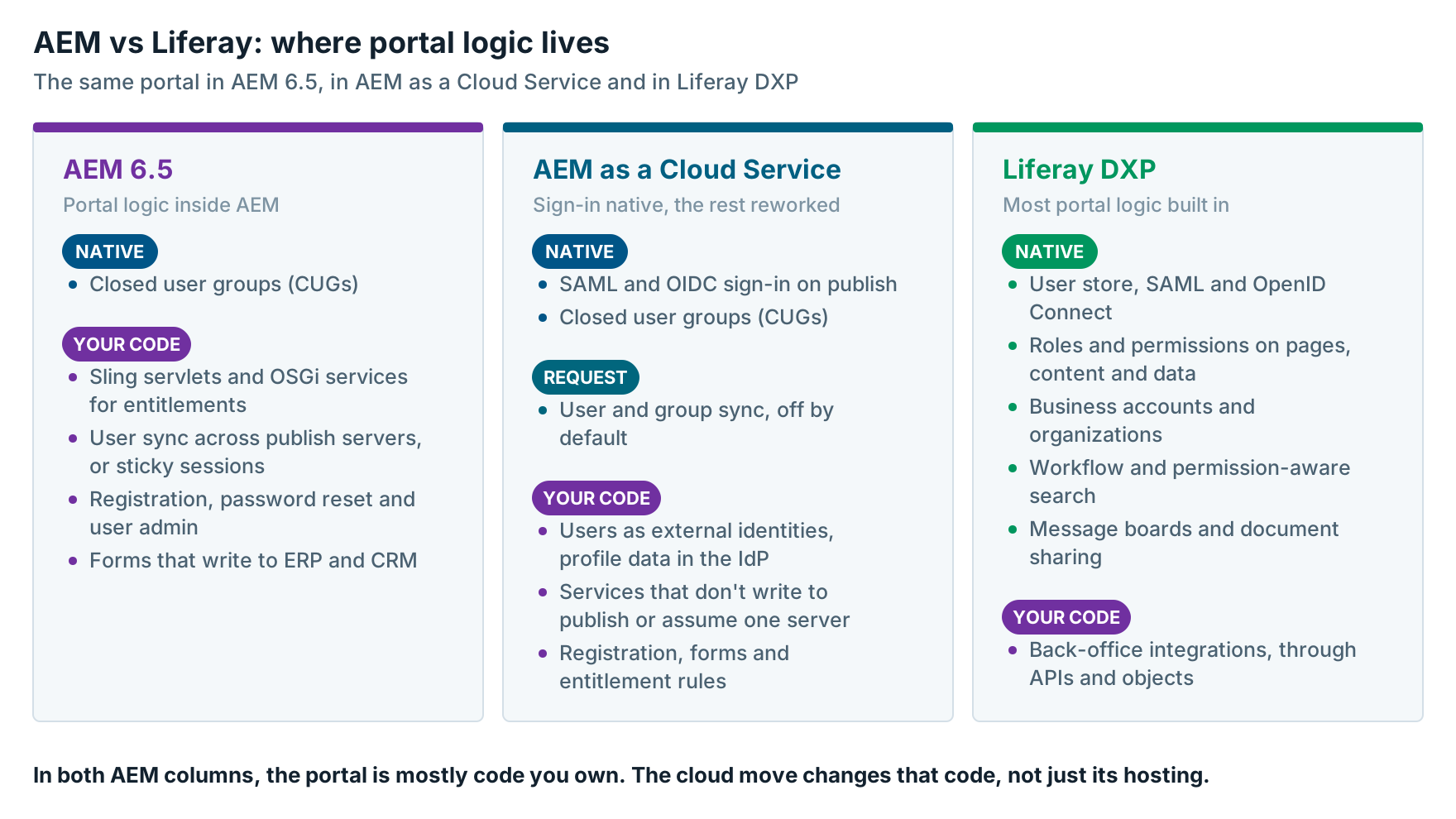
AEM vs Liferay on Eleven Portal Dimensions
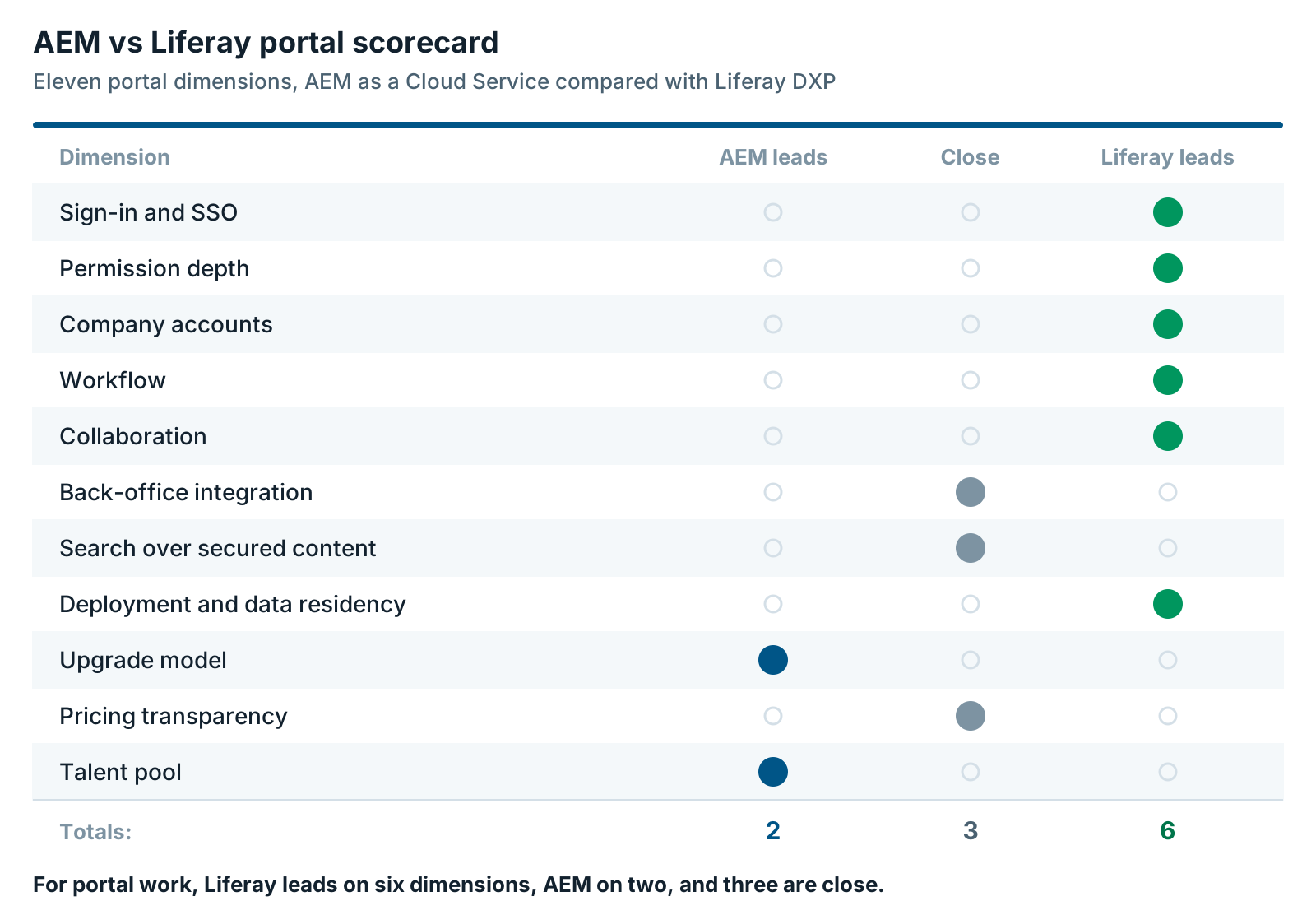
On portal work, AEM vs Liferay favors Liferay on sign-in, permissions, company accounts, workflow, collaboration and deployment choice. AEM as a Cloud Service wins on upgrades, because Adobe updates it for you. AEM also has the larger talent pool. Integration, secured search and pricing are close.
These are the same eleven dimensions we use in Sitecore vs Liferay for Customer and Partner Portals, so the two read as a pair.
| Dimension | AEM as a Cloud Service | Liferay DXP | Edge |
|---|---|---|---|
| Sign-in and SSO | SAML and OIDC native on publish. Registration, password reset and user admin are custom. | Built-in user store and admin. Standard SAML and OpenID Connect. | Liferay |
| Permission depth | CUGs limit pages and sections to groups. Finer rules are custom code. | Roles and permissions on pages, content and custom data | Liferay |
| Company accounts | Not native. Built from groups or custom data. | Business accounts with account roles. Organizations add hierarchy. | Liferay |
| Workflow | Built for content approval on the author side | A workflow engine for business processes, not just content | Liferay |
| Collaboration | Not part of AEM Sites. Ask Adobe about cloud options. | Message boards, document sharing and notifications | Liferay |
| Back-office integration | Custom OSGi services and servlets, deployed through Cloud Manager | REST and GraphQL APIs, low-code objects with their own APIs, client extensions | Close |
| Search over secured content | Repository queries respect the user’s access. Caching and search tools need care. | Search hides results a user can’t view. | Close |
| Deployment and data residency | Software as a service, hosted by Adobe. AEM 6.5 LTS for on-premise. | SaaS in six regions, PaaS on Google Cloud, or self-hosted | Liferay |
| Upgrade model | No version upgrades. Adobe applies updates automatically. | Quarterly releases. A long-term support release each year. | AEM |
| Pricing transparency | No published prices | No published prices | Close |
| Talent pool | Larger developer pool in most markets | Smaller pool of specialists | AEM |
A few rows need context.
Sign-in and SSO. Adobe has closed much of this gap with native OIDC. The edge stays with Liferay because sign-up, password reset and user admin screens come with the product.
Company accounts. Liferay’s business accounts hold many users, with roles inside each account. That’s the dealer-admin pattern most B2B portals need.
Search. AEM’s repository queries run as the signed-in user, so they respect access. Liferay checks permissions twice, once in the query and again before showing results. Both work. The harder part on either platform is searching back-office data.
Deployment and upgrades. Liferay lists six SaaS regions, including the US, the EU and Saudi Arabia. Its service life policy gives each yearly LTS release three years of Premium Support, then two years of Limited Support. On SaaS, Liferay runs the upgrades. Self-hosted, your team does. On AEM as a Cloud Service, Adobe applies updates for you through its own pipeline.
The Portal Cost Lens for AEM vs Liferay
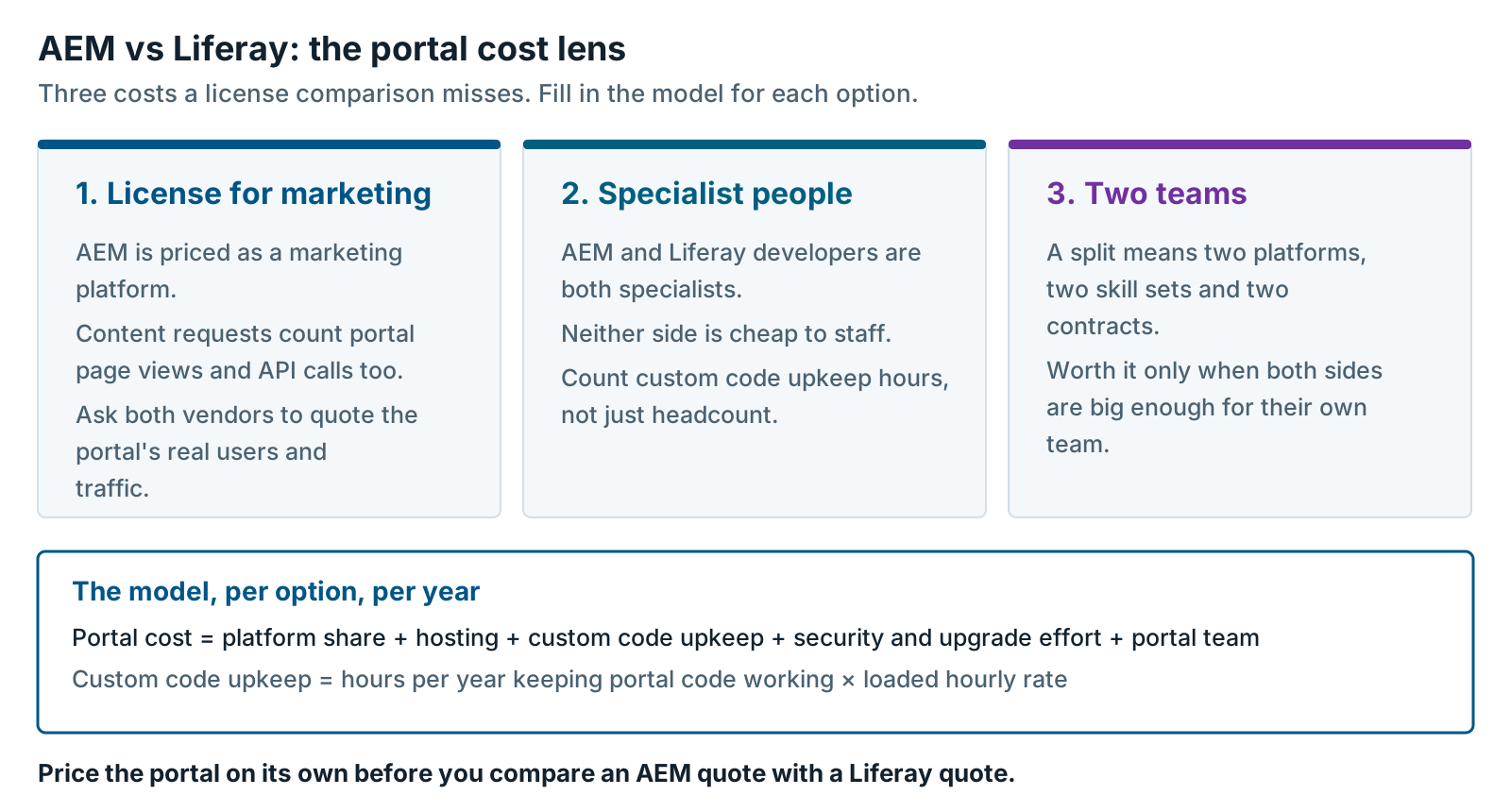
The portal cost of AEM vs Liferay comes down to three lines a license comparison misses. You pay for a license priced for marketing, specialist people on either platform, and two teams if you split. Count those three before you compare quotes.
1. A license priced for marketing scale. Adobe doesn’t publish AEM prices. Your AEM as a Cloud Service contract may license content requests. If so, page views and API calls both count as content requests. Adobe counts them “regardless of whether the response was served from the CDN cache.” Portal traffic then counts like marketing traffic. Ask Adobe how logged-in use counts in your contract. Ask Liferay to quote on the same users and traffic.
2. A specialist premium on both sides. AEM developers are specialists, and so are Liferay developers. Liferay has a real learning curve, and its talent pool is smaller. Don’t assume either side is cheap to staff.
3. The cost of running two teams. A split puts two platforms, two skill sets and two vendor contracts on your books. That’s worth it only when both the public website and the portal are big enough to justify their own team.
To compare portal costs, use one simple model for each option.
- Portal cost per year = platform share + hosting + custom code upkeep + security and upgrade effort + portal team
- Custom code upkeep = hours per year spent keeping portal code working × loaded hourly rate
- Platform share = the part of the license the portal uses, by traffic or by users
For the full model on the public website side, read AEM as a Cloud Service vs Contentful: What the TCO Comparison Leaves Out. We don’t repeat it here.
The Split: Public Website on AEM or Contentful, Portal on Liferay
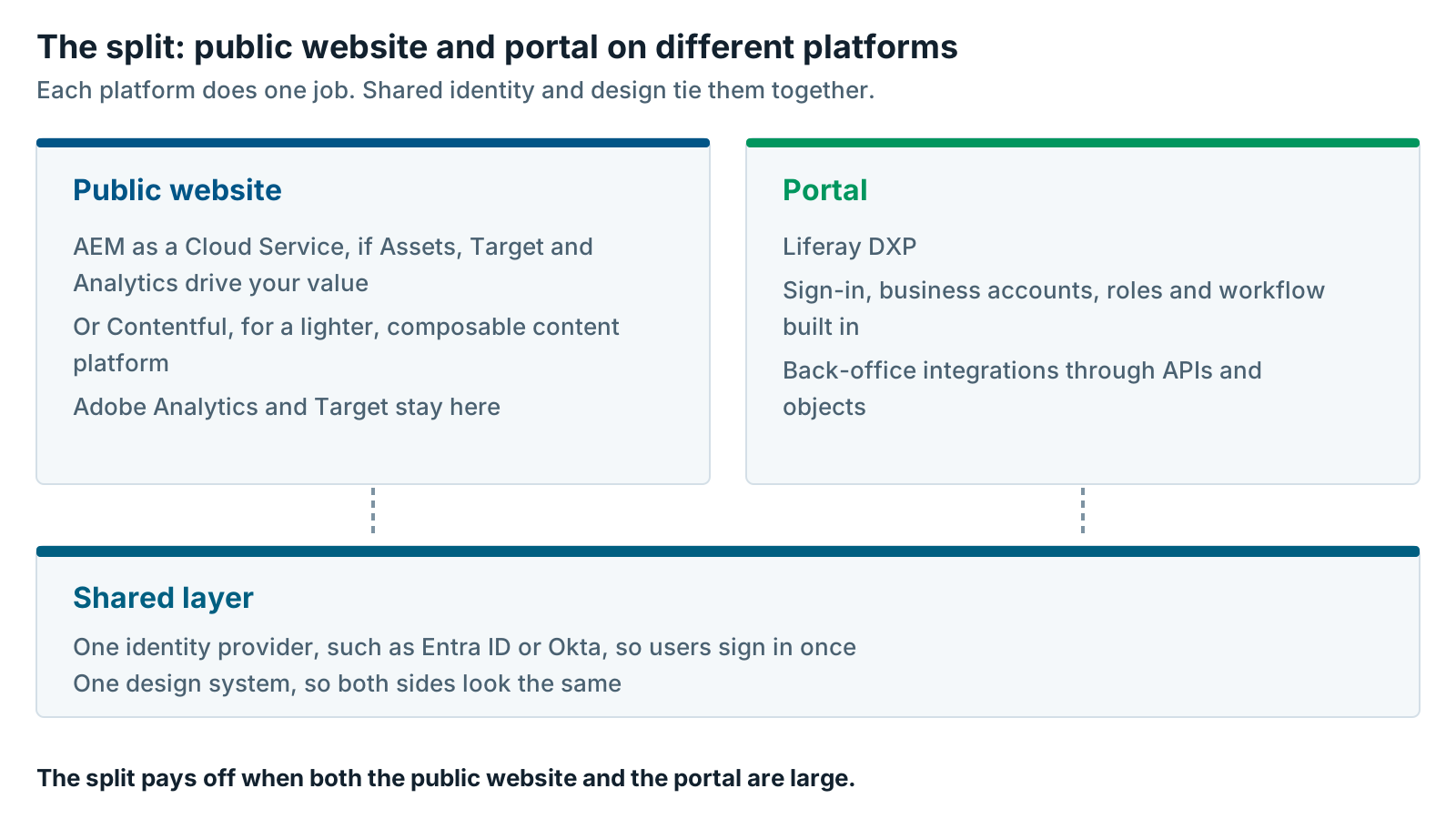
Many organizations don’t need one platform for everything. They keep AEM as a Cloud Service, or move to Contentful, for the public website, and put the portal on Liferay. Adobe Analytics and Target stay on the public side, where they earn their cost. A shared identity provider and design system hide the seam.
Here’s how the split usually works:
- Public website. AEM as a Cloud Service if Assets, Target and Analytics drive your value. Contentful if you want a lighter, composable content platform.
- Portal. Liferay DXP, with sign-in, accounts, roles and workflow built in.
- Shared layer. One identity provider for both, so users sign in once. One design system, so pages look the same.
- Adobe tools. Analytics and Target stay on the public website. The portal can still send events to Adobe Analytics if marketing needs the full journey.
This works best when both sides are large. If the portal dominates and the public website is modest, Liferay can run both. If the portal is simple and your engineers are strong, a custom Next.js portal is an option. Build or Buy a Customer Portal: Custom Next.js or Liferay DXP? compares those two. We cover all three routes in When You Need Both a Public Website and a Portal.
What an AEM to Liferay Migration Involves
An AEM to Liferay migration for a portal starts with people and permissions, not pages. Users, groups and entitlements carry the most risk, so they move first. Content usually moves last, and it’s often the easiest part.
We plan these moves in four phases:
- Inventory. List every portal, audience, CUG, custom servlet and back-office connection.
- Identity and entitlements. Connect Liferay to your identity provider. Map CUGs, groups and custom entitlement code to Liferay roles and accounts.
- Integrations. Rebuild each back-office call with Liferay’s APIs, low-code Objects or your integration platform.
- Content and cutover. Move the content worth keeping, then switch over one audience at a time.
Land the content on the new Liferay CMS, not the older Web Content feature. Liferay moved Web Content to maintenance mode in 2026.Q1, per its 2026.Q1 deprecation notes. Moving to Liferay? Build on the New Liferay CMS, Not Web Content explains why. The engineering detail is in Portal Migration to Liferay: The Technical Playbook for Sitecore and AEM Portals.
When to Keep Your Portal on AEM
Keep your portal on AEM when it’s thin, stable and lightly integrated. A gated download area or a simple profile page doesn’t need a portal platform. CUGs and native sign-in cover it, and a move would cost more than it saves.
Other good reasons to keep it on AEM:
- A move to AEM as a Cloud Service is funded, and the portal is small. Rebuilding a thin portal as part of that move is reasonable.
- You’re on AEM 6.5 on-premise with time to plan. Adobe’s release roadmap says core support is “currently planned to end by February 2027,” with AEM 6.5 LTS as the path after that. Support on Adobe Managed Services ended August 31, 2026. Our article on AEM 6.5 end of support options compares the routes.
- The logged-in area is really marketing. If personalization and testing drive it, Adobe’s tools may still be the better fit.
- You can’t staff Liferay. Liferay needs specialists. If you can’t hire them or partner for them, don’t start.
If you stay, set a date to look again. A thin portal can grow fast once a new business unit wants its own login.
Five Questions That Decide AEM vs Liferay for Your Portal
Five questions settle AEM vs Liferay for most portals. If three or more point to Liferay, move the portal and decide the public website separately. If most point to AEM, keep the portal where it is and set a review date.
- How much of your business value sits behind the login? More than half points to Liferay.
- How many back-office systems does the portal read or write in real time? Several points to Liferay. One or none points to AEM.
- Do users belong to company accounts with their own admins and roles? Yes points to Liferay.
- Do portal users need to work together, through discussions, shared documents or approvals? Yes points to Liferay.
- Is your custom portal code the main cost in your cloud move estimate? Yes points to Liferay. If the portal is a small slice, AEM as a Cloud Service is simpler.
Here’s the route. If Liferay wins, you can still keep AEM as a Cloud Service or Contentful for the public website, and start with the identity and entitlements inventory. If AEM wins, fold the portal into your cloud plan and budget the user sync and code rework up front. Not sure which workload you have? Start with Legacy DXP Migration: Are You Replacing a CMS or a Platform? or our Contentful vs Liferay decision rule.
Our Liferay DXP team can walk through these questions with you. If the answer is to keep the portal on AEM, we’ll say so.
Further reading
- Registration, Login, and User Profile — Adobe’s guide to users on the AEM as a Cloud Service publish tier
- Notable changes in AEM as a Cloud Service — the platform rules that change custom code
- Liferay vs Adobe — Liferay’s own comparison
- Liferay 2026.Q1 maintenance mode and deprecations — what changed in Liferay’s content features
Matt Wolinski is a Liferay practice leader at XTIVIA. He writes about Liferay DXP releases, including 2026.Q1, AI Hub and Liferay Data Platform, and helps customers plan portal moves onto Liferay. Talk to us.