
Last reviewed: October 3, 2026
SUMMARY:
- If your Sitecore or AEM site has logins, role checks and back-office forms, it may already be working as a customer portal platform, mostly through custom code.
- Seven signs show when the logged-in side has outgrown the marketing platform it runs on.
- A simple worksheet counts which portal features are native, custom or bought, and the custom share is the number that matters.
- Behind a login, most of a marketing DXP’s best features go unused.
- Small, stable, lightly integrated portals are often best left where they are.
Table of Contents
- How a Marketing DXP Ends Up Running a Portal
- Seven Signs Your DXP Has Become a Customer Portal Platform
- Count the Custom Code Behind Your Portal
- What You Pay For but Don’t Use Behind a Login
- What a Customer Portal Platform Does Natively
- When to Leave Your Portal Where It Is
- Next Steps for Your Customer Portal Platform Decision
How a Marketing DXP Ends Up Running a Portal
Most Sitecore and AEM portals were never chosen. They grew. The suite was already licensed for the public website, so the login side was built on it too. Ten years later, that site often works as a customer portal platform, held together by custom code.
A digital experience platform (DXP) is a software suite for building and running websites. Sitecore Experience Platform (XP) and Adobe Experience Manager (AEM) are two good examples. Both were built first for marketing: content, campaigns and personalization for visitors who haven’t logged in.
A portal is different. It’s a site where people log in to see their own information and get work done. A dealer checks an order. A broker downloads a policy. A member renews.
Here’s the story we hear again and again. It starts with a new public website. Then comes “phase two”: let dealers log in to download price sheets. That needs a login, a role check and a list of who can see what. Next year, someone wants dealers to submit warranty claims. That needs a form that writes to the ERP system. Each step is small and sensible.
Add a decade of those steps. Now the logged-in side holds most of the business value. It also holds most of the custom code.
 Most Sitecore and AEM portals were built on the suite because it was already licensed. Years later, the login side often holds most of the value and most of the custom code.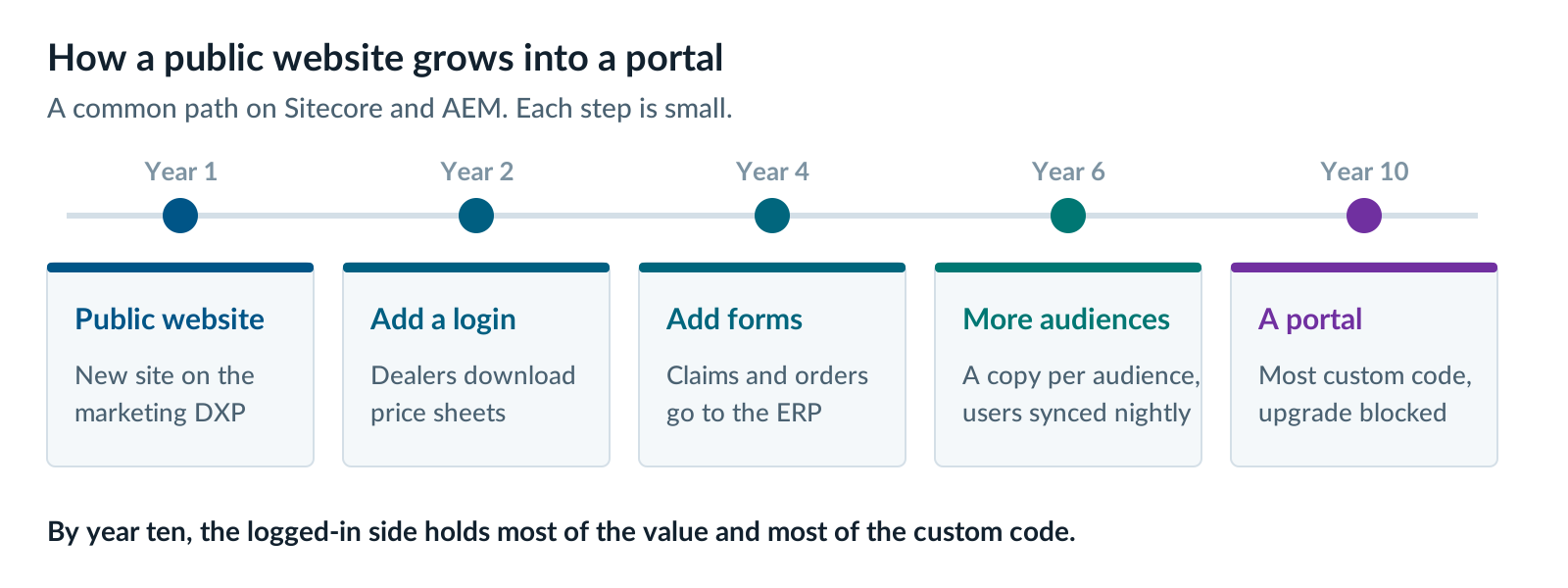
Seven Signs Your DXP Has Become a Customer Portal Platform
Your DXP has become a customer portal platform when logged-in users, their roles and their back-office tasks shape most of the work. These seven signs are the ones we see most often in Sitecore and AEM portals. Each is normal on its own. Several together tell you the platform is doing a job it wasn’t built for.
- Entitlement checks inside templates or components. An entitlement is a rule about who can see or do what. When those rules live inside Sitecore renderings or AEM components, every page change risks a security bug.
- A second user store, synced overnight. Users live in the DXP and also in a CRM or identity system. A nightly job keeps them roughly in line. When it fails, people get locked out.
- Custom role tables. The suite’s roles were built for content editors. So the team built its own tables for “dealer admin” or “broker of record”.
- Forms that write to back-office systems through custom code. Claims, orders and service requests go straight into SAP, Salesforce or a homegrown system. Each form has its own integration code.
- One instance or site per audience. Dealers get one site, brokers another, members a third. Each copy repeats the same login, roles and layout.
- Search that can’t respect permissions. Secured content is either left out of search, or filtered by custom code after the results come back.
- An upgrade blocked by portal code. The public website could move to a new version. The portal code can’t, so nothing moves.
Count the Custom Code Behind Your Portal
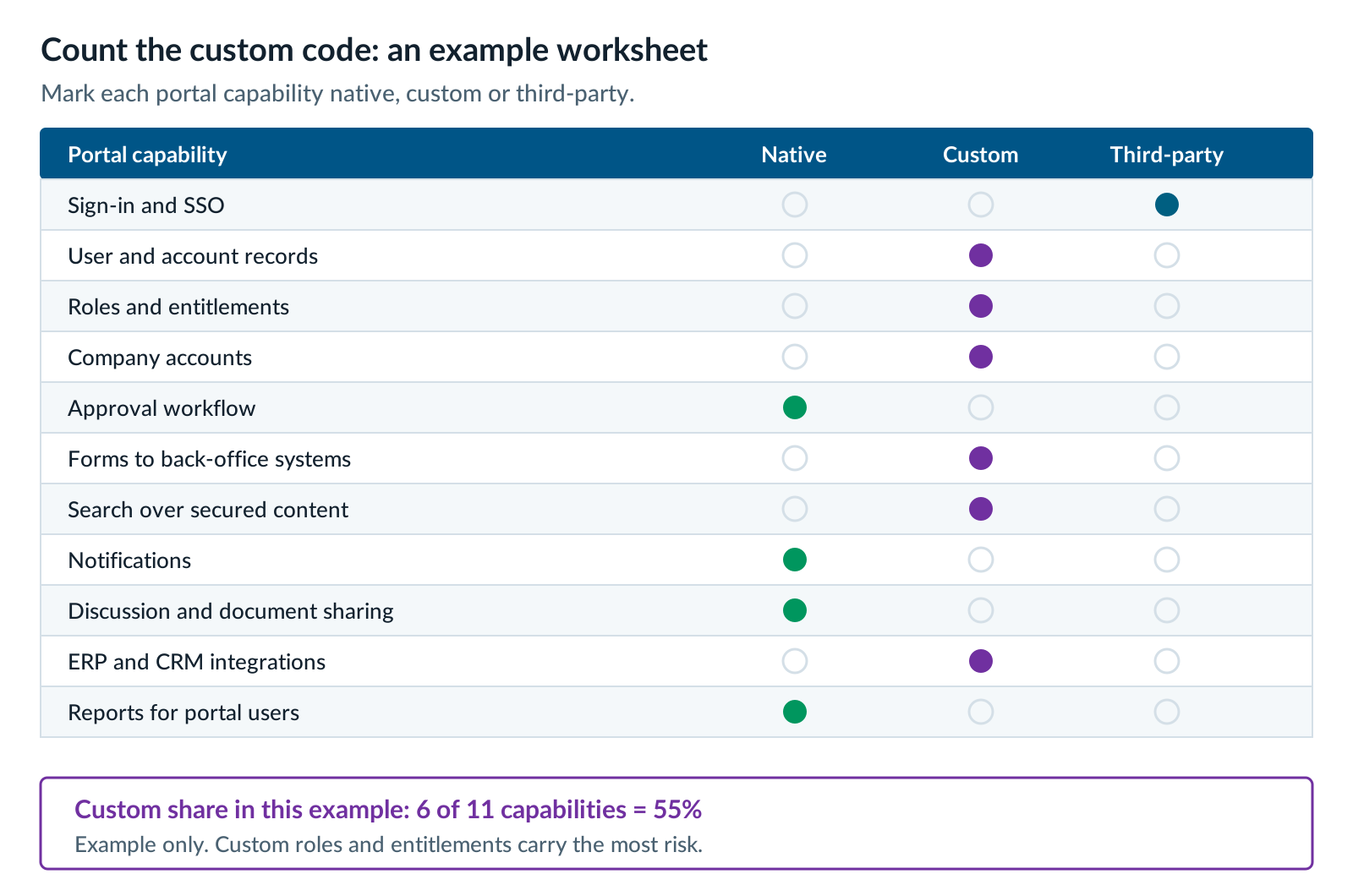
One good way to size the problem is to list your portal’s capabilities and mark each feature as native, custom or third-party. Native means the product does it out of the box (OOTB). Custom means your team wrote and maintains it. Third-party means you bought an add-on. Some items may be a combination such as custom portal code that integrates with a third party SSO such as Okta or CAS. The column marked custom is the number that matters.
Fill in this table along with the people who maintain the portal.
| Portal capability | Native (OOTB) | Custom | Third-party | Notes |
|---|---|---|---|---|
| Sign-in and single sign-on (SSO) | ||||
| User and account records | ||||
| Roles and entitlements | ||||
| Company accounts with many users | ||||
| Approval workflow for business tasks | ||||
| Forms that write to back-office systems | ||||
| Search over secured content | ||||
| Notifications and alerts | ||||
| Discussion boards or document sharing | ||||
| Integrations with ERP and CRM | ||||
| Reports for portal users |
Then divide the custom rows by the total. That’s the percentage of your portal that’s custom code. For example, if you have 6 custom features, 4 native features and 1 third-party integration, your portal has evolved into 55% custom code.
Look at which rows are custom, too. Not all custom code carries the same risk. Custom sign-in, roles and entitlements are the riskiest, because a bug there could show one customer another customer’s data. Custom security is a liability. Custom reports are also a nuisance. A solid portal platform should handle most of this for you.
Two more numbers make the picture complete. First, think about how many hours a year go into keeping custom portal code working through upgrades and security fixes. How hard is it to install a quarterly security patch? Second, ask how long it takes to add one new portal feature, start to finish. Those numbers turn a feeling into a business case.
What You Pay For but Don’t Use Behind a Login
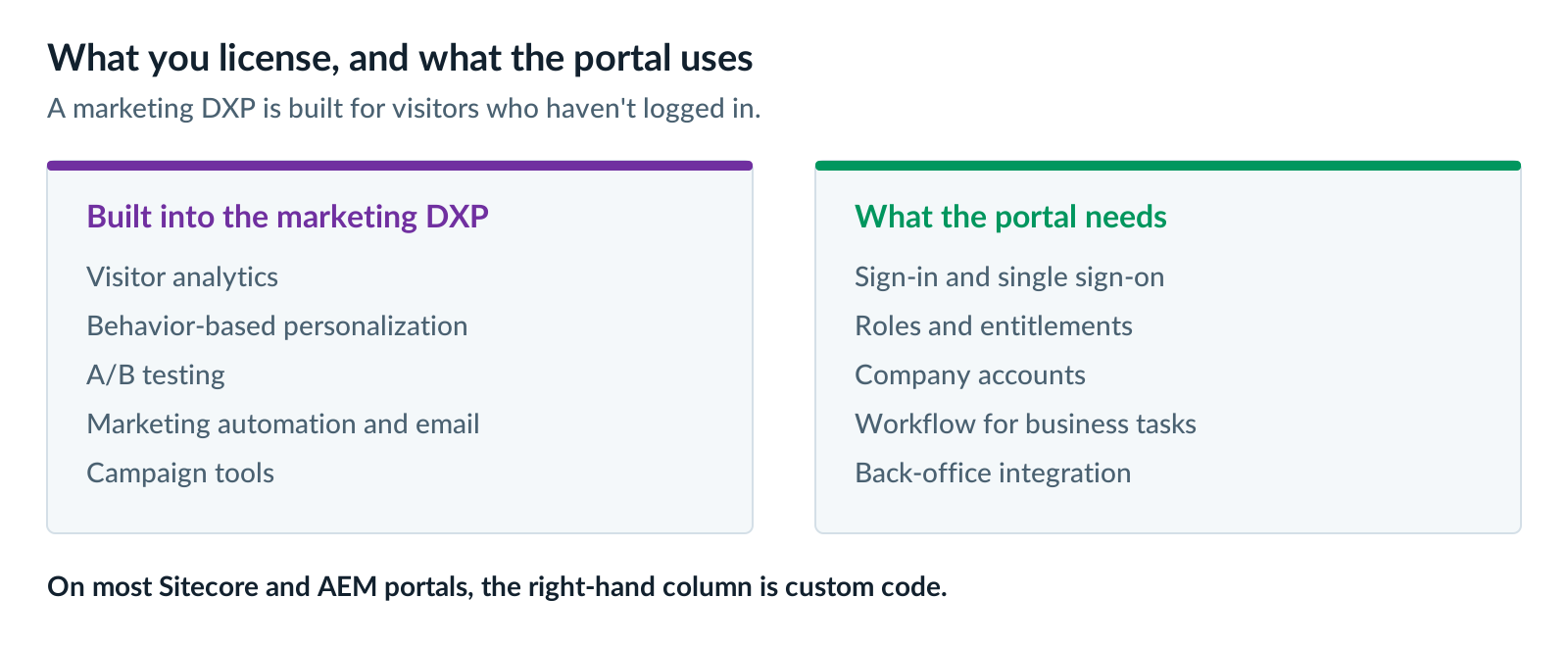
Behind a login, most of a marketing DXP’s best features sit idle. Visitor analytics, behavior-based personalization, A/B testing and marketing automation were built for people who haven’t signed in yet. Your portal users are already known. What they see depends on their role and account, not on their clicks.
That doesn’t make those features bad. On the public website, they can earn their cost. Sitecore’s analytics and personalization, and AEM’s ties to Adobe Target and Adobe Analytics, are strong tools for marketing teams.
The problem is the mismatch. With Sitecore XP, analytics, personalization and marketing automation come bundled in the license, whether the portal uses them or not. AEM sells Target and Analytics separately, but AEM itself is still built around marketing content. Meanwhile, the features the portal does need are the ones you built yourself.
Personalization behind a login is a different kind of thing. It’s mostly rules based on known facts: account type, region, products owned. A portal platform handles most of that with roles and accounts. It doesn’t need a marketing engine.
A useful question for your next renewal: which licensed features do logged-in users actually touch? If the answer is “almost none”, much of what you pay for isn’t serving the portal. You’re likely building and maintaining the wrong platform for the use case.
What a Customer Portal Platform Does Natively
A customer portal platform gives you identity, permissions, company accounts, workflow, collaboration and integration as built-in features. You configure them instead of writing them. That’s the main difference from a marketing DXP that has been stretched to run a portal.
Liferay DXP is the portal platform we implement most often. Worth saying plainly: XTIVIA is a Liferay Gold Partner. We also implement Contentful and build custom portals in Next.js, so we have a stake in more than one answer.
Here’s what Liferay DXP covers out of the box:
- Sign-in and SSO. A built-in user store, with standard SAML and OpenID Connect connections to your identity provider.
- Permissions. Roles and permissions apply to pages, content and custom data. Search hides results a user isn’t allowed to see.
- Company accounts. Business accounts hold many users, with roles that apply inside one account or across all of them. Organizations add a hierarchy on top.
- Workflow. A workflow engine runs approvals for business processes, not just content.
- Collaboration. Message boards, document sharing and notifications come with the product. Liferay moved Documents and Media to maintenance mode in 2026.Q1, with the new Liferay CMS as the path forward. Our Liferay 2026.Q1 overview explains what that means.
- Custom data and integration. Low-code objects get their own REST APIs. Client extensions let you add code without changing the core product. This is a huge advantage when maintaining a Liferay portal with upgrades and hotfixes.
Analysts rate Liferay well for this kind of work. In Gartner’s Critical Capabilities for Digital Experience Platforms (January 2025), Liferay ranked highest in the Authenticated Experience Use Case. Liferay’s own comparison also concedes that Sitecore is the stronger fit when marketing-led personalization is the main goal.
There’s a second route worth naming: a custom portal built in Next.js, with no DXP at all. It gives you full control of the user interface. But collaboration features like message boards and document sharing then mean buying another product or building your own. We compare the two in Build or Buy a Customer Portal: Custom Next.js or Liferay DXP?
When to Leave Your Portal Where It Is
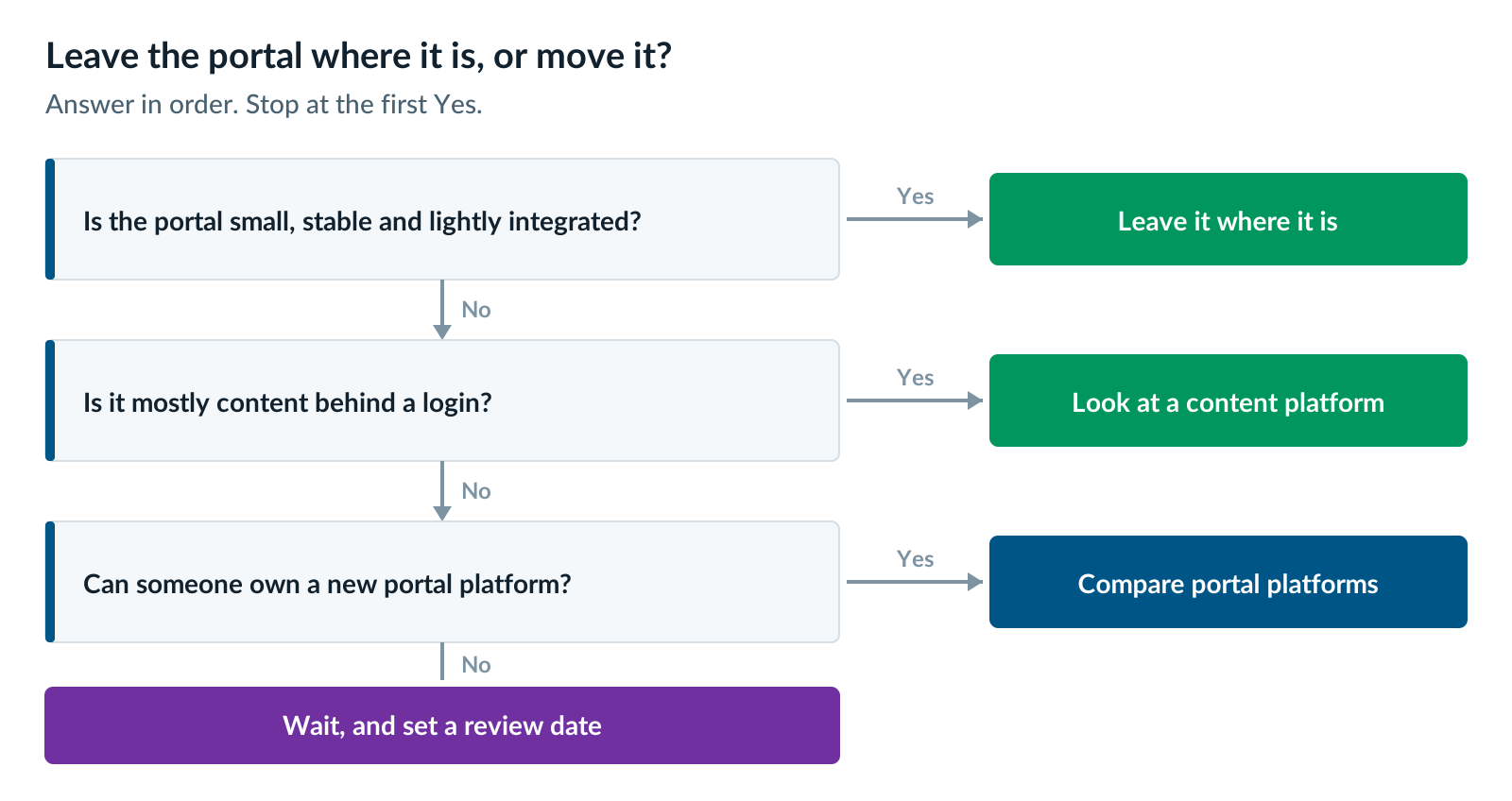
Leave your portal on its current platform when it’s small, stable and lightly integrated. If it serves one audience, reads from one or two systems and rarely changes, moving it costs more than it saves. That’s true even if it runs on a platform built for marketing.
Other good reasons to stay put:
- The custom code share is low. If most rows in your worksheet say native, the platform is doing its job.
- A move to the vendor’s cloud is already funded, and the portal is thin. A gated download area or a simple account page can be rebuilt as part of that move.
- The “portal” is really content behind a login. A member library or research archive is an editorial problem, not a portal problem. A content platform is often the better fit. Our Contentful vs Liferay decision rule covers this case.
- No one can own the new platform. A portal platform needs people who know it. If you can’t staff it, in-house or with a partner, wait.
If you stay, write down when you’ll look again. A portal that’s thin today can grow fast when business units start asking for help optimizing day-to-day user requests.
Next Steps for Your Customer Portal Platform Decision
If several of the seven signs fit and your custom code share is high, the next step is to compare platforms for the portal itself. Keep the public website out of that comparison for now. The two have different needs and different right answers.
Pick the next article by where you are today:
- On Sitecore? Read Sitecore vs Liferay for Customer and Partner Portals
- On AEM? Read AEM or Liferay for Portals: What to Do With the Login Side of AEM
- Not sure which workload you have? Start with Legacy DXP Migration: Are You Replacing a CMS or a Platform?
- Running both a public website and a portal? Read When You Need Both a Public Website and a Portal
When you have your worksheet filled in, our Liferay DXP team is happy to review it with you. We’ll tell you if we think the portal should stay where it is or what would be your best fit moving forward.
Further reading
- Liferay vs Sitecore — Liferay’s own comparison, including where it concedes ground to Sitecore
- Liferay in the 2025 Gartner reports for DXPs — the Authenticated Experience ranking
- Head application security for SitecoreAI — how Sitecore expects logged-in users to be handled in its cloud product
- Closed User Groups in AEM — Adobe’s documentation on restricting AEM content to signed-in groups
Matt Wolinski is a Liferay practice leader at XTIVIA. He writes about Liferay DXP releases, including 2026.Q1, AI Hub and Liferay Data Platform, and helps customers plan portal moves onto Liferay. Talk to us.