
Last reviewed: October 3, 2026
SUMMARY:
- For customer and partner portals, Sitecore vs Liferay usually comes out in Liferay’s favor, because sign-in, roles, company accounts and workflow come built in.
- Sitecore is stronger for marketing personalization and testing on the public website, and Liferay’s own comparison says so.
- Moving an XP portal to XM Cloud means rebuilding its sign-in and access rules in a separate app, so staying with Sitecore is also a portal rebuild.
- Many organizations keep Sitecore or move to Contentful for the public website, and put the portal on Liferay.
- Keep a thin, stable portal on Sitecore if you can’t staff a new platform.
Table of Contents
- Sitecore vs Liferay Is a Different Question From Sitecore vs Contentful
- Where Sitecore Beats Liferay
- What Happens to Your Sitecore Portal on the Way to XM Cloud
- Sitecore vs Liferay on Eleven Portal Dimensions
- Personalization on Liferay After Sitecore
- The Split: Public Website on One Platform, Portal on Liferay
- What a Sitecore to Liferay Migration Involves
- When to Keep Your Portal on Sitecore
- Five Questions That Decide Sitecore vs Liferay for Your Portal
Sitecore vs Liferay Is a Different Question From Sitecore vs Contentful
First, some background in case you haven’t been following the series. Sitecore’s future is in the cloud. Its new platform is XM Cloud, relaunched in November 2025 as part of SitecoreAI. It runs only as a hosted service. Moving to it from Sitecore Experience Platform (XP), the version you run on your own servers, is a rebuild, not an upgrade. XP isn’t dead, but the clock is running with security updates and fixes becoming a paid option for extended support under the updated support model.
Sitecore vs Liferay is a question about your portal, not your whole Sitecore build. A portal is the part of your site where customers, dealers or partners log in to see their own data and get work done. If most of your Sitecore site is a public website, you’re asking a different question. Read Sitecore XM Cloud vs Contentful: An Honest Comparison for XP Customers instead.
The two questions get mixed up because many Sitecore XP sites do both jobs. The public website sells. The portal serves. They have different right answers, so it helps to compare them one at a time. Our rule for choosing between Contentful and Liferay explains the split in more detail.
Not sure your site has become a portal? Read When Your Marketing DXP Is Really Running a Portal. It lists seven signs and a worksheet to count the custom code.
Worth saying up front: XTIVIA is a Liferay Gold Partner. We also implement Contentful. We don’t sell Sitecore. Read this with that in mind.
Where Sitecore Beats Liferay
Sitecore beats Liferay at marketing to visitors who haven’t logged in. That means personalization, testing and campaigns. If your public website makes money from targeting and tests, that’s a real reason to keep Sitecore on the public side. Liferay agrees.
Liferay’s own comparison page concedes the point. It calls Sitecore “the stronger fit when marketing-led personalization is the primary driver” and says the same for testing and targeting.
Sitecore’s strengths here are deep:
- Personalization and testing. XP has years of rules-based personalization and A/B testing. In XM Cloud, rules and tests are built in, with Sitecore Personalize and CDP for more advanced work.
- Marketing automation. XP includes it. Liferay’s native campaign tools are thin by comparison.
- Analyst standing. Sitecore was named a Leader in Forrester’s DXP Wave for Q4 2025.
Independent reviewers on G2 also point out Liferay’s weak spots. Pricing is sales-only. The learning curve can be steep. Good Liferay developers are specialists. Some reviewers say Liferay isn’t built for marketing campaigns. These points are fair. They matter more on a public website than on a portal.
What Happens to Your Sitecore Portal on the Way to XM Cloud
An XP portal doesn’t move to XM Cloud as it is. Its sign-in, roles and access checks have to be rebuilt in a separate front-end app you own. So “staying with Sitecore” is also a portal rebuild. That’s the cost most XM Cloud quotes leave out.
Here’s why. In XP, a typical portal uses Sitecore’s own visitor accounts and roles. Access checks live in MVC renderings and custom pipelines, running on content delivery servers. XM Cloud (now sold as part of SitecoreAI) removes all three. Sitecore’s list of SitecoreAI limitations shows MVC, Identity Server and content delivery servers as not available.
Content now goes out through Experience Edge, a hosted delivery service. Sitecore is clear about what Edge won’t do. Its Experience Edge documentation says Edge “doesn’t enforce security constraints on Sitecore content” and tells teams to keep private content from being published.
So where does the portal go? Into the head app. A head app is the separate front end, usually Next.js, that shows XM Cloud content to users. Sitecore’s guide to head application security recommends NextAuth.js or Clerk, connected to an outside identity provider. It also says Sitecore’s standard security fields “are designed for Content Management access only” and shouldn’t be used for visitors. For visitor access, it suggests custom role fields that match roles in your identity provider.
That’s a workable design. But it means your team builds and owns sign-in, roles, entitlements and secured search in custom code. That’s the same work a portal platform gives you out of the box.
 Moving a Sitecore XP portal to XM Cloud means rebuilding sign-in, roles and access checks in a separate app. Either way, the portal gets rebuilt. The question is where.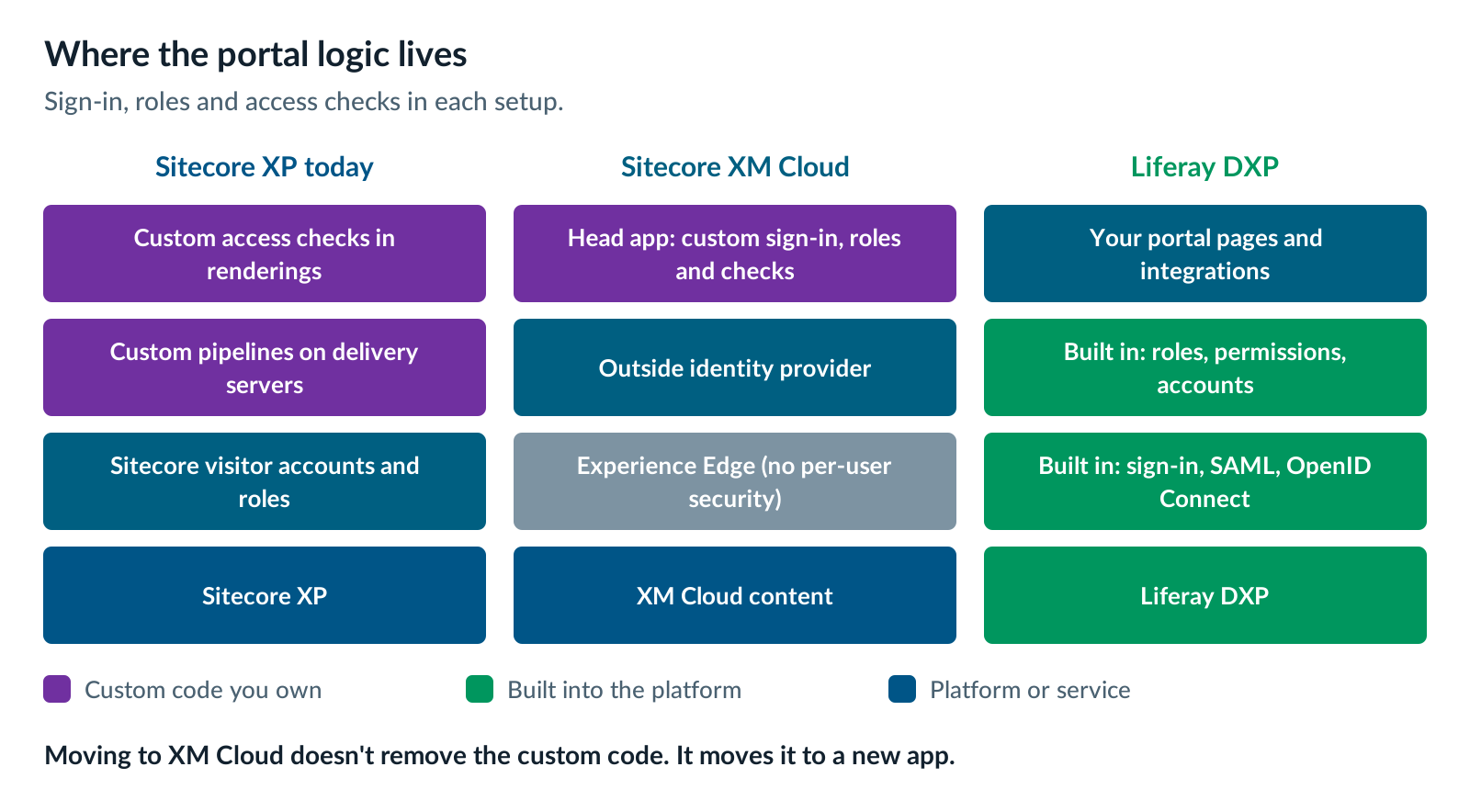
Sitecore vs Liferay on Eleven Portal Dimensions
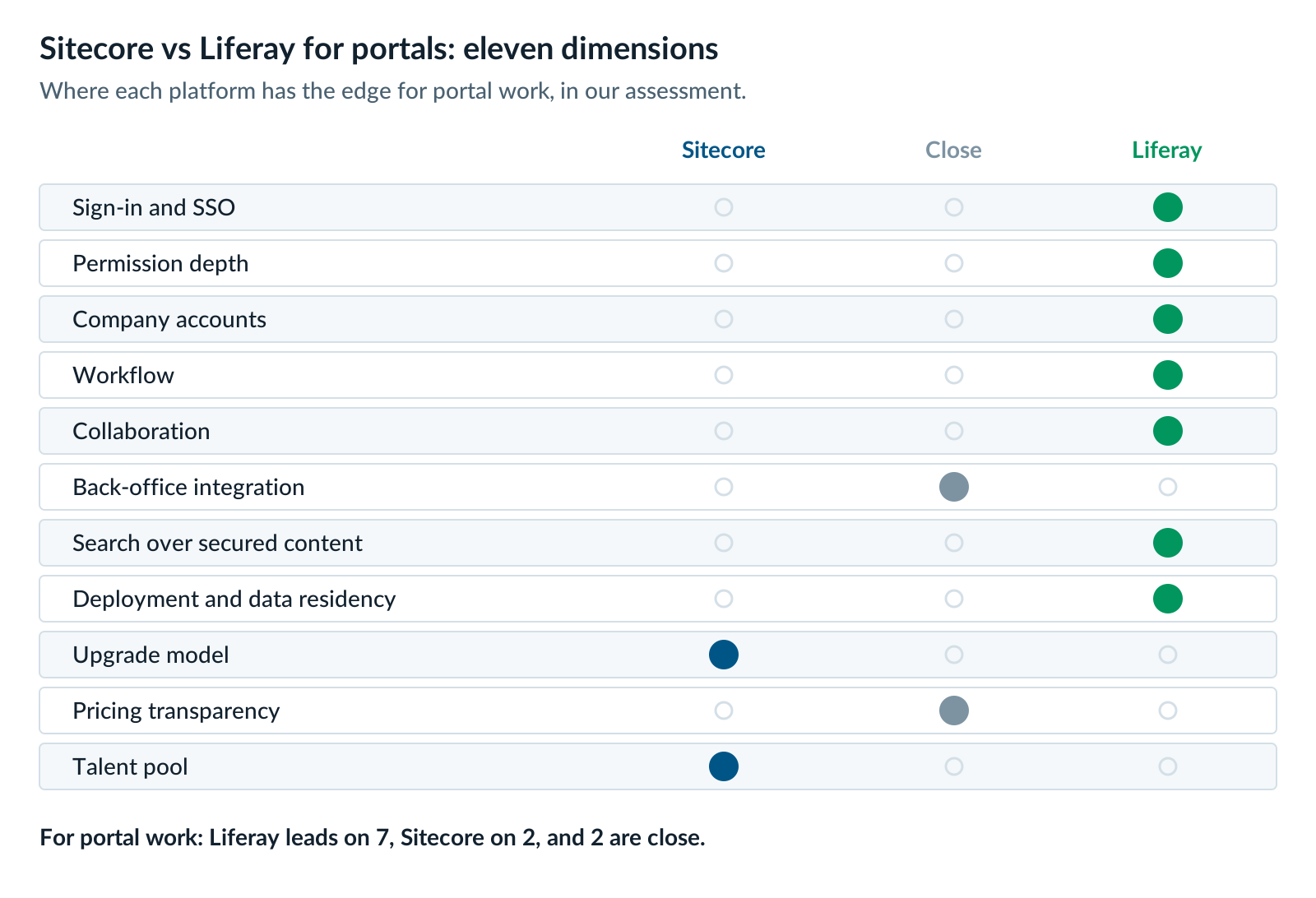
On portal work, Sitecore vs Liferay comes out clearly in Liferay’s favor on identity, permissions, accounts, workflow, collaboration, secured search and deployment choice. Sitecore XM Cloud wins on upgrades, because it’s software as a service. Sitecore also has the larger talent pool. Integration and pricing are close.
| Dimension | Sitecore (XM Cloud) | Liferay DXP | Edge |
|---|---|---|---|
| Sign-in and SSO | Built in a head app with an outside identity provider | Built-in user store. Standard SAML and OpenID Connect. | Liferay |
| Permission depth | Security fields are for editors. Visitor roles are custom fields. | Roles and permissions on pages, content and custom data | Liferay |
| Company accounts | Not native. Built as custom data. | Business accounts with account roles. Organizations add hierarchy. | Liferay |
| Workflow | Built for content approval | A workflow engine for business processes, not just content | Liferay |
| Collaboration | Not included | Document sharing, notifications, and comment framework | Liferay |
| Back-office integration | Sitecore Connect, a low-code integration tool | REST and GraphQL APIs, low-code objects with their own APIs, client extensions | Close |
| Search over secured content | Experience Edge doesn’t filter by user. You build it. | Search hides results a user can’t view. | Liferay |
| Deployment and data residency | Software as a service, hosted by Sitecore | SaaS in six regions, PaaS on Google Cloud, or self-hosted | Liferay |
| Upgrade model | No platform upgrades. You still maintain the head app. | Quarterly releases. A long-term support release each year. | Sitecore |
| Pricing transparency | No published prices | No published prices | Close |
| Talent pool | Larger developer community in most markets | Smaller pool of specialists | Sitecore |
A few rows need context.
Collaboration. Liferay moved Documents and Media to maintenance mode in 2026.Q1, with the new Liferay CMS as the path forward. Our Liferay 2026.Q1 overview explains what maintenance mode means.
Deployment. Liferay lists six SaaS regions, including the US, the EU, Brazil, Saudi Arabia, Japan and Australia. That matters for regulated portals that must keep data in one country.
Upgrades. Each year’s first-quarter release is a long-term support (LTS) release. Liferay’s service life policy gives LTS releases three years of Premium Support, then two years of Limited Support. On SaaS, Liferay handles the upgrades. Self-hosted, your team does.
Personalization on Liferay After Sitecore
Behind a login, most personalization runs on what you already know about the user: their account, role, region and products. Liferay handles that with roles, accounts and segments. For marketing personalization of anonymous visitors, Liferay is less mature than Sitecore Personalize. Plan for that gap.
Two changes in 2026 shape the picture:
- Segments are moving to Analytics Cloud. In 2026.Q1, Liferay deprecated local segment authoring in DXP. Its 2026.Q1 deprecation notes point users to Liferay Analytics Cloud for segmentation.
- Liferay Data Platform is now generally available. It brings CRM, campaign, account and behavior data together for B2B teams, with real-time segments. Our first look at Liferay Data Platform covers what it does.
For a B2B portal, that’s a strong fit. Account-based targeting matters more than clickstream tricks. For a consumer marketing site, Sitecore Personalize is still ahead.
The Split: Public Website on One Platform, Portal on Liferay
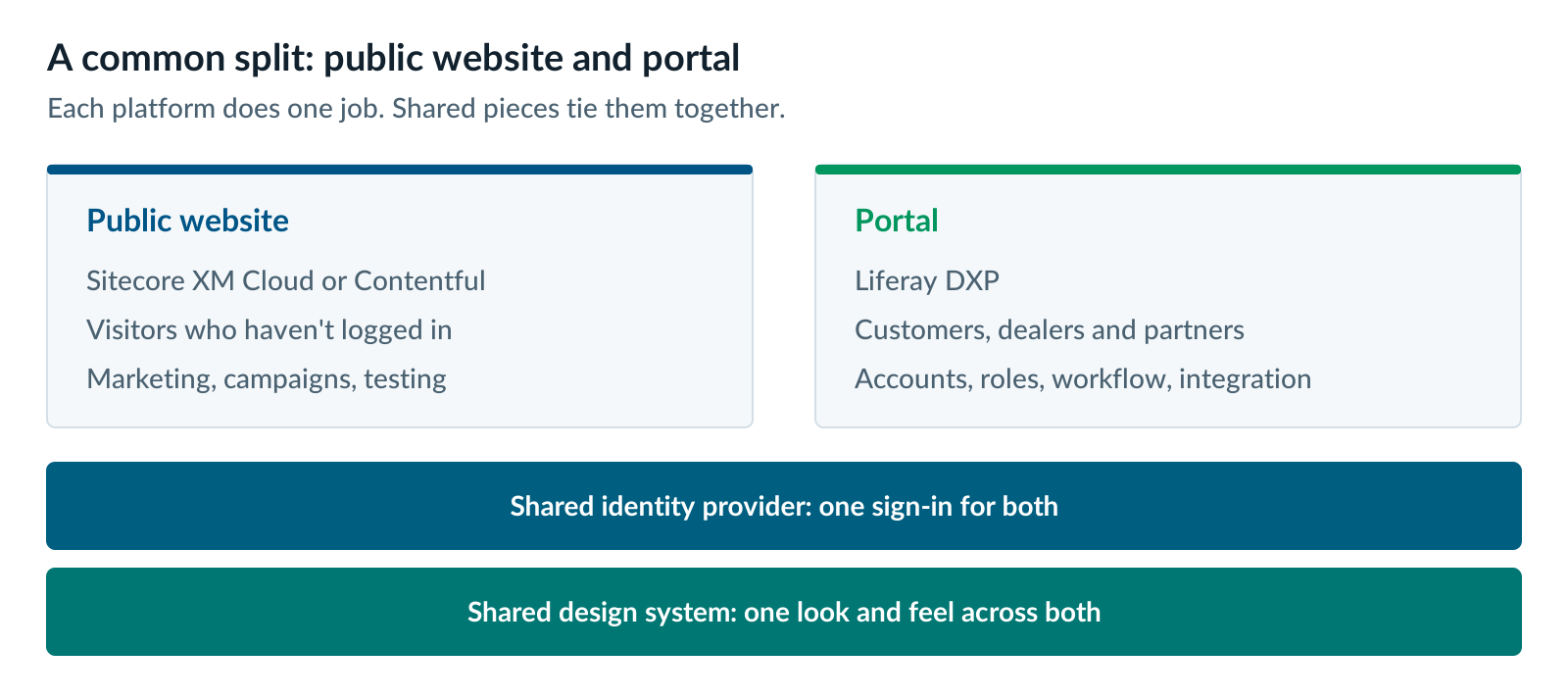
Many organizations don’t have to pick one platform for everything. They keep Sitecore, or move to Contentful, for the public website, and put the portal on Liferay. Each platform does the job it was built for. A shared identity provider and design system make the seam hard to see.
This split works best when both sides are large. If the public website is big and marketing-led, and the portal is complex and integrated, neither should be the junior partner.
There are other routes, too. If the portal dominates and the public website is modest, Liferay can run both. If the portal is simple and your engineering team is strong, a custom Next.js portal is an option. We compare all three in When You Need Both a Public Website and a Portal.
What a Sitecore to Liferay Migration Involves
A Sitecore to Liferay migration for a portal starts with people and permissions, not pages. Users, roles and entitlements are the riskiest part, so they move first. Content usually moves last, and it’s often the easiest part.
We plan these moves in four phases:
- Inventory. List every portal, audience, user store, role and back-office connection. The custom-code worksheet in When Your Marketing DXP Is Really Running a Portal is a good start.
- Identity and entitlements. Connect Liferay to your identity provider. Map Sitecore roles and custom role tables to Liferay roles and accounts. Test that every user sees exactly what they should.
- Integrations. Rebuild each back-office connection with Liferay’s APIs, low-code objects or your integration platform.
- Content and cutover. Move the content that’s worth keeping onto the new Liferay CMS, then switch over one audience at a time.
When to Keep Your Portal on Sitecore
Keep your portal on Sitecore when it’s thin, stable and lightly integrated. A gated download area or a simple profile page doesn’t need a portal platform. Moving it would cost more than it saves.
Other good reasons to keep it on Sitecore:
- XM Cloud is already funded, and your front-end team is happy to own sign-in. Some teams prefer to build in Next.js. If yours does, and the portal is small, rebuilding it in the head app is reasonable.
- You’re staying on XP for a few more years. XP 10.4 has Mainstream Support until December 31, 2027. A stable portal on a supported version can wait.
- You can’t staff Liferay. Liferay needs specialists. If you can’t hire them or partner for them, don’t start.
- Marketing personalization is the whole point. If the logged-in area is really a richer marketing experience, Sitecore may still be the better home.
If you stay, set a date to look again. Portals grow, and a thin one can become a complex one fast.
Five Questions That Decide Sitecore vs Liferay for Your Portal
Five questions settle Sitecore vs Liferay for most portals. If three or more answers point to Liferay, move the portal and decide the public website separately. If most point to Sitecore, keep the portal where it is and set a review date.
- How much of your traffic and business value sits behind the login? More than half points to Liferay.
- How many back-office systems does the portal read or write in real time? Several points to Liferay. One or none points to Sitecore.
- Do users belong to company accounts with their own admins and roles? Yes points to Liferay.
- Do portal users need to work together, through discussions, shared documents or approvals? Yes points to Liferay.
- Is personalization for anonymous visitors your top priority? Yes points to Sitecore, at least for the public website.
On AEM instead of Sitecore? Read AEM or Liferay for Portals: What to Do With the Login Side of AEM. Weighing support deadlines too? See what Sitecore XP Extended Support costs you now.
Our Liferay DXP team can walk through these questions with you. If the answer is to keep the portal on Sitecore, we’ll say so.
Further reading
- Liferay vs Sitecore — Liferay’s comparison, including where it concedes ground to Sitecore
- SitecoreAI limitations and restrictions — XP features that aren’t available in XM Cloud
- Head application security for SitecoreAI — how Sitecore recommends handling visitor sign-in
- Liferay 2026.Q1 maintenance mode and deprecations — what changed in Liferay’s content and segment features
Derek Nerenberg is a Liferay practice leader at XTIVIA. He works on Liferay portal architecture, integration and migrations for enterprise customers. Talk to us.