
SUMMARY:
- Purview multicloud data governance means cataloging Azure Databricks, Snowflake, AWS, and SQL Server data in one place, while each platform keeps deciding who can use it.
- Coverage differs by source: Azure Databricks and Snowflake get the most, while the Amazon RDS and Redshift connectors are still in preview.
- Purview access policies don’t reach these platforms, with one exception: SQL Server connected through Azure Arc.
- A sensitivity label on a Snowflake table in the Purview Data Map is a record in Purview, not a lock on the data.
- Purview fits best when much of your data is already on Microsoft, so compare a cross-platform catalog first if most of it isn’t.
Table of Contents
- What Is Purview Multicloud Data Governance?
- What the Purview Data Map Does Outside Microsoft
- Purview Multicloud Data Governance, Source by Source
- What Purview Can’t Do Outside Microsoft
- What Purview Multicloud Data Governance Costs and Takes to Run
- When Purview Is the Wrong Catalog for Multicloud Data
- How to Start Purview Multicloud Data Governance
What Is Purview Multicloud Data Governance?
Purview multicloud data governance means using Microsoft Purview to find, describe, and track data that lives outside Microsoft’s own services. Purview can scan Azure Databricks, Snowflake, AWS, and SQL Server, then show that data in one catalog. Access control stays with each platform.
Microsoft Purview is Microsoft’s data security and governance product. Two parts of it matter here. The Purview Data Map is the inventory: it scans your data sources and records what exists. Purview Unified Catalog is what people use on top of that inventory. It adds business terms, data owners, and quality scores.
This matters when your data doesn’t sit in one place. A customer table might start in SQL Server, load into Snowflake, and feed a Power BI report. Without one catalog, nobody can search across all three in one place. Following that path from end to end also depends on lineage support at each step.
Worth saying plainly: XTIVIA is a Microsoft Solutions Partner, and we implement Purview. So we have a stake in this topic. That’s why this article spends as much time on the limits as on the features.
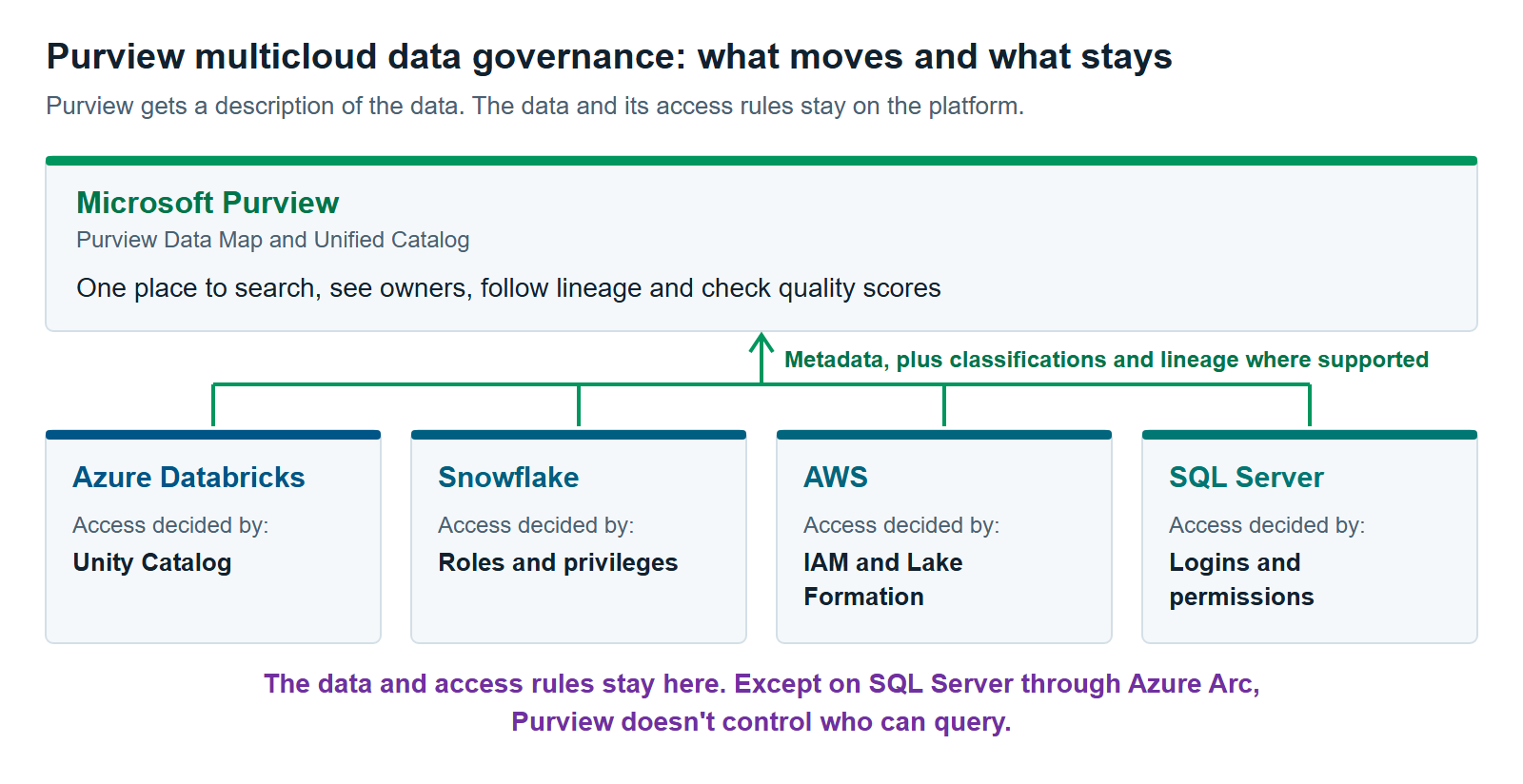
 Purview can show you what data you have across Databricks, Snowflake, AWS and SQL Server. In almost every case, it can’t decide who gets to use that data. Each platform keeps that job.
What the Purview Data Map Does Outside Microsoft
The Purview Data Map connects to a source, reads its metadata, and adds it to your catalog. Metadata is data about data, such as table names, column names, and data types. Depending on the source, it can also spot sensitive data and record how data moves between tables.
The Data Map does three main jobs (Microsoft Learn):
- Inventory. It records servers, databases, schemas, tables, views,s and columns.
- Classification. It tags columns by the kind of sensitive data they hold, such as credit card numbers. It works from a sample, not a full read. For database tables, it samples the top 128 rows.
- Lineage. It maps where data came from and where it went. This is the part that varies most by source.
Unified Catalog then gives business users one place to search. They can find a Snowflake table next to a Fabric lakehouse, see who owns each one, and check its quality score.
Purview Multicloud Data Governance, Source by Source
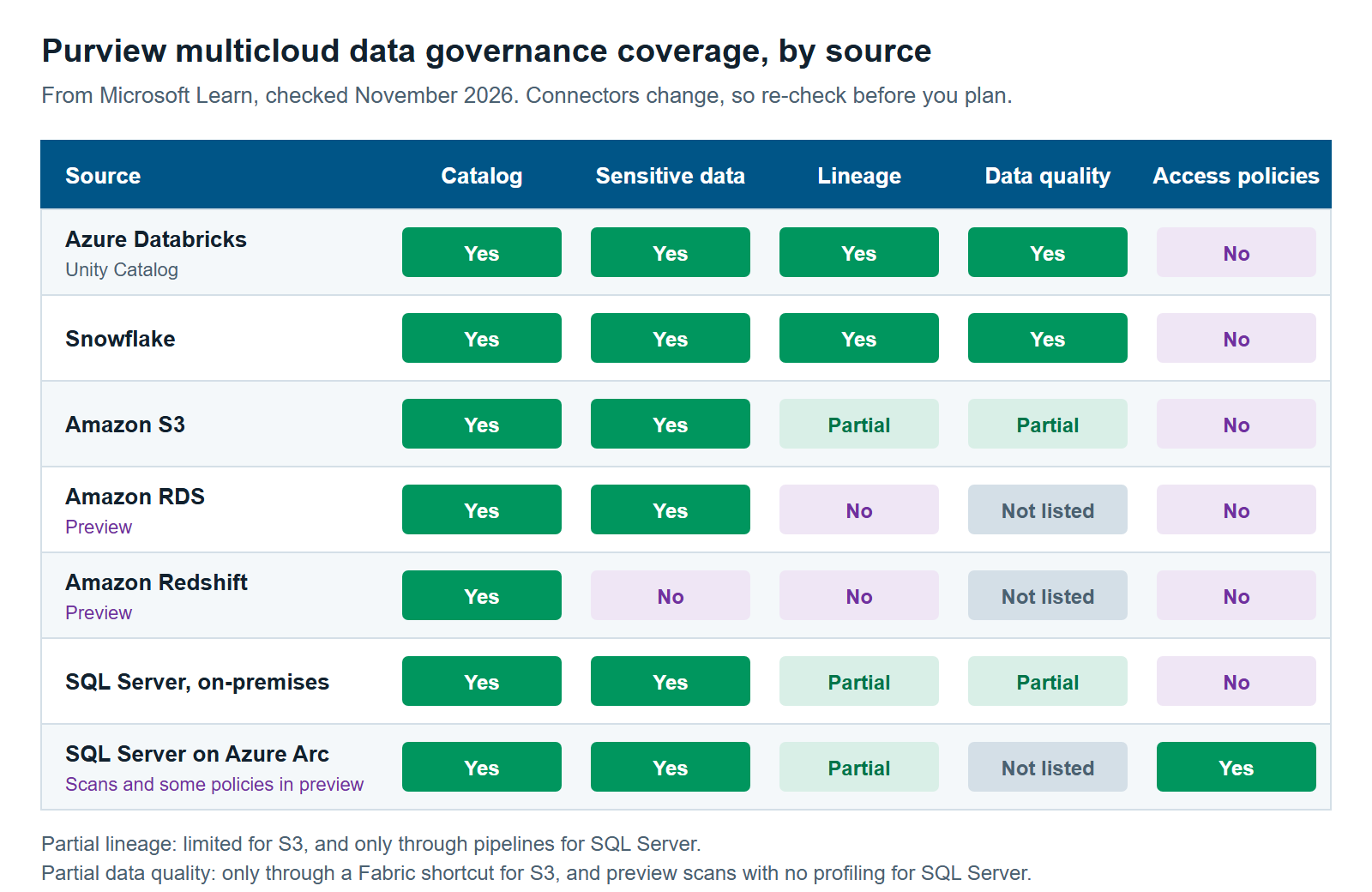
Purview multicloud data governance isn’t one feature with even coverage. Each source has its own connector and its own limits. Azure Databricks and Snowflake get the most. Amazon S3 and on-premises SQL Server get less. The Amazon RDS and Redshift connectors are still in preview, so check them before you plan around them.
| Source | Find sensitive data | Lineage | Data quality in Purview | Purview access policies | Status |
|---|---|---|---|---|---|
| Azure Databricks Unity Catalog | Yes, built-in types only | Yes, with limits | Yes | No | No preview label |
| Snowflake | Yes | Yes, with limits | Yes | No | No preview label |
| Amazon S3 | Yes | Limited | Only through a Fabric shortcut | No | No preview label |
| Amazon RDS (SQL Server, PostgreSQL) | Yes | No | Not listed | No | Preview |
| Amazon Redshift | No | No | Not listed | No | Preview |
| SQL Server, on-premises | Yes | Only through pipelines | Preview scans, no profiling | No | No preview label |
| SQL Server on Azure Arc | Yes | Only through pipelines | Not listed separately | Yes | Scans and some policies in preview |
Sources: Data Map data sources and data quality-supported sources, Microsoft Learn, checked November 2026. “Only through pipelines” means lineage appears when the data passes through Azure Data Factory or Synapse pipelines.
Databricks
Purview covers Azure Databricks, not Databricks everywhere. Its Unity Catalog connector brings in metadata, tags, classifications, and lineage from notebook runs (Microsoft Learn). Databricks on AWS or Google Cloud isn’t on Microsoft’s source list. We cover the Databricks split in Purview vs. Databricks Unity Catalog: Who Governs What When You Run Both.
Snowflake
Snowflake’s connector reads the widest range of objects in this list. Purview reads tables, views, stored procedures, pipes, stages, streams, and tasks. It also draws lineage between tables, views, streams, and stored procedures (Microsoft Learn).
Two limits matter. Procedures written in Java, Python, or Scala don’t produce lineage. And classification isn’t applied when one scan names more than one database. Sign-in needs attention too. Snowflake’s schedule blocks password sign-in for service accounts between August and October 2026, with the date set per account. So Microsoft tells customers to move Purview scans to key pair sign-in.
AWS
AWS coverage depends on the service. Amazon S3 is the most complete: Purview scans buckets and classifies files. Amazon RDS covers SQL Server and PostgreSQL databases, in preview, with no lineage. Amazon Redshift is also in preview and brings in metadata only.
For S3, a Microsoft-run scanner works inside AWS, using a role you create. Only metadata and classification results go back to Azure. Check the regions if data location matters to you. Buckets in Canada (Central) are scanned in US East (Ohio), and buckets in Europe (Stockholm) are scanned in Europe (Frankfurt). Glacier storage classes get no schema extraction or classification.
On-premises SQL Server
Purview can scan SQL Server 2005 and later, but you must run a scanner inside your own network. That scanner is called a self-hosted integration runtime (Microsoft Learn). You get inventory and classification. You don’t get lineage from inside the database. Data quality checks need a Kubernetes cluster to run, and Microsoft announced support as a preview in April 2026.
What Purview Can’t Do Outside Microsoft
Purview can’t stop someone from querying Databricks, Snowflake, or AWS data, or SQL Server data outside Azure Arc. Microsoft’s source list shows “No” under policies for all of them. Purview knows the table exists and, on most of these sources, what kind of data it holds. The platform still decides who reads it.
Each platform has its own controls for that job:
- Databricks: Unity Catalog enforces permissions, row filters, and column masks.
- Snowflake: roles and privileges control who can use each object.
- AWS: IAM controls access, and AWS Lake Formation adds column, row, and cell controls for data lakes.
- SQL Server: the database’s own logins and permissions still apply.
Sensitivity labels are the easiest part to misread. Sensitivity labels mark how confidential data is. Microsoft’s list says “Yes” for labels on Snowflake and SQL Server assets. But labeling in the Data Map is in preview, and Microsoft says the label is “only added as metadata” in the map (Microsoft Learn). It helps people see what’s sensitive. It doesn’t encrypt the table or block a query.
Azure Arc is the one exception. Azure Arc connects servers outside Azure to Azure’s management tools. For SQL Server 2022 or later connected this way, Purview can apply DevOps policies and, in preview, Data Owner policies (Microsoft Learn). Microsoft also warns that a server admin can turn this enforcement off. So treat it as help for managing access, not as a control your admins can’t get around.
Security monitoring is a separate route. Purview Data Security Posture Management (DSPM) shows where sensitive data is at risk. It reaches Snowflake and Databricks only through partner tools: Cyera for Snowflake and BigID for Databricks. That route is in preview and needs Microsoft Sentinel data lake (Microsoft Learn). No initial partner is listed for AWS services.
What Purview Multicloud Data Governance Costs and Takes to Run
Purview multicloud data governance costs you in three places: Purview meters, charges on the other platform, and the people who run the connections. On current billing, you pay for assets you link to governance items, not for everything you scan. Those items include data products, glossary terms,s and data quality. Plan for setup work on each platform too.
Purview meters. Unified Catalog bills per governed asset per day, and data quality bills by processing units. Data Map and scan charges don’t apply once you’re on this billing model, but classic accounts still pay them (Microsoft Learn). For the numbers, read Microsoft Purview Pricing for Fabric: What You’ll Actually Pay.
Charges on the other side. Microsoft’s bill isn’t the only one:
- Scanning AWS can add data transfer and API charges, based on region (Azure pricing).
- Scanning Snowflake uses a Snowflake warehouse you name in the scan setup.
- Scanning Azure Databricks connects to a Databricks SQL warehouse in your workspace.
Also ask Microsoft about the S3 and RDS connectors. Their documentation calls the multicloud connector a “separate add-on,” while the pricing page lists no separate charge. Get the answer in writing before you budget.
People and infrastructure. The scanner has to reach each source, and some options put work on your team (Microsoft Learn):
- Self-hosted scanners run on machines you maintain. On-premises SQL Server needs a Self-Hosted scanner, and Snowflake key pair sign-in needs a self-hosted one.
- Kubernetes-based scanners run on your own cluster and only support manual updates. Private RDS and Redshift databases need one.
- Credentials differ by platform. Each one needs its own scan account or role, and passwords and keys live in Azure Key Vault.
Three more points are easy to miss. When you delete a table in Snowflake, Databricks, or Redshift, the next scan doesn’t remove it from Purview, so old entries can build up. Data quality now requires the Purview account and its sources to be in the same Azure region, so check that early (Microsoft Learn). And someone must own all of this across teams that may not work together today.
When Purview Is the Wrong Catalog for Multicloud Data
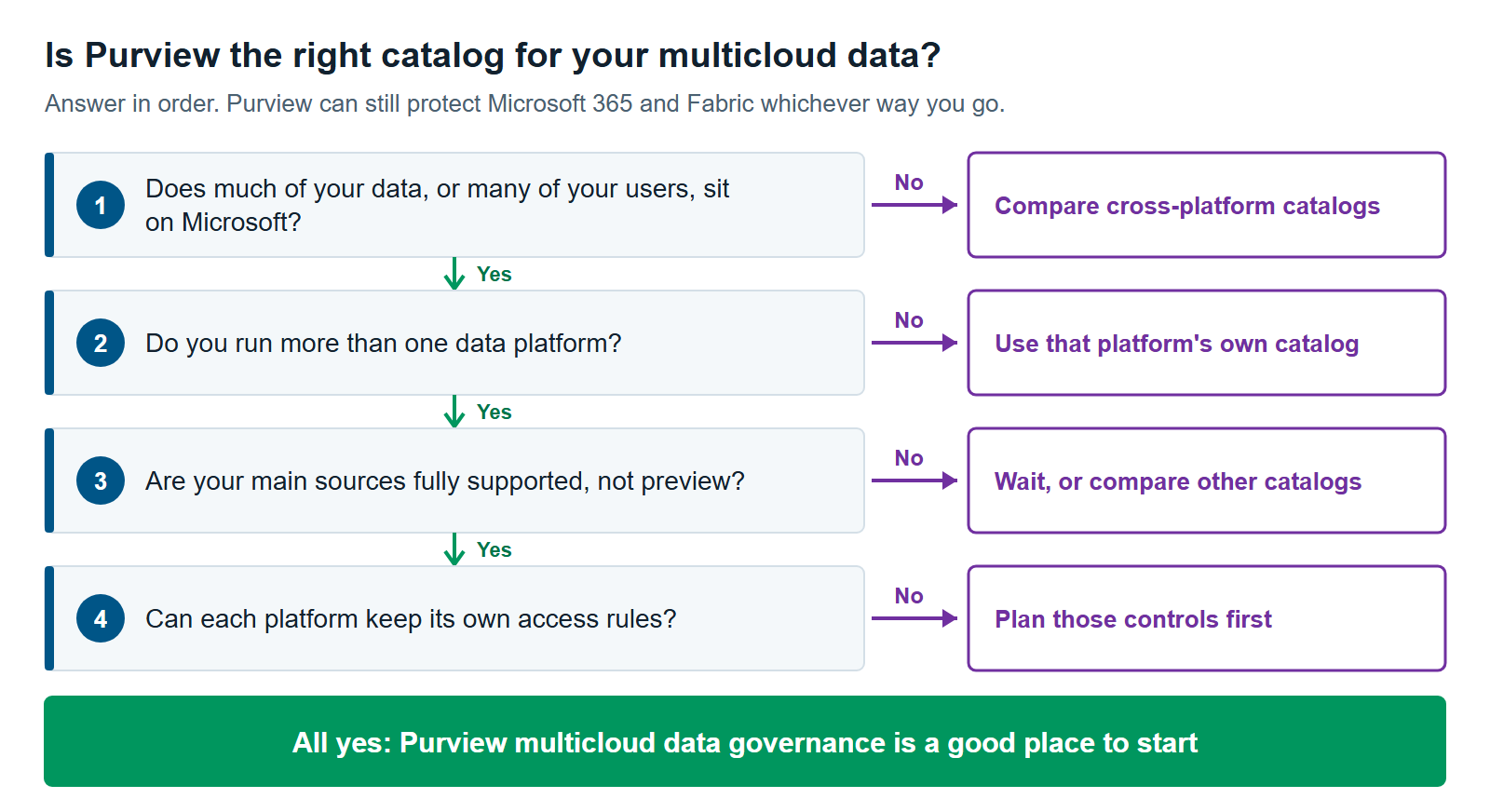
Purview is often the wrong main catalog when most of your governed data lives outside Microsoft and your data teams work elsewhere. It’s also a poor fit for Databricks outside Azure, or when your plan depends on Purview AWS connectors. In those cases, a cross-platform catalog or a platform’s own catalog may serve you better.
Most of your data and people are outside Microsoft. Say Snowflake or AWS holds most of your data, and few people use Power BI or Fabric. Then you’d be asking people to leave their tools to search. Cross-platform catalogs are built for this case. Our comparison, Data Governance Tools for Microsoft Fabric: Purview, Collibra, Alation, Atlan and Informatica Compared, covers the options. Head-to-heads are Microsoft Purview vs. Collibra for Fabric and Microsoft Purview vs. Atlan for Fabric.
You run Databricks on AWS or Google Cloud. Those aren’t listed sources. Unity Catalog alone may be enough there.
You rely on Redshift or RDS. Both connectors are in preview, and neither gives you lineage. Redshift doesn’t classify data either. That’s a thin base for a program auditors will rely on.
You want one place to enforce access. Purview won’t give you that on these platforms. If that’s the goal, a catalog won’t solve it. You need a plan for each platform’s own controls.
You run one data platform. Its own catalog may be all you need. A second catalog adds a second place to look.
There’s one exception. You may still want Purview for Microsoft 365 and Fabric, even with another catalog in place. Sensitivity labels and data loss prevention (DLP) on the Microsoft side are a separate job from cataloging, so another catalog may not replace them. Microsoft Purview for Fabric: A Practical Guide to Securing and Governing Your Data covers that side.
How to Start Purview Multicloud Data Governance
Start Purview multicloud data governance small: pick one business question that crosses two platforms, then scan only those sources. Agree on who owns access before you connect anything. A narrow first scan shows you the setup work, real coverage, and cost before you commit to more.
- Choose one data flow. Pick something leaders care about, such as customer data moving from SQL Server to Snowflake to Power BI, and check lineage support for each step.
- Write down who owns what. Name the owner of access rules on each platform. Name one owner for the Purview catalog.
- Check each source against the table above. Mark anything in preview. Decide whether you can accept that for this program.
- Set up scanners and read-only accounts. Involve each platform’s admins early. Bucket policies, firewalls, and sign-in changes are where setup can stall.
- Scan and review the results with a data owner. Classification works from samples, so check that the tags make sense before anyone relies on them.
- Link only what matters to data products and other governance items. That keeps governed assets and your bill tied to data people use.
- Add data quality last. Start with a few rules on the tables behind that first business question.
If you’re still deciding where your data should live, read Databricks vs. Snowflake vs. Microsoft Fabric: Which Platform Fits Your Workload?.
Purview multicloud data governance works best when you’re clear about what it does: it gives you one view, not one set of controls. Our Microsoft Purview services, data governance services, and Microsoft Fabric consulting teams can help you test that fit on your own data platform.
Further reading
- Data sources that connect to Microsoft Purview Data Map — Microsoft’s source-by-source list of what’s supported
- Amazon S3 multicloud scanning connector for Microsoft Purview — how S3 scanning works, with regions and limits
- Connect to and manage Snowflake in Microsoft Purview — what’s scanned, plus sign-in changes.
- Choose the right integration runtime — which scanner each source can use
Pavan Malpani is the Fabric Practice Delivery Lead at XTIVIA. Talk to us.